
DOWNLOAD THE APP


Customer Services
Copyright © 2025 Desertcart Holdings Limited
DOWNLOAD THE APP

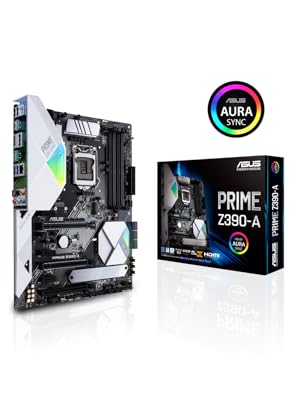
⚙️ Power your productivity with precision and style — the ASUS Prime Z390-A means business.
The ASUS Prime Z390-A motherboard is engineered for 8th and 9th Gen Intel Core processors, combining AI-driven overclocking, dual M.2 slots, USB 3.1 Gen2 connectivity, and advanced cooling controls. Its 5X Protection III hardware safeguards and Aura Sync RGB lighting make it a reliable, customizable foundation for professionals demanding high performance and longevity in their desktop builds.







| ASIN | B07HCY7K9L |
| Best Sellers Rank | #207 in Computer Motherboards |
| Brand | ASUS |
| Computer Memory Type | DDR4 SDRAM |
| Customer Reviews | 4.6 4.6 out of 5 stars (4,334) |
| Date First Available | October 8, 2018 |
| Is Discontinued By Manufacturer | No |
| Item Dimensions LxWxH | 12.91 x 2.68 x 10.35 inches |
| Item Weight | 2.23 pounds |
| Item model number | Prime Z390-A |
| Manufacturer | ASUS Computer International Direct |
| Memory Speed | 2400 MHz |
| Number of USB 2.0 Ports | 1 |
| Processor | core_i3 |
| Product Dimensions | 12.91 x 2.68 x 10.35 inches |
| RAM | DDR4 |
| Series | Prime Z390-A |
| Wireless Type | 802.11ac |
G**4
So far, so good
There were no reviews on this, so I felt like I was taking a bit of a risk, but considering the ASUS Z370-A MB was popular in reviews, I went for the Z390 Prime-A. I am glad I did. I am not a gamer, I work with DAWs and rendering video. I loaded it up with the i7-8700k and 16GB of G.Skill RAM, and the first boot (which I expected to be a disaster) ended up working flawlessly. I didn't expect it to have AURA RGB lighting, that was a fun surprise, but so far it is living up to all of its product description without any problems. The only trouble I ran into was installing drivers. For some reason, the included ASUS DVD would not let me install LAN or audio drivers, I had to find those driver directories on the DVD-ROM and install them by clicking "run as administrator." I went with ASUS because their BIOS gives you complete control over your PC by letting you change anything you want. It has an excellent GUI whether you aren't sure what you are doing, or you are an advanced user. The overclocking software and fan control software are very easy to use, and probably the best (and safest) way to learn how to control your PC hardware. UPDATE - 1 year later I recently damaged this motherboard, and had to replace it. I looked through ASUS' other products, and determined, this was still the BEST choice for my needs and ended up replacing it with this exact one. It has tons of USB 3.0 and 3.1 ports, I have had no hassle with any of its features, except for the sound. I use 2 Mackie powered monitors for speakers, and I have a 1/8 stereo --> 2 RCA Y cable going into them. I would continually get buzzing noise interference from the GPU through the speakers. Replacing the GPU made no difference. Replacing the motherboard also makes no difference. If you end up with this problem, here is the fix: Buy a Ground Loop Noise Isolator (for car stereos) for $8 on Amazon. It may be a defect, or it might just be the wiring in my house, but if the ASUS folks are paying attention, you should build these into your systems! The AI Suite Software turned out to be ridiculously dense - full of options and features to control your case fans and CPU cooler, OC your CPU (and GPU if it's an ASUS make), conserve power when you don't really need all the speed, and it will even call up OC settings when you open specific apps. This should be a much bigger selling point than it appears to be. Other quirks - The RGB is 12V only! If you end up getting something with a 3 pin connector, or Addressable RGB, I found this amazing adapter if you search: DeepCool RGB Converter ($15) and you can plug other RGB devices in don't work with Aura, and it will let you use them with your RGB headers on this motherboard. The 3 orange fans in the attached photo are "addressable RGB" fans that aren't compatible with Aura, but are now controlled by Aura. This is probably the best motherboard when it comes to people like me who do a lot of work with DAWs, Video editing, and occassional gaming with one GPU. Apparently if you use the other PCIE port, it only runs at 8x native instead of 16x. This is fine if you're not trying to reap all the performance you can out of 2 video cards. It is also nice to have an upgrade path for the day I want to beef up my system in the future. I'm already making my plans for a X-series processor when they're "old" and affordable a few years down the road. I am still very satisfied with the unit and plan on using it for years to come.
I**B
Great motherboard
The lighting is cool for this motherboard has RGB and you can edit the colors to your liking. There’s are ALOT of features in the BIOS, also very easy to understand. You can over clock the speed of your ram and cpu. The size is a full sized motherboard and there are 4 RAM slots.
P**O
Beautiful high-mid range board which hits the sweet spot
"Used - Very good" Warehouse deal was a steal, since right now these boards are overpriced when purchased new. I feel I got lucky, as it came with all the accessories and had basically no cosmetic imperfections, just missing the original box. It is working flawlessly with an [email protected] sporting 8-phase VRMs which are staying nice and cool, compared to my old ASUS TUF Z370-Pro Gaming which has a weak 4-phase design. The VRMs of the latter were overheating (110°C) and throttling at stock clocks within minutes, at full load on a measly 95 Watt power limit (Intel's default TDP settings for the i9). That old board worked fine with a locked [email protected], which only drew 65 Watts max after undervolting it a bit. Unfortunately, it was unfit for a CPU upgrade and ended up finding this Z390-A board was a sweet upgrade. The RGB refractive window on the I/O cover looks stunning, especially all red looks like a fat ruby; sadly the chipset cover lights are hidden behind the GPU. This one also has 2 non-addressable 12V RGB headers, which my previous board was lacking. Only issue I had was with installing the GPU, where its PCI bracket was hitting the white plastic cover that extends below the I/O. Required a bit of fiddling to get it to fit. It appears this cover may be protecting the audio circuitry under it. The first 2 PCIe 8x slots are metal reinforced, which ASUS doesn't even advertise on this board indicating that this is a higher end product where this kind of stuff is expected. I was pleasantly surprised after noticing, since ASUS used it as marketing for it's TUF board, which isn't so tough after all because in the end I realized the TUF-Gaming line is just durable, not high end.
G**L
Product
Super good and good price I loved it that's why they deserve good opinions
S**R
Great motherboard overall
I was originally sent a used board. I mean it was so obviously used I’m not sure how this was even put back into shipping. I didn’t take away any stars because Amazon customer service was great, and had a brand new sealed board at my door in less than a full day. I researched for this mono for a while, and decided on it for a few reasons. Once of which is goes perfect with the mostly white build I was doing. The RGB accents were also a big bonus, and it has a great amount of ports and other features. Installation was pretty easy in my Corsair 4000X case. All the components went in flawlessly, and had no issues at all with the overall build. It did give me an error on POST which I figured out after some quick research. For some reason, this board doesn’t like DisplayPort adapters for your video card. The solution was to plugin both an HDMI and DisplayPort at the same time, and it booted. Once it booted it works fine. It’s a somewhat of a common problem so if you have this issue you should be able to easily find the exact steps to resolve it. Other than that weird issue, the board has been running fine. It’s been great actually, and aside from the boot error and shipping issues I have been very happy with this board.
A**Y
Does it hold up?
Bought this 4 years ago and it has held up its end of the bargain. Everything worked as intended and I loved having that extra level of RGB inside of my system. It fit into my tower easily and paired with my liquid cooler made my PC run smooth at all times. Unfortunately I'm looking to upgrade it because I think it is time for a newer chip. Definitely worth it for your budget PC
V**N
Great offer
V**Y
Das ASUS Prime Z390-A Gaming Mainboard, Sockel LGA-1151v2 ATX, Ist ein schönes Board mit RGB AURA, hat alles was das Herz begehrt...
A**R
great mobo for the price, you’re not going to get anything close to the beautiful aesthetic that this board offers for the money. i opened the box that the board came in and my jaw dropped, absolutely stunning board. in terms of performance, i have this board suited with an intel core i9 9900k overclocked to 5.1ghz, also paired with 32gb corsair vengeance @ 3200mhz (using xmp). i’ve seen other reviews on here about people having trouble with the xmp “AI overclocking” and that messing everything up, but i didn’t encounter any problems with it. for overclocking the processor, i also used the AI overclocking feature within the bios just to test it (because reviews said people were having issues with it), and it worked flawlessly, no issues whatsoever. overclocking went flawlessly, lighting through armoury crate with my fans [deepcool rf120 fans (excellent fans for the price, definitely check them out for a cheap solid option, only issue is cable spaghetti)] and with my graphics card (rog strix 2070) , and other components sync perfectly. i really can’t find a single flaw with this board, great job asus 👍 i also saw people on other forums and threads having issues with simply dropping a 9th gen intel cpu in this board and the board saying it had an insufficient bios date for that cpu, but i dropped my i9 in there with no issues, so i don’t think you have to worry about bios updates :) highly recommend this board
M**.
This is a very good motherboard for the price. I have purchased this motherboard over 2 years ago and currently still use it for my gaming PC. I have paired this motherboard with a i5 9600k (straight out of the box), Corsair vengeance lpx 3000mhz RAM, and an RTX 2070 armor edition. I also use the DEEPCOOL GAMMAX 400 CPU cooler and the installation with this motherboard was flawless. From my experience XMP "AI overclocking" was very easy without any problems. BIOS is easy to work with. BIOS updates can be easily done and lighting software (Armoury crate) can be downloaded from the ASUS websites. I saw some reviews pointing out "really bad sound quality" however I did not experience such problems. The sound quality is really good from my experience. And ALSO THERE'S RGB, what more can you ask for!
A**D
Excelente para una computadora gaming, la BIOS viene actualizada para soportar un i9 9900K, lo único que está incómodo, es el acomodo de ls entradas SATA ya que están laterales y es un poco difícil conectarlas una vez montada la tarjeta.
Trustpilot
1 month ago
2 weeks ago