
DOWNLOAD THE APP


Customer Services
Copyright © 2025 Desertcart Holdings Limited
DOWNLOAD THE APP

🚀 Compact power, wireless edge — build the future with CM5!
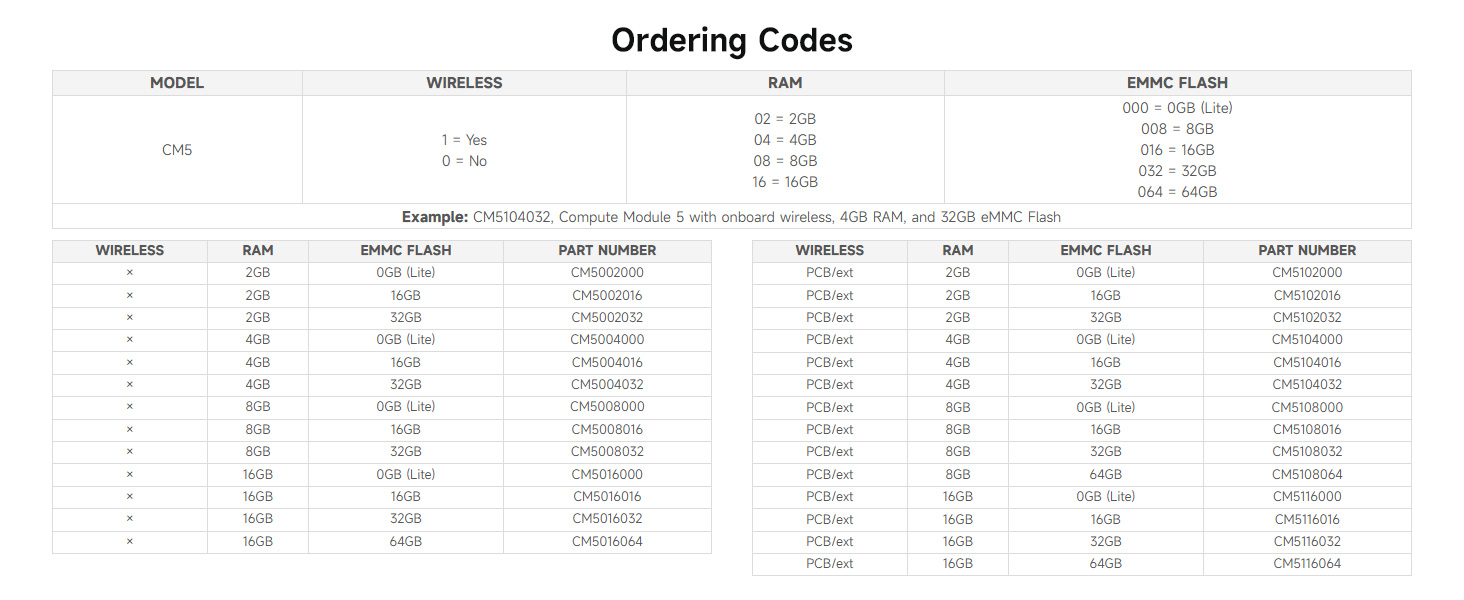
The CM5 Waveshare Pi Compute Module 5 combines the raw power of the Raspberry Pi 5’s BCM2712 quad-core Cortex-A76 processor with 4GB LPDDR4 RAM and 32GB eMMC flash storage. Designed for professional-grade embedded and industrial applications, it features onboard WiFi with an antenna kit and a heatsink for efficient cooling. Its compact system-on-module form factor supports flexible custom integrations, making it ideal for advanced IoT, networking, and edge computing projects.



| ASIN | B0DP4WHBKM |
| Best Sellers Rank | #1,316 in Single Board Computers (Computers & Accessories) |
| Brand | waveshare |
| Customer Reviews | 4.0 4.0 out of 5 stars (13) |
| Date First Available | November 27, 2024 |
| Item Weight | 2.11 ounces |
| Manufacturer | Waveshare |
| Number of Processors | 4 |
| Operating System | Raspberry Pi OS |
| Package Dimensions | 3.19 x 2.8 x 1.18 inches |
| Processor Brand | Broadcom |
| RAM | LPDDR4 |
| Series | CM5104032 Package A |
M**B
CM5 Waveshare Pi Compute Module 5 Carrier Board
This carrier board worked perfectly with my CM4. It has excellent connectivity options and solid build quality. Makes development and testing much more efficient. Highly recommended for Pi projects.
.**.
Trash documentation, trash product.
Absolute trashy product. Technical information on the product website is provided by complete amateur. There is no documentation on each specific line of product! For example trouble shooting guid will tell you hold reboot button on module to start OS installation. Simple right ? This might be true for CM4 ,but not CM5 which DOES NOT HAVE REBOOT BUTON. "Official" instruction guid will tell you need sd card flashed with OS to operate module, actually no, CM5 comes with EMMC storage. For three days I tried to get CM5 boot from EMMC boot partition without any success. Every single action you perform comes with counter-action from the board. You think you installed US keyboard and can't figure why you cannot log into wifi ? Well joke is on you, instead of | you are typing @ because CM is using UK layout. You MUST manually install US keyboard. Official installation guide consists of link to random tech youtuber. Unless you enjoy paying for suffering, non-existent technical documentation and project that fights you every step along the way DO NOT BUY CM5!
S**P
Save your money...
I haven't even got to try the CM5 unit. The heat sink that is included does not fit, no matter what screws and risers I used from the kit. It kind of seems like they just slapped together parts from the CM4 and hope it would pass. For what WaveShare is charging you would think it would just work. My advice, just buy the CM5 by itself and source your own heat sink.
S**E
Version 5 of the compute module is extremely powerful. It can run a modern browser fast enough that there is no noticeable delay. This module came with the necessary hardware, in particular a heat sink, thermal pads, and a WiFi antenna. It's easy to install in a carrier board. It is very convenient to do development on a system that can run a browser and download libraries and yet has all the standard Raspberry Pi connectors such as the GPIO. This board has been working perfectly for me with just the heat sink installed and no fan. The heat sink gets slightly warm to the touch but the processor has not been throttling, even while playing HD video. The OS loads and runs extremely fast from the 32GB eMMC.
Trustpilot
1 day ago
1 month ago