
DOWNLOAD THE APP


Customer Services
Copyright © 2025 Desertcart Holdings Limited
DOWNLOAD THE APP
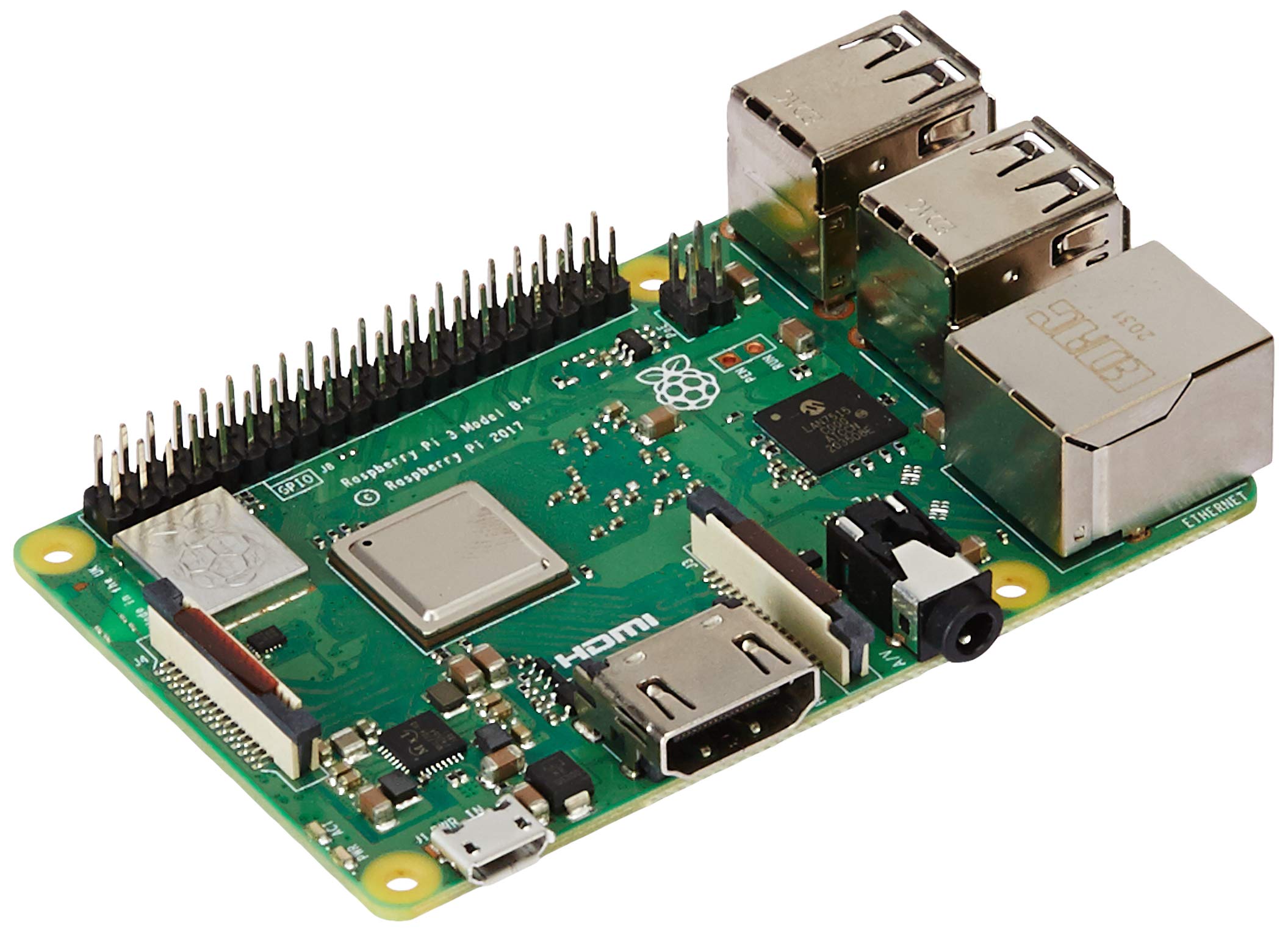


🚀 Tiny Board, Massive Possibilities — Unlock Your Next Big Idea!
The Raspberry Pi 3 Model B+ is a compact, affordable single-board computer featuring a 1.4 GHz 64-bit quad-core ARMv8 processor, 1 GB RAM, dual-band 2.4/5 GHz Wi-Fi, Bluetooth 4.2, and Gigabit Ethernet over USB 2.0. Ideal for smart home automation, robotics, media centers, and educational projects, it offers robust connectivity and community-driven support in a familiar form factor.


| ASIN | B07BDR5PDW |
| Best Sellers Rank | #10,860 in Electronics ( See Top 100 in Electronics ) |
| Box Contents | 1 Motherboard |
| Brand | Raspberry Pi |
| Brand Name | Raspberry Pi |
| CPU Model | A-Series |
| CPU Socket | BGA 437 |
| Chipset Type | ARM |
| Compatible Devices | Personal Computer |
| Compatible Processors | Broadcom ARMv8 |
| Country of Origin | Taiwan |
| Customer Reviews | 4.2 out of 5 stars 10,657 Reviews |
| Global Trade Identification Number | 00713179640259, 04200477656267, 23014572458078 |
| Graphics Card Interface | Integrated |
| Importer Contact Information | AnandIT Infotech India Pvt Ltd No 6, 3rd floor, 2nd cross, Sadar patrappa Road, Bengaluru-560002. Contact: Sales/Support:+91 77608 02505 Mail:[email protected] |
| Item Dimensions L x W x H | 9L x 6W x 2H Centimeters |
| Item Type Name | Raspberry Pi 3 Model B+ Motherboard |
| Item Weight | 1 Grams |
| Main Power Connector Type | Micro USB |
| Manufacturer | Element14, Raspberry PI |
| Manufacturer Contact Information | Raspberry PI |
| Memory Clock Speed | 1.4 GHz |
| Memory Slots Available | yes |
| Model Name | Raspberry Pi 3 Model B+ |
| Model Number | Raspberry Pi 3 Model B+ |
| Number Of Ports | 4 |
| Number of Ethernet Ports | 1 |
| Packer Contact Information | Select brands international pvt ltd. 44 pologround industrial area,Indore 452001 (M.P.) |
| Platform | Linux |
| Processor Socket | BGA 437 |
| RAM Memory Technology | LPDDR2 |
| Ram Memory Maximum Size | 1 GB |
| S/PDIF Connector Type | Optical |
| System Bus Standard Supported | SATA 3 |
| Total HDMI Port | 1 |
| Total SATA Ports | 4 |
| Total USB Ports | 4 |
| UPC | 602561998156 713179640259 |
| USB 2.0 | 4 |
| Unit Count | 1 Count |
| Warranty Description | 6 month |
S**Y
I built my own home media center!
I think raspberry pi is a great device for specific purpose only. We should not put too much pressure on it. It does wonders if used for a particular project. It's not as powerful as desktop pc. It can't be used as a full fledged desktop alternative. Although I did install raspbian os, ubuntu mate, q4os, osmc and few other oses on my pi 3b+, its performance was quite impressive for a tiny little PC. But video streaming on chromium browser was not that smooth experience. Right now I'm using my raspi as a media center (libreelec, just enough OS for kodi) for my huge collection of movies and TV series. My external HDD is always connected to pi. I purchased a wireless mini keyboard. So far so good. It converted my old led TV into smart TV. I have installed two apps on my android phone “Kore” and “web media share” both are open source apps. Kore is a grate official kodi remote app through which we can also play any YouTube videos by clicking on share and then again click on play on kodi. "Webmediashare" app as the name suggest can share online media to Kodi but the best part is that not just YouTube, we can stream any video steaming sites on kodi like hotstar, sonyliv etc to TV from android phone. I did put my raspi in official raspi case. It would be grate if they included this case with raspi board as it enhances the safety and look of the board. I don't cover my raspi with upper lid to keep it cool. I think fan and heat sink is just a “feel good factor” , doesn't make any difference if pi really heating up. My raspi's temperature never goes beyond 60 °C while playing 1080 p videos without even fan and heat sink. And again we should keep in mind that its a tiny little PC some says credit card PC, should not put too much pressure on it. Its a wonderful device to learn or play.
R**H
The Leader among SBCs
There are many many copycats but none like the original. The Raspberry Pi 3B+ is still simply the best value in Single Board Computers (SBCs). This version comes with a 1.4 GHz Broadcom CPU, 1 GB RAM, Wi-Fi, Bluetooth, HDMI Audio-Video out, Composite Audio-Video out, Gigabit Ethernet (delivers about 300 Mbps). Indeed the only thing I had to supply was Keyboard, Mouse and Power. The power recommendations are higher (5V DC 3A) but it will also work with an older mobile phone charger that is rated at-least 5V DC 1.5A as long as do not connect too many peripherals. In headless more (no peripherals, no HDMI out, no Wi-Fi), it will just about work with 5V DC 1A adapter. I purchased a 5VDC3A adapter from Element Engineers on Amazon and the board is working well it it. The heating of the CPU has been normalized by using a heat-spreader. The CPU does touch 80+ degrees centigrade during benchmarking tests but remains stable. I purchased a basic plastic case and heat-sinks from REES52 on Amazon and the board is working well. I applied a little thermal transfer paste while mounting the heat-sinks and these Aluminum blocks are certainly picking up a lot of heat away from the CPU. The Raspbian "Stretch" OS is a delight. In the Console-only version, it only takes 22MB RAM on start. In the Desktop version, it takes about 50MB on start. Compare this to Ubuntu on PC which takes over 300MB on start and does not work properly on a system with less than 2GB RAM. The OS starts in 5 seconds. Even the Desktop version starts in less than 10 seconds when loading from a Sandisk 16GB Class 10/U1 MicroSD card. On the Internet, there are tons of reviewers who will talk about better boards from other manufacturers. What they do not get is the mission of the Raspberry Pi Foundation and how hard they work in staying true to their mission. For example, the Asus Tinkerboard is twice as fast at twice the price. Is it that Eben Upton (the founder of Raspberry Pi Foundation) cannot invent a faster Raspberry Pi board and charge a higher price? Certainly he can, but his mission is to deliver the best technology experience while staying under the $35 price point. Consider this: - Boards such as Orange Pi (from Schenzhen Xunlong, China) are available at $35 price but are highly subsidized by the Chinese government. Without the subsidy, they would cost nearly $60. I recently purchased a Orange Pi board and after paying for shipping ($5) and Customs duty (nearly 44%), the board costs me Rs.4000/-. In comparison, the Raspberry 3B+ board costs me Rs.3400/-. Not to mention the painless warranty/return support I get in case of the Raspberry Pi board. - Boards such as Odroid / Asus Tinkerboard are way faster than the Raspberry Pi but at the$70 price point, you are better off buying an Intel Atom processor integrated motherboard than can run Windows. If you are looking for raw-power, then considering a SBC is ridiculous. But if you want to create devices around the house that serve specific functions such as a Firewall, Ad-blocker, VPN Gateway, Printer Sharer, HDD Sharer, Media Player, Retro-game machine, then you should consider the Raspberry Pi because of it's engineering and developer support. Let me know if the review was "Helpful".
H**R
Not worth for my use case.
This best board you could find in the market and only because of it's huge community and official support from many software vendors( caconical, docker, kodi etc.,). This board is worth if you want to learn software development, software deployment and learning electronics, Kodi without heavy video plugins. Other than the above use cases, I would not recommend it since this board is not powerful enough to be a basic htpc replacement. This device starts stuttering after some time when only Kodi, ftp, ssh are active without any desktop components running in the background.
M**R
Excellent.
For a college student it is very much suitable as a secondary linux pc ...added a full hd 60hz monitor....works perfectly with lightweight raspbian...very good instrument for education and developing...dont expect gaming(except some retros) , can see movies using vlc.., can do browsing with chromium..afterall totally value for money...and i am totally satisfied with it.
R**A
Don't buy from this seller
Dont buy this product from this seller The product is not working worst product and the customer care also worst I repeat don't buy
S**M
Not worth
The board suddenly stopped working, now only the red led glows and nothing else.
S**A
Very nice.. No need sd card, directly boot from Pendrive
Hi.. It's working nice. Just required basic os knowledge and some tweaks. I have directly booted from Pendrive (through berry boot) and installed openelec software on another Pendrive . I can play almost anything from my android phone (YouTube, pics, mp3, videos etc) on TV. No need keyboard and mouse after booting to openelec.. I'm using my android phone as keyboard and mouse. Many remote available in playstore. I recommend yatse remote control in playstore, it is good for openelec...
A**I
Make your Ordinary TV a computer or Smart TV
Packaging was good. Delivered on time. Excellent performance with 32GB High speed SD card. Best for beginners. Best gift for your children . Rasbian OS is based on Linux and hence you are able to use : 1) Libre Office (to do office work) 2) VLC media player (to watch movies and listen songs) 3) Chromium browser ( to watch youtube , facebook and any website ) 4) Few games Just connect this device to you TV by HDMI cable and make it your mini computer . Don't worry if you TV is not smart , just purchase this device and make it smart today.
Trustpilot
3 days ago
2 weeks ago