
DOWNLOAD THE APP


Customer Services
Copyright © 2025 Desertcart Holdings Limited
DOWNLOAD THE APP

🔌 Plug into the future—smart, sleek, and always connected!
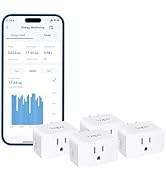
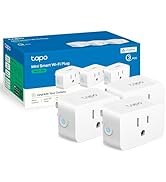
The TP-Link Tapo P125 Smart Plug Mini (2-Pack) offers powerful 15A/1800W capacity in a compact, UL-certified flame-retardant design. Compatible with Apple HomeKit, Alexa, Google Assistant, and more, it enables effortless voice and app control. Features like advanced scheduling, away mode, and Bluetooth onboarding deliver smart automation and security without blocking adjacent outlets. Perfect for millennials seeking sleek, reliable smart home upgrades with easy setup and broad ecosystem integration.









| ASIN | B0BMWFQNDC |
| Best Sellers Rank | #9,787 in Tools & Home Improvement ( See Top 100 in Tools & Home Improvement ) #14 in Home Automation Hubs & Controllers |
| Brand | Tapo |
| Brand Name | Tapo |
| Circuit Type | 1-way |
| Color | white |
| Connectivity Protocol | Bluetooth, Wi-Fi |
| Connector Type | Plug In |
| Contact Material | Metal |
| Contact Type | Normally Closed |
| Control Method | App, Touch, Voice |
| Controller Type | Amazon Alexa, Android, iOS |
| Current Rating | 15 Amps |
| Customer Reviews | 4.5 out of 5 stars 27,923 Reviews |
| Included Components | 2 x Mini Smart Wi-Fi Plug P125, 1 x Quick Start Guide |
| International Protection Rating | IP00 |
| Item Dimensions | 2.36 x 1.5 x 1.3 inches |
| Lower Temperature Rating | 32 Degrees Fahrenheit |
| Manufacturer | TP-Link |
| Material Type | Plastic |
| Model | Tapo P125(2-Pack) |
| Mounting Type | Surface Mount |
| Number of Items | 2 |
| Number of Positions | 1 |
| Operating Voltage | 120 Volts (AC) |
| Operation Mode | ON-OFF |
| Specification Met | UL |
| Switch Type | DIP Switch |
| Terminal | Through Hole |
| UPC | 840030705205 |
| Unit Count | 2.0 Count |
| Upper Temperature Rating | 104 Degrees Fahrenheit |
| Warranty Description | 2 Year Manufacturer |
| Wattage | 1800 watts |
G**K
Perfectly Sized and Fast Setup
This review is for TP-Link Tapo Apple HomeKit Smart Plug Mini, Compact Design, 15A/1800W Max, Super Easy Setup, Works with Siri, Alexa & Google Home, UL Certified, 2.4G Wi-Fi Only, White, Tapo P125(2-Pack). I waited way too long to get this mini smart plug! I had a giant Century timer that used pins to set the timer and it worked fine but it’s just not as convenient and a hassle to set up. Out of the box, it was very easy to set these guys up. I just plugged each into the outlet and opened my Tapo app to add the devices. It took me less than a minute to set up each of them and I was off and running. These devices can also be updated to run the latest software, which is great! I used these smart plugs to schedule grow lights for my monstera and sansevieria plants. They work perfectly. The lights turn on and off when my other Aerogarden lights come on. I can set these to turn on and off using my location for sunset / sunrise or set my own custom schedule. There are so many options in the Tapo app as to how I want to run them. Note: Check to make sure that the electronic device can be left in an “On” state first before purchasing these mini plugs because some devices automatically default to the “Off” state when power is cut off and remain in the “Off” state until manually turned on. These plugs will not automagically fix that issue! I have several grow lights that are always in “Off” state even when power is turned back on and they will stay “Off” until I manually turn them on with their controller or buttons. I cannot use these mini plugs or any type of automatic timer for that matter with those grow lights. Overall, these are really excellent mini smart plugs. They hardly take up any outlet space, unlike my last timer, and they are very easy to set up and operate through the Tapo app. See their video on the product page on how to set up the plugs, if it’s not clear. However, I found it to be very easy and intuitive to set up. I would give these mini smart plugs a 5.0/5.0 - 10/30/2024.
J**B
LOVE
I now have smart bulbs or plug ins for all my lights except the overheads.... I also have several brands. I purchased a TP link indoor security/baby monitor camera a few months ago to be able to keep an eye on my bedridden spouse. I liked it so much I immediately bought a second for the hearth room. Those were so easy to set up that when I wanted another smart plug in I looked for the TP brand again. YAY. I already had the app on my phone so set up took maybe 2 minutes - for it to find the device....THEN a minute to set it up with Alexa....again so easy because I had the TP app on my phone. I gifted my neighbor with one of my three. She has said "I should maybe get things like that"....so I helped her plug in her first smart plug, helped her get the app on her phone and then get her Echo to find it. She was really proud of her first SMART light. She will be buying more. You can't go wrong with this brand. They have amazing prices on really quality products that seem to work seamlessly. I just ordered one of their outdoor SOLAR security cameras that I need to install. The solar panel goes up near the roof line and I have a perfect spot on the facia to attach the light. I really like that I can control my TP Link devices with their app, with my alexa app, or with my voice. I really really love this brand.
F**N
Tapo is the best and works great with Google
I’m replacing all my smart plugs with these because they are easy to program and work great. Don’t mock me for basically falling for “The Clapper.”
D**E
Great With Homebridge not HomeKit
I bought these to replace some older beefy Belkin WeMo outlets that were so bulky they covered up the second outlet. I choose these for their compact size and direct HomeKit compatibility, compared to my old WeMos that were connected via Homebridge. They’re very easy to setup in the Tapo app which discovers the device, added it to the app, updated the firmware and working within minutes. After you add them to the Tapo app, you can select them and add them to your Home app via the QR code. That process was also very straightforward and they were controllable via Siri and my Apple ecosystem as a whole both inside and away from home. Unfortunately they only stay connected for about 16-24 hours after which they disconnect from both HomeKit as well as the Tapo app. Unplugging and plugging them back into the wall got them back up in seconds, but must be done once to twice daily. I’m a network engineer and no amount of reconfiguring my network would keep these online, 16-24 hours is all I would get. So I setup the fourth outlet but this time only added it to Tapo, not HomeKit and that one plug never went offline while the other three were still a problem. So I searched the Homebridge plugins and they indeed have an up to date and maintained Tapo plug-in (homebridge-tp-link-tapo, added as a child bridge). So I reset the other three, added them all back to Tapo, skipping adding them to HomeKit directly, and added them via the plugin, and all four have been solid ever since and work perfectly in HomeKit via Homebridge now. I have a few HomeKit direct devices and none of them have any issues, so I don’t know if this is a flaw in HomeKit or the Tapo implementation but thank goodness for the Homebridge community. My main reason for these plugs are their compact size so I’m ultimately happy.
D**S
Easy automation
Love these little things, matter supported smart plugs make automating some older lights easy without having to pay absurd prices for smart lighting. Very easy to setup through Apple HomeKit, and I assume it's just as easy through google home. You just open Apple home, add device, scan code and then it's added. I have all my Christmas lights setup on these, and I am slowly adding the all around the house. So now, instead of walking around the house turning Christmas lights, I have a timer set an if I want to turn them on outside the timer, its a single button press to turn on the group.
G**N
Easy to set up, especially if you read the instructions first!
I initially struggled with setting up these smart plugs, even though I’m relatively “techie”. I purposely bought the ones that work with the Apple HomeKit, not realizing I didn’t NEED the Apple HomeKit in order for them to work. I tried setting them up through the (Apple HomeKit) app, and nothing was working. I finally realized that unless you want to coordinate a lot of different devices and features, you don’t need to use HomeKit. (If you do want to use Apple HomeKit, you need to set them up through the Tapo app first.) Went to the Tapo app and easily set up multiple plugs for things like air filters, a fountain, and grow lights for my plants. All I wanted them for was to turn lights, etc., off and on at specific times. I’m not even using the HomeKit app, in fact I deleted it, and everything is working perfectly.
P**K
Easy Peasy
These plugs have been flawless since installation. These replaced some older units from another manufacturer that would seemingly have connection issues with my WiFi. I would have to frequently reconnect them with my network, which was annoying to say the least. Set up was painless, and four months in I’ve had no issues.
E**E
Indispensable and easy to install and use but lots of ads
Terrifically useful and easy to install and use. User interface on the application is intuitive. Icons to indicate what type of appliances, lamps, power, etc., help identify the unit you want to power on or off. It appears you can time when items turn on and off. I purchased this item twice. It is indispensable for turning a lamp on that has no wall switch and is not near the room entrance. Without this item that would be a dark corner. This is an edit to my review. Although it didn’t appear immediately ads have become appearing when I turn on the app. This may become a dealbreaker in me, finding another smart technology. While turning lamps on and off, when they are hard to reach makes this an indispensable tool – the ads are a real detractor.
Trustpilot
2 months ago
3 weeks ago