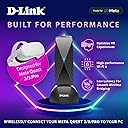
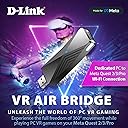
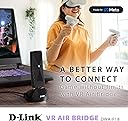
🚀 Cut the cord, not the experience — VR gaming unleashed!
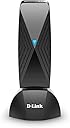
The D-Link VR Air Bridge (DWA-F18) creates a dedicated WiFi 6 wireless link between your wired PC and Meta Quest 2/3/Pro headset, delivering ultra-low latency and smooth frame rates for cable-free PC VR gaming. Designed exclusively for Meta Quest, it unlocks access to the PC VR game library with easy setup via USB 3.2 Gen 1. Ideal for gamers seeking freedom of movement without sacrificing performance, though optimal results require a wired PC connection and line-of-sight placement.


| ASIN | B0BJ39BCPL |
| Best Sellers Rank | #35,609 in Video Games ( See Top 100 in Video Games ) #427 in PC Virtual Reality Headsets |
| Customer Reviews | 3.6 3.6 out of 5 stars (411) |
| Date First Available | October 28, 2022 |
| Department | Adult |
| Item Weight | 9.6 ounces |
| Item model number | DWA-F18 |
| Manufacturer | D-Link Systems, Inc. |
| Product Dimensions | 3.77 x 1.18 x 0.39 inches |
A**N
Setup was smooth and it works just as well as a cable as far as I can tell.
I just bought a Quest 2 for the first time when they went on sale this year, but when I tried to use Air Link between my PC and my router, it was really choppy and unusable. My PC is hardwired to the router and the Quest 2 is only about 15 feet away from the router, but the router is an older Asus from 2014 and there is one wall between the PC and the Quest 2. I was hoping it would still work, but no luck. The reviews on this bridge are a little mixed, but I figured it was worth a shot to see if I could play PC VR games without a cable. The setup was pretty easy and basically consisted of opening the Oculus app on the PC, plugging in the bridge, doing a restart and setting a password for the wifi that the Bridge puts out. I plugged the included cable into a USB 3.2 port on the back of my PC and set the D-Link Bridge on the desk facing the play area. I am playing in the living room, just about 20 feet from the bridge. Then you just connect the Quest 2 to the wifi from the bridge and launch the Air Link from the Quest menu. At first I was concerned that the the bridge wifi had no internet connection, meaning the Quest didn't have a connection to the internet when I was connected to the bridge wifi. Then I realized that the Quest doesn't need an internet connection while you are using the Air Link, because the games are running on the PC anyway. The Quest is just acting as a VR headset for the PC, so as long as the PC has internet, you are good to go. When you are done with the PC you just reconnect the Quest to your normal wifi to get internet back. It just takes a couple clicks on the Quest menu to swap back. So how does it perform? It is actually really good! I honestly can't tell the difference between using the Quest standalone versus using it to play PC games through the bridge. I bought Contractors VR because it is a cross-buy game, so I can test the same game on the Quest versus playing through the PC. Other than the graphics on PC being WAY better, I can't tell a difference between how the game feels and controls. It runs really smooth through the bridge, and I forgot I was even running the game on my PC. I have played a few different games (Contractors, Microsoft Flight Simulator, Tabletop Simulator) for several hours now and I haven't had any crashes or issues. I have really only seen it stutter a couple times in the time I have played so far, and it was very briefly. I do have a higher end PC (i7-12700k, RTX 4080), which I am sure helps eliminate any bottleneck on the PC side.
A**R
Feels like a half baked product.
I have played with this unit for a month with a Quest 3 and I can definitely say it is not great. It feels like a half baked product. The setup took a lot of convincing to get it to work. It's buggy, laggy and on occasion, crashes my very recently built, high end gaming computer. It also has issues connecting much of the time and it is prone to dropping the connection, which in turn, causes my computer to crash. The internet gets cut to the VR headset when you use it (part of how it works). Connecting and disconnecting from the PC is a hassle if you want to go back and forth between the PC and headset environments. The range is not great and was reduced by simply having the unit behind a monitor. The range is about that of a small to medium bedroom as long as it is line of sight. I just upgraded my network to WiFi 6E and that is where it's at. Everything just works seemlessly. If this product worked liked that, I could highly recommend it. But it doesn't. If you have a 2.5Gbps or greater NIC on your PC, a new high end or custom router is definitely a better investment, especially given that this unit is quarter the price of a decent router. The range is longer, it's not laggy and the connection is stable. It doesn't crash my computer and switching between the PC and headset environments is seemless. This unit may be good in a pinch. Like if you are using a laptop and your friend has a garbage network. It definitely beats being wired. For a home set up, there are better solutions.
J**Z
Great product
Was easy to setup didnt have any issues..works great, before was choppy and unplayable after i had it setup and running it was smooth!! Would recomend if you dont have I f you dont have a newer router and fast internet
A**.
Incredibly consistent Airlink vs even a proper AX network.
I have a wifi 6 10gbps mesh network at my home that can run airlink at 200mbps 90% of the time with no issue. The problem however is that as all of my wireless devices are connected to this network there are moments where the network can become congested enough to cause airlink to lag for a few seconds. I had two solutions I could do 1. Dynamic bitrate so that during moments of congestion the bitrate will drop or 2. Create a dedicated wifi 6 AP for just the quest 2. This dongle allowed me to create a connection exclusively for the quest 2 at a far lower price point than buying a good enough router would have been. The issue is that setting it up was a lot more difficult than it needed to be as it didn't "just work" since I needed to reset my airlink settings completely before my headset would see the PC when connected to it through the dongle. Overall the perfect uninterrupted stability more than made up for the issues with the initial setup.
H**.
Way less glitches compared to my router
I use VR Bridge on my Gaming PC with Virtual Desktop and Quest 2. I had some major glitching in issues when using either my main router or a router turned access point close to my headset. A friend recommended I should try VR Bridge. VR bridge optimizes is direct on the PC and optimizes the signal for VR somehow. Glitches are still there sometimes, but it's way less frequent. A huge improvement! Setup isn't straight forward, though. last time I checked the RX 7000 series wasn't listed in the Oculus link software page., even though they are powerful enough for VR. Not sure if there is a lack of supporting of my 7800 XT or what there is dor a reason Oculus link doesn't want to work well with my setup.
Z**F
This is a great solution if your on a different floor than your router. Even though this product page says you need your PC to be wired, it's not necessary. My computer isn't wired at all and I'm playing perfectly fine. First time setup is easy if you know how to be patient and you may need to turn airlink of and on once or twice on first setup
M**A
A 2 semanas de la nada dejo de funcionar, no se conecta no manda algún dato, nada
R**D
This is the worst thing I have bought in a very long time. Took forever to configure even though you are led to believe it’s easy. It just wouldn’t connect, took several attempts to get it to connect. Then it was connected and I opened up Contractors Showdown and it was extremely laggy and the compression shot through the roof. It was like I was watching a low res stream. I rebooted the headset and it worked perfectly, I was blown away by how good it was. Fast forward to next day and I could get it to connect to the D-link every time but there was no Link available no matter what I did. This product is total garbage. Stay away. I have tons of tech experience and have never written a bad review that wasn’t deserved. Trust me this is a bad product.
J**H
I followed the instructions and this was a plug and play device right until the end. The instructions will get your Quest connected to your PC but it leaves out that in your PCs network settings you need to enable sharing on your internet connection and set the wi-fi direct virtual adapter as the sharing target in order to get an internet connection on your quest, which is fairly important. Aside from that I have not had any issues with the device, it's been stable and reliable so far.
C**E
It takes an obnoxious amount of fiddling every time you want to connect, and the initial connection was absolutely brutal. It glitched out so bad I had to follow a forum full of hundreds of people with the same issue as me and the only solution was to uninstall the Oculus app, delete a bunch of hidden folders in AppData and then reinstall. It's been working like a dream ever since, but man this thing is not plug n play. Still, it WORKS. Completely wireless, perfect PC VR. I give that a thumbs up
Trustpilot
3 days ago
1 week ago