
DOWNLOAD THE APP


Customer Services
Copyright © 2025 Desertcart Holdings Limited
DOWNLOAD THE APP
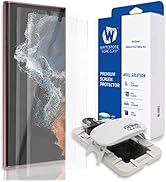
![[2 1 CAM PACKAGE+ UV Lamp] Whitestone Screen Protector for Google Pixel 7 Pro - 2pack](https://m.media-amazon.com/images/I/71x87+0sZXL.jpg)
🛡️ Elevate your Pixel 7 Pro’s defense with precision-engineered clarity and strength
The Whitestone Dome Glass Screen Protector for Google Pixel 7 Pro offers a premium 2-pack plus a free camera film protector, featuring patented liquid dispersion technology that self-repairs and hardens into a 9H scratch-resistant shield. Its LOCA adhesive guarantees HD clarity and seamless fingerprint recognition, while the included UV lamp and installation frame enable a bubble-free, edge-to-edge fit. Ideal for detail-oriented users seeking top-tier protection and flawless touch sensitivity.



| ASIN | B0B99PPTPJ |
| Best Sellers Rank | #37,344 in Cell Phones & Accessories ( See Top 100 in Cell Phones & Accessories ) #2,432 in Cell Phone Screen Protectors |
| Color | transparency |
| Customer Reviews | 3.7 3.7 out of 5 stars (1,171) |
| Date First Available | August 11, 2022 |
| Item Weight | 8.8 ounces |
| Item model number | 8809365407361 |
| Manufacturer | Dome glass |
| Product Dimensions | 6.2 x 2.8 x 0.5 inches |
| Special features | Scratch Resistant |
| Whats in the box | uv lamp, camera protector, glass 2 pcs |
A**G
Great screen protector, but installation is not for everyone
This is a great screen protector. It is Google-certified for the Pixel 7 Pro and the protector works very well with the Pixel's fingerprint-recognizing screen. I originally purchased and used a different screen protector that was not Google-certified but that looked good on Amazon b/c it had over 10,000 reviews and an average review of 4.3 stars. But that screen protector, while otherwise fine, did not work at all with the PIxel 7 Pro's fingerprint-recognizing screen so I constantly had to type my phone PIN when wearing glasses (the phone doesn't recognize my face with glasses). Now, with the Whitestone Dome screen protector, the phone readily recognizes my fingerprint and the screen is much more sensitive to finger swipes. This Google-certified protector is also otherwise great -- I had a great installation outcome -- no bubbles, dust, very clear screen -- and its sleek design works with phone cases. But -- and this is a big but -- this screen protector is not for everyone. I recommend this only for individuals who can perform precision work with their hands and are detail oriented and careful. I suspect the 3.6 star average review reflects that many aren't up to the nontrivial task of installing this screen protector. But if you take your time (maybe 20-30 minutes) do a good job, the result is truly excellent. Watch the installation video first to decide if this is for you. Also, three final installation tips. First, the very abbreviated paper instructions really must be used in conjunction with the installation video on Amazon. The video covers all the steps and fills in the substantial gaps in the paper instructions (which then serves as an outline of the steps, not a free-standing set of instructions). Second, make sure you place cardboard or something under the jig to capture any excess adhesive that leaks from the jig. I did not, and I'm now hoping that my attempt to clean the leaked adhesive from our tablecloth will work. And third, make sure that the surface on which you place the jig is level or that you have something to function as a shim to level out the jig. My table is not exactly level and the very slight grade makes the adhesive flow downslope. I used some cardboard to level things out and the installation worked great. Good luck!
P**D
WHITESTONE DOME GLASS SCREEN PROTECTORS INSTALL CAN EASILY FAIL DUE TO POORLY DESIGNED PARTS
I've had whitestone dome glass screen protectors and every one was difficult to install, but was worth the small amount of time watching installation videos to ensure you follow each step because when done right this is the best glass out there. The glass feels slicker and stronger than the virgin unprotected glass screen on your shiny new phone. But even if you are careful and follow the instructions to the letter it is easy to have the first install process fail. And it is just as easy to have the second install fail. I checked the level of the kitchen island where I did the install and it was flat. So both installations failed because the liquid glue did not flow right so there was gaps at the bottom edge and bottom right edge. I also got a kit with a broken bar. But come on you shouldn't need it if you can open the glue cylinder and drop it in the spot by looking at where the bar goes into the jig and drop the glue in the middle. It should not be this hard. Whitestone dome has great glass but terrible installation parts that can arrive completely broken or cracks in the plastic . It has happened to me on other phones before. I don't want to blow another $40 bucks and have 2 more failed installs so I have to find something that is easier to install but made up of glass. I hope I will find a company with glass that is close enough to whitestone dome's quality glass, but not with a stupid installation process. I thought the sammy S21 ultra install was harder, but that one was easier to have good results. Maybe its the curved glass that is the problem. Do your research on which screen protectors have high quality glass and look for installation feedback and finished results from real people that aren't youtube shills that probably get several kits to install and have perfect results because even if you have installed glass protectors before with the liquid glue, whitestone dome glass installation is too easy to have bad results with. It's a real shame that I have to give this product the lowest score of any product I've reviewed but I felt that I have to warn people that this thing sucks. Maybe the problem is that there is always a different way to install. Why can't they use the same type of jigs but with different proportions for the model you have. Peace out and please buy wisely.
T**C
The most important thing you need to know if you're considering purchasing this item is that you should really take the time to watch a couple of installation videos before you even open the box. The official one is okay, but there's more floating around, and watching a couple of different ones will give you a solid overview of how it all works and what you'll need to do. This was my first time ever installing a screen protector and, given some of the reviews and my natural propensity to clumsiness and impatience, I was convinced installation was going to be a nightmare. I went in hoping that I'd at least get it right with the second protector (there are two in the kit). Turns out my worries were completely unfounded. I followed the advice in the comments here to watch the how-to videos a couple of times until I was fully familiar with what I needed to do, and that made all the difference. The installation was really straightforward, the included guide frame fit like a glove and the adhesive spread perfectly (just make sure you're on a level surface and make sure to get the blob to the centre, as per instructions, before lowering the glass. Pulling out the bit to lower the glass does tend to tug it a bit out of place (watch the videos!), so I made sure to carefully position the fingers of my other hand to limit any movement as I did this. The protector went on perfectly, doesn't dim the display at all, and fingerprint reading continues to work seamlessly. The protector is also compatible with my Spigen Tough Armour case and, after ten days of intensive use, shows no sign of any lift happening or about to happen.
M**S
Bästa skärmskyddet som finns
N**A
Les commentaires négatifs ne sont que des personnes qui ne suivent pas correctement les instructions. Posé sans souci après avoir regardé quelques tutoriels trouvés sur youtube. N'hésitez par à pencher le gabarit pour que la colle s'étale bien sur toute la surface une fois le verre posé dessus, ne pas appuyer sur le verre lui-même comme lu sur quelques commentaires et pensez à l'ajuster avant de faire la première session d'éclairage UV. Verre de bonne qualité, épouse parfaitement l'écran incurvé, aucune bulle, touché parfait, lecteur d'empreinte parfaitement fonctionnel également. Ma coque, la Spigen Rugged Armor passe sans problème en laissant 1mm entre elle et le verre trempé. Satisfait de mon achat.
K**E
I recently installed the Whitestone Dome Glass Screen Protector on my phone, and I’m thoroughly impressed with the quality! The installation process was surprisingly straightforward thanks to the included tools and clear instructions. I was a bit nervous about applying it myself, but the step-by-step guide made it easy to achieve a perfect fit. Once applied, the clarity of the screen is outstanding! It feels just like the original screen, and there’s no noticeable loss in touch sensitivity. I also love that it provides excellent protection against scratches and minor drops. I’ve already had a couple of close calls, and my screen is still flawless! What sets this protector apart is its ability to cover the curved edges of my phone without bubbling or peeling. I’ve tried other protectors in the past, but none have offered such comprehensive coverage. Plus, it doesn’t interfere with my phone case, which is a huge plus. Overall, I highly recommend the Whitestone Dome Glass Screen Protector for anyone looking for top-notch protection without compromising on functionality. It’s an excellent investment that gives me peace of mind knowing my device is well-protected!
F**N
Starting off with this, the package is big. A lot bigger than you see with most screen protectors. It comes with the following items in the box: - 2x Glass screen protectors - 1x back camera flexible protector - 1x UV light - 1x Installation Jig + accesories - 3x Glue Recipients - 1x cleaning kit (wet wipes, 2x high quality microfibre cloths, dust stickers etc) It seems a bit daunting at first, but scanning the QR code on the box led me to the instructions page. From there I just followed the links to the YouTube video specific for my model. It was only a 3 min video, and I've watched it a few times to make sure I know the process without having my eyes glued to the screen. Turned off my device and only occasionally skimmed through the video to make sure I get the steps right. Flawless installation from the first try. It wasn't that hard. However, I did take additional precautions to make sure I install it as best as I can. I would say if you follow these tips you'll have a spotless installation as well: 1. Level surface - this will help you once you put the glue on the phone. Find the best stable and level surface in your house. I used the Compass app on my phone (which has a spirit level option) to make sure my desk is flat enough. 2. Close doors, windows, fans and any sources of drafts in the room you're working. This will help with any specs of dust and lint floating in the air. Give the room a few minutes to settle. If you have a humidifier it might help to have it on for a half an hour to make the air less dusty. Or you can do this in the bathroom with a hot tap or shower open for humidity. 3. Wear latex/nitrile gloves to avoid knocking off dead skin, hair and dust from your skin. Also wear a had or shower cap to not have any dandruff from your head falling into your space. Don't do any sudden or fast movements whilst installing the thing. Breath lightly and wear a mask if necessary (if you're coughing or are a heavy breather). 4. Have a light shining on the side of your phone to spot any stray lint or dust after cleaning the screen. On top of these tips and what's in the box I suggest getting a plastic tool to help with getting the speaker protector on. This was the only step that provided enough frustration and required me to try a few times to get it right. I might have gone a bit over the top with preparation, but I'm very happy with the install. Now some positives and negatives about the protector: PROS + Smooth and very high quality surface + Sensitivity seems even higher than without the protector on. I could unlock the phone with my nitrile gloves on - not sure what that says about security though + Cristal clear and doesn't look like there's additional glass on + Fits with my Spigen case with ~1.5mm clearance around the edges + With the install kit it's almost impossible not to have it well aligned + Cutout for the camera - I do not like protectors that cover up the camera as they usually affect the picture quality + Clear instructions CONST: - Price, obviously. This protector kit is expensive. I didn't jump on buying it right away. Whilst I followed the price it went from £34.99 to £47.99 then dropped to £29.99. In addition to that, I got a £10 voucher for it during the Black Friday week so it made it more bearable (£19.99). Still double the price of typical screen protectors, but well worth it. - It covers less of the screen than my previous cheaper protector (~0.5mm around the edges less). This means less protection and catches easier on edge swipes. Would have liked this to cover just a bit more around the edges. - No instructions for the actual UV light. It's actually one press for 15" and two fast presses for 60" (from off). All in all I'm very happy with the quality and feel so far. We'll see how long it lasts. Especially the oleophobic coating which is the first to go. P.S. This screen protector has tiny stand-offs on every edge. These will not be visible after installation.
Trustpilot
5 days ago
2 weeks ago