
DOWNLOAD THE APP


Customer Services
Copyright © 2025 Desertcart Holdings Limited
DOWNLOAD THE APP
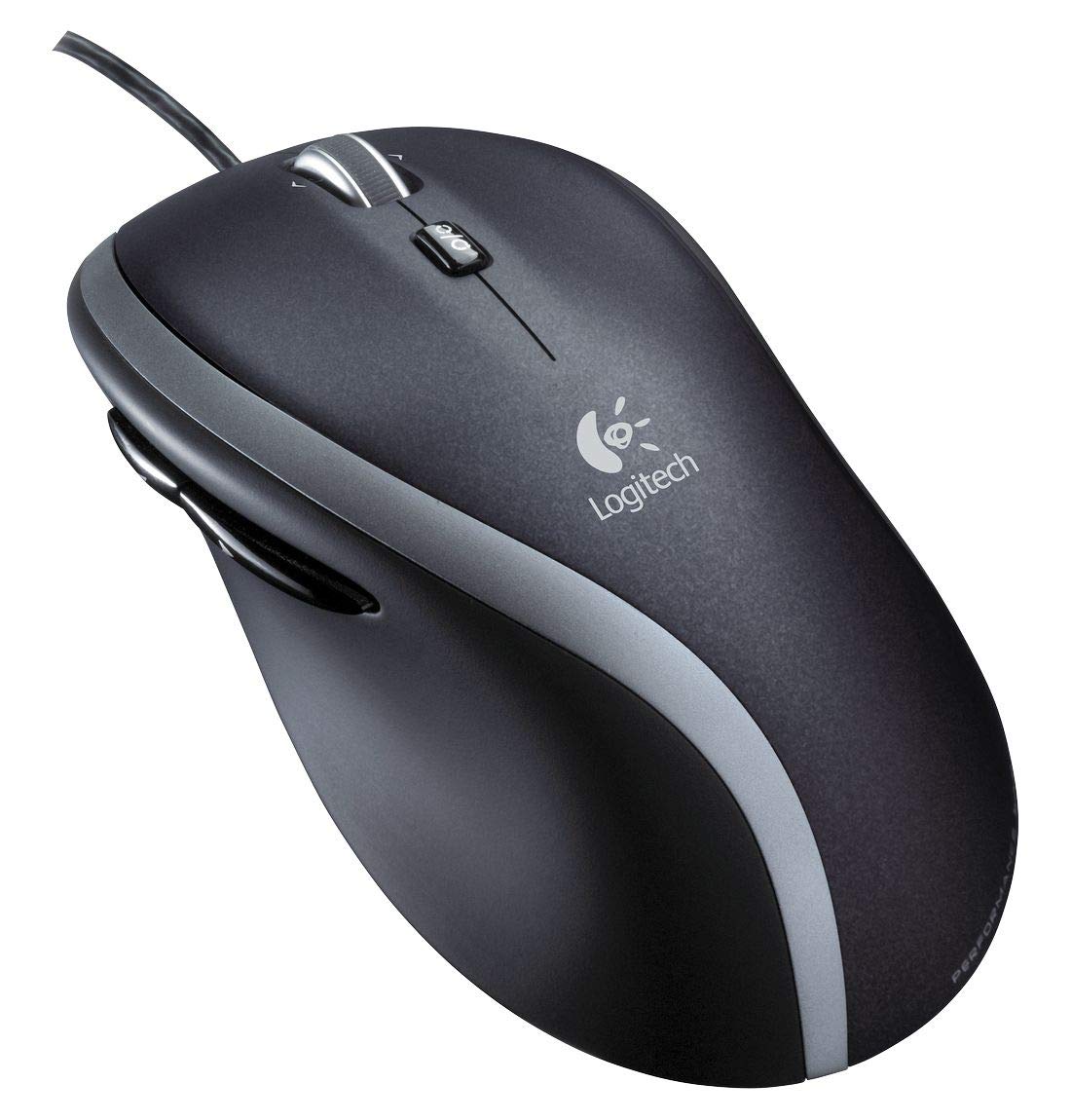
🖱️ Elevate Your Click Game with Precision and Comfort!
The Logitech M500 Wired USB Mouse combines high precision 1000 DPI laser tracking with a user-friendly design, featuring 7 buttons for enhanced navigation. Ideal for both PC and Mac users, this mouse offers hyper-fast scrolling and a comfortable grip, making it perfect for professionals who demand efficiency and ease in their daily tasks.


| ASIN | B00HV9ZG98 |
| Antenna Location | Laptop |
| Are Batteries Included? | No |
| Are Batteries Required | No |
| Best Sellers Rank | 109,117 in Computers & Accessories ( See Top 100 in Computers & Accessories ) 2,208 in Mice 27,025 in Hi-Fi & Home Audio Accessories 41,403 in Home Cinema, TV & Video Accessories |
| Box Contents | Computer mouse |
| Brand | Logitech |
| Brand Name | Logitech |
| Button Quantity | 6 |
| Colour | black |
| Compatible Devices | Laptop, Personal Computer |
| Connectivity technology | USB |
| Country of Origin | China |
| Customer Reviews | 3.9 out of 5 stars 3,330 Reviews |
| Enclosure Material | Plastic |
| Global Trade Identification Number | 05099206048324 |
| Hand Orientation | Right |
| Hardware Platform | Laptop, Personal Computer |
| Item Dimensions L x W | 12.7L x 6.9W centimetres |
| Item Weight | 144 Grams |
| Manufacturer | Logitech |
| Model Name | M500 Corded Mouse |
| Model Number | 910-003726 |
| Mouse Maximum Sensitivity | 1000 Dots per Inch |
| Movement Detection | Laser |
| Movement detection technology | Laser |
| Network Connectivity Technology | USB |
| Number of buttons | 6 |
| Operating System | Mac,Mac 1,Windows |
| Power Source | Corded Electric |
| Product Features | Ergonomic Design, Wireless |
| Range | 100.0 meters |
| Special feature | Ergonomic Design, Wireless |
| Style Name | Fast Scrolling mouse - M500 |
| Theme | computer accessories |
| Unit Count | 1.0 Count |
T**Y
A solid not over-fussy mouse. Great for web/design work.
A great mouse. I do graphic and web design, on a Mac with CS6 and this mouse works really well for that. It's a good size. I have average to large hands and it's very comfortable, shaped well to fit the palm with no accidental hitting of side buttons and nice responsive main-button clicks. Some mixed opinions - but I love the wheel, and use it mostly in 'free' mode to fly through long pages. The left/right tilt is also great for horizontal scrolling - with options in the software to control speed and acceleration to customise it to your own needs. The buttons can be assigned and the software allows for a LOT of configuration options, including 'per-app' set-ups. Now I have 'proportional sizing', Brush size etc. through button and wheel combos. It saves time and is easy to set-up and use. Accuracy is good and it works well on almost any surface. I can't understand why it's so hard to get a mouse with 4-way scroll on the wheel when it's so helpful in graphics and web-browsing (like the Mac mighty-mouse). While this is a tilt wheel (rather than a swipe or roll-ball) it works well. For graphics work this suits me well. Most gaming mice have too many buttons which gets confusing or cramped - and are of dubious construction. This one has five (left/right/side 1/side 2/wheel-click) which is enough to build in useful functions without making it easy to accidentally press them. A big thumbs up from me.
K**K
A great mouse at a good price.
Functionally, this is a great mouse; very configurable (once you've downloaded Logitech's free 'Control Centre' software, which works brilliantly with my Mac running El Cap, btw), it just gets out of the way and lets you get on with your tasks in a very fluid style. The ergonomics are comfortable, with the mouse sitting naturally under my fairly small hands. It suits a 'wrist down' style of mousing, I'd say. This is the second M500 I've owned; it's so much nicer than Apple's own fiddly Magic Mouse, and the fact that it's USB powered means that you're not buying batteries every two or three months. (To be fair, Apple's MM2 charges over USB as well now.) If I had a criticism of my first M500, it was that the build quality wasn't quite as inspiring as it might have been; it creaked and popped a bit in use, and felt like it was made from the same stuff as chocolate box liner trays. This current one is a lot more solid though, and seems reinforced at points of stress. I expect it to last a few years at least. Overall it's a great mouse at a good price.
M**E
A decent enough mouse, but the G500 is much nicer to use
I currently use this mouse at work and Logitech's G500 mouse (a very similar mouse but targeted for games use) at home. Having experienced both for a while now I'm afraid have to say don't buy this - buy the G500 instead. Now this is certainly not a bad mouse, and I'm not going to rubbish it - it fits very nicely in the hand (I mean this, Logitech have nailed designing comfortable mice*), it's grippy, but only where you want it to be, and I like the scroll wheel design it shares with the G500. But there are just a few little things that annoy me enough using it that I have to recommend the G500 instead. This isn't me being all particular and obsessing over gaming gear - obviously lots of the G500's features don't matter for the use case of this mouse and I'm not suggesting that everybody needs adjustable mouse sensitivity or extra customisable buttons - they clearly don't - but the build quality and the experience with the G500 are, to my mind, quite significantly better. Firstly, the scroll wheel has a tendency to scroll one click downward when the mode is changed - I've never seen this happen on the G500, and while not a huge problem it is definitely annoying. Secondly, and much more importantly for me, the pads on the bottom of this mouse are rough. The smoothed metal pads underneath the G500 absolutely glide over my mousemat, but these ones resist much more and the result is that I feel like I'm fighting to drag the mouse over it much more. This is constantly frustrating for me to the extent that I'm now considering buying a second G500 instead! These obviously aren't huge issues and I can get by with this mouse, but they serve as examples of the noticeable difference in quality of build and materials used for the mice, and I'm quite sure anybody else who compares them will agree that the M500 is a comparative grind to use. In many ways, this is almost as good a mouse as the G500, but when you try both that little difference in the experience just isn't one you want to do without. Almost somehow isn't quite enough. *Only if you're right-handed though, unfortunately.
C**I
Fits Nicely Under The Hand
I was looking for a decent quality replacement mouse for office use after the left click button started to go on my cheapy old mouse. The M500 seemed to have good reviews. It's nice and big and fits the hand well. Plugged into my Win7 PC and worked immediately without any additional software installation. But note that to make the two additional thumb buttons work you need to run a custom Logitech app which assigns them. Since I don't like installing apps off the internet I'm sticking with the standard windows driver - so I'll have to do without the thumb buttons. The other feature is the free-running scroll wheel. While this might sound like a good idea for scrolling thru large documents, in the windows apps I use the scroll speed is software limited so flicking the wheel is no better than holding down an arrow key. Also - in unlatched mode the wheel is prone to accidental touching causing unwanted scrolling - so I just keep mine in latched mode. So the two tent pole features - the thumb buttons and free-wheeling scroll - are a bit of a nothing burger for me. So perhaps it's not worth the extra price. However - it is a good size and fits nicely in the hand - so you pays your money and makes your choice.
T**G
For the price it is, it's perfect! Read the product description first and don't expect a £100 mouse for £20!
Very good mouse, no issues with it. I bought this mouse because my old mouse scroll wheel kept getting stuck so it would press the middle mouse button as I scrolled due to a few years of use as well as the scroll wheel not really sticking out. I bought this mouse as it looked like the scroll wheel was a lot better... and it is, so I don't see it getting stuck like my old one. I also prefer wired mouse and it fits perfectly in your hand. Of course... you have to get used to the feel of it as well as tweak the settings to your liking, but that's expected. A few people have left negative reviews because the mouse didn't have certain features they were looking for... don't buy this mouse expecting something without reading the product description, for the price it is... it's perfect. Don't buy this mouse expecting to get something worth £100.
S**I
Absolutely bad Logitech product
That's it. After two failures on this series, this is the last time I buy a Logitech mouse. Let me explain. I started owning Logitech mice with the same form factor and design many, many years ago. The winning factor for me was the additional buttons I could configure with the Mac to perform various operations. The first one I bought was corded, I don't remember the M number, but it was really a long, long time ago, possibly 10 years ago. It wasn't perfect, but the additional buttons were clever and I really liked using them. When I lost it, after many years, I decided to buy the cordless one (in the meantime, models came and went, but the same form factor was available). I quickly discovered some major flaws: 1. the cordless mouse was much heavier, and it became a problem for my wrist as I aged. This was not a dealbreaker, but a lesson for the future. 2. this is much more important: the movement becomes choppy to the point of being unusable when high data transfer is performed via wifi. I suspect it's because they are on the same frequency (2.4 GHz). The mouse uses a proprietary receiver, not bluetooth. This choppiness made it unusable in the office, so I used it at home for a while, where it is equally useless as neighbor wifi routers are active. Now let's come to this mouse. I bought it for the office, so, lesson learned: must be corded. Lighter and no interference. I thought. Here is the deal: - this mouse is significantly heavy. it's pretty much as heavy as the cordless version. I ignore the reason, but it certainly made me quite annoyed - the button to change the scrolling wheel behavior from smooth to stepped, that used to be on the bottom, now sits on the top and sticks out 3 mm. It digs into your finger as you scroll and it's so unpleasant I am going to file it down. - the main button activation force is not consistent. Sometimes it's harder to press, sometimes not. It feels sticky and mushy, with a very poor feedback. Maybe it's defective, maybe it needs to wear down because the plastic is new, but still not a good experience. - the two side buttons don't have any clicky, positive action that was present in the cordless model from a few years ago, and they are now very mushy. I would return it if I could, but I opened it so I'll have to hack it. I am going to file down the scroll wheel mode button, open it to fix whatever devilry makes the main button action so bad, buy new pads (because the screws are under the pads, of course) and grumble all the way of doing so. Or maybe I'll just throw it in the hardware recycle pile, and look for a serious mouse this time.
P**R
NOISY and imprecise buttons
I bought this to be a decent basic mouse, a replacement for a similar, older model which has worn out. Out of the box it feels good in the hand - the ergonomics are unchanged from earlier models - but this thing is NOISY. The wheel scrolls silently but the buttons are all very clunky, and the scroll-button and thumb buttons have this horrible mushy mix of squishy and clunky response, so you feel like you're fighting the thing all the time. The scroll-wheel button has an obvious click when you press it lightly, but this doesn't do anything - you have to push harder to get a solid Clunk and register a button press, which means it's very easy to accidentally scroll the wheel when you're trying to press the middle button. My last two mice were in this Logitech series and I was happy with them both, but this is a real disappointment.
D**.
Excellent quality (for price) mouse!!
Comfortable to use, has a nice speed over the mouse mat, not too fast but thorough enough to know it's a quality mouse at a good price. I bought for my wife to use on her laptop, and she was very impressed with it, so much so that she's taken it to use on a business trip with her to Tokyo. I'd recommend this mouse for the following reason: I'm used to playing Razer products on my PC, so with ease I can probably spot a bargain, and this is one. It's plug and play, no hassle no thrills, and fantastic quality at the price it's being sold for.
Trustpilot
2 days ago
2 weeks ago