![J-Tech Digital Wired Ergonomic Vertical USB Mouse with Adjustable Sensitivity (600/1000/1600 DPI), Scroll Endurance, Removable Palm Rest & Thumb Buttons [V628]](https://m.media-amazon.com/images/I/412aVruC3ZL.jpg)


🖥️ Elevate Your Workspace with Comfort and Style!
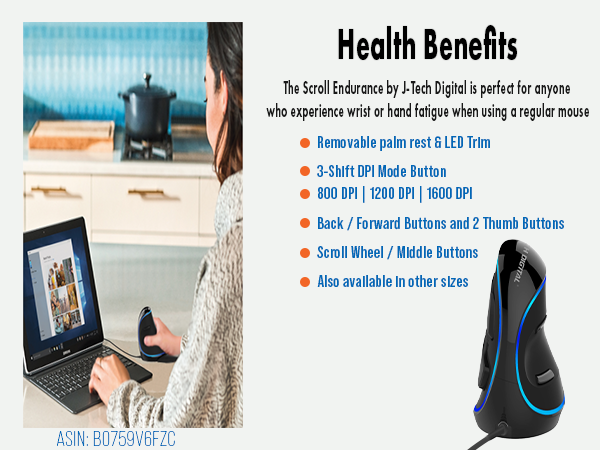
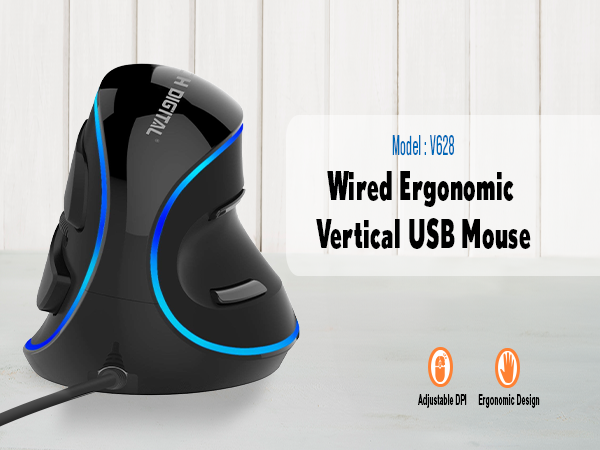
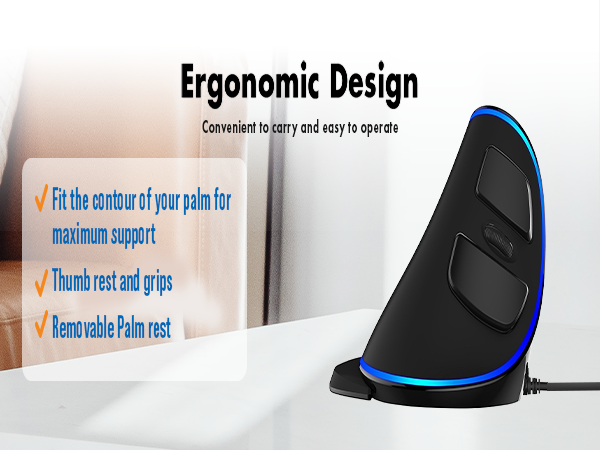
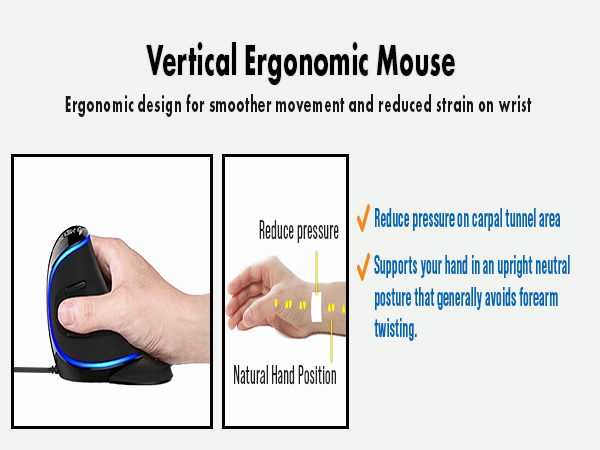
The J-Tech Digital Wired Ergonomic Vertical USB Mouse combines advanced ergonomic design with customizable features, offering adjustable sensitivity (600/1000/1600 DPI), a rechargeable battery, and compatibility with multiple devices. Its unique design helps alleviate wrist strain, making it ideal for professionals seeking comfort and efficiency in their daily tasks.



| ASIN | B0759V6FZC |
| Additional Features | Ergonomic Design |
| Antenna Location | Indoor |
| Are Batteries Included | No |
| Are Batteries Required | No |
| Best Sellers Rank | #6,285 in Video Games ( See Top 100 in Video Games ) #77 in Mac Gaming Mice #284 in PC Gaming Mice |
| Brand | J-Tech Digital |
| Built-In Media | Detachable palm rest, user manual |
| Button Quantity | 7 |
| Color | Black |
| Compatible Devices | Multi devices |
| Connectivity Technology | USB |
| Customer Reviews | 4.1 out of 5 stars 6,267 Reviews |
| Embellishment Feature | LED |
| Enclosure Material | Plastic |
| Hand Orientation | Right |
| Hardware Platform | PC |
| Item Dimensions L x W | 4"L x 3.74"W |
| Item Height | 4 inches |
| Manufacturer | J-Tech Digital |
| Model Name | V628 wired blue |
| Model Number | V628 |
| Mouse Maximum Sensitivity | 1600 Dots per Inch |
| Movement Detection | Optical |
| Movement Detection Technology | Optical |
| Number of Buttons | 7 |
| Operating System | Linux |
| Power Source | Corded Electric |
| Range | 30.0 feet |
| Special Feature | Ergonomic Design |
| Style Name | Wired |
| UPC | 766150280319 |
E**E
It Took Away My Wrist Pain
My wrist was becoming quite sore from overuse on a traditional mouse. I knew that they were making new types of mouses, so I checked out the ergonomic ones. The reason I picked this one was mainly chance. There are a number of mice of this general configuration, and since this is not a store where you can handle the wares, I had to just go ahead and pick one. I am glad that I picked the one that I did. It is perfect for me. I would say I have a medium-sized hand, perhaps a bit large for a female and quite small for a male. When I grip the mouse, my fingers find the appropriate buttons instantly. Not only that, but for the first time I am using the thumb buttons since they are easy to use. Within a few days of using this mouse, my wrist pain had all but disappeared. Now that I have had it for a while I have no wrist pain. There is a learning curve for using this mouse. You move it around with your elbow and shoulder more than your wrist and this takes a while to get used to. At first, I was dragging my pinky finger beside the mouse so that it would not overshoot its destination. Now, I do not notice myself doing that anymore. This mouse will not work with a neoprene mouse pad. I had to switch out to a metal mouse pad, and let the mouse travel on the "leather" side of the mouse pad. It squeals when deployed on the aluminum side of the mouse pad. It glides very smoothly and the piece of plastic to rest the side of your palm on is a great help. I had to give this mouse a rating as far as its gaming capability. Unfortunately, I am not a gamer, so I just put in five stars because it is a nice mouse. Once you get control of it, it does glide around very fast with little friction. Also, I had to rate it as far as battery performance goes. This is a wired mouse with no batteries. This is a good thing for the environment; batteries in landfills create heavy metal pollution in groundwater, so I try to avoid accessories with batteries when I can, and use accessories with removable batteries which I can recycle if I must have batteries. I have always preferred wired mice. I just examined the bottom of the mouse, and discovered an on-off switch. this controls whether the lines around the top of the mouse glow or not. There is also a button you can depress that I suppose adjusts the DPI. A visit to the manufacturers website reveals that you can download software and customize the buttons. I tried downloading the software, and found that a wide variety of functions can be assigned to the buttons on the mouse, including three types of wheel clicks that don't do anything by default. I set mine so that a simple click on the scroll wheel will double click what I am pointing at. Cool.
A**M
An initial impression of the vertical mouse! Updated 4/15/2018
I do have to say that this is my impression immediately after having opened the J-Tech Digital V628 (Gen 2) Vertical Mouse. I went from an Anker Ergonomic mouse, which wasn't bad. Although, I do have to say that this mouse is definitely an improvement and an upgrade. It is better designed and ergonomically more comfortable. I believe my home/study desktop is complete with this mouse. I am very pleased with my initial impression and will keep my eye out on what J-Tech develops next for their vertical mouse. Excellent experience so far! I'll write and updated review as time goes on, but for now I'm satisfied. Update after a day of use (3/21/2018): I will say that this mouse will take some getting use to. At times it feels closer to a joystick than a mouse. It is very much comfortable for my hands, which are between medium and large hands. I can see this mouse potentially being a problem for someone with very small hands or extremely large hands. This has been mentioned in another review here on Amazon, but the precision of the mouse is difficult to get use to. I'm getting the hang of it, but it is not something that will happen overnight. Some other reviewers mentioned how the mouse does not have precision, which led me to believe that the optics on the mouse itself may be of lower quality. This is not true. I find that it is the fact that you have to move your arm in a different way to get the precise movement that you intend. So there's a learning curve to say the least. But overall, my impression is that this is a high quality product that has high value for its price point. The next vertical mouse that I would consider is more than two times the cost of this. Also, the LED lights are a very nice touch. I do have to say that this Gen 2 version is much more attractive than the previous generation. This mouse honestly looks like a piece of art on my desk. Very unique looking and has very smooth contours that are appealing in a modern contemporary way. One other point of consideration is the Forward/Back buttons by the thumb rest. These are placed in a way that makes it extremely easy to trigger when using the mouse, but I have noticed that it is easy to press these buttons by mistake when grabbing the mouse to use. This is another part of the learning curve. When browsing websites it is very easy to use these Forward/Back buttons in the sense that it is lightning fast to trigger, but will require getting use to their placement. Still satisfied and hoping that there won't be any negative aspects to this mouse with future use. Update 4/15/2018 After using this vertical mouse just under a month, I have nothing, but a positive experience to report. I have become accustomed to the design and my hand naturally grabs the mouse now. It was not as easy when first using for the first week or so. Now I am even able to use the mouse without a full on grab. I can just use my index finger, middle finger, and thumb to do a quick movement of the cursor. This greatly adds usability for causal use. When I'm fully engaged in what I'm doing on the computer I will use a full on hand grab, which is very comfortable to use indeed. The backward/forward buttons by the thumb position looked very cool in the photos of the J-Tech mouse, but it really is effective in use. When first getting use to the mouse, I would grab the mouse and inadvertently press one of the backward or forward buttons. This since has stopped after almost a month of use. I use this mouse on the right side of my Microsoft 4000 ergonomic keyboard and a Logitech T650 touchpad on the left. I have become accustomed to this setup and I am glad I purchased this V-Tech mouse. I feel that my setup is complete now. Ultimately, I would say that this vertical mouse has a learning curve. If you are motivated to gain the benefits of its ergonomic design then I believe anyone can learn to use it within a month. But I do understand the few reviews that mention how it is nothing special or that it has an awkward design. It definitely is not for the average user. But for those that have a desire to move beyond an ordinary engagement with their work on a PC, this will definitely move you to the next level.
G**Z
UPDATED - Good ergonomic mouse, but with a few oddities and my original mouse failed in 1 day of use
7/8 Update: I've now been using this mouse for a few weeks and its grown on me. I like it better than the Anker mouse and think its worth the additional $10 in cost. It is more strain relieving on my wrist than the Anker mouse is. Upgrading the review score to 4 stars. ------------------------------------------------------------------------------------------------------------------------------------------------------------------------------------ 6/27 Update: J-Tech contacted me after I posted my negative review and was insistent on sending me an new device, free of charge. I've been using the new mouse now for a few days and it looks like this one has a working optical sensor, yay! This mouse did require me to use a mousepad (this was unneeded by other mouse models I've tried) for the optical sensor to track properly. Ergonomically, this mouse is much better than a standard mouse for my wrist. Its unusually heavy, something which can be remedied easily by removing the bottom plate and removing the added weights they put into the mouse and the angle is a little funny, but it is still a pretty good ergo mouse. After my original device failed, I bought the Anker Vertical Ergonomic mouse, which I think is a better buy ($10 cheaper at the time of writing this review, and more comfortable for me). I am still going to use the J-Tech mouse as a backup mouse however. Giving this mouse a 3-star review now up from 1 star for the good customer service and the fact that this is a pretty good mouse for the price point. I wish they didn't add additional weights to the mouse and that the first product I received was functional. ------------------------------------------------------------------------------------------------------------------------------------------------------------------------------------- Original Review: I received this mouse last week and today is the first full workday I've used the mouse for. Today, after 6 hours or so of using the mouse, I stopped getting cursor tracking from the mouse. I can still click with the mouse, but I cannot use it to move my cursor on my screen. The mouse was comfortable and good at relieving wrist strain. Since other reviews are mostly positive, I think I got unlucky and received a defective product.
C**R
Worth every penny
I love this mouse! It took no time to get used to. This is my second one. (Knocked onto a concrete floor MANY times so it finally broke and needed to be replaced.) It is so comfortable and I no longer get the wrist fatigue. Especially good for making graphics. Will definitely get again if this one ever wears out.
J**K
Great Until it Randomly Dies
I've had a few of these. I enjoyed it so much, that I replaced it with the same one hoping the first that died was a fluke. PROS They're hard to beat for the cost. They're sturdy, sleek looking, and the lights are cool. They're super comfortable and work quite well when they do work, but I've had multiple randomly die which leads me to CONS: They literally just randomly stop working. I'm not talking like after years of use. The first I had go didn't last a year. I replaced it hoping that was a a one off because I really enjoyed it. I have another that died in a little over 2 months. It's the last one I'm ever buying and it stinks because it's actually a good mouse when it works. With that, I highly recommend NOT buying this.
S**R
Good mouse with a weird quirk - short lifespan
Edit: After 5 months of daily use, the scroll wheel is wearing out - it sort of tilts out of alignment and I have to click it back into place every 30 seconds or so. In this case, the cost was perfect for testing out a vertical mouse, but now I will invest in one with higher build quality - you get what you pay for here. Until it wore out, though, it was excellent. If I could just repair it, I would. I adjusted to using this mouse within a few days and all previous wrist pain I had is gone! I experienced some of the things pointed out by other reviewers like unintentional clicks, but after a day or two this stopped happening as I learned to use the mouse better. I've found the DPI settings sufficient for fine detail work like CAD where I prefer a relatively slow pointer. My mouse arrived early and I was able to plug it in and go. The bubble wrap had shifted in the package so the shiny top surface is scuffed a bit, but I don't care enough to exchange it (though others might). It's well made, a good weight, and the soft touch is nice. I would like to be able to use the optional palm rest, but because I use a keyboard tray with an attached wrist pad, the mouse is too long with the attachment to fit on the tray and still have room to move around. I have long fingers so without the palm rest the mouse probably sits in my hand a little different than intended, but even so my wrist pain has been alleviated, which is a huge relief. The weird quirk is that I can't leave the LED strip on overnight. If I l forget to switch it off, when I come back in the morning both the mouse and my keyboard have stopped working and I need to switch the USB ports they're plugged into to get the computer to recognize them. As a result, I leave the LED switched off entirely because it isn't functionally necessary, which is too bad because it looks cool. All in all I'm pleased with this mouse and for the price, I would recommend it.
D**E
Well Made Vertical Mouse
I have been using J-Tech digital mice for several years. I literally use each until it wears out. I've found they consistently offer me relief from carpal tunnel pain and the newer ones with LEDs look super cool. The one thing that bothered me about this purchase is that I had a lot of difficulty telling the difference between models. I was actually expecting the wired version, which I also think is/was slightly bigger? I am, however, happy with the wireless version I received. It fits my hand just fine, works perfectly, points accurately, has a long battery life, can be used while plugged into the USB in case you forget to charge it, and basically is a very well-made mouse. Considering the last mouse I had I bought about 7 years ago, I'd also say these are an excellent value for the money. I actually thought it was worn out after using it daily for years and got a replacement. My husband then took the original one apart, noted how well it was designed, and was able to remove a little accumulation of grime to make it functional again. So it's now my backup. I cannot recommend these highly enough. Silent, plenty of buttons, beautiful lights and last for eons.
A**Y
Supports healthy ergonomics, reduces pain!
I've tried about a dozen mouses (mice?) to try to relieve my wrist pain. I wore a wrist brace, but the pain just migrated up to my elbow and shoulder. Within a few hours of using this mouse, the pain is GONE. I'm blown away. The wrist-rest means I can actually rest my hand instead of holding it "up in the air" like some other ergonomic mice. The size is perfect, not too big to where I can't reach the buttons or so small that it's hard to hold. The lights are a nice touch. Not overly bright. And it's rechargable. If I had just one ask, it'd be for it to work without the dongle, via bluetooth. I only have 2 ports and 1 is taken up by my keyboard dongle, so I'm left with no extra port. (I know I could get a splitter. I don't want to.) But for my pain to be gone, 5 stars. I'm buying another one to leave at work, and returning all the others I ordered. For reference, I'm a woman, size 8 shoes (so you can extrapolate the approximate size of my hands). The angle on this isn't quite 90, maybe 80? It's the most upright of all the mice I've tried.
Trustpilot
1 month ago
2 months ago