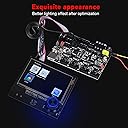
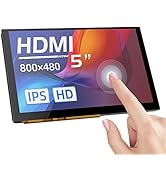
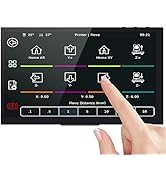
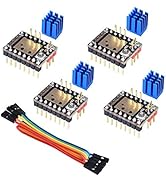
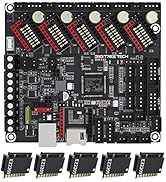
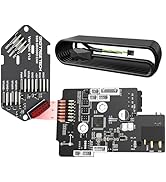
🚀 Elevate your Ender 3 game with the ultimate silent, cool, and smart control board upgrade!
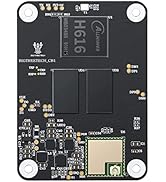
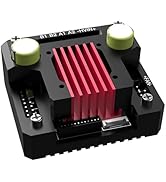
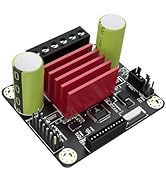
The BIGTREETECH SKR Mini E3 V3.0 Control Board paired with the TFT35 E3 V3.0.1 touchscreen is a cutting-edge upgrade for Ender 3 series 3D printers. Featuring the latest STM32G0B1RET6 chip, enhanced heat dissipation with triple CNC fans and improved heat sinks, plus a versatile smart display supporting multiple modes and media inputs, this combo delivers quieter, cooler, and more efficient printing. Pre-flashed with Marlin firmware and designed for easy customization, it’s the go-to upgrade for serious makers seeking precision and performance.


| Brand | BIGTREETECH |
| Color | Black |
| Customer Reviews | 4.3 out of 5 stars 2,931 Reviews |
| Display Type | LCD |
| Manufacturer | BIGTREETECH |
| Material | PCB |
| Voltage | 24 Volts (DC) |
A**A
The BEST upgrade for Ender 3 Pro
This mainboard was by far the best upgrade to my Ender 3 Pro (MicroSwiss all-metal hotend is a close second). The TMC 2209 drivers make the steppers so quiet that I sometimes forget it is actually doing something (although there is the fan noise). The added space on the EEPROM was perfect for fitting all the features I wanted into my Marlin build (Linear Advance, Auto-Bed leveling, and Junction Deviation in particular). Not entirely sure why BIGTREETECH only lists 256KB...it is actually 512KB which allows me to compile 'bloaty' stuff (PIDBEDTEMP, M503, boot images, extra menu items for LCD, etc.) into the firmware and not have to worry about saving every last little byte. Installation wasn't difficult, but it was frustrating as Creality hot-glued everything to their stock board. Took a long time to get that stuff off without damaging anything. Came pre-loaded with a recent version of Marlin and was easy to flash to a custom build by simply dropping a 'firmeware.bin' file onto SD card and turning the printer on. A nice feature is that after it updates the firmware, it renames the file to 'firmware.cur' so it does not try to reflash every time you turn the printer on (the bootloader I flashed to my stock board didn't do this). BLTouch & Auto-Bed Leveling I did have some trouble configuring the firmware for ABL using the BLTouch at first. Most guides out there assume you are plugging into the Z-Stop on the board, but this board has the 5-pin header for BLTouch (which was convenient to build a 5-pin DuPont connector right to the board instead of separate 3-pin and 2-pin connectors). In your configuration.h, make sure that #define Z_MIN_PROBE_USES_Z_MIN_ENDSTOP_PIN is commented out and that you are using #define USE_PROBE_FOR_Z_HOMING. One other thing I had to change was #define Z_MIN_PROBE_PIN PC14. PC14 is the Z-endstop pin from the 5-pin header. The pin set to this by default will not work. In configuration_adv.h, PROBE_OFFSET_WIZARD is a really handy menu option to help set the z-probe offset value. There are other minor things you have to change to get ABL to work, but all the guides out there cover that in great detail. The Instruction Manual does include a link to pre-compiled Marlin binaries for this board. I believe from that page the 'firmware-bltouch.bin' would have worked for me using the 5-pin Z-Probe header, however the webpage is unclear and I wanted more control over what features were in my firmware. Would be nice if they supplied the configuration.h and configuration_adv.h files for these builds so that users know what's in them. Extra Stuff I bought the kit with the Mainboard, BLTouch and no touchscreen display. Be aware that the wires for the BLTouch probe are nowhere near long enough to reach your mainboard. You WILL have to do custom wiring or need to buy a BLTouch extension cable (1-meter should be long enough). This kit does NOT come with a bracket for the BLTouch either. I printed one out from Thingiverse and it works great, but if you prefer a metal bracket, you'll have to buy it separate from this. The kit does have appropriate screws/washers/springs to install the BLTouch. It is pretty clear in the description and pictures that it would not come with the bracket or long-enough cabling, however some folks might not notice or realize they need these things and be very disappointed. Overall a great board and an awesome upgrade that would really only be better if the documentation was more specific instead of a few pictures and incoherent sentences. In particular, configuring Marlin for BLTouch using this board's 5-pin header (notably the PC14 pin). Oddly, the BIGTREETECH configuration files specifically for this board on GitHub for Marlin do NOT have the pin defined as PC14. Despite a few challenges, this is still 5-stars all around because this upgrade is not designed for people who like for things to 'just work' or simple plug n' play. Go buy a more expensive printer if that is what you want.
X**3
Probably the best upgrade for Ender 3 Pro
This is a detailed 2 part review please take time to read.... 1.) This board is amazing! Installation was a breeze just recommend to take a before photo of the old board wiring before beginning and then be sure to pay attention to the wiring diagram online from BTT and after a little bit of time compiling the firmware on the card and uploading to new board the printer runs like a dream. so quiet you don't even know its printing all you can hear are the fans cooling. I do recommend watching the video on installing this board and compiling the firmware that's on YouTube by Chris's Basement very helpful. 2.) Now on the back end of things the first board quit working after a few days couldn't get it to reset or work again even after re flashing the firmware. Amazon did replace free of charge and sent another out to me, however it was shipped in its own little box it was NOT placed into an amazon mailer of any kind no bubble mailor no outer box with cushioning there was nothing but a shipping label on the outside so of course the board was damaged in transit and I couldn't even use it. Since this was already a replacement sent out they could not send another one to me just a refund for the purchase price. This was ok however now I was left with no board for my printer and I purchased this board when it was on a one day sale and since the price had already increased again they could only refund the sale amount originally paid and now I must come up out of pocket the difference to re order one more time and hope for the best on the third attempt.
J**R
Good upgrade for CR-10
This board was a great upgrade for my stock CR-10s. The board itself is small, and it took some time but installing it was simple, just make sure you cable manage. The board allows for my stepper motors to be even quieter and accurate to 0.25 mm.
J**N
Excellent Base Upgrade, difficult to find firmware for CR-10 base model
Pros: 1. If you are planning on going beyond what Creality provides in their printers, this is an excellent base upgrade. It allows many more options than the base board, making modding the printers significantly easier. I was able to plug in the bl-touch without unplugging the z-stop switch. There are many other ports for common upgrades. 2. The replacement of the original board is EASY. Just unplug the wires from the Creality board and plug them into the same place on the SKR board. 3. It is SILENT! I really didn't have a complaint about the noise of the stepper drivers in my original Creality v1.1.4 board, but the drivers on this board make the steppers essentially silent. I had heard people complain about the fans and I chuckled... Now I get their complaint. Cons: 1. If you buy this kit with the BL-Touch, it comes essentially not wired. you have to supply the wires between the short pigtail from the BL-touch and the board. You have to have fairly specific crimping tools to do this (I happen to have them). 'cmon guys, supply a wire for this, it wouldn't cost you virtually anything and it would make this kit much more viable for the average user. I have an issue with the BL-touch working and I blame it on my wires. 2. Firmware Availability. I upgraded a CR-10 not a Ender. Finding firmware that works with the BL-touch and this board was somewhat difficult. the Bigtreetech github site doesn't list it... Perhaps that is just a matter of configuration, but I don't know. It seems that building your own firmware is common, and it is really not that hard, and it is what I ended up doing, but It shouldn't be necessary to do for this upgrade.
R**N
The screen sucks, the mainboard might work?
Avoid this waste of money. The screen is so insanely pathetically underpowered and slow to the point you can't even hardly baby step the z while printing. THAT IS HOW HORRIBLE IT IS. Get any other board and screen other than this lump of coal. This was a waste of $90 and who knows how many hours of my time now. I was impressed at first but the Screen code is horribly flawed. This thing destroys your bed. How? Well when you use the probe offset feature, if it rams the nozzle into the bed what do you do? There is no stopping it. The code sucks SOOOOOO BAADD that it doesn't bother to use your BL touch, NO WHY DO THAT JUST RAM THE PERSONS BED WITH THE DAMN NOZZLE. So you turn it off to stop it. Ok when you turn it on what do you think it does???? It runs your BL touch, then doesn't raze the nozzle. So you go into the Movement setting and try to raise the Z offset to not carve your bed, right. What does it do? It tells you that you can't move the damn hotend until you home the printer. OH JOY SO. So what do you think it does when you try to home it? It decides now is the perfect time to drag the damn nozzle over the bed and carve it up more. Isn't that just awesome. Why for the love of god not use the damn BL touch or allow the user to raise the Z without homing or atleast raise the bed before moving. So to sum it up. If your settings are off and you go to set the p offset feature, it first rams your nozzle so hard into the bed it actually knocks the whole assemble off. Then if you turn it off and on again, you are stuck with your nozzle rammed as hard as possible into the bed and no way at all to get the damn thing to stop. The only way I found to move the nozzle up when it is eating the bed is to turn off the printer, turn it back on and then choose the marlin screen, then choose Z offset wizard, which has the only smart code you will find in the screen and actually raises the damn bed first. Again the screen CODE IS SO HORRIBLE that instead of doing the smart thing and raising the hotend, it just prefers to eat your bed and ruin your nozzle instead. Isn't that nice? Isn't that what you want???????? So now my bed is SEVERELY RUINED and I need a new one.. The code for the Screen is 99 levels of amateur horrible code. AVOID THE SCREEN. Another super annoying issue with this kit is it just chooses a random printing speed every time, no matter what. Sometimes it is normal, other times it is 10%, and yet other times it is 160% SO AWESOME, SO COOL, JUST WHAT I WANT. I mean why use the Gcode settings I put in Cura when you can just do WTF ever you want. Yeah, woohoo . My runout sensor also doesn't work. I'm sure there is a setting in the configuration that needs to be changed. And that was another thing with this board, so many of the motor settings have to be inverted to make it work. The screen looks nice and works, but the underlying code is BARFTASTIC and Chock full o bugs. Want to load and unload filament using the built in feature??? TOO BAD SO SAD ERRORS FOR YOU!! I mean it goes on and on. Full of bugs. The screen makes working with the board easier than the stock Creality screens except for a the bugs/issues. The code for the screen in it's latest version has some irritating bugs. For example it keeps telling you that you need to home the bed before moving, even if you have already done that. What happens is if you do not interact with the printer for more than a minute it somehow forgets that it has been homed already and demands you rehome the printer. This gets SUPER ANNOYING when you are working on the printer. For example I moved the z axis up to change the nozzle, when i went to lower the damn thing it barfs at me that I must home the printer before moving. I think the issue is the fact that the screen is running it's own version of marlin and it connects to the printers mainboard, which is running it's own marlin. In this configuration, the screen is acting sort of like Klipper, it sends the instructions to the printer and displays what is going on. I think there is some setting that turns communication off after a minute. So it is like reconnecting to the mainboard all over again. Another issue is swapping the filament out with the option in the menu doesn't work. It just gives some stupid error that I haven't looked up yet. You have to manually control the extruder and reverse the filament out. I haven't had enough time to dig into the problem further. You can use this in many other printers other than the Ender 3. I am using it in an Ender 3 max which has a larger print bed. In order to do this I had to compile my own Marlin for the board, which is not hard at all, there are videos on youtube on compiling marlin. I'd actually suggest configuring and compiling your own marlin for the mainboard. I haven't messed with the screen code much, I downloaded and installed an updated version without compiling my own. I may in the future try compiling my own marlin for the screen to try to fix the bugs I found, but that will require actually editing code which I don't have time for right now. This mainboard will work with Klipper. So I plan on avoiding the overpriced screen of fail and replacing Marlin with Klipper on a Pi clone. But the screen is junk, it has too many bugs. I wish I knew this before I bought the combo. The mainboard is good, the screen sucks. I could have saved $45 and bought a pi clone if I knew how bad the screen was. Someone honestly needs to fix the screen code. I have yet to get this working properly. The z offset is always off for some reason and I have to baby step each print to even get close to a nice first layer. It has been a waste of $90 so far. Marlin for one sucks big time. I am thinking that is part of the z offset problem I'm having. I've had more failed prints than successful. I would switch back to the creality board but I have a Geetech board I want to try next. But I will buy a SBC to run klipper before I waste more time with Marlin.
A**C
Great quality prints at a noise level I never could have anticipated
I'm upgrading from the stock 4.2.2 board on my ender 3 pro. This is been the second best mod to my ender 3 pro. The first being the CR touch auto bed leveling accessory. My first print is a noticeably better quality. And it's INCREDIBLY silent. Print quality: Looking back at previous prints, it's absolutely noticeable. Curves are smoother. There's no noticeable ghosting. No weird print artifacts. I've only done a couple prints but I'm impressed. I wish I had installed this before printing some projects for Christmas presents. Noise: It's dead silent. My 4.2.2 board wasn't loud. I couldn't hear it on another floor of my house and even on the same floor it wasn't loud. I wasn't expecting much. It's SILENT. The motors almost never make noise when they move. I'm astonished. Setup: This is the 600 pound gorilla of this board. The first party documentation is functionally non-existent. The pre-compiled firmware didn't work. If you buy this board, you WILL need to build your own Marlin or Klipper firmware. There's a decent amount of documentation on this but I ran into some hiccups still. I've been 3d printing for about a year now, and I'm an IT professional. I'm familiar with code and can make my way around code to edit if I need to. This was definitely a stretch to my knowledge. If you're a beginner, probably go with something a bit more supported. It took about 2 hours to remove the old board and install the new one. And then about 6 hours to fiddle around with, build, and install the firmware to get it able to do everything that I want it to. I'm taking off a star for this because it's just a lot of work. But that's 3D printing. This was a fun, engaging project that stretched my knowledge immensely. Overall, it's well worth the $45. But just know what you're getting into before you get it.
C**.
Wow - what a difference
I ordered this after seeing a Teaching Tech review on YouTube. I figured it would help me produce some better prints, but holy cow... I had no idea the difference this would make. I have an Ender 3 pro. Noise: Honestly, this is reason enough to get this board. The rest of the benefits are great, but from a noise perspective alone, this was worth the cost. My printer has gone from sounding like an old matrix printer to being virtually silent. No joke - the fans are now the loudest part and I can't hear it printing when sitting 5 ft away. Print Quality: Everything is smoother. Going to 32bit was a big improvement for when I'm printing anything with a curve. Expandability: I haven't installed the other upgrades to this board yet, but I did take a quick look and it's basically plug and play now. Should be very easy. NOTE: This board has dual Z slots, so if you have an Ender 3, make sure you plug the wires into the correct slots (they are labelled). I had an issue with my machine not responding correctly because I plugged my X into the second Z by accident - thinking it would be the same as the board I started on.
R**1
What a great control board/touch screen combo!
Bought this and used it in a scratch build printer. Documentation for the V2 control board is there, but somewhat lacking. Being a popular board, there is enough info on the net to fill in the blanks. The board is well built and worked right out of the box. For firmware I used Cheetah 5.0 from Kay3D.com Their firmware is a version of Marlin that takes you through about 20 steps to configure a printer. All these steps are placed at the front of the Config files and notated so well it is almost impossible to screw up. If the notation in the config file is not enough, their online guide and video make it even easier. Many common printers are listed in the firmware with all their features, and simply selecting one, takes care of most your firmware choices. You will not find an easier firmware for setting up a BL Touch or any sensor. It is painless and almost guaranteed to work. All options are in the firmware for custom builds also. If you are not a firmware ace, be sure to try this firmware and make your life easy! Back to the board. The TMC2209 stepper drivers keep the motors silent. Sensorless homing works awesome. Do note that sensorless homing does NOT work on a Z axis with a lead screw. Settings are almost impossible to obtain. If you can get a setting that works, it will only be temporary. Digging into this issue I found right in Marlin where it says it will not work with a Z axis lead screw. Just something to be aware of. I had to add a limit switch on the Z axis. The TFT35 touch screen is plug and play. Documentation on connecting the serial cable to the control board is lacking, but again, the internet is your friend. The touch screen operates in either traditional Marlin mode or touch screen mode, and you can switch between the two. You will want to switch between the two for initial setup. Some settings are only available in the Marlin screen and some only in the touch screen. This is my only gripe, but in reality, once everything is setup it is no big deal. One really nice thing is the ability to change stepper drive current right from the touch screen. Gone are the days of a small screwdriver and multimeter to set each chip individually. I did have to turn up the current on my Z axis chip due to a subpar leadscrew. It's not perfect, but for the price it is really hard to complain about anything. The few minor annoyances are easily offset by the price. With this combination being so popular, there is plenty of info on the internet if you run into any issues.
Trustpilot
2 weeks ago
4 days ago