
DOWNLOAD THE APP


Customer Services
Copyright © 2025 Desertcart Holdings Limited
DOWNLOAD THE APP


🚀 Elevate your build, flaunt your power.
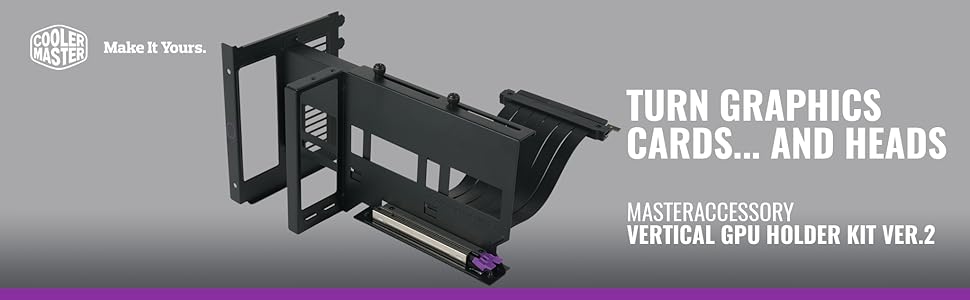
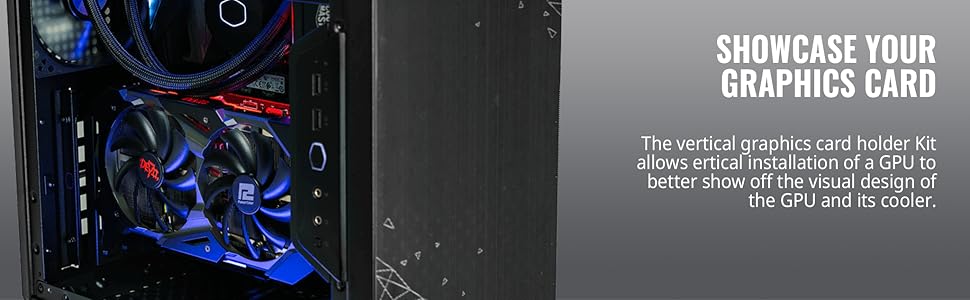
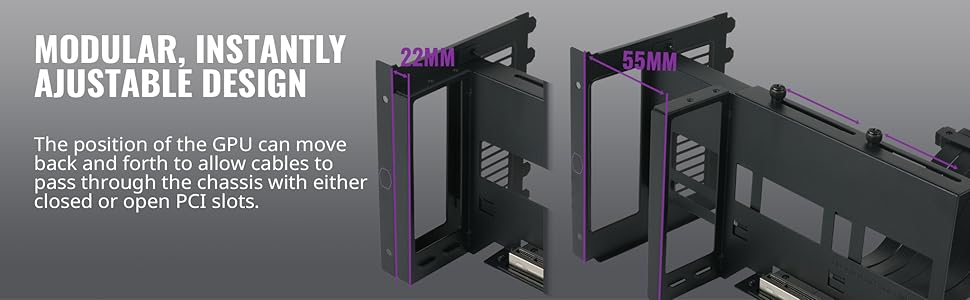
The Cooler Master MasterAccessory Vertical GPU Card Holder Kit V2 transforms your PC build by enabling vertical GPU installation in any standard ATX chassis with 7 or more PCI slots. Featuring a modular sliding design and a robust SGCC steel frame, it supports heavy GPUs without sagging. Included is a premium PCI-E 3.0 x16 riser cable for reliable connectivity, making setup quick and visually stunning—perfect for professionals who want their rig to stand out.


| ASIN | B08BWZCY56 |
| Best Sellers Rank | #1,109 in Computer Cases |
| Card Description | PCI-E 3.0 x16 |
| Chipset Brand | AMD. nVIDIA, Intel |
| Customer Reviews | 4.3 4.3 out of 5 stars (696) |
| Date First Available | September 15, 2020 |
| Graphics Coprocessor | AMD. nVIDIA, Intel |
| Item Dimensions LxWxH | 7.24 x 5.59 x 4.76 inches |
| Item Weight | 1.28 pounds |
| Item model number | MCA-U000R-KFVK01 |
| Manufacturer | Cooler Master |
| Product Dimensions | 7.24 x 5.59 x 4.76 inches |
| Series | Vertical GPU Card Holder Kit V2 |
| Set Name | MasterAccessory |
| UPC | 884102075438 |
E**A
The Best Vertical GPU Mount for a Stunning Setup... The riser cable maybe not for High Optane GPU's.
I recently tested a vertical GPU mount, and overall, it’s been a strong performer with some important things to consider. Pros: * Perfect Fit: This mount is ideal if your case has at least 7 back slots. It fits perfectly, making installation straightforward and hassle-free for most PC cases. * Strong GPU Support: I tested it with several heavy GPUs, and it held up well across the board. The mount is sturdy and easily adjustable to fit different GPUs. However, the main limitation comes from the riser cable rather than the mount itself. * Easy to Set Up: The setup process is very simple, with clear instructions that make installation quick and easy. * Improved Aesthetics: Installing your GPU vertically can give your PC a sleek, modern look, which is a nice bonus. Cons: * Loss of PCIe Slots: One downside is that you’ll lose access to all your PCIe slots when using this mount, which might be a dealbreaker if you rely on those slots for other components. * Riser Cable Limitations: The included riser cable isn’t ideal for high-power GPUs like the RTX xx80/xx90 or RX X800XT/X900XT. These GPUs can produce a lot of heat, which might cause the riser cable to overheat. Plus, the riser cable only supports PCIe 3.0. If you need PCIe 4.0, you might experience performance issues or even fail to get a video signal so remember to configure your motherboard to PCIe 3.0. * GPU Sag: While the mount supports large GPUs, it could be still a slight sag, especially if the GPU is stretched far from the mount. It’s not a huge issue, but if your GPU is close to a fan, it could become problematic.
K**N
Works with Lian Li O11 DYNAMIC mini!
It's hard to find a nice vertical Gpu mount specially for the Lian Li 011D Mini. I tried to get theirs but you can't find it anywhere. I ordered different GPU mounts and this is the first one that came. Easy instructions. Easy to set up. Pros: * Fist my lian li mini perfectly * handles heavy gpus like a champ (I mounted it on with the Red Devil 6900XT. * easy to adjust. Cons: * you will lose all your pcie slots. * you need slim cables because they will need to go inside your case. Ones with big heads will have a hard time getting them through the slots. * even though it supports my huge gpu, slight sag still occurs, the further you stretch the gpu the more sag you get, but nothing mayor. It will cause an issue of you have a fan too close. Mines was just that that point but isn't interfering with it. It's a great GPU Vertical mount no dought. Great built quality. Just be prepared to lose pci express slots.
E**R
Easy install!
This product is more than fairly priced for its build quality and ease of install. Its perfect for showing off my founders edition 2080ti while also eliminating any stress from the PCIe slot. This riser should be a one size fits all for most applications. Its not heavy and pretty sturdy. It fits perfectly into my case aswell. Got it installed in under 10 minutes!
O**T
ATX Case only. Good Sturdy Vertical GPU Bracket. Needs 7 PCI slot Open
Excellent bracket from Cooler Master. You can show off your GPU in your PC Build. Unfortunately you loss 7 PCI slots. I wish there was a way to include a half-height PCI slot so you can keep a WiFi expansion card or similar. The PCIE Riser is gen 3. works great! It could be longer but should work in most cases. You may have to configure your BIOS to run PCIE 3
C**E
STRIX3070/Corsair 570x LOOK NO FURTHER!
This mount has worked great for my needs. After trying to install a ROG STRIX 3070 in my Corsair Crystal Series 570x (MIRROR EDITION) the 3070 did not fit with the case mounting option as this specific card was to large and would protrude past the case. This bracket was able to push my card back and allow ample space for it to breath. A heavy card like the strix 3070 will need a support bracket as this will still sag. Great bracket and the NOCUT design saved the integrity of my case. Cooler master products still continue to impress me. Get this mount.
P**Y
Looks great, but major issue with cable arose, freezing and restarts
It does look nice, but only lasted 3 years. I've been using a kit for 3 years and it looked great and did a great job, until a problem arose. My PC started randomly shutting down and freezing. Sometimes it would go days without an issue and sometimes it might freeze 3 times in a ten minute span. Usually if I was watching a video, or gaming I would have no issue, but if surfing or doing something on the desktop it would freeze. If I left my PC for a while and came back it might have restarted or be frozen. and I tried figuring out why. I removed updates, programs, checked my RAM and HDs. I checked every USB item and nothing. The program persisted and nowhere did I see anything about these kits being the problem. Finally, I took it into Microcenter and the guy checked the kit right off and found there was a problem. He removed the kit and mounted the card horizontally on the motherboard and no more issues. He told me in the last 3 years he has seen this about a dozen times. Something in the cable from the kit to the motherboard goes bad and it causes system shutdowns or freezes where the system requiring a restart. Will I put another type of kit in my PC? I just might.
M**S
High Quality. Sturdy. Easy Installation
Works beautifully. I have a super compact Mid-ATX case so I was worried about the fit. I got this thing in with literally NO room to spare (granted its because of the size of my card and front mounted radiator). The mount is actually VERY sturdy. Given the space I had to work with, this mount did really well. My only complaint is I has to manually set my motherboard to PCIE 3.0, which realistically isn't an issue considering no games actually take advantage of 4.0, but when the time comes I'll have to upgrade the riser cable. Other than that, I got exactly what I wanted. 5/5
X**J
جميل جدا
E**4
A bit difficult to install in NZXT H710i cuz the cable is very hard to bend, but the quality is really good
J**N
Really happy I made this choice as I just wanted something to 'Fill' my case a bit more covering the unused slots where I came across this fancy peripheral bracket. To summarize, it really is just an expensive addition for aesthetics but that is what it's all about now - to show off what we have in a non-performance benchmark way. This bracket was perfect for my Gigabyte C200 where the rear PCI-E support is not removable BUT you can leave the original brackets in and only remove the ones where the HDMI or DP cables will go through. I didn't realize this until i removed them and tried re-installing them later on to cover the gaps though only if space permits and trial and error depending on GPU etc. Easy to install with the provided riser cable which was a bit too long at 165mm creating a bit of a 'cramped' fitment as this was a universal size included but the GPU bracket makes it easy to adjust as you can separate the bracket from the holder giving you enough room for your cables and can move without issues. The bracket has 2 thumbscrews on top that you can finger tighten when everything is in place leaving a space for the plugs or if you cut out the case PCI-E grille then you can slide it all the way across looking neat and tidy. I have 2 cables coming out of mine but I will be making a separate adapter concealing the cables 90° down and through the back. So, over-all, this is a great aesthetic improvement IMHO for any GPU that lets your GPU finally be seen. Notes: Case width is important to measure as the fans may be pressed hard up against the front glass panel restricting airflow. Weight will need to be considered for 300mm+ GPU's and a GPU support is recommended. Once installed, the bracket creates a trapped air pocket behind the GPU as the MB components will rise in temps where I have my rad on the front and changed the bottom fan to run faster which helps cool this area. Don't press the GPU down hard into the slot as you will bend the bracket that can mis-align the pins causing failure so connect the GPU first before slotting it into the holder.
I**C
-Running a b450 MB Running pci 3.00 with a RTX 3060tl LH. - Running a stress test for an HR no fire lol. -GPUz reports its Running at PCI.3 no drama's. Will see what happens. -SUPER EASY INSTALL INTO A COOLERMASTER CASE. JUST MAKE SURE YOU HAVE MORE THAN 7 PCI SLOTS. -Plus no GPU sag.
A**C
Der vertikale Montageadapter, der angeblich universell sein sollte, passte dennoch nicht in das PC-Gehäuse des NZXT H9. Ich musste ihn etwas modifizieren, damit er passt. Das Riser-Kabel, das dem PCIe 4.0-Standard entsprechen sollte, entsprach leider nicht der Beschreibung und verursachte viele Probleme. Mein Computer stürzte immer wieder ab, die Temperatur war nicht das Problem, sondern ich musste im BIOS PCIe auf GEN 3 einstellen.
Trustpilot
2 weeks ago
1 month ago