
🎮 Elevate your flight sim game—because your cockpit deserves pro-level control!
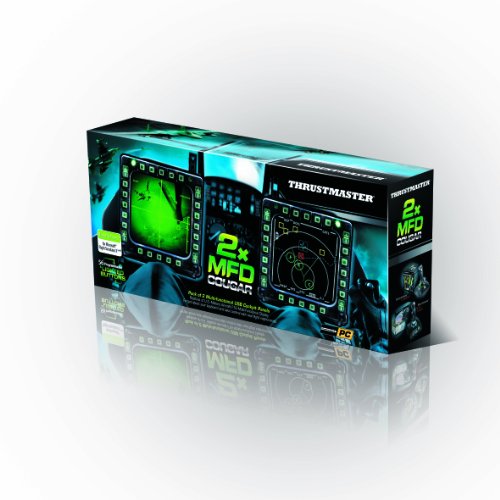
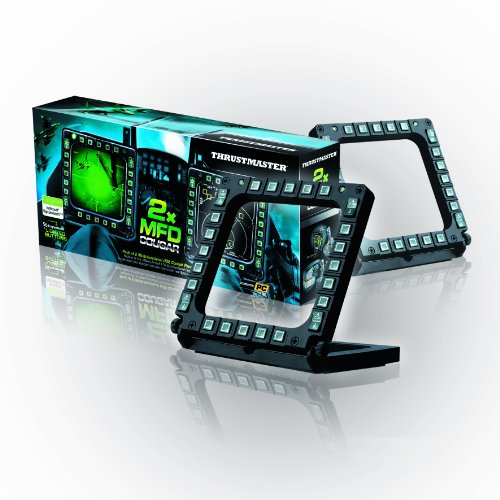
The ThrustMaster MFD Cougar is a dual multi-function display panel designed for PC flight simulators, featuring 48 programmable buttons and switches, weighted non-slip detachable bases, and dual programmable LEDs per panel. Compatible with major simulators like Microsoft Flight Simulator and DCS, it offers pre-printed layouts for quick setup and supports advanced customization including touchscreen upgrades, delivering a professional-grade cockpit experience.


| ASIN | B002HH9TRY |
| Customer Reviews | 4.6 4.6 out of 5 stars (986) |
| Is Discontinued By Manufacturer | No |
| Item Dimensions LxWxH | 33 x 6.5 x 15 Centimeters |
| Item Weight | 1.17 g |
| Item model number | 2960708 |
| Language | English, French |
| Manufacturer | Guillemot Corporation |
| Product Dimensions | 32.99 x 6.5 x 15.01 cm; 1.17 g |
| Rated | Not PEGI rated |
C**E
O Thrustmaster MFD completou meu setup de cockpit. Como já tinha o hotas, pedais e quadrante da CH Products, acabei ficando no total com 104 botões únicos para configurar os simuladores (IL2-BOX e DCS). Só os MFDs acrescentaram 56 botões. São muito bonitos com a iluminação, que pode ser controlada, e com uma facilidade única que são os painéis impressos com a função de cada botão. E precisa, porque não dá para memorizar todos. No site da Thrusmaster há um aplicativo para isto. Está na foto. Mesmo que você tenha um joystick básico, vale muito a pena ter os MDFs e deixar de utilizar o teclado!
S**N
Comprado por 74,99€ Un buen complemento para tu simulador de vuelo El pack Thrustmaster MFD Cougar es una solución de alta calidad para mejorar la experiencia de simulación de vuelo en juegos y aplicaciones de simulación. El pack incluye dos paneles multifunción (MFD) que replican los controles utilizados en aviones de combate reales, lo que te permite tener un control más preciso y una experiencia más inmersiva. Cada panel MFD cuenta con una pantalla LCD retroiluminada y 20 botones programables más cuatro interruptores, lo que te permite asignar funciones específicas a cada botón según tus necesidades y preferencias. Esto te permite acceder rápidamente a funciones importantes durante el vuelo sin tener que recurrir al teclado o al ratón. El diseño compacto y ergonómico de los paneles MFD los hace fáciles de instalar en tu escritorio o en tu setup de simulación de vuelo. Puedes colocarlos a ambos lados de tu joystick o en cualquier otro lugar que te resulte cómodo, lo que te permite personalizar tu configuración de vuelo según tus preferencias. Es compatible con el resto de tus periféricos de vuelo, lo que te permite integrarlo fácilmente en tu setup existente. Es compatible con los principales juegos de simulación de vuelo como Microsoft Flight Simulator, X-Plane o DCS World. Aunque lo puedes usar en cualquier modelo de avión, en mi opinión donde es más recomendable (por su realismo) es usarlo junto con modelos de helicópteros o cazas de combate, pero tampoco viene mal en aviones de aviación General para tener unos cuantos botones extras. Puedes descargarte un par de programas específicos desde la página oficial de Thrusmaster si quieres sacarle todo el “jugo” al dispositivo, aunque honestamente, no hay necesidad si no te quieres complicar, ya que tanto desde el propio simulador o, con programas tan recomendados como Spad.next, puedes hacerlo perfectamente. Los leds son configurables en intensidad y si quieres colocarlo con cierta inclinación trae unas varillas que junto con una ruedecillas laterales bloqueables, te permiten darle el angulo deseado. Trae también unos cartones que simulan las pantallas. Puedes usar estas o diseñar las tuyas. Y si quieres llevarlo a un nivel superior, puedes comprar pantallas táctiles de 7 pulgadas e incorporarlas al marco (ver vídeos en youtube). En este último caso le daría un realismo total. Compra recomendada.
C**H
These MFD's (comes with two) Add quite a bit of Immersion to my games and simulators! But, the best part is that it does it in a very subtle way! Better still:, Is that it free's up a few buttons on my Warthog H.O.T.A.S. as well(my flight stick and throttle), Which allows me to map more important things onto my HOTAS. Which allows me to say: Enter a dogfight in my F/A-18C in DCS-World by hitting a single button to drop my fuel tank(s) without having to "look down" at ym keyboard and put my fingers on the specific keyboard controls and then push them! The 2.5 seconds or so it takes to press those keyboard commands is ALL another player needs to lock his radar and fire a missile my way, thus putting myself at a SEVERE DISADVANTAGE by forcing me to fly evasively and defensively when everyone knows in a combat mission, you need to be able to keep your eyes out of the cockpit and looking around the sky for threats just as much as you search with your radar! And I use my Cougar-MFD's when flying ANY Aircraft that has Multi-Function (Color) Displays and it's especially helpful for navigating quickly to the proper display page in Simulators like the D.C.S. A-10C "Warthog" or their KA-50 "Black-Shark" helicopter which has it's own version of an MFD with it's "ABRIS SYSTEM" Which consists of it's Target Data Display and Navigational screens and/or Map Display System. I even find myself using these MFD's in other games as well!, like when Flying an F-16 in "Falcon BMS 4.33" Or Even when using the MFD buttons for the Remote-weapon controls for the armored vehicles in "Arma-3" with it's new "TANKS" DLC. I've even found it helpful for hotkeys in other games that recognize it. i use the bottom Row of one MFD to select ammo-types in Warthunder for it's "Tanks" gameplay. As well as others like Euro-Truck Simulator and American-Truck Simulator, as easily accessible buttons to quickly get me to specific pages on my "Dashboard Mounted GPS." In Short, the sheer Competitive edge and/or Potential that these MFD's offer the average gamer or simulated racing or Flight simulator enthusiast is only limited by their ability to visualize or imagine uses for it within their Simulators and Games! Better still, is that they're a steal for amount of immersion that they add! As an example of that point: I spent over $130 dollars on the "Track I.R.-5" Infrared Head-Tracking System, (Allowing me to move my head in real life which serves to control my Simulated pilot's ability to look around within the cockpit or simulation.) And it helps to mimic that feeling of actually being in the cockpit or behind the wheel! A little tip: Thrustmaster, If you read these reviews, you should seriously get into the market of manufacturing these with real color displays before someone else corner's that market and makes something with less plastic at only slightly higher price point!,SO MANY Flight simulator pilots as well as Racing enthusiasts would JUMP AT THE CHANCE to get their hands on a set of fully functional MFCD's that only costs them a little bit more than having to foot the bill of making a set for themselves!the cost of soldering equipment and connectors and wires and things from Amazon. Already simulations like "Falcon BMS 4.33" has a simple and easy way to extract the images from the MFD images eithin their simulator! And that allows savvy Sim pilots to display their combat-Radar as well as their waypoints and whatnot ONTO an external 4-inch by 4-inch screen which allows the enthusiast to see much more clearly whats going on inside their cockpit without having to squint or look down for an unnecessary length of time in order to find and lock targets or input targeting data and take their eyes off the sky in front of them! It could honestly be as popular as the Warthog stick! And offering these one's without the MFD's would allow Sim enthusiasts to experience them for a decent price-range which would (at least for me) allow them to ineract with the MFD's without display, which would allow them to use the MFD's while enticing them to upgrade or purchase the full or expanded edition of these MFD's. In Closing these are a great product and they have way more functionality than you would originally think they do! And equally exciting is you can make them into FULLY FUNCTIONING DISPLAYS with a little bit of elbow-grease and some parts you can buy right here on Amazon!
S**L
ürünün bir tanesi düzgün çalışmıyordu birkaç ay sonra ikinciside bozuldu
S**L
Très bonne qualité de construction, très stable avec le support 72 degres et ne dérape pas sur son support même sur du plexiglass. Facilement reconnu avec W7 64bits. Automatiquement configuré avec Falcon4 BMS4.33U1 et avec DCS A-10C. Reste à tester sur FSX avec VRS FA-18 et FSUIPC4 mais les retours d'autres utilisateurs sur ce point sont bons. Profil lua trouvés pour DCS KA-50 et cela fonctionne, J'ai eu tort de ne pas les avoir achetés plus tôt...Très bel effet avec faible luminosité de la pièce car tous les boutons sont éclairés (et bien sûr la luminosité est ajustable très facilement par software TM)
Trustpilot
1 day ago
2 days ago