![Venus Gaming Mouse RGB Wired, 16400 DPI High Precision Laser Programmable MMO Computer Gaming Mice [IGN's Recommendation]](https://m.media-amazon.com/images/I/711v7IhyWbL.jpg)
🔥 Dominate Every MMO Battle with Precision & Style 🎮
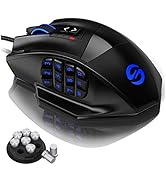
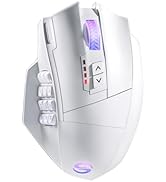
The UtechSmart Venus MMO Gaming Mouse is a wired, professional-grade gaming mouse designed for MMO enthusiasts. Featuring an ultra-high precision Avago sensor with up to 16400 DPI, 12 programmable side buttons, and customizable RGB lighting with over 16 million colors, it offers unparalleled control and personalization. Its ergonomic design includes adjustable weights and textured grips for comfort during extended gaming sessions. Durable construction with a braided cable and gold-plated USB ensures reliability, making it a top choice for serious gamers and productivity pros alike.

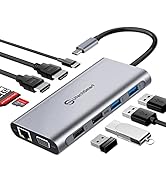
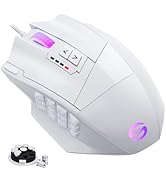

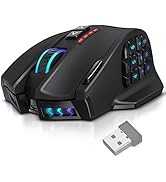
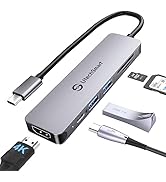
| ASIN | B00FNKMVUO |
| Best Sellers Rank | #222 in Video Games ( See Top 100 in Video Games ) #19 in PC Gaming Mice |
| Brand | UtechSmart |
| Color | Black |
| Customer Reviews | 4.4 4.4 out of 5 stars (23,728) |
| Date First Available | March 6, 2014 |
| Hardware Platform | PC |
| Is Discontinued By Manufacturer | No |
| Item Dimensions LxWxH | 4.6 x 3 x 1.5 inches |
| Item Weight | 7.8 ounces |
| Item model number | DS-2535 |
| Manufacturer | UTECHSMART INC. |
| Operating System | Windows System |
| Power Source | Corded Electric |
| Product Dimensions | 4.6 x 3 x 1.5 inches |
| Series | DS-2535 |
| Voltage | 5 Volts |
N**N
Get this one! Its worth it!
No gimmicks just a mouse ready to use with a good mmo side pad. I bought my first one in 2019, my 2nd one in 2023 and now just picked up my third one in 2025. Over the years the scroll wheel click starts to fail but that is over years! I would say this mouse is durable I just have big meaty hands and am rough on it. Even then it feels great in my hand and is perfect for long gaming sessions of FPS or my favorite, Factorio!
G**R
Good Mouse. Worth more. Bought to replace my Razer Trinitys.
Update: Nov 12, 2025 I have been using this mouse (now I have two and another brand but similar, Not Razers) for two years and I have no complaints. The office one that I use everyday (no games, just office clicking) have survived so far. Occasionally I have noticed that some of the programmed functions does not work. When this happens I open up the driver/program and resave. This seems to get the mouse back in line. - None of the buttons are bouncing so I am happy. - I have gotten used to the Program buttons so it is better. - I still have some problem with the mouse buttons 5 and 8 as described on the orig review. - Thumb rest still can be a bit higher so my thumbs is resting on the bottom row of buttons. Overall still a good mouse and if I need to replace this I would buy the same. Original Review: Oct 2023 I have several Razer Trinity wired Mice. They are on all my computers. I do not play games bit I like to program the buttons to do may of the repetitive clicking like copy, paste, cut and so on. All of the Razers, the left button/clicking started to bounce and I slowly replaced with cheaper mice from my used drawer. Razers are not cheap. When the mouse from my main computer started to bounce, I decided to buy a new programmable mouse. (I prefer wired although a bit clutter but I loose the dongles all the time and do not want them anymore, be it Logi, Razer, Utech or 3-D connection. I have so many and all take up a slot.) I read all the reviews that had more than 10 reviews, haha, and found this with 4.5 review with 5% 1 rating. I bought one to test it out before I buy more for the other computers. I am very happy with my buy. The shipping from Amz is always been fast but the mouse was works well. I use the 12X side buttons on Razer (why would you include 3 side to increase the price and they are cluttered in the drawer) so I duplicated the button assignment. They work well and due to my experience with the other mouse it was easy to reassign all the buttons. There was a bit of nomenclature difference so just a little stumble but ok. The mouse worked similar to Razer and will buy more after few more days. With Razer I have to download a large software to have the mouse working but with Utech (wired) the directory size is 11.6 Mb Vs 948Mb for Razer. (Geez, Give me a break!) I was surprised to find that just a driver was able to do this. I attached the screenshot for FYI. Now I have not used it much, only 1 day, so I will update as time goes. I did have an event when I clicked one of the buttons, it went to "Show Desktop" which is one of the buttons programmed. This could be that I am not used to the mouse. I will see if this happens or if other buttons misbehave. Too early to tell. This is for the Utech people or others on my thoughts: - The USB connector is long compared to Razer so it sticks out. I think being shorter does not detract from the function so should be shorter. - The cord is much thicker and stiffer so I was a bit disappointed. This also should be able to be smaller and softer. - The "Fire" button next to the left click is nice extra and works as an "enter / double click" but for me it would be much better if it was about 1/4 inch or 6 mm closer to my finger so it can be clicked easier. I honestly do not think it will interfere with left clicking - The clicking pressure is a bit more that Razer but I am sure I will get used to it. - I like the "Thumb rest" but would be better if it was raised about 3 mm the thumb is already closer to the buttons. The buttons have some pressure resistance so this would not be a issue with accidental clicking. I put a silicone foam pad to raise it and have more comfort. - The slant on the right side of the mouse can be more vertical so I can pick up the mouse with my thumb and 3rd finger in case you want to. This would not interfere with molding the case. I put another foam pad to aid in comfort and friction but due to curvature, pad is lifting off. - There is a "tactile rise" on the 5th and the 8th button but I would have preferred it a bit higher. Although it is there, I could not feel it much. They did put some thought into it so this is good. Razer does not have it so even after years of use I sometime look down. So far this is it. I like to add some follow up after more use.
J**N
Best Mouse I've ever used! Insanely Durable, Never had double click/drag issues even after 8 years
Correction to this review - the original mouse I purchased of this 9 years ago was the best I ever used and in the 8 years never once had a double click/drag and drop problem or anything. But I've just purchased 2 of these over the last 4 months and after a couple of months the first mouse started getting the ole drag and drop issue (it's the most annoying mouse problem to have, I would rather a mouse malfunction or stop working all together). I purchased a second one and after a month it's getting the drag and drop issue as well. That's unacceptable. So this is no longer that awesome product that it used to be, so I'm switching the stars from 5 to 3, which is probably too generous, but it still has some residual from the initial one I purchased 9 years ago. I'll leave my original review below, but it's crazy because it's doing all the things I hailed this mouse for not doing. The Razer mouses at least took a year before they'd start giving me such problems. I'm going to purchase the other well reviewed Redragon mouse to replace this and hopefully I can have a good mouse again. Best Mouse I've ever used. I've been without it for the last 8 months and have been settling with a Razer BallSack for the time being.... while a pretty decent mouse this Utech mouse blows it away. In the over 8 years I had the mouse I never ran into any double clicking, folder dragging problems that commonly happen with the Razer mice after duration of use. And the only reason the Utech went bad on me is it had a pretty hard drop on the ground (it wasn't a fit of rage or anything, but It caught on something and it catapulted into the ground. I'm surprised it's taken me until now to get it back... since it's such a cost friendly mouse as well, yet it feels, looks, operates like a beast. Update - likely not the manufacturers fault (unless it's a common echo of being a problem), but this second mouse I received was missing the cover that goes over the light sensor. Didn't initially pose an issue, but now it is and I need another one. So do I go back to the tried and true (except for this time, but I'm pretty sure it was damaged and repackaged somewhere in the supply chain, which is a peeve of my mine in Amazon reviews when a reviewer trashes a product when a seller sent them a used one when it was supposed to be new, etc which in most cases is a seller review issue not a product issue, unless it's their product, but I digress) or do I get risky and choose another well reviewed one... almost everytime I get cute and get something else reviewed as good or better (across the board it could be packing tape) it's almost always a step back, so we'll see. But in the meantime going back to the Razer Basilik mouse on hand (currently for $40, which is overpriced), is such a noticeable step down from this mouse in every way.
D**Z
Llevo 2 días con el, es algo grande comparado a los que solía usar, pero no tiene nada de malo en ese aspecto, creo que es similar en tamaño al scimitar de corsair. En mi caso la caja vieno con el raton, el cable, el receptor inalambrico usb, el manual, una tarjeta con un key usb (no es una memoria, y cuando lo insertas ejecuta comandos para abrir la pagina de los drivers), y un repuesto de calcomanias deslizantes para la parte de abajo del raron. El software es muy simple, pero parece muy útil, yo solo lo he usado para cambiar el color del RGB. Ahora dire unos detalles a considerar: El RGB cambia en todas las áreas iluminadas del ratón (no se puede cambiar el color por zona), en mi caso no es muy importante y depende de gustos. A pesar de que el RGB cambia en todas las zonas del ratón, el color no es muy consistente, especialmente la luz blanca (pongo de ejemplo una imagen con la luz blanca). Los 4 indicadores de DPI no son RGB, son rojos, no afecta pero depende de gustos. El USB que vino en la tarjeta ejecuta comandos para abrir la página de descargas (una de drive por cierto), hubiese sido mejor que ya tuviera el software descargado listo para instalar. Por lo demás, creo que es un raton de buena calidad.
B**O
Been using my Deathadder and G15 mouse for years - thought I would try a cheaper alternative Mouse is solid (does not feel plasticky) and also a good weight with all weights used. lots of buttons on side, useful for MMOs, not really needed for FPS gaming. Otherwise a nice mouse to have came bundled well in packaging with drivers
A**K
Mouse ottimo per gli mmorpg però c'è da sfatare un mito se sei un giocatore di fps e stai leggendo qui bene . Io lo uso soprattutto per giocare a gli fps poi per streammare ci sono 12 tasti programmabili un tasto vicino il click sinistro con fuoco di tre colpi anche quello puoi impostarlo come vuoi, i dpi puoi metterli a tuo piacimento, i pesetti da aggiungere oppure anche rimuoverli , 5 settaggi personalizzabili a tuo piacimento per i vari giochi che fai qualità prezzo ottima ah si dimenticavo ha anche il suo programma per settarlo ovviamente
A**Y
Buyer beware - if you live outside of the US, be prepared to pay twice as much to return (or more). Reason for return - cord is VERY stiff, makes it difficult to use. If you lift your hand off, mouse moves as stiff cable pushes it. Too bad as the mouse itself is nice, but the cord ruins it.
G**E
The UtechSmart Venus is a wired laser MMO gaming mouse built for serious gamers who want precision, customization, and macro control without breaking the bank. With 18 programmable buttons, weight tuning, and RGB lighting, it’s a beast for MMOs, productivity shortcuts, and high-DPI gaming. ✅ Key Features DPI Range: 50 to 16,400 – adjustable in 5 profiles Buttons: 18 total (12 side buttons + top controls) – all programmable Sensor: Laser – ultra-responsive with consistent CPI tracking1 Weight tuning: Includes 8 removable weights for balance control2 Lighting: Customizable RGB zones – scroll wheel, logo, side buttons Profiles: Save up to 5 user profiles with macros and lighting presets Build: Matte finish with textured grip – helps reduce palm sweat3 Software: Windows-only configuration tool for macros, DPI, and lighting
Trustpilot
1 day ago
1 week ago