We remain fully operational. Our teams are working around the clock to ensure your deliveries continue safely.

DOWNLOAD THE APP


Customer Services
Copyright © 2025 Desertcart Holdings Limited
DOWNLOAD THE APP

✨ Upgrade your MacBook’s view — because your screen deserves a glow-up! 🖥️
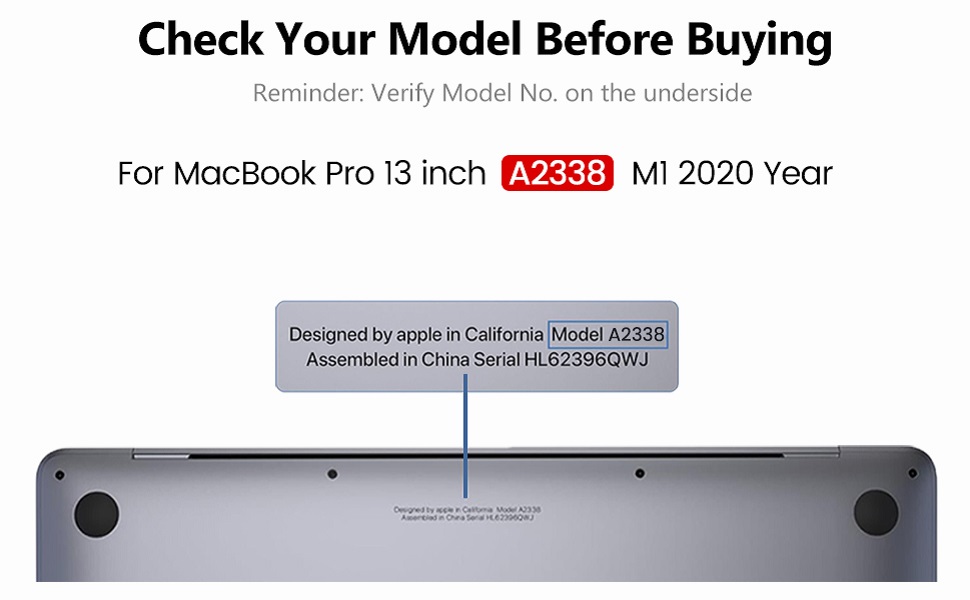
The LHM A2338 Screen Replacement is a high-resolution 2560x1600 Retina LCD assembly tailored for MacBook Pro 13.3" M1 and M2 models (A2338, EMC 3578/8162). It includes a full professional-grade fix kit and detailed installation guides, ensuring a smooth DIY repair experience. Packaged with enhanced protective foam, it safeguards against transit damage, making it the ultimate solution to restore your MacBook’s display to factory-like perfection.



| ASIN | B0DC3SQFTR |
| Are Batteries Included | No |
| Best Sellers Rank | 7,658 in Computers & Accessories ( See Top 100 in Computers & Accessories ) 2 in Laptop & Netbook Computer Replacement Screens |
| Brand | LHM |
| Colour | A2338-Space Gray |
| Customer Reviews | 3.8 3.8 out of 5 stars (104) |
| Date First Available | 12 Sept. 2024 |
| Guaranteed software updates until | unknown |
| Item Weight | 1.09 kg |
| Item model number | A2338-Espacio Gris |
| Manufacturer | LHM |
| Product Dimensions | 30.48 x 21.34 x 1.02 cm; 1.09 kg |
N**K
Easy to install
The screen arrived well packaged with all the tools needed to install it. The instructions were easy to follow (along with the ifixit video). It is a fairly straightforward repair which can be completed within an hour or two.
M**S
Dont trust this company to support you when you need it!
Webcam didn't work on unit, even though screen was working. Tried to contact the seller two times through email and through Amazon's messaging service after I spoke to an Amazon representative. No response at all. Highly disappointing, especially when they say they have "Best Customer Service" - I would avoid this company.
A**R
If you’re on the fence, just buy it!!
WOW amazing product! My laptop has been broken for years, but it’s still quite a new model. I was quoted £600 in the Apple Store to replace the screen, but they advised to buy a new laptop as the laptop itself is no longer worth £600. A smaller tech shop then quoted me £300 but it would be an unbranded screen replacement. I did some research and found this. Amazing quality and my laptop is completely fixed. There were a few stumbles through the instructions and the manual didn’t match my laptop, but YouTube helped too. I would buy this item again, would absolutely recommend. Delivery was v fast and secure. Packaging was secure and professional. My previous experience is minimal. I’d say I’m interested in tech but I’ve only ever attempted to change an iPhone screen. This is doable for anybody, regardless of experience. It was a gamble, but it paid off.
M**E
Cheapest way to change your screen
Screen flickers at times but you can live with it it’s not a whole screen problem it’s mostly towards the bottom. Now for the positives, I’ll start off with how much money i saved, my model was the A2338 which will cost you £200 for the screen, i got a quote for £250 from a local repair shop and i’ve heard that getting it repaired by apple ranges from £500-800 and it took me 2 hours to do so saving the very least 50 pound in 2 hours ain’t too shabby. The screen was packaged very well and arrived as expected, the screen came with the tools necessary and with plenty of instructions written in clear english along with tips on how to stay organised and how to re-install the new screen. The screen was really easy to install and fit the model perfectly (make sure to make sure your colour and serial number is the same as your order) The colour was slightly off but only noticeable if you stare at it for too long aswell as a slight rubbing on the black part of the screen which hopefully won’t cause any issues however, apart from those factors the screen fit flush with the rest of the body. The screen looks exactly the same as original once installed. The laptop will wake up confused after you reassemble the new screen due to the battery being disconnected but as soon as you log on it should be back to normal, you also have to plug the laptop in to get it back on at first. I would say look at youtube tutorials before so you get an idea of whether you’re willing to change the screen yourself or if it would be better to take it to a repair shop but i would say it’s worth it changing it yourself. Also make sure to stay organised. Definitely the cheapest way to get a new screen .
T**N
Instruction on how to replace screen 🖥️
Amazing, came with step by step instruction booklet and tools 10/10
H**N
Could be better
Here is a clean, edited Amazon review that includes your second-purchase experience and sounds clear, fair, and professional: ⸻ Used to be ⭐️⭐️⭐️⭐️☆ (4 stars) Now 3 This is my second time purchasing this screen. Overall, it is still a very good quality replacement, but there are some important issues worth mentioning. The screen itself looks excellent. The 2K resolution is sharp, with no obvious glitches or dead pixels. The kit is very well presented, with colour-coded screwdrivers, a magnetic pad, and both online and printed guides. The instructions are clear, and the tools are genuinely useful. The only improvement I would suggest is that the magnetic screw pad would be better if the numbering matched the actual screw locations more closely. My first installation took about 90 minutes with no prior MacBook repair experience. I would strongly advise beginners to record themselves while disassembling so they can track screw sizes and locations, as it can get confusing. Now for the downside on this second purchase: The hinges were far too stiff out of the box. The screen would not close properly and bounced back instead of resting like the original. I had to apply oil to the hinges to loosen them. After that, the lid now opens with one finger and closes fully like the original, but I should not have had to do this on a £250 part. After diagnosing the hinge issue (about 30 minutes), I am also still experiencing display instability. Previously I had a green line; now the issue has changed to flickering ever so often when display is opened. That suggests inconsistent quality, possibly a batch problem. So while the screen looks great and the kit is well designed, the hinge stiffness and connection instability mean this is not a perfect experience — especially given the cost. ✔️ Pros: Great display quality, excellent tools and guides, beginner-friendly kit. ❌ Cons: Over-stiff hinges, unstable display connection, too expensive for inconsistent quality. Overall: Very good screen, but quality control needs improvement. ⸻ If you want, I can make a shorter Amazon-style version too 👍
L**O
Excellent product
It’s a really good product, it was easy to use, great instructions, I only can recommend it.
T**A
Wie beschrieben. Top Qualität zu top Preis!
J**O
It works well. The replacement took me about one hour by following an online video guide.
R**B
Used this for my A2159 2019 MBP after getting the pink bars. I was quoted $700 for a repair from Apple. The screen itself works fine. The display is indistinguishable from the original one and the screen itself includes all the same branding, but the rubber around the bottom of the screen is not as flush as the original (shown in picture). A minor detail no one would ever notice unless they had been spending a couple of hours staring at it under a magnifying glass like I was. Came well packaged in a protective cardboard case. I was concerned it would be damaged in shipping but that’s virtually impossible the way it was shipped. Shown in picture. This is listed as a “frequently returned item” and I can see why. It is not because of issues with the product, it is because this is a difficult repair to do. Lots and lots of very small parts. Some tips based on my experience: Get about 7 shot glasses to hold the different tiny screws from each step. Also get a magnifying glass with a light. I picked up one on a boom that clamps to my desk for about $30. Hopefully you have an external mouse and keyboard handy and a second screen. If you plug in a second monitor and then close the lid, the second monitor will become the primary monitor and then you can run the command to turn off auto boot. Note that turning off auto boot still makes the screen turn on briefly when the lid is opened, but it does not boot. The instructions are pretty simple but the written instructions are in a slightly different order than the video instructions, which makes it confusing if you’re following both, but the written instructions are more useful and include very good, color images. The illustrations matched my A2159 perfectly. One last word of advice. Be very gentle and patient with the screws. They strip very easily. Unscrew slowly and don’t use any force when putting it back together. This repair does not require particular technical skill, but it does require both patience and a little bit of intelligence. This is not an overly difficult repair, but it is not an “anyone can do it” repair.
G**I
La luminosità è bassa e ci sono degli enormi aloni luminosi in basso a sinistra. Qualità veramente bassa. Da evitare assolutamente.
J**G
Apres avoir suivi les étapes de démontage de l'écran qui se sont bien passé, je me suis rendu compte que l'écran de remplacement avait un défaut. En effet on doit mettre des "covers spring", un à droite et un à gauche. Hors celui de droite présente un défaut, il est trop court. Impossible donc de finir le montage car par dessus ce câble on venir poser la barre d'antenne.
Trustpilot
3 days ago
1 week ago