Some deliveries may take a little longer than usual due to regional shipping conditions.

DOWNLOAD THE APP


Customer Services
Copyright © 2025 Desertcart Holdings Limited
DOWNLOAD THE APP

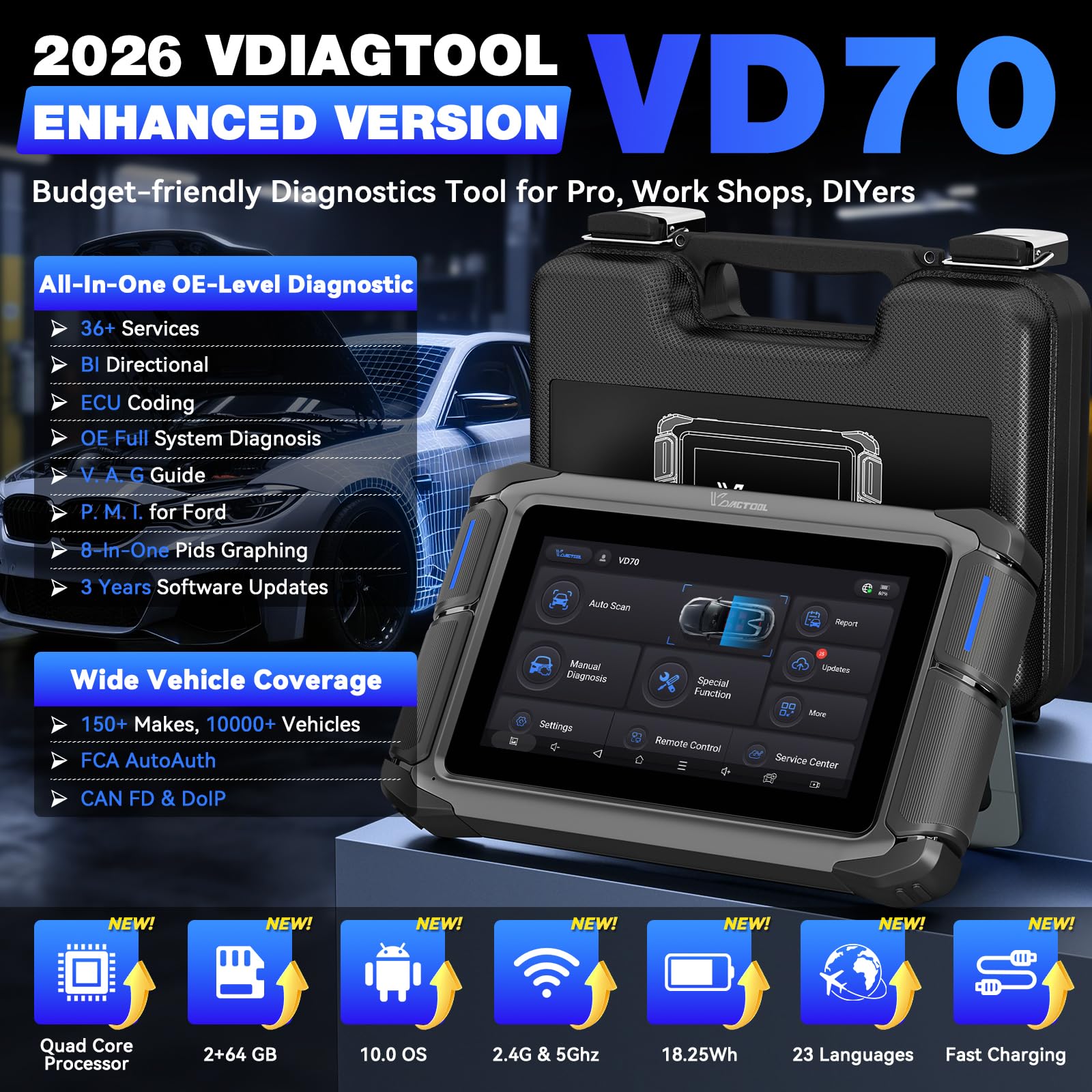


🚗 Diagnose Smarter, Not Harder — The VD70 is Your Garage’s Secret Weapon!
The VDIAGTOOL VD70 is a professional-grade bidirectional OBD2 scanner designed for technicians and DIYers alike. Featuring over 4000 active tests, 36+ reset functions, and advanced ECU coding for European and global vehicles, it offers comprehensive diagnostics across all vehicle systems. Equipped with a robust 18.25Wh battery, 64GB storage, and powered by Android 10, it ensures fast, reliable performance with 3 years of free updates. Supporting CAN FD and DoIP protocols, it communicates up to 3x faster without extra adapters, covering 150+ models and 22 languages. Rugged, user-friendly, and future-proof, the VD70 streamlines complex vehicle maintenance and empowers users to save time and money.


| ASIN | B0CXDYSWDD |
| Batteries | 1 Lithium Ion batteries required. (included) |
| Best Sellers Rank | #72,196 in Automotive ( See Top 100 in Automotive ) #394 in Code Readers & Scan Tools |
| Brand | VDIAGTOOL |
| Customer Reviews | 4.4 4.4 out of 5 stars (142) |
| Date First Available | March 7, 2024 |
| Item Weight | 4.67 pounds |
| Item model number | VD70 |
| Manufacturer | VDIAGTOOL |
| Manufacturer Part Number | 3 |
| Model | VD70 |
| Package Dimensions | 12.52 x 10.83 x 4.09 inches |
B**E
A reasonably priced, exceptional bidirectional scan tool for techs and hobbyists alike
Whether you are a Do-it-Yourselfer or a professional technician, you’ll find the VD70 packed with features you would find on a scan tool costing much more. I’ve been using the VD70 for several weeks and have found it to be an exceptional tool for diagnosing automotive system issues. First of all, the tool is built into a rugged tablet that feels like it could survive a fall without damage. It arrives packed in a sturdy hard-shell case that also contains the comm cable to the OBD port on the vehicle, a USB-C charging cable, and a charger with a selection of AC adapters for different countries. There is a quick-start guide included. The VD70 is also charged through the OBD cable so there is no chance it will run out of power during use. The first time you power the tool you’ll be prompted to set up a free account via a wireless connection to the Internet. When you register the product, you’ll receive a free 3-year subscription for updates. When I selected the update button on the tool, I was presented with 33 updates that took about 28 minutes to complete. You will set up the language, units, and other customizable parameters per your preference. I downloaded the full user manual into the tool which is then accessible by touching an icon inside a menu. The tablet has about 40GB of storage available for reports, photos, and other things you might want to save during diagnostics. You can add an optional endoscope later that will allow you to see what the scope sees right on the tool’s screen. There is a built-in camera. When you connect to the vehicle, the VD70 grabs the VIN, make, model and mileage. I had to replace the battery on one of my vehicles and was able to easily reset the battery monitoring system after installation. This device can access and control so many systems on vehicles. I ran a full automatic diagnostic on my car and it accessed hundreds of nodes and actuated an array of devices such as door locks, AC, speakers, headlamps, etc. and reported back on all the modules it could find. The scan was comprehensive, and it took about 10 minutes to complete. It identified several items of concern that I could then follow up with individually. Every item that is run during the automated testing can also be controlled manually. I like that fuel injectors can be disabled individually by the tool to verify their effect on how the engine if performing. Because you can control so many devices with the tool, you can make easily decisions on whether a component is functioning as it should. There is a recording feature that can be used to save live data and later overlay it into a graphing format with several monitored channels. Reports can be saved and transmitted via email or presented as a PDF. There are dozens of features I have yet to try out. Key programming, TPS monitoring, ABS bleeding and oil reset are just a few of the capabilities of the VD70 that I plan to use soon. About the only feature I did not find and would like to see included in a future version would be topology mapping. However, at this price point I feel the VD70 is an excellent choice for a bidirectional scan tool.
G**E
VD70 is a great scanner!
When I was looking for a more advanced scanner, this one seemed to check all the boxes for my needs (plus a lot more). The price, the capabilities, the support and the simple to use interface. They did a good job making the software user friendly. It is also fast to get the data from the vehicle. Some of the other scanners I've used were much slower. The initial software update went smooth and quick. The auto-scan found the 3 vehicle I tried right away. The trouble codes were easy to understand and clear (although a few, like TPMS dead batteries came right back). The live data is very handy and helpful. You can even do a live graph. The special functions are really cool. You can actuate things like dampers and lights to test them independently. Although I didn't try them all, like brake bleeding and some others, the ones I used worked great. There is even key programming! I'm sure this one will be my go-to for quite a while. I'm not a professional mechanic, but I do most of my own work Even when it's a job for a professional, I want to know as much as I can before I go see them.
D**S
Bidirectional Scan Tool that can read codes AND control actuators and settings
This bidirectional scan tool comes packed in a very nice case along with all the cables, plugs, and chargers you will need. I was pleasantly surprised by the large number of languages that are supported. Setup consists of choosing the language you want and then setting up a wifi connection. Updating the tool and installing all the latest vehicle updates is recommended. When you power up the tool it will open a set of touch buttons for various functions. Pressing "Auto Scan" will cause the tool to automatically connect to the vehicle, negotiate the proper protocol, and read the VIN and other vehicle information. You can then automatically scan for any DTCs (Diagnostic Trouble Codes), and if any DTCs are found, pressing the corresponding button will take you to diagnostics for that code. The vehicle I was testing had an EVAP and an oxygen sensor issue, see the photos for the steps in reading those codes. To investigate the oxygen sensor issue I selected a custom set of sensors to monitor and directed the tool to display the data as a graph, as shown in the attached photos. Being able to select which sensor data is displayed is a huge benefit, you can watch relevant data without having to scroll through pages of unrelated data. The tool can read Live Data so you can monitor selected sensors and functions as the car is running. This is useful for diagnostic testing and allows you to try making a change and immediately seeing the impact on vehicle behavior. The tool also reads the Freeze Frame data, the "snapshot" of sensor data recorded when a DTC is set. This allows you to see what was going on at the time the DTC was set. This tool also has bidirectional capability, so it can control actuators on the vehicle as well as program keys, reset TPMS, bleed ABS brakes, etc. Note that some of that capability is dependent on the car, and if the car does not support a feature the tool obviously cannot control that feature. This is more of an issue on older cars, anything 2010 or newer should be fully supported. The manufacturer has a great webpage that will tell you exactly what functions are supported on which vehicles, so you can check this before buying if you want. This is a very capable tool and will perform nearly any diagnostic testing and control for most vehicles. It's priced to be affordable for home mechanics but is capable enough to be the main diagnostic tool in a pro shop.
K**.
The ONLY scan tool known to me on the market that can recode AND reprogram batteries on E70 BMW. Not even OEM BMW scan tool could do it! INPA/P wont function, Tool32 is missing scripts for that car specifically/wont communicate properly with car etcetc. This tool? Plug in, hit BMS, recode in minutes. Can even see exchange history! Something BMW tool cannot do properly without exchanging process even if it did work! Only four stars because it wont connect to wifi. Tried 5ghz and 2.4ghz and nothing. Had to connect to hotspot on my phone and it took forever to download updates. Refuses to connect to SRS module in 2018 Civic LX, used I-HDS tool instead.
J**M
I preferred launch, until they got greedy.
K**S
Did not work for me. I have check engine light and auto start Stop off from blocked eve. Only issue it found was weak battery in the key fob. I wanted it to Work well add it’s fast and has 3 years subscription but if it can’t read oem specific codes then has no use.
P**I
The VDIAGTOOL is a fantastic scanner for the price! It connected to my car quickly and gave a full diagnostic report in minutes. I love the bi-directional control and maintenance features super helpful for DIY repairs. Works great on my VW. Highly recommended for anyone looking for a reliable, easy-to-use tool!
B**Y
Great bidirectional OBD2 has many functions and operations can turn on off fan open close windows scan all modules great semi professional tool for small shops or major back yard diagnostics. Best price point for advanced tool
Trustpilot
1 month ago
2 weeks ago