We remain fully operational. Our teams are working around the clock to ensure your deliveries continue safely.

DOWNLOAD THE APP


Customer Services
Copyright © 2025 Desertcart Holdings Limited
DOWNLOAD THE APP


🎬 Elevate your home theater—wireless surround sound that moves with you!
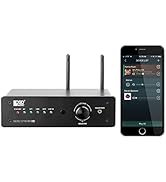
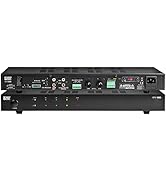
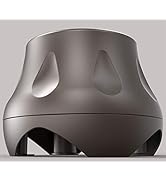
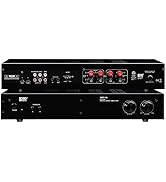
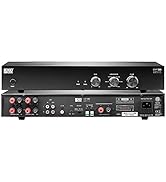
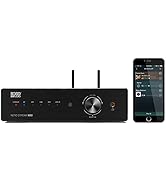
The OSD Nero 5.8GHz Wireless Surround Sound Rear Speaker Amplifier offers a powerful 2 x 50W output with subwoofer support, delivering immersive audio without the hassle of cables. Operating on a less crowded 5.8 GHz frequency, it ensures crystal-clear sound up to 100 feet away. Easy to install and compatible with most home theater receivers, it’s the perfect wireless upgrade for any media room.











| ASIN | B01MTD0U3H |
| Best Sellers Rank | #40,053 in Electronics ( See Top 100 in Electronics ) #203 in Wireless Audio Receivers & Adapters |
| Customer Reviews | 4.1 4.1 out of 5 stars (264) |
| Date First Available | January 16, 2017 |
| Is Discontinued By Manufacturer | No |
| Item Weight | 2.75 pounds |
| Item model number | WRSK250 |
| Manufacturer | OSD Audio |
| Product Dimensions | 2 x 7 x 4 inches |
C**Y
👌🏾👍🏾
Been working great since I got it
D**G
Great way to move your sub woofer
I didn't know these existed. They are great. You turn them both on, they pair immediately and i was able to move my subwoofer behind my couch. Out of the way, and it's cool feeling the couch shake during a movie. Use a high quality speaker cable that plugs in to LFE.
A**B
Works great. I was able to relocate my subwoofer wirelessly.
This works great. Our house is full of WifI, cell phones, etc, and there seems to be no interference. I am running a subwoofer remotely so "sound quality" is hard to hear, but it sounds fine to me. (low frequencies are easiest to reproduce, so it is probably fine) One thing, it does introduce a delay. When I ran my receiver speaker setup the apparent "cable length" of the sub woofer was pretty long. Fortunately most good receivers can compensate the timing for things like this. The delay might be more of a problem for high frequency speakers (like front / dialog) if your receiver can not adjust for it.
D**H
Did not work for me
I've had a surround sound system set up for years and used wireless for my subwoofer and it has worked great. A recent rearranging of things meant that I could no longer practically run a wire for my rear surround speakers. My current wireless setup for my sub was a single channel sub-only system so I needed a new one that could handle my surround speakers as well. This unit looked perfect. Thing that drew me to it were it's claimed 34 available wifi channels, to help avoid interference, and it's 100' line of sight range. My installation would be 25' with line of sight, should work great! Ultimately it was a nightmare. Setup was super easy, the units look great and are a good size. The indicators are clear enough to understand what is going on but I just couldn't get a wifi channel selected that didn't have some interference. The instructions say to press the M button on both devices at the same time (25' apart in my case) to change channels and avoid interference. You then wait 20 seconds or so for the devices to link up again and then I used the speaker setup/tuning white noise on my receiver to listen for the steadiness of the signal. After roping in members of my family to do this on three different occasions, taking roughly a minute per attempt, we could never find a 'channel' that didn't pop/breakup/fadeout/dropout within mere seconds. Additionally, the device gives no indication what 'channel' you are using. So does this procedure of pressing the M button on both devices dynamically select a channel that might work or are you cycling through the supposed 34 channels in order? We pressed the buttons (again simultaneously with two people 25' apart) 40+ times and never found a channel that worked, not even for a minute. I sent an email to OSD via the support address on their website asking how this channel changing really worked and for help avoiding interference. Over a week later no response at all. Hugely disappointing. I don't feel my house is super challenging for wifi interference. We have a single 2.4ghz wifi access point and we are in a detached single family home. We have some wifi overlap from our two closest neighbors but its nothing compared to what you might see in a townhouse, or condo/apartment situation. I'm returning this and simply cannot recommend it at all.
M**D
works great for me
works perfectly for me. I am using with an onkyo home amplifier and connecting to a Bic America powered sub. Setup was absolutely easy as could be. Plugged in and it connected immediately. I can detect no lag in nor level loss in the sub and NO popping. The transmitter and receiver are approximately 15 feet apart and now I have the sub in a place that is out of view yet is providing great low end. Wish I had known about years ago. Very happy
B**N
Units work great ! initially frustrated by older instruction manual !
Installed units and so far everything works great. The only issue I had was the manual says units would go into a standby mode when no signal transmitted from amplifier after 17minutes. I called the customer service number and was told these are newer units and do not go into standby modes (indicated by green lights) and lights would remain blue and always active. Meaning you have to manually turn off power when not in use (which I actually preferred). The manuals need to be updated to reflect this fact and to avoid frustration and wondering if the units were faulty.
J**L
Works well for me, setup a little tricky.
Allowed me to move my subwoofer to a back corner of the listening room wirelessly. Attempts to wire in and use of a 2.4 GHz transmitter both produced unacceptable noise. This device produces no unwanted noise and any signal delay is not audible to me. Initial pairing of TX and RX units didn't work as described in the instructions. What did work for me was to set the units side by side, power up both units, then press the "pair" button on the RX unit. So if you find that the instructions provided don't work for you, try my method instead.
M**L
Sound Is Good, but Interfere with 5GHz Wifi
The range of the transmitter is good and the delay is lesser than the traditional 2.4GHz models. However, it has major interference issue with 5GHz wireless AC. It literally killed the wifi reception of my Shield TV Pro, which is on wireless AC. What is interesting is even if I change my wireless AC network to lower channels 36-64, which are in 5.2 to 5.3GHz frequencies, this "5.8GHz" adapter still chokes my wifi reception from over 300Mbps to just a few Kbps. If you don't use any streaming devices that rely on 5GHz wifi, this adapter is quite good. If you use only 2.4GHz wifi, then it is ok. I ended up returning it and got a dual band 5.2/5.8GHz adapter that I can choose to avoid using the same 5GHz frequency bands as my wifi.
B**A
Worked for about a month. Got it end of April, installed in early May 24, and now its in June 24, and doesnt seems to be transmitting any more. Tested hardwired to my sub from my Yamaha Aventage , and subwooder is working just fine, its the issue with the transmitter. Wrote to their online contact on website, but no reply.
P**R
Arrived promptly, easy setup. but it doesn’t work very well. When connected as intended, there’s a significant drop in volume compared to a wired setup. No way to attenuate the volume.
Trustpilot
1 month ago
2 months ago