We remain fully operational. Our teams are working around the clock to ensure your deliveries continue safely.

DOWNLOAD THE APP


Customer Services
Copyright © 2025 Desertcart Holdings Limited
DOWNLOAD THE APP


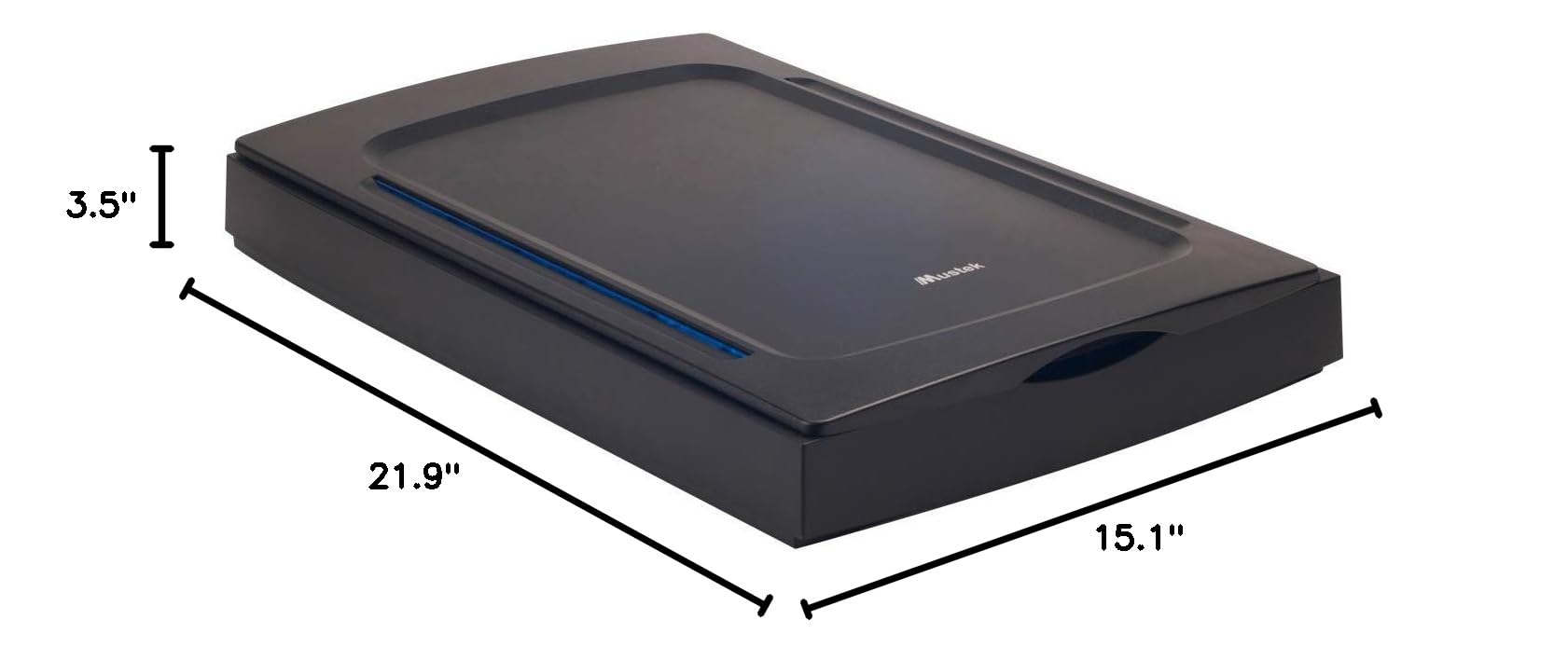
🚀 Elevate Your Scanning Game!
The Mustek A3 2400S is a high-speed, large format color scanner designed for professionals who demand quality and efficiency. With an impressive scanning area of 11.7 x 16.5 inches and a resolution of 2400x2400 dpi (interpolatable to 9600x9600 dpi), this scanner is perfect for capturing detailed images and documents. Its USB 2.0 connectivity ensures fast and reliable data transfer, making it compatible with both Windows and Mac systems. Weighing only 9.5 pounds, it combines portability with powerful performance.


| Item Weight | 9.5 Pounds |
| Item Dimensions D x W x H | 21.9"D x 15.1"W x 3.5"H |
| Minimum System Requirements | Windows XP |
| Standard Sheet Capacity | 1 |
| Paper Size | A3 |
| Optical Sensor Technology | CIS |
| Greyscale Depth | 8 bits |
| Light Source Type | LED |
| Connection Type | USB |
| Resolution | 2400 |
| Wattage | 20 watts |
| Supported Media Type | USB |
| Scanner Type | Document |
F**.
Great product and superior customer service!
I’m an artist (kidsntraining.com) and was looking for a A3 flatbed scanner with a removable lid that I could afford (under $300). I needed to be able to scan my large watercolor paintings in sections and put them together again in Photoshop to produce art prints.I found the Mustek A3 2400 scanner on Amazon and purchased it. Instead of using the CD that came with it for installation, I downloaded a driver from the Mustek website that is compatible with Windows 10.However, there was a problem with it and I kept getting an error when trying to scan. I couldn’t find a solution.Finally, I called the Mustek website and talked with Richard. He had his technician email a video to show how to install the driver. Still, it didn’t work.Richard set up an appointment with me to have his technician, Sam, contact me from Taiwan and actually take control of my computer so that he could figure out what the problem was. In just a few minutes, Sam was able to get the driver installed correctly and the scanner is now working perfectly!I’m thrilled with it and also with the excellent customer service provided by Mustek’s great team of personnel who go out of their way to get it right!
J**P
Died after two months, and uses weird drivers, feels like an abandoned product.
I bought this for scanning in large artwork. It worked okay the first week I used it, and it's been sitting idle on my desk for about two months until I go to use it today. At first it refused to work, throwing an error whenever I'd go to scan anything in, then after uninstalling and reinstalling the drivers, it scans everything in as solid pink. So basically it died after about 5 scans.I found Epson makes an a3 sized all-in-one scanner, printer, fax, that's quite a bit cheaper than this thing, so I plan on replacing this with that. (I just hope it lasts more than two months)It also has a bit of a strange UI, in that it requires you to use it's scanning panel, and there are no buttons on the scanner itself, like a large one that says "scan". There are no power lights or any other indication that it's on.It feels like an abandoned product as the registration page won't allow you to enter any date after 2007. (or any windows version after xp)Update: I got an epson wf-7520 today, and so far it seems like a much better deal. Not only did it cost a lot less, but the scans are much higher quality (despite it only being 2400x1200 per inch), and make the 2400s scans(for the short time it was working) look washed out without any mid-tones. The only downside is that the thing is huge, (though it does have a slightly bigger scanning area as well.)
G**K
So far, so good!
I purchased this scanner as I have a large quantity of oversize music that needs to be scanned. In the past, I've either done this at work (a no-no, I know!) or had to scan it sideways in two passes per sheet, and stitch it together in Photoshop. (a royal pain!!). This scanner works faster than my slightly older legal sized scanner, and is 'way faster than doing it in two scans and Photoshop.My biggest quibble is with the software. It doesn't seem to be possible to directly load ONLY the drivers from the accompanying CD. I use Vuescan from Hamrick software (going on 15 years, now!) and have my own workflow. I don't want the scanner program that comes with a scanner. The software actually interferes with Vuescan's operation (and deletes each scan after a few seconds! (EVIL!)I got around this by loading the $%^& software, finding the DLLs that are needed as drivers, saving them on a USB key, and then uninstalling the software (which also removes the drivers!). THEN I could re install the scanner, and point Windows at the USB key as the source of the drivers.Anyway, other than the intrusive software, the scanner works like a champ, so far, and is certainly the best tabloid sized scanner I've found for the money!
A**S
Good for the money, but not the long run.
First, know that I'm a comic book artist and illustrator. I bought this to scan 11X17 bristol boards.Second, know that I work on a Mac, and I stay pretty current software-wise as I also teach at an Art School in my area.So, we already know the advantages: it'll scan the right size, and it's much more affordable than an $1,100 scanner that we know I'd rather buy.Disadvantages:1) On the Mac, it's a twain scanner. Twain support went out many "OS"s ago. This means you have no choice but to use the twain application "Image Acquire". Don't even try to install the scanner through "preferences".2) "Image Acquire" will not scan at 2400 dpi, despite the scanner's ability to do so. It'll just give you an error message. So, know that 1200 dpi is the limit for large scans.3) It claims to do 48 bit color, but the limit is 24 bit color.4) Scans are good! But not as clean as an $1100 scanner. Bright side: slightly better than the Brother large format all-in-one I had been using.5) When scanning several images in a row, be prepared to shut the software down between scans, or it'll crash/refuse to save.6) I'm pretty tech savvy, and it took me about an hour to get up and running on OS 10.9, so if you aren't too tech savvy, it'll likely take longer.So, there ya go! If you want a "real" scanner, spend a LOT more money. If you can sacrifice a bit of time for install/usage, this'll do!
Trustpilot
1 month ago
2 weeks ago