We remain fully operational. Our teams are working around the clock to ensure your deliveries continue safely.

DOWNLOAD THE APP


Customer Services
Copyright © 2025 Desertcart Holdings Limited
DOWNLOAD THE APP

🔔 Elevate your doorstep security—because your home deserves the VIP treatment.
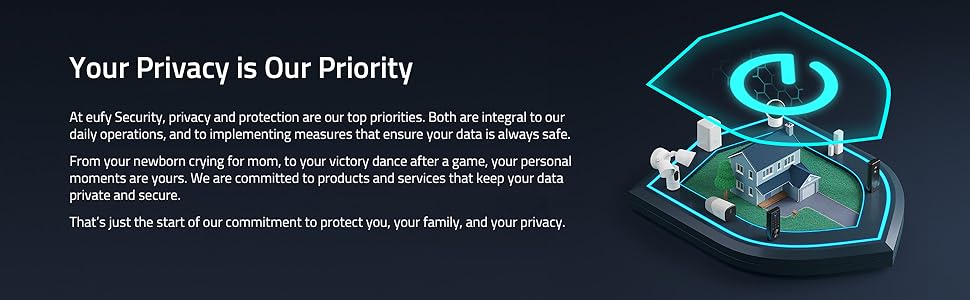
The eufy Security Video Doorbell S220 delivers professional-grade 2K resolution video with advanced WDR, ensuring crystal-clear footage day and night. Its AI-powered human detection sends precise motion alerts, minimizing false alarms. With an impressive 180-day battery life and optional wired power, it offers flexible installation without the burden of monthly fees. Encrypted local storage on the HomeBase keeps your data private and secure, while seamless integration with Alexa and Google Assistant lets you monitor and respond in real-time. Weatherproof and easy to install, this doorbell is designed for modern homeowners who demand privacy, reliability, and smart convenience.




| ASIN | B081C4JN51 |
| Alert Type | Motion Only |
| Antenna Location | Outdoor Security |
| Are Batteries Required | Yes |
| Best Sellers Rank | #119 in Home Security Systems |
| Brand | eufy Security |
| Built-In Media | no |
| Color | Black |
| Compatible Devices | Smartphone |
| Connectivity Protocol | Wi-Fi |
| Connectivity Technology | Wired, Wireless |
| Control Method | App |
| Controller Type | Amazon Alexa, Google Assistant |
| Customer Reviews | 4.2 out of 5 stars 7,319 Reviews |
| Field Of View | 160 Degrees |
| Indoor Outdoor Usage | Outdoor |
| Indoor/Outdoor Usage | Outdoor |
| Item Dimensions | 5.51 x 2.13 x 1.1 inches |
| Item Weight | 0.46 Pounds |
| Manufacturer | Eufy |
| Manufacturer Warranty Description | 12-month worry-free warranty |
| Model Number | T8210 |
| Mount Type | Wall Mount |
| Night Vision | Night Color |
| Number of Channels | 2 |
| Number of IR LEDs | 1 |
| Number of Items | 1 |
| Other Special Features of the Product | HD Resolution,Motion Sensor,Local Recording,Human Detection,Customized Detection,2 Way Audio |
| Power Source | Battery Powered |
| Recommended Uses For Product | Outdoor Security |
| Room Type | Classroom, Kitchen, Living Room, Office |
| Special Feature | HD Resolution,Motion Sensor,Local Recording,Human Detection,Customized Detection,2 Way Audio |
| UPC | 194644180553 |
| Unit Count | 1.0 Count |
| Upper Temperature Rating | 50 Degrees Celsius |
| Video Capture Format | MPEG-4 |
| Video Capture Resolution | 2K |
| Voltage | 24 Volts, 8 Volts |
| Waterproof Rating | IP65 |
| Wattage | 15 watts |
| Wireless Technology | Wi-Fi |
S**8
UPDATE: Ring may be the leader, but Eufy is the better value
UPDATE: My Eufy Doorbell camera has been installed for 95 days now (see picture) and my battery life just hit the 50% mark. I’ll take it down and charge once it gets into the 30% range. I still have it on the 2nd highest battery setting, Optimal Surveillance, which record longer clips = with no battery drain issues. I’ve had the Eufy Flood Light cameras installed for almost a year now and still haven't had any issues with camera / audio quality or with any recording for either of my Eufy devices. Overall, I’m thoroughly impressed with Eufy!! I have bought and used both Ring and Eufy Outdoor Flood Light camera systems. I favor Eufy over Ring, primarily for no monthly fees, camera quality, and notifications. > Both cameras have excellent video quality. Eufy has like a two or three-second delay. I can’t recall if Ring also has a delay with recording. > Eufy is the only doorbell battery camera that I’ve own and, for me, the battery is excellent. I set it up 35 days ago and just checked the battery life and it’s still going strong! As of today it shows 83% life remaining after 96 recorded events / notifications. Further, I have it on the 2nd highest battery setting, Optimal Surveillance, which record longer clips. Very impressed! > As for my Floodlight cameras, I will say with Ring I noticed that my backyard flood camera had a slightly wider view. > With Eufy, I love having to not worry about any extra fees and having extra storage with Homebase. (I will add that it took me a while to understand Homebase's purpose. I knew it was to hold extra storage. But, that’s not a concern if you delete random notifications /clips regularly. But, the bonus that I appreciate is that Homebase is also the doorbell chime for the Eufy Doorbell, so you don't need to buy a separate Chime - I was happy to return the one I bought. I also like that there are several chime tones to choose from. I have a 4,000 sq foot home and can hear the chime at its loudest setting easily throughout the house.) > As for the notifications, I honestly got more false notifications on my phone with Ring than Eufy. Eufy seems to be more consistent although there are some false notifications. Ring annoyed me to the point where I decided to switch to Eufy. From my experience, the notifications on these outdoor camera systems aren't 100% accurate at times. For example, with both systems, I get non-stop alerts when the exhaust from my home's HVAC system blows out into the cold air. Still, I take it as par for the course. > If you get Eufy (or perhaps any device) be sure to check the App Store for updates regularly. At one point, the Eufy notifications kept piling up even when I deleted recordings. I did an App update as my last resort and it cleared all those notifications as well as install whatever updates it needed. I'm willing to bet that none of these systems are perfect. It's technology and when combined with human efforts is flawed to some degree. Though, Eufy beats out Ring, at least with the Flood Light camera. I plan to buy more Eufy devices in the near future.
M**G
Easy setup, secure and no subscription fees!
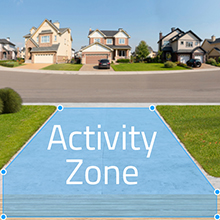
I was looking for a video doorbell to replace my old wireless model that finally died. I wasn't excited about having to subscribe to a service, or to have my video images broadcast over the internet telling the world every time I left my house. This doorbell offered the solution. There are other video doorbells out there without subscription services required, but Eufy is part of the Anker family of products. Anker is a name I'm familiar with. Since I have had good luck with Anker's USB hubs, USB cables, and power cells I thought I'd give this a shot. So far, so good. The setup was easy. The video quality is pretty good, not "cinema" quality, but good enough to recognize people at the edge of the detection range. Initially, I had the doorbell notify me every time someone entered the detection area. It was cool to see delivery people drop off packages, but you also get alerts every time you leave and enter as well unless you put the unit to sleep first. I was getting 12 - 15 notifications a day and this caused the battery to drain fairly quickly. Since the notification feature isn't something I need all the time I leave it off until I do need it. The good thing about the detection area is it WORKS well. No false alarms from wildlife or people walking by just outside of the set detection area. Once I hardwire the unit so that it has a constant supply of power, I'll leave the detection feature on 24/7/365 again. NOTE TO EUFY/ANKER: It would be useful if one could program when to have detection on and off to get more out of the battery and not sacrifice security. Remembering to turn it on and off is a hassle. The app for your smartphone works well (at least the version for my phone does) and is intuitive. The app makes it is easy to manage your device settings and see who is at your door. YES, the app utilizes the internet to notify you and send you a video, but I can disable that feature and the videos are stored LOCALLY on the base unit, not in the cloud. All that and no subscription fee or internet privacy concerns.
A**N
Good, with some misleading advertising
UPDATE (6/28/20): tl;dr This was a good purchase for the value it can offer. I wanted to update my review after having somewhat of a deep dive into issues with the battery doorbell (please see original review at the bottom). Right off the bat, I think it is important to acknowledge just how good Eufy customer service is: they sent me a replacement doorbell since I suspected that the one I got was malfunctioning even though the original purchase was 2+ months ago. Just for that, I am adding another star to the review. Now to the main issue with the battery doorbell: the battery. Eufy claims this battery will last 6 months and here I was charging my doorbell roughly every 4 weeks. But after they sent me a replacement, I am seeing marked improvement in the battery life (I have not changed any settings on the camera ie motion detection is on, sensitivity is medium, activity zone is roughly the same; I even used the same mount as the old doorbell). Having had the doorbell for about 2 weeks now where I would be at 50% battery with the old bell, I am sitting at 80% with the replacement. So extrapolating this, I see a battery life of about 2.5 months, which is much better than the 1 month but still far short of the advertised 6 months. A quick way to understand what could be causing this discrepancy in their marketed battery life versus reality is to look at the “power manager” menu on the doorbell which provides stats for number of detections and number of events filtered out without recording. My doorbell was filtering out 100s of events daily and being in lockdown I have been home all day and I know for a fact that 100 objects (people + cars) don’t traverse my street (unless I lived in Time Square). So it seems like there are many triggers (even though you can choose to detect on humans as opposed to all motions) that the camera is unable to filter more efficiently. So if you place your doorbell on a wall that faces the street you’re likely going to have the same situation in terms of battery life. But if you instead mount it on a perpendicular wall (ie one that faces the doorframe), you’re going to get a much better battery life (much closer to the advertised 6 months). HOWEVER be aware that such a position may not give you a good view of your threshold and if a scrupulous individual were to walk by and pick up a package delivered at your doorstep, your camera may likely not detect that. I think the AI filtering false motions can be optimized by software updates so I am optimistic about seeing marginal improvements to battery life and for that I am adding another star to my original review. That being said, I still think having the ability to switch out batteries is more advantageous than having to remove the entire doorbell to charge which is NOT an elegant solution. Original review — (** 2 Stars) The bad: I have had this camera (on battery mode) for about 7 weeks now and I see a couple MAJOR problems (both battery related) that I want to share with prospective buyers: 1) Battery life: I have already charged it twice (once upon receiving it and once after it drained after about 4 weeks of use). Battery capacity suggests you charge this twice a year. The caveat being, you only get a certain number of motion detections per day among other restrictions. Not sure what the point of purchasing this camera would be if you don’t use the bells and whistles provided. My camera has been on medium sensitivity and I have enabled zone detection which covers only about 20% of the field of view so it’s not even detecting the entire area. On average I have had about 15-18 detections per day so I expected the battery to last 3+ months. It lasted about 31 days. So unless I remove motion detection (which I cant because I don’t want packages stolen from my doorstep!) I would likely be charging this once a month. 2) Battery replacement: if I am cursed to charge this every month, I think it’s reasonable to expect that a battery replacement be provided such that a fresh battery can be switched in without having the take down the camera every time. The not-so-good: 1) Smart integration with google home: there is a solid 15 second gap between my voice command and execution. 2) Geofencing: Never works (even after I allowed constant access to location data). This functionality is in beta mode so i am sure it’s being worked on. 3) Ability to store data on homebase instead of the doorbell: it’s on the “not so good” list because I would like the ability to add more storage (currently restricted to 16GB). Finally, the good: 1) Night Vision: solid 2) Video quality: excellent 3) User interface on app: very good, easy to use, and good response time Bottom line: if you live in a city and expect a reasonable amount of foot traffic, and don’t want to have wiring installed, I SINCERELY urge you to consider purchasing battery doorbells that offer replaceable batteries (there’s a few out there: Ring and Kangaroo off the top of my head, amongst others). If I could return this product, I would.
A**N
Clear pic, works great, easy installation
Must get! Clear picture, works fabulous!
R**2
(UPDATE) Eufy is iffy.
“Update” Due to recent reports from various sources, Eufy (Anker) is allegedly uploading images from video captures and using/storing facial recognition into their AWS provided cloud system, even when cloud services are not selected by the user. This seems to be an alleged breach of privacy and because of these recent reports, I will not give more than 1 star. When it is advertised that your information will be stored ONLY locally, I fully expect that. It’s 2022 and mobile devices now have more power and memory than ever. Cloud services should not be required to do basic functionalities. There’s a reason I avoid Amazon and Google products – lack of privacy. And now that Eufy (Anker) is allegedly putting personal facial recognition information without permission AND on an AWS system, I will now be in search of a replacement that hopefully doesn’t have this kind of issue. After 2 years with this I have mixed feelings. TL;DR No subscription needed. Pretty good camera picture. Good, intuitive app UI. Streaming recorded events is fast. Good looking doorbell. Motion detection is way too aggressive at times even when using motion detection zones and after changing suggested settings, causing you to not want to check your notifications which defeats the purpose. Intercom is pretty laggy (about 1.5 seconds with high speed internet). Doorbell microphone doesn’t always pickup what’s being said during intercom use. Not compatible with Apple HomeKit. Cannot attest for battery life since mine is hardwired. First the positives: No subscription!!! That is a rarity in todays world. It is for that reason that I haven’t switched, yet. Good video quality. Streaming recorded content is fairly fast. App UI is straightforward and simple. Camera isn’t obnoxious. Now the negatives: The motion detection is somewhat inconsistent. No matter what setting or restrictions I put on it, more times than none, it records unwanted motion detection, even things that are out of its motion zone. I would say it DOES record wanted motion (like the mailman dropping off mail at our wall mounted mailbox) fairly consistently – about 95% of wanted motions. But there are random days where it will record every single car passing by, even though the street isn’t selected in its detection zone. There are days when we’ll have just porch movement recordings, then days when it’s every single car driving by. So sometimes a day with 3 or 4 recordings, others with 15-30 recordings. It’s incredibly annoying because the point is to check the motions that matter. I can’t be checking my motion notifications every 5 minutes at work. So then I quit checking them and then add to the chance that I won’t catch something important happening. Another negative is the lag when using the intercom system. It’s bad enough that you can’t really relay your messages without confusion. On top of that, the camera doesn’t always send the audio in the intercom system, so on top of the delay, you’re also asking them to replay what was said. I don’t use that feature often, but when I do need to, it’s kind of useless. I’m also tied to the Apple ecosystem, and really wish this camera would work directly with HomeKit. I’ve received 6 motion notifications while I typed this. It’s all just cars driving through my street. Luckily I don’t live on a busy street or I’d just get a different camera (probably will anyways).
N**N
Doesn't need cloud storage
We had an old wired doorbell, but we didn't want to mess with the wires, so we put up our new battery operated Eufy doorbell right next to the old one. We have stucco over concrete blocks for our house construction, and although I have a hammer setting on my drill, we couldn't make a nice hole in the wall for the screws. So, we put up the Eufy doorbell with heavy-duty double-sided tape, and it's holding well. (EZlifego Double Sided Tape - Nano Double Sided) Also, I didn't want to have to pay extra every month for storage. The Eufy videos are saved in the app on your phone, and also stored on the Homebase. You can easily delete videos you don't need to save from your phone and from your Homebase, from the app. The Homebase plugs into the wall, and connects to your Wi-Fi, and pairs with the doorbell and your app. They give you suggestions as to where to mount the doorbell. We had a lot of bright backlight, so we mounted it on the side wall next to the front door. We set it to "motion" alert, because we really don't get animals on our screened-in porch, but you can set it to only recognize humans. When someone comes to the house we get an alert on our phones (both my husband and I), and if they press the doorbell, we get an alert and also the doorbell chimes on the Homebase. It only takes a couple of seconds for the Eufy to start recording. We only had one delivery man who avoided being recorded by throwing the package in quickly (not any Amazon delivery!) The video is recorded on your phone, and you can easily download it, for example, to email it to your Homeowners Association or to the police. We generally delete the videos after watching them. You are supposed to be able to interact with your visitors, either speaking live, or using a recorded comment, but we haven't figured out how to make that live interaction work yet. But the video of the person at your door pops up immediately on my phone, so I know who is there. The night vision is very clear, but if you want full color you can get a Eufy motion-detecting light. The first doorbell we received wouldn't hold a charge, so they overnighted a new replacement. I have to say that customer service is amazing. I have to keep my phone on the slower Wi-Fi setting, because the doorbell doesn't work with 5G. But we are REALLY liking our new Eufy doorbell. Update: I was wrong about the 5G. I put my phone on 5G, and the doorbell works perfectly. Second Update: I just got a notification from the app that the Eufy battery was low. It has been over 7 1/2 months; 503 motions have been detected, and we watch almost all of the videos. Wow! We love our Eufy video doorbell! I also finally was able to drill holes in our stucco-covered concrete block house, and screw on the doorbell. We highly recommend this doorbell. Third Update: I called Customer Service to find out how to talk to the person at the door. As I already said, Customer Service is amazing. They explained simply how to speak during a live video: On your phone, touch the notification, and go to the live feed. Make sure the arrow is clicked for it to play live video, and a Phone symbol will show beneath the video. When you touch it, you can speak, when you touch it again, you can listen. This is a great system.
E**D
Revised Review: Great product and superb customer service
Revised 17 July 2020 Eufy customer service reached out to me shortly after my post of the initial review. They asked if I would be willing to work with them to troubleshoot the issue. Since my issue was not critical and did not affect functionality or security, I agreed. Over a series of days, I performed tests and uploaded logs to their support staff, and any time that I had questions or comments, they replied to me quickly. Ultimately, the problem could not be resolved, and they replaced the doorbell without question. Now that I've been using the doorbell for close to a month, I can say that I am thoroughly satisfied with it. It is responsive, has great video quality, saves video locally instead of the cloud, can be powered by battery or existing wiring, can use existing doorbell chimes, chimes on the Homebase hub, chimes and announcements on Amazon Alexa. I have nothing but positive comments about this device and Eufy's customer service (thanks Daisy). I'm leaving the original review below, because it documented my observations and discoveries when I first installed the doorbell, and they may be helpful to new users. Any problems that I experienced in the original review have been resolved. ************************ Original Review I really didn't need a fancy video doorbell, as I live in a gated community on a dead-end street with very little traffic and few visitors. However, I replaced my front door and thought that it would be a good time to replace the original old-school doorbell while I was at it. I chose this product primarily because of the local storage. I have very slow Internet (20MB down, 1.3MB up), and other products which relied on cloud storage would not have worked for me. I also chose wired installation instead of battery so that I would not have to charge the battery manually 2-3 times a year. Installation was relatively straightforward, but I found that motion detection was not working. In fact, the doorbell failed to respond until I was only a few feet away. I contacted Eufy support, and without hesitation they told me to submit a request for an exchange, which I did. A few hours later, I found a setting in the "Power Manager" section that had three options: Optimal Battery Life (default), Optimal Surveillance, and Customize Recording. The default setting is doorbell only with no motion detection. If that was mentioned during setup, I did not see it. You would also think that the support techs (2 of them - one on live chat, and one on phone), would think to have me change that setting, since I am a new user with a new installation and probably using default settings. So, I changed the setting to Customize Recording, which enabled motion detection, and allowed me to set longer record times. Since I am using a wired setup, I don't have to worry too much about long recordings depleting the battery. The next thing that I tried to do was download video clips from the Homebase to my iPhone while in my home wifi network. Every video that I tried to download SEEMED to download properly. There was a % download progress display, and the time to complete was appropriate for a 30 second clip, but the file saved to my photos was only the last 3 to 5 seconds of the clip. I repeated this multiple times with about 10 different files, with the same result. I then realized that all of these files were associated with an eventual doorbell push. So, I activated the system several times from motion detection only (without pushing the doorbell button) to see if it made a difference. Every single one of those clips would download to my iPhone in their entirety. So, it appears that if someone pushes the doorbell button, you are not able to download the full clip from the Homebase - only the last few seconds. This makes no sense to me, as the full clips are available and viewable on the Homebase, but they are apparently not fully downloadable. I have not yet contacted Eufy on this second issue - perhaps they'll see it here and comment on it. The final observation is that it seems that video clips are more stable (when created and also when viewed later) if the Homebase is connected with ethernet instead of wifi. I have terrible Internet, but great internal wifi (Arris Surfboard Max Mesh), and videos seemed more jittery with more dropouts and freezes on wifi. I was pleased to see that I am able to receive alerts and view clips when my phone is on cellular, although the video is very choppy. This, I assume, is because the video is streaming to me over the Internet via my terrible home internet 1.3MB upload connection. I am actually OK with that, because I didn't expect to be able to access anything away from home anyway. Overall, I am relatively happy with the device, and hope that some of these issues go away with firmware updates.
P**R
Doesn't always detect motion, need magnifying glass to read numbers on unit to register
This is a pretty good device, not perfect but pretty good. I wanted to have a few weeks use before writing a review. The good is that it seems to work fairly reliably and the price is good for what you get. The bad is that the motion detectors don't always work, the app has frozen several times, and the installation instructions were not clearly written. I'll start with the installation instructions because that is where most people start. I started following the instructions only to find that I could not get my phone to correctly read the qr code on the home base. The instructions said nothing about charging the doorbell/chime, although in searching online for help I found instructions that said to charge the chime before beginning. After an hour of attempting to get the qr code read, I gave up for an hour, came back and the lighting must have been different enough that I could read the qr code. You are given the option of entering a number instead of reading the qr code, but the numbers were so tiny that no one in my house could read them. After getting the qr code read, the rest of the installation was no problem. I have played around with a lot of the settings to check out the doorbell motion detection features. I have found that even on what I assume is the most sensitive settings and the largest area for detection, we still have people come up to the door and they are not detected. This seems to happen every few days and there seems to be no pattern to when someone is not detected. Perhaps the app was freezing or crashing at the time. Yes, the app has crashed/frozen on me more than once. I know of at least one time that the doorbell rang an as I was trying to open the app to see who was at the door, the app crashed. I've also had someone attempt to ring the doorbell and there was no notification from the indoor chime or from the app. All in all, I'd purchase it again but I hope that some of these issues are fixed because I want to know who is at my door, especially when I'm home alone. UPDATE: I had to pull 1 star from my review because today I have had 2 package deliveries, a mail delivery, me walking out the door twice to get my packages and another household member walking out the door. If this worked as it should, I should have had 6 motion notifications from the unit. Instead, I had 1 notification. A 17% capture rate of motion is not acceptable. The weather is sunny, clear and 82F so there should be absolutely no issues capturing motion. UPDATE 2: I've had this doorbell up and running for a couple of months. I was in contact with the manufacturer about it not ringing when someone presses the button to ring the doorbell. We both agree that the black unit is getting too hot with the sun shining directly on it. They refunded some of the purchase price so we could buy some sort of a shield to block the sun, but we haven't seen anything available for purchase. A few days ago we had a new front door installed and I removed the doorbell unit so the workmen wouldn't be triggering the motion sensor all day long. Unfortunately, we had only glued the mounting bracket to the wall and it pulled off. I went ahead and charged the doorbell (we are getting about 3-4 months per charge, not the 6 months specified so if it is an issue for you be aware). While I have had it in the house waiting for the new, non-glue covered mounting bracket to arrive, I've had 3 separate instances where the doorbell rang with no one pressing the button.
Trustpilot
1 week ago
3 weeks ago