We remain fully operational. Our teams are working around the clock to ensure your deliveries continue safely.

DOWNLOAD THE APP


Customer Services
Copyright © 2025 Desertcart Holdings Limited
DOWNLOAD THE APP
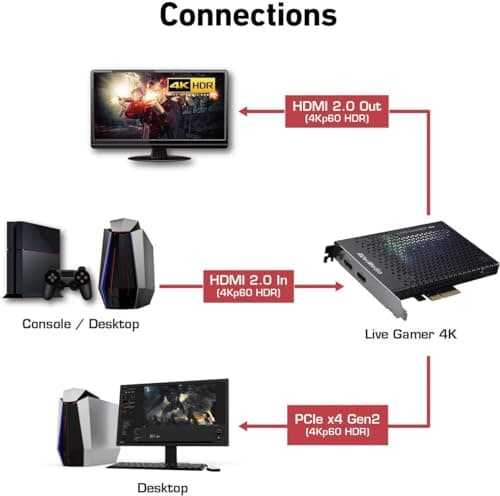
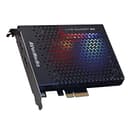
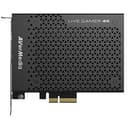
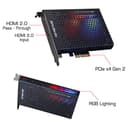
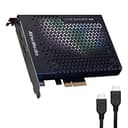
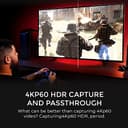
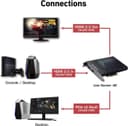


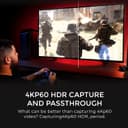


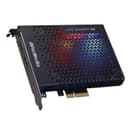
🎥 Capture the future of gaming—4K HDR, ultra-smooth, zero lag!
The AVerMedia Live Gamer 4K GC573 is a PCI Express capture card designed for professional-grade 4Kp60 HDR recording and ultra-high frame rate gameplay capture up to 240 FPS. Featuring ultra low latency for real-time monitoring, customizable RGB lighting, and bundled CyberLink PowerDirector 15 software, it empowers gamers and content creators to produce stunning, smooth, and vibrant video content with ease.


| ASIN | B07DHSZC4K |
| Batteries | 1 Lithium Ion batteries required. |
| Batteries Included | No |
| Batteries Required | No |
| Best Sellers Rank | #2,346 in Video Games ( See Top 100 in Video Games ) #315 in PlayStation 4 Accessories |
| Brand | AVerMedia |
| Colour Screen | No |
| Compatible Devices | Camera, Gaming Console, Personal Computer |
| Connector Type | HDMI 2.0 |
| Country of Origin | Taiwan |
| Customer Reviews | 4.4 4.4 out of 5 stars (1,146) |
| Data Transfer Rate | 5 Gigabits Per Second |
| Date First Available | 4 March 2018 |
| Device type | TV Tuners & Video Capture |
| Generic Name | Game Capturing Device |
| Hardware Interface | PCI Express x4 |
| Hardware Platform | Gaming Console, PC |
| Has Auto Focus | No |
| Imported By | Tirupati Enterprises |
| Includes Rechargeable Battery | No |
| Includes remote | No |
| Item Dimensions LxWxH | 15 x 12.4 x 2 Centimeters |
| Item Weight | 209 g |
| Item model number | GC573 |
| Manufacturer | AVerMedia |
| Model | GC573 |
| Model Name | Live Gamer 4K |
| Model Year | 2018 |
| Mounting Hardware | • CyberLink PowerDirector 15 Product Key Card, • HDMI 2.0 cable, • Live Gamer 4K (GC573), • Quick guide |
| Net Quantity | 1.0 Count |
| Noise Level | 44 Decibels |
| Number of items | 1 |
| Operating System | Windows 10, Windows 11 |
| Power Source | PCI-E Gen 2 x4 |
| Product Dimensions | 14.99 x 12.45 x 2.03 cm; 208.65 g |
| Programmable Buttons | No |
| Speaker amplification type | no |
| Special Features | Lightweight, Portable |
| Supports Bluetooth Technology | No |
| Video Capture Resolution | 4Kp60 |
S**.
Bad
Used damaged product
A**K
Stop working
Stop working after 1 year
A**R
False Advertising by AverMedia GC573 fails
False Advertising by AverMedia as this Capture Card GC573 fails to perform as advertised. It's not able to capture 4k@60fps HDR resolution Gameplay & Re-Central App aslo keeps Freezing & crashing inspite of all Software & Drivers are up-to-date via AverMedia.Com.
D**T
I recently upgraded to the **AVerMedia GC573 Live Gamer 4K** and I couldn't be more impressed. As someone who streams regularly and creates gaming content, this capture card has been an absolute game-changer! ### **4K Ultra HD & HDR Support:** The quality is unmatched! Recording and streaming in **4K at 60FPS** with **HDR** is mind-blowing. The colors are vibrant, and the footage is silky smooth, making my content look professional and polished. Even at 1080p, the card handles **240 FPS**, perfect for those who prefer ultra-high frame rates. ### **Low Latency Performance:** One of the standout features is the **ultra-low latency**. There's virtually no delay between the game and the captured footage, which is crucial for fast-paced games like shooters. It’s perfect for live streaming and ensures you’re always in sync with your audience. ### **Easy Setup & Integration:** Installation was a breeze, and it integrates seamlessly with OBS and other streaming software. The RECentral software that comes with it is intuitive, though you can use other programs if you prefer. The card also handles multi-tasking very well—stream, record, and play all at once without a hitch. ### **Perfect for Content Creation:** The AVermedia GC573 isn’t just for gamers; it’s perfect for anyone doing live event capture, video editing, or streaming. Whether you're doing gameplay, tutorials, or live shows, this card has all the professional-level features you need. If you're serious about quality and performance, the **AVerMedia GC573 Live Gamer 4K** is worth every penny. Highly recommended for gamers, streamers, and content creators who want the best!
D**.
Muy buena capturadora, da buena imagen y casi no tiene retardo. Si vas a usar OBS antes asegúrate de actualizar el firmware y plugin para que reconozca sin problemas la capturadora. La pega que le encontré es que se calienta un poco. Computadora con la que se grabo y se realizo stream: PC Stream CPU: i5 12600k 4.5 GHZ en todos los núcleos (QuickSync para stream) RAM: 32GB Kingston Fury DDR4 3200 en dual Chanel Mother: z690 Asus Prime pd4 con ultimo firmware GPU: RX 7600 (AMD AV1 grabación) Nota: Si pretendes hacer stream a doble pc como yo, te recomiendo que el audio del juego, alertas, etc., lo mandes mediante el protocolo NDI con OBS, siento que es más fácil de configurar y más estable que el programa Voice meeter. Nota 2: Si tienes un monitor de alto refresco y notas que en ciertos juegos el stream o grabación hay saltos de fotógramas pero en tu pc de juegos va fluido te recomiendo que la capturadora la configures en 120hz tanto en OBS como en la pc de juegos y que el juego lo limites a 120 fps. Esto va ayudar un poco a que no haya como esa desincronización. Investigando un poco sobre el tema, encontré que esto sucede porque jugamos a un número que no es divisible entre el número de fps al que estamos grabando, en mi caso yo tengo un monitor de 165hz pero transmito y grabo a 60fps (Twitch y youtube solo admite videos a 60fps).
J**C
The pass through works great and the card captures well!! The only gripe is the low profile card sells the bracket separately 😑!!
O**E
Graba tus partidas, emite directos, todo con gran calidad y sencillez de uso. La instalación también es intuitiva y muy sencilla, prácticamente plug and play. No requiere de grandes conocimientos previos y captura todo tipo de aparatos (PlayStation, Nintendo Switch, consolas retro...). Es una excelente herramienta que da una calidad de imagen y sonido realmente buena sin necesidad de grandes ajustes. Ahorra espacio al ser interna. Se acompaña con un programa de edición y captura de video como es el Power Director, en una versión algo antigua eso sí, pero permite trabajar y editar en la mayoría de las situaciones más habituales, con lo que no es una gran pega esta versión, se le puede dar un uso mucho más que aceptable con muy buenos resultados. El programa sí requiere de algo más de práctica, pero como cualquier otro editor de video, una vez conocidos los pasos básicos es muy fácil de usar y conseguir los resultados que buscas.
A**I
Ótima qualidade
Trustpilot
1 week ago
2 weeks ago