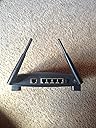
🚀 Elevate Your Internet Experience!
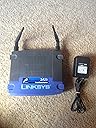
The Cisco-Linksys BEFW11S4 Wireless-B Cable/DSL Router is designed to connect seamlessly to broadband modems and Ethernet backbones, offering an impressive wireless range of 300 feet indoors and 1,500 feet outdoors. With advanced features like roaming, load balancing, and network traffic filtering, it ensures optimal performance. Configuration is a breeze through your web browser, and it can also function as a DHCP server, making it a versatile addition to any network.
| ASIN | B00005ARK3 |
| Antenna Location | Home |
| Best Sellers Rank | #968,982 in Electronics ( See Top 100 in Electronics ) #5,355 in Computer Routers |
| Brand | Linksys |
| Compatible Devices | Personal Computer |
| Connectivity Protocol | Ethernet |
| Connectivity Technology | Wireless |
| Control Method | Remote |
| Controller Type | Switch |
| Customer Reviews | 3.8 3.8 out of 5 stars (541) |
| Data Transfer Rate | 11 Megabits Per Second |
| Frequency | 2.4 GHz |
| Frequency Band Class | Tri-Band |
| Global Trade Identification Number | 00745883549948, 00745883551330 |
| Is Modem Compatible | Yes |
| Item Part Number | BEFW11S4UK |
| Item Weight | 1.36 Kilograms |
| LAN Port Bandwidth | 10/100 megabits per second |
| Manufacturer | Linksys |
| Maximum Upstream Data Transfer Rate | 11 Megabits Per Second |
| Mfr Part Number | BEFW11S4 |
| Model Name | BEFW11S4 |
| Model Number | BEFW11S4 |
| Number of Ports | 4 |
| Operating System | Linux |
| Other Special Features of the Product | WPS |
| Security Protocol | WEP |
| UPC | 745883549948 683728020361 683728106560 745883551330 |
| Wireless Compability | 802.11abg |
D**D
Quick and Easy
I am very satisfied with my home network and it is exceeding my expectations. I wanted to set up a small home network for two PC's in a two story townhouse condominium. High speed access is provided by cable modem and I have an HP Officejet K80 connected to a USB port on a Windows 98 desktop PC. My other PC is a Dell notebook running Windows 2000. After reading numerous Amazon customer reviews on wireless routers and adapters, I decided to buy the following: Router - Linksys Wireless 4-Port Cable/DSL router (BEFW11S4 v.2) Wireless network adapter - Netgear MA401 802.11b Wireless PC card 10/100 Lan card - Linksys LNE100TX 10/100 Lan card Total Cost - about $210 I chose the router because Linksys seemed to have less problems than other brands. I chose the Netgear wireless PCMCIA adapter because users reported excellent signal strength over varying distances and it had a built-in antenna. I also didn't want to use my one USB port on the notebook for a network adapter. The Linksys 10/100 Lan card was just a great buy for under $20. Setup was relatively straightforward. I installed the 10/100 Lan card first into my desktop PC and then connected it to the cable modem just to make sure the card worked properly. Next, I followed the quick start instructions for connecting the router to the cable modem and to the desktop PC. Then I used the setup wizard on the CD to guide me on configuring the router. At one point during the router configuration, I had to power off and on the cable modem before the router detected the Internet. Once it did, it automatically picked up the information it needed to configure the router with my ISP's assigned addresses. Note: the network patch cable that came with the Linksys router is only about a foot long, so you may want to get a longer one. Once I verified the desktop was accessing the Internet through the router, I setup the Netgear wireless PCMCIA card for my Dell notebook. Again, I just followed the setup instructions and it connected to the router without any problems. I placed my notebook PC on the first floor of my condo and the Netgear utility program showed the signal strength and link quality at 100% or Excellent. The router is on the second floor approximately 30 feet away and about 3 feet off the floor. Once I set up file and print sharing on the desktop PC, I was able to print easily from my notebook to the HP Officejet K80 connected to my desktop. The only quibble here is that the desktop PC has to be on for the remote printing to work. I may invest in a Linksys Etherfast Wireless USB Print Server (about $80) if it gets too inconvenient. The last thing I did was read the Router's user's guide to set up the WEP security for 64 bit encryption. I used a passphrase for both the Linksys router and Netgear wireless adapter and it worked without a hitch. I also changed the router's web-based utility default password for additional security. All in all, I found the setup to be straight-forward and I did not need to talk to any technical support people. Every product I purchased lived up to the reviews that I had read, so I hope this review will help someone, too.
C**F
Good Box but Poor Documentation for Use with Others' Cards
I've never written a review, but I got so much help from others' reviews I thought I would return the favor. Setting up the BEFW11S4 using my desktop computer, which was linked by an Ethernet cable, was easy. What took me a loooooong time was getting the Wireless connection to work with my laptop's Cisco Series 350 PCMCIA Wireless LAN Adapter card. At the end of the day, I would have been time and money ahead just to pay [the extra money] and get Linksys' LAN Adapter card, but I didn't want to juggle two cards and two wireless profiles. It took me some time to realize that Cisco's "Aironet Client Utility" or "ACU"---a separate program under Start/Programs---, and not my Windows 2000 operating system, controls the important wireless parameters for the card. Once I found that out, I was able to set the channel, infrastructure and other parameters to make a wireless connection. However, I couldn't get WEP encryption to work at all until I upgraded the firmware, driver and ACU for the Cisco card past my apparently outmoded (6 point something) firmware version. Cisco now bundles firmware, drivers, and ACU upgrades together in packages for downloading from its Website. But you have to be very careful to select the right bundle. Each numerical series of Cisco LAN adapters has many products with names that look and sound alike, and some joker listed two bundles (not applicable to my card) as for "Windows 2000" while, further down on a long list, listing another (applicable to my product) as "350-Windows-98-2K-Me-Bundle-2.exe." My aging eyes missed the buried reference to "2K," so I downloaded two wrong packages before finally getting the right one. Once over these hurdles, all proceeded smoothly, except that neither Linksys nor Cisco told me to set the ACU for shared encryption keys. I found that out by trial and error. Cisco has good instructions on its Website for downloading and installing the updated firmware, drivers, and ACUs. Its newer ACUs allow nonadministrative users to set up separate profiles for such things as home networks, and there is a setting which is supposed to sense which network ("enterprise" or home) is transmitting and switch automatically to it. I haven't tried this yet, but a colleague tells me it works well. What this means is that you can leave the Cisco card in its slot as you move the laptop between home and office, and the software will switch automatically between your home and office networks as you move from one to the other. I still couldn't get WEP encryption to work on the Cisco card at 128 bits. This is not surprising, as Linsys' documentation implies that its 128-bit protocol is proprietary. I did, however, get WEP working at 64 bits (called 40 by Cisco). I could cut and paste the encryption keys directly from Linksys' Web-based access point manager into Cisco's ACU, as long as I remembered not to "apply" or "OK" either one until both were set the same. Linksys' "passphrase" utility was useful for generating the four "64-bit" encryption keys. I noticed that just changing two or three characters in a 31-character passphrase completely changed all four keys, suggesting a robust random-number generator. Once fully set up, the wireless access point worked well. After some fiddling, it gave me 40% to 50% signal strength through my house's aluminum siding and out to the edge of my back yard. You have to play with the two little antennas, however, to get the best signal strength. I found the best strength resulted from having one antenna in a nearly horizontal position and the other slightly off vertical. (Be sure to set your parameters for both access card and LAN adapter to "diversity," which uses both the antennas.) People who gripe about signal strength should remember that they are dealing with high radio frequencies. The network uses 2.5GHz, a frequency much higher (and therefore much more susceptible to reflection and interference) than the ones used by FM radio stations. Just as your body moving around the room, as well as many other things, can interfere with FM radio signals, it can interfere with a home network wireless signal. For example, it makes a difference whether you sit between your LAN adapter card and the access point, and whether your LAN adapter card's antenna points toward the access point. Short of repealing the laws of physics, adding a monster antenna to the access point, or increasing its power (probably to more than the FCC allows without licensing) there's probably not much anyone can do about this. I give Linksys high marks for a good physical product, but mediocre marks for its documentation of wireless. I doubt I'm the only one who wanted to adapt an office network card for home use; and there's no reason to have to juggle two different LAN adapter cards. I would hope that Linksys would give a few hints in its documentation about how to get its base station to work with others' wireless cards, particularly Cisco's, which seem to dominate the industry. But maybe I'm just dreaming. The woeful industry custom seems to be: if you use someone else's products, you're on your own. Maybe that's why tech stocks are at an all time low.
A**M
As an ntl cable customer with a laptop & a PC both with wireless cards this product is a life saver. The product was easy to set up requiring no details from Ntl... If you have ever used peer to peer wireless cards (as sold cheaply in todays market) and been disapointed then this product will solve your problems the wireless access point is a god send no droped conections and no having to leave the main pc switched on . As a new customer to amazon I was impressed that they delivered free of charge within 3 day of my order being placed on a saturday and were 33 % cheaper then other online companys in the internet "jungle". A 1st class product and 1st class service from amazon...
D**S
I use this little wonder to act as a gateway between my internal network (currently consisting of a PC and Apple PowerBook) and the outside world (through a Telewest-supplied cable-modem). Setup is really simple: connect your PC directly to the cable modem, run the given install program, switch the connections so that the router's between the PC and the modem, and click 'Next'. It automatically picks up the settings you need to get going and configures the router. That's all you need to function perfectly well. For the more inquisitive, the router has the functions you'd expect: static and dynamic routing, WEP encryption, MAC address cloning and filtering, port forwarding and a DMZ. HOWEVER... Beware if you're intending on connecting an Apple PowerBook (or, I suspect, anything else that's Airport Extreme) via wireless. Although the PowerBook picks up an IP address via DHCP consistently and with no problems, you'll have to crank back the Tx speed on the wireless to 1-2Mb (rather than the default 1-5-11), or suffer horrendous packet loss that renders it unusable. For most people this isn't a problem, as broadband typically operates at 0.5 to 1Mb/s (2 if you're lucky). But it may cause problems if you do heavy file transfer between network machines via wireless. Even with that caveat, it's a very nice piece of kit.
M**E
I bought this wireless cable router to allow me to share my Blueyonder broadband connection with my business laptop (running windows XP & featuring adaptec £18 pcmcia 802.11b card) and my XBox using cabled XBox live. I got my broadband, xbox live subscription + router all in the space of one week and have not had any experience in setting any of these up before. Therefore, I wasn't expecting everything to run smoothly. However - I could not be more surprised. I ran the auto-installation disk supplied with the router, which obtained my cable modem setting and the whole thing just...worked. When does that *ever* happen? The router also provides four wired network ports to allow you to share your internet connection between devices, so I plugged my XBox into one of those and everything, once again, worked perfectly without any problems. So this router scores 5 stars plus on its ease of installation. That alone should convince anyone with any worries about installation. The other thing that impressed me was the range of the unit. I live in a modern 3 bedroom semi and can get full 11Mb rate wherever I am in the house. I haven't tried it in my garden yet, but I imagine it'll work fine there too. Remember that I'm running a cheapo pcmcia wireless card and this seems even more impressive, as there is no external aerial attached to it. Oh - and I've stuck it in the corner, on the floor of the living room behind a tv, video, telewest box, xbox + playstation. There must be more interference there than anywhere else in the house. Therefore, 5+ stars again, as it does absolutely everything that I need it to do. Linksys really have a well sorted product here, which proper documentation + comprehensive software. I would not hesitate in recommending this to anyone with a similar setup to myself. And it only costs £50.70p - how can it be so cheap! I'm just sad that I didn't save up another mere £15 to get the 54g version of this unit. In the next few months I imagine that that will be the product I upgrade too. Hope this review proves useful to someone as all the previous positive reviews did for me.
D**S
I purchased this router for the usual reasons of sharing a broadband internet connection between different members of the household. This device worked straight out of the box with very little set-up - only the cloning of the MAC address from my "primary" PC was necessary. Being a complete novice to anything networking I then added wireless cards to the remaining machines and one by one they were all connected with very little intervention. My more paranoid colleagues have encouraged me to switch on 128bit WEP encryption which again was simple to get going. This is an ideal hassle free way of getting a home LAN up and running. Although this seems like an advert I have to admit to one failure - the wireless side inexplicably shutdown - LinkSys support, although rather annoyingly take your details and then ring you back, proved very helpful and replaced the router without any issues - can highly reccommend both the product and the support.
E**R
Ok, i'll keep it simple... I plugged it into my NTL modem, configured the IP address, rebooted... and here I am. So far I've used it in the garden (I had to!) the kitchen and the living room. I have a laptop but was confined to the spare room, but not anymore... I don't usually review stuff, but for this product, at <£100, stop thinking! I have to point out I have a Toshiba Protege laptop with built in Wireless connection to WAN but would pay £30 or so for a card if I had to. Thinking still?
Trustpilot
1 week ago
3 weeks ago