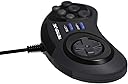
🎮 Level up your retro gaming with precision and power!
The RETROFLAG Classic Retro Wired USB Gamepad delivers authentic retro gaming experience with plug-and-play ease, turbo function for rapid-fire control, and broad compatibility across Raspberry Pi, Windows PC, and Nintendo Switch platforms. Lightweight and ergonomically designed, it’s perfect for millennial pros craving nostalgia fused with modern performance.


| ASIN | B07JMQ5YFL |
| Additional Features | Ergonomic, Rumble |
| Best Sellers Rank | #74,381 in Video Games ( See Top 100 in Video Games ) #135 in Sega Genesis Accessories #759 in PC Gamepads & Standard Controllers |
| Brand | RETROFLAG |
| Brand Name | RETROFLAG |
| Button Quantity | 16 |
| Color | Mpad |
| Compatible Devices | Mac, PC, Windows |
| Compatible Video Game Console Models | SEGA Mega Drive HAA-2500 |
| Connectivity Technology | USB |
| Controller Type | Gamepad |
| Customer Reviews | 4.4 out of 5 stars 314 Reviews |
| Hardware Platform | PC, sega genesis |
| Item Dimensions | 6.69 x 4.72 x 2.36 inches |
| Item Weight | 100 Grams |
| Manufacturer | Retroflag Tech Ltd. |
| Manufacturer Part Number | 432118 |
| Model Name | RM |
| Model Number | 432118 |
| Package Quantity | 1 |
| Power Source | Corded Electric |
| UPC | 193886420632 |
A**L
A Sublime Piece of Gaming History
This is by far the best Sega Genesis controller available that’s not the actual original one. It’s well known among Capcom fans that the original Sega Genesis 6 button pad has one of the best D-Pads around. The layout of the 6 face buttons was also perfect for Capcom fighters and designed in conjunction with the release of Street Fighter 2 Championship Edition for the Genesis. The buttons were extremely high quality, as was the overall construction and the set of materials Sega used. With that said, the only options for a USB version thus far have been relatively poor or overpriced. For Capcom’s initial PS2 era Street Fighter 2 Anniversary gamepads, they choose to “heavily borrow” the Sega Genesis/Sega Saturn pad design. I bought the Akuma hologram gamepad when it came out, and it was truly beautiful looking, but the D-Pad was a hard, imprecise mess, with a thick construction that was incredibly uncomfortable to hold, despite how large my hands are. The RetroFlag Genesis controller has none of those issues. There are, however, only 2 issues I have with it, and one isn’t really a fault of the actual game pad, but rather one I had with the original Genesis 6 button pad itself when it came out. It’s incredibly small for those with big hands. The 3 button Sega pad felt like the perfect size for all different hand sizes, but the 6 button pad was far slimmer, and slightly thinner in certain areas, such as the recessed finger rest in the back of the controll pad. Everything else about the 6 button pad was better overall, in my opinion, than the original 3 button controller. The way the D-Pad could be used for long stretches without any discomfort, due to an incredibly nice feeling, soft textured plastic finish, with very precise directional control, was possibly the nicest aspect of the Sega 6 button gamepad. Now the second issue is actually one with the RetroFlag gamepad itself. It adds 2 features, namely an L and R button for more modern titles. This is great in theory, but it’s so flat against the curved sides of the pad that it’s somewhat uncomfortable to use. It seems as if they wanted to make such a perfect replica of the 6 button Genesis pad that they felt making the L and R shoulder buttons more prominent would detract from the perfectly replicated form factor. To be fair, on the original 6 button pad, there was a recessed mode button where the right trigger button is on the RetroFlag controller. The only difference is that the mode button’s only purpose was for original 3 button Sega games that needed its one time functionality to allow the games to work with the newer 6 button pad. It wasn’t a button that gets any form of constant use, so its recessed and well hidden form factor made sense. The Sega Saturn Second Gen US gamepad, modeled after the Japanese one, would’ve been the most logical pad to replicate in this case, though I understand why RetroFlag choose to make the correct controller for their Genesis case. Despite that, the Sega Saturn S controller remidied all of the aforementioned issues with the Genesis 6 button pad in 1995. It featured the same exact softly textured D-Pad which was already sublime, and it had a larger, form fitting hand shape, with raised L and R shoulder buttons that felt comfortable to use. Both of its R and L buttons had a nice, satisfying mouse click style sound when pressed down. Aside from that, the Saturn S gamepad was basically a small evolution of what many felt was the nearly perfect 2-D gaming 6 button controller the Sega Genesis had. I love the RetroFlag Genesis pad, but I’d gladly buy a Sega Saturn replica right away if RetroFlag made one. While Sega already did this a while ago with their SLS (Sega Logistics Services) Saturn USB pad, it was a very limited release that sold out right away. It was not only a perfect replica, but it had some very minor improvements too. It’s extremely expensive on eBay now, and many of those that are sold there are actually poor knock offs with horrible D-Pads and sub-par construction. The other Sega Saturn USB gamepad replicas that are sold now aren’t great in terms build quality at all. Sega even released another USB Saturn pad from Play Sega. It’s an official product, but after buying it and comparing it to my actual original Sega Saturn S Pad, the quality feels just slightly above the knock offs, and the D-Pad is severely lacking. It’s also not as nicely textured or soft, which causes discomfort in precise 2-D platforming or fighting games over longer stretches of time. In the end, this RetoFlag Sega Genesis 8 button replica of the sublime 6 Button Genesis pad is truly the real deal. It’s curently the best one I’ve seen or used thus far. I put it through it’s paces today, playing the Sega Classics Collection on Steam with it. To show my history, I have a platinum trophy in the Sega Genesis Collection for the PS3 and beat Sonic 1-3 without using any continues at all on my original Sega Genesis. I did the same thing with Streets of Rage 1-2 and Revenge of Shinobi when I was a kid. This is something I haven’t been able to pull off on any other controller other than the original Genesis 6 button pad. I was able to do it today with Revenge of Shinobi, Streets of Rage 2 and Sonic 1 using the RetroFlag USB pad on my day off. The price is excellent, and thus far, the build quality seems like it’s top notch too, so it’s a must buy for classic Sega game fans. All I’m hoping for now is a RetroFlag Sega Saturn S Pad replica. If this controller has any longevity issues, I’ll update this review accordingly.
T**4
Up there as one of the best classic USB pads. Blown away by the d-pad.
As an avid retro emulation enthusiast, I've used quite a few classic-style USB controllers. Most of them with the same old issue of an underwhelming d-pad. So when Retroflag dropped these alongside their new Mega Drive-inspired Raspberry Pi case, I immediately jumped on them. They arrived earlier than my case, so I gave them the workaround in some classic games to test out. I previously purchased a J-style SUPERPi case, and it came with Retroflag's Super Famicom pad, the JPad. That felt wonderful to use. So I had high hopes for the MPad. And it did not disappoint. The controller is a faithful recreation of the 6-button Sega Genesis/Mega Drive controller, for the most part. Same classic layout, with 6 face buttons, the circular d-pad, and Start button. A couple key differences, though...Retroflag added a Select button and changed the Mode button to a standard shoulder button, as well as a second shoulder button opposite of it. This makes the controller very usable with many retro games, including Saturn games, and even PS1 games that don't require analog. The controller also has other features, such as DInput/XInput toggling, turbo functionality for the face buttons, and the option to swap the C and Z buttons with the L and R shoulder buttons. The cable is a decent length at 6ft. When it comes to using the controller, I was surprised at how well it performs. Everything feels pretty quality. Buttons respond as well you could ask and feel solid. The controller is small to hold, but that is because this is a replica controller, and the original wasn't very large, itself. The greatest part is the d-pad. I will say I prefer circular d-pads overall, so there is slight bias, but the responsiveness and accuracy of it is something I haven't experienced with any d-pad in recent memory. To put it into perspective, I'm big into fighting games. I play Street Fighter Alpha 2 somewhat, and normally I have mild issues with inputs within the game, specifically one Sakura combo. And this is largely due to the d-pad...I just never really have a d-pad that works well enough to perform it confidently. That changed with these. That combo was suddenly easy and consistent for me. On a $15 controller. Wow. The only shortcoming of the pad is the shoulder buttons. For a kid's hands, they won't be very difficult to use, but they're awkward for adult hands due to their position and how easy they can be hit. Not an issue for me, personally, as it's not too difficult to adjust to, but it can be off-putting for others. If you're in the market for a classic-style controller of any kind, or more specifically, a Genesis/Mega Drive-style controller, this is very much worth the price. And even if that's not your market, they can be a good choice for fighting games.
T**.
Case and controller are both excellent!
For some reason I can't write a review directly for the case, so I'll do that here. The MegaPi case is simply amazing. The faithful recreation of the Sega Genesis/MegaDrive is something pictures can't do justice. It looks awesome online, it looks even better in person. When I opened the box I had the biggest grin on my face. This thing is just well built and quality all around. Does it really do anything for your RaspPi other than make it look super awesome? No, not really. But it makes it look SO AWESOME that it doesn't matter. This thing is fantastic. OK. Now that I've got that out of the way, there are a few, small, tiny details that I feel the need to mention. 1) The case is a VERY snug fit. Getting everything in there is not hard, but if you have a large fan and/or heat sink on your Pi, there's a very good chance you'll need to take them off to fit in here. I did not have a heat sink, but I did buy a small fan to fit in. All the wires are a bit difficult to tuck in so you can secure the board to the case with the screws, but once you're set up, you shouldn't need to tinker with it too much, so it's really not a big deal. 2) The SD card access bay on the side is very difficult to open. Again, not a huge deal because I personally don't plan on swapping cards very often, but if you do, I found that I thought I was going to break it when I first tried opening it. I actually questioned if I was doing it wrong somehow and had to resort to YouTube to see if anyone else had difficulty. Yes, yes they did (at least, the guy I watched did). The easiest way to open this bay is to take a small flat head screwdriver or something, stick it in the little notch, and flip it open from there. I simply could *not* do this with just my hands. Also, as someone else with their NES case pointed out, you may want to remove the SD card from your Pi before you install in to the case. It looks easy enough to accidentally snap the card if you leave it in while installing. It's easy enough to slide it right back in after the board is secure in the case, though. I wouldn't risk it, so just take the card out before you slide everything in to be sure. 3) The access to the LAN port and other two USB ports are not optimal. To get to them, you'll need to pop off an access panel and have cables sticking out the side, which does ruin the overall look of the case. Again, not a huge deal for me since I'm using it on WiFi and I only ever need two controllers at this point in time. Can't really fault the case for this, though, I don't think, because the only other option might have been to modify the case to extend the ports out, add all four to the front, or something like that. This would ruin the slick look, so it is what it is. 4) This is for the controller. The controller is pretty nice overall. Feels solid and responsive. How long it lasts is anyone's guess, but for the price, it feels quality enough. Setting it up as a 6-Button does take some fancy whatnot. It won't work properly as a 6-button controller for Sega Genesis games right out of the box. I asked a question about this here on Amazon and RetroFlag provided an answer that should get it up and working. Or you can directly search YouTube and/or the RetroPie support pages to find the correct documentation. It's not overly complicated, but it was not something I was expecting, and it won't just work as you would hope right out of the box. Not RetroFlag's fault, but would have been nice to have instructions for this included with the controller, because otherwise how are we more novice users really to know? 5) I didn't setup the safe shutdown script. It doesn't look hard to do, though, from the guides I looked at. But I can't comment on that aspect directly. Overall, the case and controller are worth the money. Even if the case somehow breaks or otherwise stops working somehow, I don't care. It still looks awesome as a mini-Genesis (even if it is officially the Mega Drive look... close enough) on my shelf. I would have bought it just for that, even if I didn't have a Pi, because I'm a dork. The fact that it also serves a reasonable function to protect my Pi is really a bonus for me. A sweet, awesome bonus. I really hope RetroFlag does some other Sega cases. A mini Dreamcast, Saturn, and/or Master System would be outstanding and if they were of the same quality as the MegaDrive case, I wouldn't hesitate to buy them, too.
G**R
Awesome controller, only a few things could be improved
Textured D-pad , just like the old genesis 6 button controllers feels awesome. No false diagonals, super precise. The controller shell is slightly smaller than a 6 button genesis controller but retains the shape. Be aware its not the exact same size, but still feels great. L and R side buttons are very shallow, almost like a mode button on the OG 6 button genesis controller. Could be much improved. Fire rate for turbo is 30 hz or greater which is awesome. I was able to beat a shooter called Zero Wing on MAME, which I could not beat with my Hori RAP4 or 8bitdo M30 controllers, or any other controllers, until I used this one which had a higher fire rate for the turbo setting. Big problem is that you have to set 4 of the face buttons to turbo or none at all. Theres no inbetween. This would be a big issue for games where you dont want buttons on turbo, like a jump button. For most shooters it should be ok, but you should be able to set turbo to individual buttons. Very easy firmware fix. Short chord. Awesome overall..
T**N
The Best USB Genesis Controller ever.
The RetroFlag 6 button Genesis controller is absolutely incredible! Its a super solid controller. The best usb Genesis/Saturn controller you can buy. I say Saturn because this controller also comes with left right shoulder buttons, which is the sole reason why I bought this controller. Setting up with retropie will be an extreme pain if you don't find the right instructions. There is a review video on the web which goes through all the steps for setting up the controller perfectly in retropie. Amazon doesn't allow for outside links to be posted in there reviews, so you will have to try to find the info on your own. There are no problems at all with the controller that I can speak of, the issues are with how retropie was designed for genesis controllers but once you have the propper instructions to follow setting things up can be very easy and the result is absolutely incredible. This controller is a perfect match for playing Sega Genesis on Retropie, on a computer or even on an Android device that accepts USB controllers and with also having left and right shoulder buttons, this controller will work great with Sega Saturn emulators as well.
S**T
Buy it!
You shouldn’t be on the fence about this. Just an absolute quality little product. It is slightly smaller then the original Sega controllers, but it’s still comfortable to hold. These little guys have the L/R bumpers in addition to the usual buttons (ABCXYZ). The analog pad is smooth and doesn’t stick. They are perfect for playing emulators on your PC...I haven’t tried it with any other systems but I imagine it will do just fine. As far as construction, it’s solid, and has a nice look. Nothing feels loose or flimsy. For the price I don’t think you could do much better. Perhaps there are higher end ones out there, but if you just want somthing that works, then this is exactly what you want.
K**P
So good.
There were a few lingering questions and no reviews to go off of but I trust the quality of Retroflag, so I just went for it. Wow, these are nice! They feel just like the original 6-button Sega controllers only better because they have extra L and R shoulder buttons that you can't see in these pictures so that was a very nice bonus as it will make it ideal for both Genesis and SNES emulation. Also the chord length is about 6 ft so no issues there. They have a nice heft to them and the plastic is high quality. Very happy with these.
A**R
A Cheap Facsimile
This is a cheaply and poorly designed hunk of junk. While is looks the part of a classic 6 Button Genesis/Mega Drive controller, the addition of two overly sensitive shoulder buttons leads to a lot of incorrect button inputs in games that don't allow button remapping. Additionally, after three months of use, buttons started to stick. I took it apart to find out why and see if I could fix it in any way. Unfortunately, the culprit is the pictured piece of indented rubber, the contacts get stuck in place as the rubber loses its springiness due to use. There's nothing that can be done about that, so into the garbage this thing goes.
R**E
One of the best on the market.
Amazing works and feels like an original sega controller. 100% recommend if you play retro games.
V**S
retroflag is awesome!
I bought this and 2 retroflag genesis controllers. It was a little complicated to set up for a dummy but overall, I would buy anything that retroflag sells.
B**E
Super Qualität
Die Pads haben eine vergleichbare Qualität wie die früheren Original Sega-Saturn-Pads. Sie sind hochwertiger verarbeitet als die Retrobit-Pads, insbesondere die Tasten L und R ("Zeigefinger-Tasten"). Besonders nützlich ist die Möglichkeit zur Umschaltung zwischen DirectInput und X-Input, sowie die Möglichkeit, die Tasten Lund R mit C und Z zu vertauschen. Ich bin sehr anspruchsvoll bei der Qualität von Gamepads, und mit diesen bin ich echt zufrieden. Schade, dass sie kaum noch erhältlich sind.
A**.
Manette mega drive USB retroflag
Qualité retroflag ! Attention branchée en OTG à un Android phone la manette n'est ni reconnue ni prise en compte... Pour jouer sur mon téléphone j'ai pris la M30 Bluetooth de 8bitdo !
A**X
Buona qualità e consegna veloce
Funziona benissimo, ma mi sembrava che il joystick della Sega originale fosse un po' più grande, forse sono semplicemente ingrandito) E quindi tutto mi va bene
Trustpilot
3 weeks ago
3 weeks ago