Buy anything from 5,000+ international stores. One checkout price. No surprise fees. Join 2M+ shoppers on Desertcart.
Desertcart purchases this item on your behalf and handles shipping, customs, and support to Indonesia.
🚀 Upgrade your connection, upgrade your life!
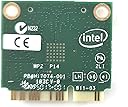
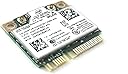
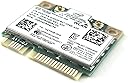
The Intel 7260.HMW Dual Band Wireless-AC 7260 is a high-performance mini PCIe network adapter delivering dual-band 802.11ac Wi-Fi speeds up to 867 Mbps and Bluetooth 4.0 support. Designed for laptops and desktops with half-height mini PCIe slots, it enhances wireless coverage, capacity, and battery life. Featuring Intel Smart Connect and Wi-Fi Hotspot assistant, it’s ideal for professionals seeking reliable, fast, and future-ready connectivity.
| ASIN | B00MV3N7UO |
| Best Sellers Rank | #175 in Internal Computer Networking Cards |
| Brand | Intel |
| Built-In Media | Network adapter |
| Color | multicolor |
| Compatible Devices | Desktop |
| Compatible Operating System Family | Windows |
| Customer Reviews | 4.5 out of 5 stars 1,572 Reviews |
| Data Link Protocol | 802_11_ABGNAC |
| Data Transfer Rate | 867 Megabits Per Second |
| Global Trade Identification Number | 00735858283083 |
| Hardware Interface | Bluetooth |
| Item Dimensions L x W x H | 0.5"L x 0.5"W x 0.5"H |
| Item Type Name | Intel 7260.HMWG.R Dual Band Wireless-AC 7260 Network adapter PCI Express Half Mini Card 802.11 b/a/g/n/ac |
| Item Weight | 9.07 g |
| Manufacturer | Intel |
| Mfr Part Number | 7260.HMWG.R |
| Minimum Required Operating System Version | Windows 1 |
| Model Number | 7260.HMW |
| Product Dimensions | 0.5"L x 0.5"W x 0.5"H |
| UPC | 735858283083 768451100136 012024017124 |
| Warranty Description | no warranty |
L**L
Amazing upgrade to an older laptop... do your homework and ensure it will work in your PC
Perfect replacement for my Dell's B/G/N adapter. Before you try this for your laptop, here's what you need to know; 1. Do I have a 1/2 height mini PCIe slot? Find an exact replacement for your laptop and read the description... if it's a 1/2 height mini PCIe, continue... if not, look elsewhere. 2. Does my laptop manufacturer 'whitelist' components in the BIOS? Whitelist is a method the vendors use to limit your options to only hardware they allow. The questions is a hard one to answer too; I had to google quite a bit to find out the Dell does not whitelist. Your vendor might... If they don't, continue... if they do, consider a USB adapter. 3. Can you get to the card and are you comfortable with the task? Again, google and youtube are your friends... I youtube'd how to replace my wifi card and a perfect video showed me how to remove my keyboard to gain access to the card and how to swap the card. If yes, continue... if no, look elsewhere. I installed the card in my 18 month old Dell Inspiron 17R, Core i3, 8 gig, Win10... I downloaded and installed the Intel drivers from a comment in a review before I installed the card. When I powered back on and booted up, the adapter worked instantly with no additional action required. My 5 Ghz network was immediately available and connected with no issues. Previously speedtest.net put my downloads from Charter at 35 average from my TP-Link AC1750 router. After installing this card and connecting to the 5Ghz network, my speedtest results easily top 120. It's a huge change for $30 and about 15 minutes of actual installation work. I spent about 2 hours googling the various compatability questions and watching how-to videos. Highly recommend this card to anyone willing to do the research ahead of time to ensure it works. The AC speeds are fantastic and I don't have a USB dongle or external card to worry about snagging or breaking.
S**Z
867 Mbps. That's right!
I am thoroughly satisfied with this network card. I was skeptical because I intended to use it on a 2008 Dell Inspiron 1545 (with an Intel processor). I was worried if such a modern (relative to the computer) card would be compatible. I am running Windows 8.1 Pro, so I knew that the drivers were present, it was just a matter of the chipset accepting this wireless card. Other concerns like, if the full bandwidth could be attainable on such an old device were also present. And turned out, none of those concerns were a problem. This card is incredible and extremely backwards compatible. I recently upgraded this PC to Windows 8.1 and just had my WiFi router upgraded to a dual channel, 802.11ac with dual streams. The maximum AC (link) speed advertised both by my router and on this card was 866 Mbps. And if you look at the image on this review, this theoretical link speed was achieved with this card on a 7 year old laptop. I haven't installed Plex Media server after the Windows 8.1 upgrade, however I can not wait to have Plex up and running. My Roku and other plex apps are going to be thrilled. I tried chrome tab morroring on the chromecast and it was almost real time and was flawlessly casting HD videos from Vimeo (I'm not a big vimeo user, but I used vimeo because it streams the video on the computer as it is an unsupported site for direct casting, supported services like Netflix or YouTube would stream directly to chromecast, which would have made this casting test useless). While it beat up my good old Core2 Duo processor, the WiFi card just performs. Additionally, I use Xender app to transfer files between my phone and the PC. Now the app transfers faster than the wired USB connection. Additionally, the card came with a bonus Bluetooth 4.0 LE upgrade, earlier my Bluetooth headset only worked in the room this computer was in and maybe the neighboring room...Now it works everywhere in the house. Even outside. Latest drivers are always posted and updated periodically on Intel's site. P.S: My Internet connection nowhere nears this link speed. My 7 year old card could handle triple the speed of my Internet plan. The reason to have this card was not internet speed, at all. I have an ecosystem of intraconnected devices, that interact with each other. The update to the WiFi router and this upgrade to my laptop takes the intraconnected communications to their best potential.
D**G
Good for Wireless-AC and Bluetooth (not for WiDi though)
[Nov 30, 2014] Summary. This Intel 7260-AC is great for wireless-AC on my HP Envy laptop, with new TP-Link Archer C7 v2 (dual band AC 1750) and my Bluetooth mouse. I found it is best to use only Windows Update for drivers (Intel.com drivers caused Bluetooth random drops). I stopped using Intel WiDi as connections were erratic with hesitation and audo/video stutters. [Nov 30, 2014] Intel WiDi is not usable with Netgear NeoTV Max -- random drops, video/audio stutters. I'm now trying Google Chromecast media player, which uses Wifi-N. [Nov 5, 2014] Quite happy after a week now with a new wireless-AC router (TP-Link Archer C7 AC1750), which replaced my old wireless-G router. On Windows 8.1, the only tweak needed was to set "AdHoc QoS Mode" to "WMM Enabled" on the Intel card, which corrected a WiDi problem of randomly dropping connections. Happily using the Intel 7260's WiDi on my laptop to play web videos such as Hulu and Youtube to my TV using WiDi. Connects as advertised at 300Mbps on 2.4GHz band or at 866.7 at 5GHz band. Strong and fast connections anywhere in my 1200 sf home. I have other devices with no more than 100Mbps connections, so no way to test the max throughput, but those devices are easily maxed out by my laptop now. [Oct 22, 2014] I'll defer on all questions concerning the "Revision" label. I've removed my previous speculative comments. Too little info available. [Oct 16, 2014] The item I received works great. On it is printed "Intel Dual Band Wireless-AC" and "Model 7260HMW", as I expected. No indication of a revision, but the vendor did post a picture of the shipping label showing the dot "R", so I'm fine with that. [Oct 14, 2014] Paid 29.99, received on-time (Oct 11, 2014), non-retail packaging (plastic clam-shell), with 2 useful screws. Sold by Mobile Computing Solutions. This product, Intel 7260HMWG (Wireless-AC, dual-band, Bluetooth 4, WiDi) replaced an Intel 2230 (Wireless-N, single-band 2.4GHz, Bluetooth 4, WiDi). It's only connected to an 802.11g router, but with this upgrade working well, the next step is to upgrade the router. It's also connected to a WiDi display. My laptop is HP Envy Touchsmart m6-k025dx (Intel i5-4200U CPU), Windows 8.1.
J**.
Good Value
Used this wi-fi to upgrade an older laptop. With the turn of a few screws, the old wi-fi card was removed and this unit installed. Worked as designed. It is a good unit and priced correctly.
J**S
No problems on my HP Pavilion G6-2249wm with (Windows 8.1/10)
I've got a G6-2249wm POST 2012 production so I didn't have to worry about HP's infamous and dreaded "whitelist" or a "BIOS restriction that only allows HP certified WiFi cards to be used". This prevents user from easily upgrading their crappy HP certified WiFi cards with good ones like the intel7260. In this case, an upgrade requires the user to "flash" or "mod" their factory BIOS with a sketchy, 3rd party, un-tested, boot-able app in order to remove or modify this "whitelist". No thank you. I highly recommend that all PRE 2012 HP, Levono and Toshiba users do a little research on your laptops specific model to see if you have a BIOS whitelist prior to purchasing the intel7260. Though this upgrade is still feasible it may not be worth your time, depending on your skill level. The installation for my laptop was literally plug and play. I uninstalled the factory Ralink3920 drivers prior to removing and re-installing the new hardware, booted up and just like that everything was working! I tried to upgrade drivers and I got a message that the most recent drivers were already installed! Upgrading from a Ralink3920 to an Intel7260 was like upgrading from the "Wright Brothers" first flying machine to a F-22 fighter jet! Went from a lousy unstable 30-72mbps to a stable 144mbps using wireless N. Also, NO more Bluetooth audio dropouts! The Ralink Bluetooth was garbage would hardly work even from 3 ft away, the Intel has a range of at least 10 ft or better! I do notice while using Bluetooth and Wireless N at the same time, my WiFi bandwidth will sometimes fluctuate between 144mbps and 130mbps. My internet connection maxes out at 60mbps so for all basic purposes, this is minimal interference and completely unnoticeable unlike my experience with the factory Ralink. I haven't tried on a wireless AC network yet, but I certainly plan on upgrading to an AC router shortly. Perhaps with the extra bandwidth l will be able to simultaneously stream to a Bluetooth audio device and 1080p over a wireless AC router to my VGA projector server! Wishful thinking.
J**R
Works great in Linux Mint, also Win 10 (if you find the drivers)
I've re-purposed an old (2010) Asus P50IJ as a Linux Mint machine and been pleasantly surprised how much I've enjoyed the OS. The original 802.11n card needed an upgrade. This Intel 7260.HMW surprisingly included a half to full mini PCI-E adapter that I needed. Linux Mint (Virginia 21.3) seamlessly utilized the new WiFi card on reboot along with new Bluetooth capability. The WiFi router connects at 5 GHz, so enjoying the simple pleasure of an easy upgrade. Put my Windows 10 ssd back in and it was a challenge to get a stable connection on the latest v.18.xx drivers. It would intermittently randomly drop and/or revert to 2.5 GHz (802.11n protocol). Ultimately, I reset the network settings and used the v.17.15.0.5 driver, which was successful. Win 10 requires a separate Bluetooth driver that was easy to find online and less finicky (all versions worked). Getting real world Speedtest >400Mbps WiFi download, not bad for basic tier service on EOL legacy hardware.
D**C
Breathed New Life Into An Old System
Given an older Toshiba Satellite P55-5200 laptop. The 2.4 only Intel Centrino N-2230 wireless card had to be replaced to maintain sanity in a 5G world. Replaced it with this Intel 7260 HMW and the results were excellent. Also waiting on a new SSD drive but in the meantime, ran Linux Mint 21.2 locally using USB and with a Core i5, saw the same 5G test results as my Marvell card running in my Surface. Also, supported my Bluetooth Arc mouse very smoothly unlike before. Once the new hard drive is in, going to try Windows 8.1, but I think that is the last version of Windows that supports this card naively. At least, that's what I'm reading, so beware if you are running 10 or 11 as there may be no drivers to support the 7260, even from Intel. Hopefully, another reviewer will read this and correct me if I'm wrong. Linux however, piece of cake and happy surfing! Update: Card supported and performs well using Windows 8.1. Update: Used the same card for an upgrade to a Dell Precision M6700 while also upgrading to Windows 10. Card performed well in wireless but Bluetooth completely disappeared. Problem was solved by understanding that this particular model of Dell originally came with Broadcom Wireless and Bluetooth. The Intel windows BT driver obviously doesn't work with a Broadcom BT device and you must install the Broadcom BT driver. I located it on Windows Update and installed it. Bluetooth works great now.
S**N
Did not work
Did not work.
L**A
Surprisingly good quality. I will buy more when needed.
Works well, but are not on all Lenovo white lists. Double check before you buy.
J**Z
Very good
Súper power
M**L
Compatible avec Toshiba C660
Compatible avec le Toshiba à condition de télécharger le driver sur le site d'INTEL.
A**W
just what I needed great value works well real fast charging
got this to so I could change to 5G WIFI on my desktop
N**.
Great for Linux, bad drivers for Windows 7
I bought two of these in 2019, to upgrade the wifi on a 2009 laptop (Core 2 Duo) and an older netbook (Atom). Both wifi cards still work great in 2023. I maxed out in all specs in the laptop, and the wifi was one of the things I wanted to upgrade from WiFi "N". Back then I still had my Windows 7 as a "just in case" OS, but the Intel wifi driver was garbage with it (I removed Windows as a result). With Linux Mint, it ran at maximum speed, the wireless range improved significantly, it was a delight to see the old laptop so fast in networking. At the moment of writing this review, I'm doing a network backup through it, and it keeps going at maximum speed. The same performance brought the even older netbook into modern days. I don't need that for CPU power, but the fast wifi was perfect for what I wanted to do with it. The bluetooth also works great on both, this is a solid card and I'm happy with it almost 4 years later. If you have an old laptop with poor wifi, upgrading it is well worth it.
Trustpilot
2 months ago
2 weeks ago