🔧 Upgrade Like a Pro — Stick with the Best for Your iMac!
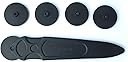
LeFix Replacement LCD Panel Adhesive Tape Strip Sticker Kit is a precision-engineered solution for iMac 21.5'' A1418 models (2012-2015). It includes six exact-fit adhesive strips and a professional opening cutting wheel tool, enabling clean, damage-free screen removal and resealing. Packaged securely to maintain adhesive integrity, this kit ensures a durable, dust-free bond for flawless display reassembly after repairs or upgrades.
| ASIN | B07H32CHBJ |
| Best Sellers Rank | #11 in Computer & Mobile Device Repair Kits |
| Customer Reviews | 4.6 4.6 out of 5 stars (2,335) |
| Date First Available | January 24, 2018 |
| Is Discontinued By Manufacturer | No |
| Item Weight | 1.76 ounces |
| Item model number | A1418 |
| Manufacturer | LeFix |
| Package Dimensions | 16.54 x 2.05 x 0.51 inches |
D**D
Works perfectly fine
I recently had to upgrade the hard drive in my iMac and of course, had to take off the screen and needed these adhesive strips. They seem to work perfectly, but I did have to trim one of them down because they are off just a little bit. But not so much that it made a big deal or a big difference. It would be nice if they were a little more helpful with telling you where to put each one of them they kind of just say starting in the left with one and work your way around, but they don’t really lineup completely. Either way they’re a great value for money and they did the job.
T**R
Great product
Exactly as advertised and worked great on 2013 iMac 21.5"
A**S
Simple to use
It was a perfect fit for my late 2013 model 27" imac; very easy to install and secures the screen well.
E**I
Works great. Take your time.
If you take your time, this works perfectly fine. Test Mac before closing everything up. Make sure to scrub off any residue from the metal body and the glass case with a towel and rubbing alcohol, maybe even a plastic spudger. This took me about 40 minutes to be 100% certain it was clean. Don't grab the screen with your oily hands all over the edges as that will make it not adhere well. After installing the screen, LAY THE MAC ON ITS BACK!!! Use a towel to press down all around the display. Either use a heat gun from a distance on the front and rear or turn on the Mac and play a high res video on it for a few hours. Maybe use clamps and towel/sponge on the corners. I had it rest like this overnight just to be safe. The 2nd time I took apart the same mac, I cracked the screen (barely visible when on), so I guess the tape works very very well. I would also recommend using zip ties or something to hold down the sata cable to the ssd if that's what you're doing. I had it come off very slightly loose after 4 months, causing it not to boot (flashing folder with ?).
D**D
Works perfectly... One Caveat
I've been working with and building computers for over 35 years. I will say that replacing the Fusion drive in my 27" iMac was intimidating to me even after watching some YouTube videos of folks who made it look extremely easy. There's something about using a heat gun and scraping tools to get remove a delicate display screen that made me pretty nervous. I will say the single biggest reason why I purchased these strips was the tool that comes with them that you slide in behind the glass to break the seal on the old adhesive. It really is like one of those kitchen tools my mom used to have when making an apple and she had this wheeled hand tool that would poke holes in the crust. That tool made it so easy, once you applied the heat to the glass to just roll along the edges and separate the glass from the old adhesive. Without this tool, it was going to be like using tire-irons to replace an inner-tube on a bicycle. The adhesive strips are the perfect amount of really sticky but not so sticky that they are unforgiving if you have to pull it back up and fix a mistake. I would have given these things 5 stars had they simply included a diagram that explains what strip goes where. Nowhere in the box were any instructions and the strips must go in very specific locations when installing them as they are cut to fit into those exact spaces. I did find a YouTube video that explained where they go but I think a piece of paper showing where each piece goes would be helpful to folks who have not done this before. If there were instructions, this would have been a 5 star review.
P**Z
Articulo llega en el tiempo estipulado y en buen estado
D**D
Facil de utilizar y muy util
J**.
Highly Recommended
Highly Recommended
D**H
Fits perfectly
I**S
Alles bestens
S**O
Ottimo per aprire e riposizio a pannello schermo imac.
S**N
Nachdem ich meinem iMac eine SSD verpasst habe, musste das Display neu verklebt werden. Für mein Modell genau passend inkl. Aussparung für das Mikro unten.
A**ー
きれいに形状に応じカッティングされていて使いやすいです。このような製品の中には施工後モニター部分が脱落したという怖いレビューもあるようですが、念のため黒いマスキングテープ でしばらく本体とモニターの接合部を補強しておけば私の場合は大丈夫でした。ちなみにマスキングテープ はさほど目立たないのでそのまま剥がしてないです。
Trustpilot
1 month ago
5 days ago