Buy anything from 5,000+ international stores. One checkout price. No surprise fees. Join 2M+ shoppers on Desertcart.
Desertcart purchases this item on your behalf and handles shipping, customs, and support to Indonesia.
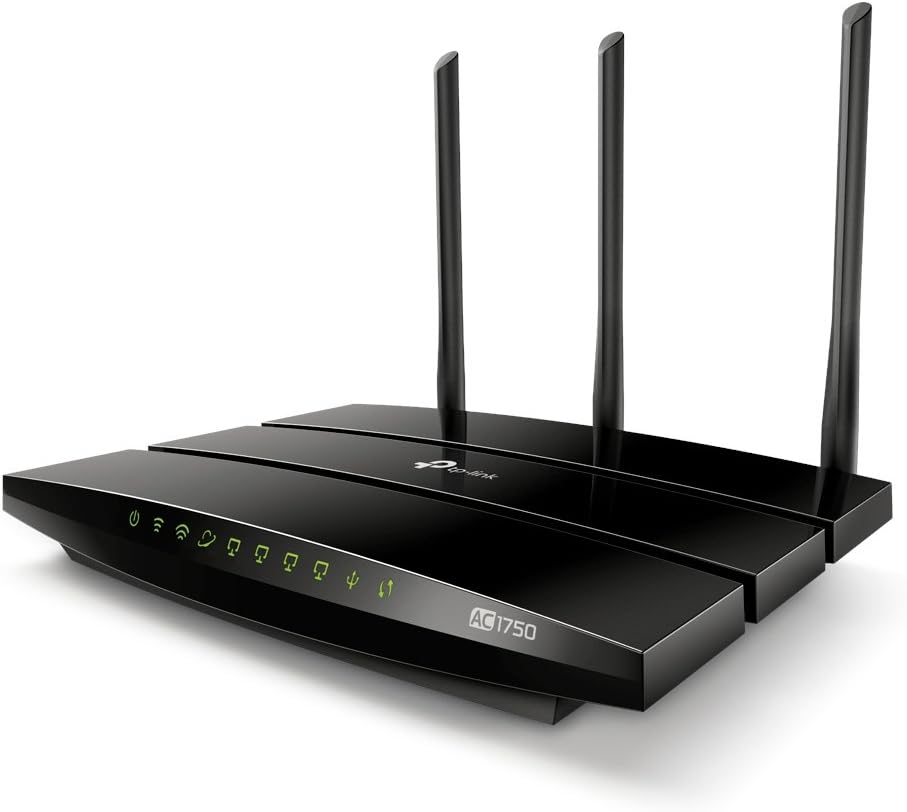
🚀 Upgrade your WiFi game with Archer C7 — speed, control, and security in one sleek package!
The TP-Link Archer C7 AC1750 is a dual-band wireless router delivering up to 1.75 Gbps combined speed with 5 gigabit Ethernet ports and dual USB 2.0 for media sharing. It supports the latest 802.11ac standard, offers guest network access, IP-based bandwidth control, and is compatible with OpenWRT for advanced customization. Ideal for professionals seeking reliable, high-speed connectivity and smart network management.


| ASIN | B00BUSDVBQ |
| Antenna Location | Indoor/Outdoor |
| Antenna Type | Internal |
| Best Sellers Rank | #71,339 in Electronics ( See Top 100 in Electronics ) #500 in Computer Routers |
| Brand | TP-Link |
| Built-In Media | Routers, hub, networking |
| Color | WiFi Router |
| Compatible Devices | Tablet |
| Connectivity Protocol | ethernet, wi-fi |
| Connectivity Technology | wireless |
| Control Method | App |
| Controller Type | vera |
| Customer Reviews | 4.2 out of 5 stars 18,795 Reviews |
| Data Transfer Rate | 1750 Megabits Per Second |
| Frequency | 5 GHz |
| Frequency Band Class | Dual-Band |
| Global Trade Identification Number | 00845973070601 |
| Item Dimensions L x W x H | 9.57"L x 6.32"W x 1.28"H |
| Item Part Number | Archer C7 |
| Item Type Name | TP-LINK Wireless Dual Band Gigabit Router (Archer C7) |
| Item Weight | 0.51 Kilograms |
| LAN Port Bandwidth | 10/100/1000 (Gigabit) |
| Manufacturer | TP-LINK USA |
| Maximum Upstream Data Transfer Rate | 1300 Megabits Per Second |
| Mfr Part Number | Archer C7 |
| Model Name | Wifi Router |
| Model Number | Archer C7 |
| Number of Ports | 5 |
| Operating System | Microsoft Windows 8/7/Vista/XP/2000/NT/98SE, MAC OS, NetWare,UNIX or Linux. |
| Other Special Features of the Product | Alcohol-Free |
| Security Protocol | WPA-PSK/ WPA2-PSK |
| Smart Home Compatibility | Smart Home Compatible |
| Special Feature | Alcohol-Free |
| UPC | 845973070601 971736088382 |
| Unit Count | 1.7 Ounce |
| Voltage | 110 Volts |
| Warranty Description | 2-year. |
| Wireless Communication Standard | 2.4 GHz Radio Frequency , 802.11a/b/g/n |
| Wireless Compability | 2.4 GHz Radio Frequency, 802.11a/b/g/n |
L**Z
Awesome!
This will be kinda long, since I like the product and I'd like to give the review this product deserves. First of all, why I needed a new router? The router my ISP gave me dropped connection sometimes when I had about 5 wireless client and 2 wired clients. So now all that router does is feed Internet to my new router. I made sure to assign DMZ to the router so I can have full management of ports as well. The router I received, and of course that I'm reviewing, is V2. (Most of the apple problems with this device is from V1, but it seems TP-Link can RMA them with a V2 if you have problems with it) Now, my Internet connection. ATM it's optical fiber with about 10Mbps download and about 4Mbps upload. Needles to say that this router can handle that without any problem at all. Now, some of my devices, their capabilities and how they are connected. (All wireless connection are 5GHz unless specified otherwise) 1.- PS3 CECHA01, connected to the WUMC710 (Which is an ac client) wired 1 Gbps. 2.- PS3 CECHA01 connected directly to the router. Wired at 1 Gbps. 3.- Nintendo Wii U connected as n client. 2.4 GHz and 150 Mbps (Support for 5 GHz is only for the gamepad) 4.- Nintendo Wii connected as g client. 2.4 GHz and 54 Mbps. 5.- Nintendo 3DS connected as g client. 2.4 GHz and 54 Mbps. 6.- Nintendo 3DS XL connected as g client. 2.4 GHz and 54 Mbps. 7.- Media connector WUMC710 connected as ac client. Rated as 1300 Mbps, but really showing 1170 Mbps. 8.- HP dv2125la laptop connected as a client (a/b/g capable). 54 Mbps. 9.- Custom desktop (2006), wired at 100 Mbps. Also wireless as n client 150 Mbps. 10.- Xperia Z2 (D6503) smartphone connected as ac client. 450 Mbps~433 Mbps. 11.- Xperia Tx (LT29i) smartphone connected as n client. 150 Mbps. 12.- Samsung Y S6310 smartphone connected as g client. 2.4 GHz and 54 Mbps. I'm only mentioning them because it's a great variety, and I haven't experienced any problem at all with any client. I also have one DS and one DSi, but since those don't support WPA2 they are connected wireless to my old router. I tested them with WEP once and they work OK, tho. I'm also planing to get a PS4 at some point, but this will share the WUMC710 with the PS3. I don't want to use the PS4's wireless because IMO it has a crappy antenna. In the USB ports I have: 1.- Toshiba HDD 500GB 5400 rpm 2.5" with USB 2.0 2.- HP Photosmart D7160 with USB 2.0 (This is not listed in TP-Link web page, but it works like a charm) About performance, I haven't been able to test the Ethernet at its full capacity (1 Gbps), since I only have the PS3 with 1 Gbps connection at home (I have a newer desktop, but I moved it to my school since I spend a lot of time there due my Masters It has 1 Gbps and ac 2x2 at 867 Mbps). But I've tested 100 Mbps and as expected, they work OK and at full speed. Ping times to wired devices is less than 1ms. To wireless, it depends on the signal, but the average is about 10ms, which is good, if you ask me. The router has a "Diagnostics" tab where you can ping any device in your network or even web pages. The max speed reported is in the WUMC710, but I cannot fully stress that connection. This is a 3x3 ac client. So technically, it can take the most advantage of the wireless of this router. On the USB department, the printer has like a 10 sec delayed, compared when it was directly connected to the desktop. But once the work starts, it's the same time. I can stream full HD content (about 6 Mbps) with 5.1 channels to the PS3 or the Xperia smartphones without any buffering time. This was not possible for me before with g clients (expected). This router is DLNA capable. The storage is accessible as well from my computers and smarphones, but max writing speed is about 8 MBps. It's not a limitation in the ethernet ports per se, but I'm guessing the USB port is not as fast as it could be. USB 2.0 can give speeds of about 30 MBps in laptops/desktops. I won't complain here, since there are devices with worse performance in the USB ports. Range: Even while A/N/AC (5 GHz) has less coverage, I can see good signal in every room that I need it. My house is about 100 square meters and the router is in the center, more or less. B/G/N work OK, even when the antennas are internal. Setup: With at least little knowledge about network, it takes about 5 mins. You don't need the CD that comes in the box. Extra: Make sure to install the latest firmware. It'll let you use the TP link tether app. This router has a 2.5 A, which is enough for powering HDD with the USB. Since I wanted to install OpenWRT I also checked the full specs of the router. Here are some: CPU: MIPS74Kc@720 MHz Flash: 16 MiB SPI Flash model: Winbond W25Q64FV RAM: 128 MiB RAM model: Winbond W9751G6KB-25 x 2 Wireless 1: QCA9558 (QCA9558-AT4A) 3x3 b/g/n Wireless 2: MiniPCIe: QCA9880-BR4A 3x3 a/n/ac (This is what changed from V1. V1 is: MiniPCIe: QCA9880-AR1A 3x3 a/n/ac) Wired: GbE AR8327N-BL1A 2 USB 2.0, It suports Serial and JTAG (Programing ports) From this specs I can tell that it has a decent CPU, and good RAM and Flash. So I should be able to install different packages and run them in the router. This router is fully supported by OpenWRT. Sadly for the moment I don't have time to "play" with it. It also does almost everything I'd need, so no need atm. (I'd love to have a torrent client in the router, tho. Possible with OpenWRT) If you think I missed anything, let me know in the comments. I can check it and modify this review. I'll update it once I finish my Masters and my desktop is back home. L8er!
L**O
Excellent Router that Punches Well Above its Price Point -- Buy It
I found this router through a third party website review (the Wire Cutter), that aptly called this, "the Best Wi-Fi Router (for Most People)." I would probably amend that title and say, "the Best Wi-Fi Router (for Virtually Everyone)." Do not let the low price fool you into thinking it's an entry level or low-end model. It only costs around $100 but, from my observations against four other routers that cost considerably more, it performs well beyond its price point. I have purchased a number of routers over the years as the technology and performance improves, and the number of devices my family uses has increased. Over the past few years, I had migrated to the more expensive ($300+) routers in the hopes of greater performance. Right before this, I had an Asus RT-AC5300, a beast of a router that exceeded $400 when I bought it. But what I found was that as the price point goes up, the performance does not, and the reliability goes down. These expensive routers tend to be buggy and drop connections; they simply have too many features and are way too complex, all to provide functionalities that no one uses, or that none of your connected devices support anyway. The ASUS got so bad it was rebooting itself every few hours. The days of the rock-solid Linksys WRT54G seemed long gone... So I returned the ASUS RT-AC5300, gave my WRT1900ACS to a friend, and bought an Archer C7 (v2). After two weeks of testing it, I have four words: it just works -- period. The signal is strong and punches through the lathe-and-plaster walls of my nearly 100 year old house. Its signal is considerably stronger than the WRT1900ACS that I had (which cost almost three times what this one did), and rivaled the signal strength of the $400 ASUS. It doesn't drop connections, doesn't reboot itself, and delivers a strong and steady stream of data to all devices, wired and wireless. Only one word of warning; you need to make sure the Archer C7 that you purchase is NOT a first version. Everyone on the web has reported that TP-LINK badly botched the V1, especially for Macintosh/Apple devices (which is most of my house); most of those should be out of circulation or in landfills by now. The one I bought from Amazon was a V2, and it works perfectly with all of my Apple and non-Apple devices.
P**E
Thank you TP-LINK, this is is a great router.
Thank you TP-LINK, this is is a great router. I have had it running for almost 3 weeks now.two iPhones, one Samsung Galaxy S4, one Chormecast, two wired computers. I have Cable Service provider with speed of 60mbps download and about 6-7 mbps upload. Out of the box, the router worked like a charm. I upgraded the firmware to latest to be able to load their Tether software. At first I did not like Tether but I like it now. It tells me who is connected to the router wirelessly or via wired. This is good to know. This is not a cloud based router so this information is available when you are home using not when you are at work or some other place. Before I purchased this router, with my old wireless N router, using my Galaxy S4, I always had wireless signal issues. A lot of talk on Internet about the GS4 wireless issues but with this router, it is solid. I get 5 bars no matter where I am at. Of course, I use 5GHZ AC with my GS4 but 2.4GHZ also works very well. Signal bars never drop any more no matter where I am at. iPhones 5C as well, they work very well. My son is into gaming and he loves this router. The latest firmware also fixed the wired speed problem. I was getting about 25mbps with old firmware that came on it, after upgrade, now wired speed is up to 60mbps. Even though I did not see it mentioned on TP LINK site, I am sure they fixed it. I use Linux Ubuntu. I was able to connect a flash drive to the USB port and use the "SMB://IP Address" to connect to that flash drive. This is great. I can upload my stuff onto the USB drive.The only issue is that the USB ports are 2.0 specs and not 3.0. Not a big deal for me, speed of 2.0 USB is good enough. The look of the router is also very nice. I really like it. Lights flash too much. I agree with another person who said this also. But not a big deal, I like it. I think it has its own personality. Link lights are available for all the 4 gigabit ports. This is a plus. On, off button for wireless even though I wished it was in front or on the side for access. I paid below $100.00 Dollars for this router. A comparable name brand AC router like this (1750) runs for about $150.00 Dollars or more. I also emailed their tech support and their response was fast and on time. They were very professional and wanted to work with me. However, I figured out my problem and resolved it. Considering that this is not a router that was released a while back, it is way ahead of its time. The only reason I give this router 4 stars and not 5 is that I get about 30-32 mbps download speeds on 2.4GHZ N side of it. I expected better, close to 40 is what I would like to see. But again it is not a signal strength issue. I can live with that. For those people that can not get their devices work with this router, you need to play with settings. I see lots of "My Printer did not work or did not connect wirelessly....." it is not always the router that is in fault. Router has many settings that can be changed to work with your devices. If you can not make it work, then get someone to help you. Just like anything else, tweaking is sometimes needed to make devices talk to each other. Strongly recommended, I will also look at other TP LINK products in the future.
B**T
Terrific Router! If your looking for a solid
Terrific Router! If your looking for a solid, stable, up to date, quality router at a fair price with the bonus of being priced better then the competition then this is the router for you. I installed the TP-Link AC1750 in my home a few months ago, after realizing that my well liked Netgear N300 was getting a bit overwhelmed by the dozen or so devices in my home that connects to it at any given time. I am as happy as I could be with the TP-Link ac1750. Of course I read all the reviews on Amazon and also in the press. The router has performed as well and as best/better as I could have expected. I think the price is a bargain in todays world of WAY grossly overpriced routers. The TP Link been rock solid stable and more then sufficient using our 3 Ruku players, Channel Master, 2 desktops, 2 laptops, Ipad, 2 wifi cell phones when we are home, Ooma home phone line, Epson Printer, Magic Jack (getting rid of that, Ooma rocks) plus our daughters wifi stuff when home from college and whatever else I am forgetting! Set up was extremely easy and I have found the interface MUCH better then I expected, some people have said the interface seemed dated/confusing, honestly I found it very refreshing, very informative, full of options/extremely complete and simple to use. Maybe its just me but seems like some people need to see buttons and symbols in programs instead of straight forward words. Anyway, I fell in love with the interface, very complete. A little background, I am in the security industry and work with customers routers almost on a daily business for their home security cameras, you cant believe the junk or outdated routers I see in most houses, including the garbage that the internet providers give their customers, they all do their job for light duty stuff but easy can get confused with the more demanding stuff, range being a big issue. So what I am saying is I only wish they all had this TPLINK router, if they did our job would be a lot easier and more trouble free for the customer. The price is a bargain and no reason to settle for less by buying a name brand that you may feel more comfortable with. Im into electronics, computers, etc and service and install security systems and cameras, I have no relationship with this (TPLINK) company, nor have I ever used their products before, well, I am sold, as long as they produce products like this at really good prices I will be a customer, I was so impressed I also bought their Cable Modem, once again, I could not be more happy with its performance, I actually at all times get a better advertised speed then I am paying for, normally you get slightly less speed depending on time of day, I always get slightly more speed. Anyway, I just wrote this short review for anyone like me who reads through countless reviews before buying something. If your reading this, I can tell you, if you buy this router, you will be happy and it will perform just as good and better then the "name brands" at 50% more cost. Am I saying this is the best router in the world? No, I am saying at this price point I do not think any other name brand router will beat its stability and performance at cost of up to 50% more. I will say, now owning TPLink cable modem and this router that I am sold on TP Links products and if I were to ever upgrade I would certainly look into purchasing another one of their products. Right now this combination is working very well in our 3000 sq ft home. Update - April 2018 __ We have owned this router for 2.5 years now. It has been rock solid, I have been computing for 2 decades now, this is the most stable router I have ever owned. We have no less then over a dozen wifi devices running in our home, including 4 Roku streaming boxes. This router (and our internet connection) performs flawlessly, honestly never even have to reset it. If your shopping price, without exception I dont see how you can buy a better router for under a $100. Im not saying not to buy something more expensive, but just think for the average home up to 3000 sq ft this one does a job well done. TPLink has made a believer out of me, as far as their routers and modems go.
D**D
Don't waste your time. There are far better options out there. - UPDATED
UPDATE: I am keeping the router, and actually like it again. I'm leaving the 1 star review, though. TP-Link customer service was BS, as I explain in the old review below. What caused me to change my mind about the hardware? LEDE Project started building OPENWRT firmware for this device, and I tried it out. It blows the stock TP-Link firmware completely off the battlefield. This is now my primary router and it works fantastically. If you have a chance to pick up the Archer C7 V2, and don't mind fiddling with the firmware, get it. If you don't want to mess with it, I suggest you go with Ubiquiti. I know that reddit suggests buying this router quite often, but don't take that advice. This router has no configuration settings for Quality of Service (QoS). This means that streaming, gaming and voip do not get any sort of priority over downloads or other low prio traffic. This also means that if your ISP suffers from bufferbloat, you are screwed. I have a 100mbps download speed from my cable company, yet wired streaming is interrupted by wired game downloads. This is unbelievably bad. To add to this, TP-Link has now taken a stance against aftermarket firmwares such as DD-WRT or OpenWRT, so even if you wanted to go in yourself and fix these game-breaking issues, you are unable to. I am beyond my return window, so I am actually going to donate this piece of junk to my office for use as a wireless access point only and will buy a router that's got basic features included. EDIT: TP-Link responded to my review and asked for an email discussion. So I contacted them, they asked me to paste my review into the email, which I did. The response was to give me a link on how to use their awful "bandwidth control by IP", as some kind of half-butt work-around for QoS. Option 2 was for me to buy the TP-Link AC2600 router instead, which has updated firmware and actual QoS settings. This is a joke. First time buying anything from TP-Link, and definitely the last time. 1 star review remains. 11-8-2016 UPDATE: I decided to replace this router with an ASUS AC68u. Night and day as far as performance and options. I have not had a single problem. Here's where the Archer continues to woe me. I relegated it to a wireless access point by turning off DHCP and NAT, plugging a LAN port wire into the main router and setting the SSID/passwords the same, and putting the wireless broadcasts on differing channels from the main router. This is similar to how I had it set up with my Netgear as the AP and the Archer as the main router. What a piece of junk. I understand android phones don't have roaming built in for access points on the same network. But this Archer AP now actively boots me off for a few minutes, even with all roaming features disabled. I've relegated this pile of trash to being an expensive 4 port dumb switch for my kid's room. I will absolutely not buy another TP-Link product again. This one piece of equipment and stand-off p*ss poor customer service that went with it is enough to keep me away for life.
L**H
A very good choice for high speed WiFi.
I purchased one of these in March 2015 to replace and old Linksys 802.11g WiFi router that was failing, after trying a Netgear unit that just didn't do it for me, and loved it! It's an attractive unit, though a fingerprint magnet if you leave it where it can be touched. This unit is impressively fast and can handle a heck of a lot of devices. I have around 18 devices attached to it at any given time. Typically these are 3 Bose SoundTouch speakers (the 130 + two 10s + WiFi/Internet adapter), 2 to 3 laptops, 2 tablets (Android and Amazon Fire), a PS3, Xbox 360, a Panasonic smart Bluray player and Viera Smart TV, a high end PC, 3 smartphones (iPhone 6, Android and BlackBerry Z30), an Amazon Fire TV (with Amazon Prime, Hulu and Netflix subscriptions) and an Amazon Echo - it handles them all, and more, without a hiccup. When guests come over there are no hassles at all. I have all of this running on a 32MBit unlimited internet link. My first unit was replaced by Amazon hassle-free when it failed after 6 months even though it was outside the stated warranty period and they weren't under obligation to do so. (Amazon has always treated me right - which makes me a loyal customer.) It started to act erratically and required constant reboots, and would cause various networked devices in my household to act up, even to freeze. The new unit has been running for 2 or 3 months without a hitch, stable and reliable as you would want it to be, which led me to realise there were issues with the first one from the beginning, though I hadn't realised it. The 4 Gigabit Ethernet ports are a fantastic addition, I have it paired with an 8-port TP-Link Gigabit switch and performance is top notch. Interestingly, at the local TP-Link office the staff use the Archer C7 as their office router. That says a lot right there, and they have 20+ devices attached to it. That said, TP-link service wasn't exactly falling over their feet to replace the unit for me or help me get it repaired when they learned I bought it on Amazon, though they did have have a tech check it and informed me that it was permanent failure and replacement was the only option. They told me to email the repair centre in China for help, and wished me good luck. Their service is a tad poor, as has been noted elsewhere in the reviews and comments. I stream Deezer (discounted Bose offer), Pandora, Internet Radio services and YouTube, sometimes from 2 or 3 different devices at the same time - it's never been an issue. The web interface is easy to use, and it's easy to do firmware updates. It was simple to set up, though I wish there was a VPN option. I would love to connect the Archer C7 to my VPN server as a client and then connect my mobile devices through it. This is the one feature I feel it is lacking. Other than that this is a great unit, with excellent performance. The 5GHz signal does not reach as far or penetrate as well as the 2.4GHz signal - which is normal. Still, it's powerful and I have no issues in my apartment. despite the walls. I moved the 2.4GHz Channel to one that is unused by other WiFi routers in my vicinity (you can select 1- 14) and have a constant, steady signal. Other reviews discuss other features and so on, but this is what I use it for with at minimum 18 devices and over 20 on occasion. Should you buy it. Yes. If it breaks, will Amazon replace it? Yes Can it do what it says on the box? Yes, and then some. ** For those who may consider replacing the firmware with OpenWRT, the V2 firmware works perfectly with the replacement. The caveat, as I have learned is that performance (overall link speed, not range) may be affected. I would recommend the stock firmware for optimal performance. This affects the Gigabit Ethernet throughput as well as the WiFi from what I can gather. I've just bought another TP-Link, the C20i AC750 as a Christmas gift for a friend who needs a replacement router. So despite my first router having hardware failure and the questionable service, I'll risk it. The Archer C7 experience has left me feeling positive about their products.
B**M
The C7 solved 3 major network headaches
I have been looking for many months for a solution to solve these 3 problems: 1. The Amazon Echo disconnect issue (with ATT-DSL modem) 2. Monitor and manage a family home network and not only assign bandwidth, but also LIMIT USAGE per device 3. Improve signal strength, consistency and reach throughout the house to connect multiple devices After extensive research, I ordered this router and I am happy to report that it solved all my above problems: Ad 1: We got frustrated that our Echo kept disconnecting constantly to the point that it became unusable. I researched this problem and the issue seemed to be the interaction between the ATT-modem when one also uses the ATT-modem as WIFI-router. After installing the C7 as the router (turning the WIFI-mode on the ATT-modem off and directly connecting the C7 via CAT5-LAN cable and making the C7 the WIFI-router) the problem was immediately fixed. NOT a single disconnect ("Sorry, I am having trouble understanding you right now") came up since the C7 took over. Ad 2: Like many, we have a monthly cap on our home internet and with multiple devices and family members streaming video, we often went over that limit and incurred additional charges. For many months I looked into how I could 1. find out who uses the most data and 2. how to allocate and limit data usage per user/device to avoid the overage fees. Unfortunately the only solution that kept coming up was installing and maintaining a home proxy server and route all traffic through the proxy. A major headache....I just wanted a router based (simple) solution. I eventually came across the "Gargoyle Router Management" firmware and I can happily report that this router works perfectly with this firmware. I followed the instructions and replaced the original firmware with the Gargoyle (do this at your own risk, as this may "brick" your router and void the warranty) and I can now monitor usage data and assign data usage caps for the whole network through the router interface. Most routers do have parenteral or user access controls, but none I came across could truly assign USAGE limits (most only let you put limits on TIME, BANDWIDTH and WHITE/BLACK-listing sites). This custom firmware lets you do all this PLUS assigning DATA QUOTAS. The issue is that not every router works perfectly with the Gargoyle firmware (some have 5GHz-issues etc.), but the C7 works great and I could not be happier. Ad 3: Before the C7, the ATT-modem also served as the WIFI-router an we had to buy a "range extender" to get the signal everywhere. After installing the C7, I was amazed to find out that we could eliminate the range extender! Since the C7 is connected to the ATT-modem via LAN-cable, it is in the same location, and still delivers a constant, strong signal to places that we could only reach via the extender before. Now, I cannot report how the C7 performs with the built-in, original firmware, but with the Gargoyle firmware running I solved 3 major headaches within an hour that I think many of us experience these days. This router can even pay for itself, if you consider eliminating overage fees (or "distribute" the fees to the responsible parties because now you know who the data hogs are, if you don't want to set the router to disconnect the internet once the limit is reached) and also not needing the range extender in my case. I even looked into the high end router category, but even those would have needed the Gargoyle firmware (none had the data usage cap option built in). And "bricking" a 300+ dollar router was not an option. Summary: The C7 not only solved 2 major headaches immediately on the first try (that usually never happens), but as an added bonus helped me eliminate my range extender. I am one happy customer!
J**F
Mediocre Router at Best
10-1-15 Sent this router back for a refund. Like I previously stated I think its a good router for someone that lives in a small home or apartment but for a large home and where good range is needed it just didn't live up to my expectations. Update: 9-25-15... I am now changing my initial review. Initially, I wasn't pleased with the range of this router and I was praising the Netgear R7000 but this is what happened. I had already thought about returning this router and was going to keep the Netgear Nighthawk R7000 but what I learned was this: I was streaming some live sports via my Roku 3 on the 5GHz band with the Netgear Nighthawk; the router was in the same room as the Roku and wouldn't you know it! started dropping connection every two to three minutes and this was with the firmware up to date. I immediately disconnected from the 5G and connected to the 2.4 G and the dropped connection went away but that was a big disappointment! my whole purpose of buying an AC router was to get some of the congestion off the 2.4G because I have several devices that can use the 5GHz band. So I plugged the TP-Link back up and connected the Roku 3 to the 5 GHz and it didn't drop the connection not the first time.... I even went into my living room which is about 25 to 30 feet away and was able to stream on another Roku device without any dropped connections. So even though the range may not be everything I was hoping for with the Archer C7 what I've learned is that its connections are very stable and fast! In the end, the expensive Netgear Nighthawk went back to Staples and I may be keeping the TP-Link.... to be honest ,I had never had good luck with Netgear anything and this time was no different. For the price, the Archer C7 is a great deal and as stated in the first review I like that it has a 2 year warranty and free 24/7 tech support; there aren't too many others that offer that. It seems as this point that the great review this router received on the wire cutter.com website is a fair review. 9-19-2015 (Initial Review) I bought this router based on its high recommendation from the wire cutter. I received the router yesterday and it didn't take me long to make a quick decision to send it back for a refund. This was my first time buying a TP-Link product and may be my last. I live in a one story ( ranch style ) home that is approximately 1500 square feet. The set up out of the box was very easy and straight forward and I had no issues setting it up with my cable modem and configuring my networks and connecting my devices. The router seemed to be of good quality and I really liked the black, sleek look that it has and the antennas were very sturdy compared to others I have attached to other routers. Also this router seemed to run very cool and didn't even get warm.... At first everything seemed fine and I really wanted to like this router because of the specs and price as compared to others. Things went south whenever I started testing out the signal strength (range) in various places in my home. I don't have the greatest setup as my cable modem for my internet is at the far end of my house in my bedroom. Reviews had suggested that the 5GHz band on this router was very fast and strong but when I tested it in my living room that just wasn't the case unfortunately. I connected my roku and the signal strength was " good" and at times fell to "poor"... I also tested the 2.4GHz and it was ok but nothing great. I did all of this testing after immediately disconnecting a Netgear R7000 that I bought a week ago.....I wanted to see if the great claims of this router would live up to its expectations as I paid nearly double for the Netgear Nighthawk and TP-Link also had a better warranty ( 2 years) and 24/7 support as where Netgear has 90 days of phone support and a 1 year hardware warranty. This router didn't even come close in performance to the Nighthawk, particularly with the wifi range. I think if you live in a small apartment or small to medium house this router would serve your needs just fine but if you live in a large home its best to just pay out the extra and invest in the better routers. I guess its true you get what you pay for as it was in my case. I understand everyone has different environments and what may work well in my home may not in yours but in my situation this router just didn't live up to expectations. Even my older Asus RT N66 had better range than this router. I hope my review will help some others out there.
P**É
Produit conforme, fonctionne très bien comme relais
Utilisé pour prolonger mon réseau wifi et avoir des ports ethernet supplémentaires, le routeur remplit pleinement sa fonction. Après avoir un peu tâtonné à l'installation (1er démarrage long), le résultat est très satisfaisant. La première étape était de le basculer en mode point d'accès, puis copier coller le SSID et mot de passe Wifi de la box dans les paramètres du routeur : il n'apparaît alors plus q'un seul réseau auquel les appareils se connectent automatiquement sans que j'ai pour le moment rencontré de problème de bascule (MacBooks et iPhones). En ethernet j'ai connecté ma box TV HD 4K qui fonctionne sans aucun problème ou bug. Mais je n'ai pas testé le débit exact par rapport à celui de la box. Les test de débit Wifi sont concluant et dépassent régulièrement 200Mbits (l'image postée est un peu le débit mini). J'ai souvent un upload plus fort que mon download donc il me reste quelques paramétrages à creuser... Dans tous les cas, il remplit sa fonction d'extension de wifi et de hub ethernet : les débits sont suffisant pour tous les usages, y compris un téléchargement rapide (un fichier de 2,5Go en 3mn en wifi). Enfin au niveau tarif, le routeur était en promo à 56,10€ et Amazon offrait 10€ pour toute commande supérieure à 50€ : au final cela me revient à 46€10, un tarif imbattable. Difficile de ne pas être satisfait ! Si mon avis vous est utile, cliquez, cela fait toujours plaisir !
S**)
Mejoró el wifi y el alcance. Con muchísimas funciones. Tope de gama.
PUNTOS POSITIVOS: - El router doble banda más rápido que he probado hasta ahora. - Muchísimas opciones de configuración en el panel del administrador. - Servidor DLNA, Servidor FTP, Servidor de impresora USB, y Servidor de almacenamiento. - Puede emitir a 2 frecuencias (2,4ghz y 5ghz). *En mi caso mi portatil no reconoce la frecuencia de 5ghz aunque el movil (Nexus 5) si. La frecuencia de 5ghz es la recomendada para por ejemplo streaming de video o juegos online (al no tener tantas interferencias con otras redes wifi o aparatos electrónicos). Puedes desactivar alguna de las frecuencias si no las necesitas o si tus aparatos no la reconocen. PUNTOS NEGATIVOS: - Tamaño físicamente grande (mayor que otros routers que he probado). - El panel del administrador puede resultar algo confuso (de tantísimas opciones que tiene y la manera en que se organizan). Cuento mi experiencia: Hace tiempo mi proveedor de internet me aumentó la velocidad a 50 megas y me tuvo que cambiar el router antiguo por uno que soportara una mayor velocidad (Netgear CG3100D). Todo fue “más o menos” bien, con la excepción de que: 1)No llegaba el wifi al salón de mi piso (no es exageradamente grande, 90m2). 2)la velocidad se reducía un poco con respecto al cable (en principio normal, ya que por wifi siempre llega menor velocidad). 3)A veces se “trababa” cuando había muchas conexiones al mismo tiempo y había microcortes de conexión. Hace muy poco se me aumentó a 200 megas, y la cosa fue peor: No me llegaba ni un 30% de la velocidad contratada por wifi, etc y seguía sin tener acceso al wifi en el salón. Este router: 1) Mejoró la cobertura wifi del piso y ahora tengo wifi en donde no llegaba. 2) Aumentó considerablemente la velocidad de internet (sigue sin llegarme el 100%, pero si el 60%). 3) Tiene muchísimas opciones que en principio no sabía ni que existían. La instalación básica fue muy sencilla. En la caja había un mini-cd (también se puede descargar desde su página web), seguí los pasos tal como indicaba y listo. Los usuarios más avanzados pueden meterse en el panel del administrador a través de su explorador (en mi caso 192.168.0.1) y cambiar las opciones que deseen, pero para los que somos novatos la instalación standard a través del mini-cd fue una maravilla y en 10 minutos lo tuve montado. Como curiosidad en páginas web especializadas comentan que TP-Link usará de ahora en adelante la nomenclatura "Archer" para los routers con el estándard ac (último standard de wifi lanzando en 2013). ALTERNATIVAS: TP-LINK TL-WDR4900 Una buena alternativa. Al sacar el Archer han reducido bastante de precio este modelo (80€ en diciembre 2013). Sería un router que no se adecúa al último standard ac pero que para muchos otorga un rendimiento más que de sobra (y muchísimas funciones al igual que este. Puedes ver tablas comparativas que proporciona TP-Link para tomar tu decisión de un modelo u otro. ASUS RT-AC66U 139,59€ diciembre ‘13 (envío gratis si eres de amazon premium). Es un poco más caro que el router que el TP-Link que adquirí. Emite doble banda, Gigabit LAN, 802.11ac - 802.11 a/b/g/n/ac, wifi para invitados, multitud de características… y con la garantía de una buena marca referente en la informática como es Asus. Además está en el Top 10 de routers comprados, por algo será…. ASUS RT-N66U 117,71€ en diciembre ’13 (envío gratis por amazon premium) El modelo antiguo del anterior, Gigabit LAN, 802.11ac - 802.11 a/b/g/n… CONCLUSIÓN: El router TP-Link Archer C7 es fantástico y mi experiencia ha sido muy positiva. ¿Merece la pena gastarse más de 25€ por adquirirlo en lugar de TP-LINK TL-WDR4900? Probablemente no, ya que el rendimiento por lo que comentan en los foros es muy parecido. Yo me decidí a comprar el Archer ya que uso internet muchas horas diariamente y no me arrepiento de mi decisión.
Z**R
Incredible consumer router. Add Gargoyle firmware and you have the best consumer router, hands down
I am coming from a TPLink WDR-4300 environment so the bar was already set very high. My WDR-4300 when running other firmware (Gargoyle) was a bulletproof router/AP. Not a single reboot/freeze/crash in months of operation even when my 25/10 connection was saturated. The C7 is a step above and the best rated consumer router/AP by many publications. Some routers costing 5x more only provide marginal performance boosts. I paid $80, a real steal. The C7 happily runs OpenWrt/Gargoyle/DDWRT firmwares meaning you can tailor the controls/logging/protection levels for your network and your clients. Most of these allow you to configure a guest network which is amazing. You can provide access to someone who drops in and not have to worry that your main password will escape into the community, requiring you to reconfigure all your wireless devices, of which I have about 50 on my network. I put the adult children living here on the guest network which I have speed limited them to a paltry 256Kbps (this is about 5x dialup as they have misbehaved in a major disrespectful way and now have to suffer the consequences or buy their own internet service. Sometimes being the older adult is a blast.) Mind you, I've been running the stock firmware now for a month and there's not been a single reboot/freeze or dropped packet on my network. I recommend the stock firmware for non network savvy people. It's fairly simply to configure, not Netgear simple, but not command line impossible. I get 867mbps connection speed on 5ghz AC band with real world speeds of 50+ Mbps when moving files around. This is roughly half of 1ghz wired speeds but the convenience of wireless can't be emphasized enough. The only real shortcoming of this router doesn't even affect me directly. I've noticed/read that compared to other routers GUI controls for child safety aren't as powerful or flexible. You can implement anything you want, but some things require command line configuration which can intimidate. This may be a concern if you're router shopping with child safety as a primary requirement. I'm going to flash Gargoyle in shortly, after it properly supports 5ghz through the GUI. Gargoyle is my recommended firmware for the Tp Link series of routers. I find it bulletproof, incredibly stable, flexible beyond my dreams, and easy enough for a semi techotool like me to understand. So, TP Link router + Gargoyle firmware = perfect consumer router at unbeatable price.
R**L
Werkt goed en simpel te installeren
Deze ruim 8 maanden in gebruik als een accespoint voor wifi in het hele huis. Ik heb een nieuwbouwwoning en dan heb je tegenwoordig geen of een matige wifi op sommige plekken in huis. Ik heb eerst verschillende wifi versterkers geprobeerd, maar een accespoint werkt voor mij stukken beter. De TP link is super makkelijk te installeren en geeft een sigmaal op 2,4 en 5 g hertz. Helemaal top.
L**A
Great product
Good product, took only few minutes to get it up amd running, improved signal strength and fast delivery.
Trustpilot
2 weeks ago
1 day ago