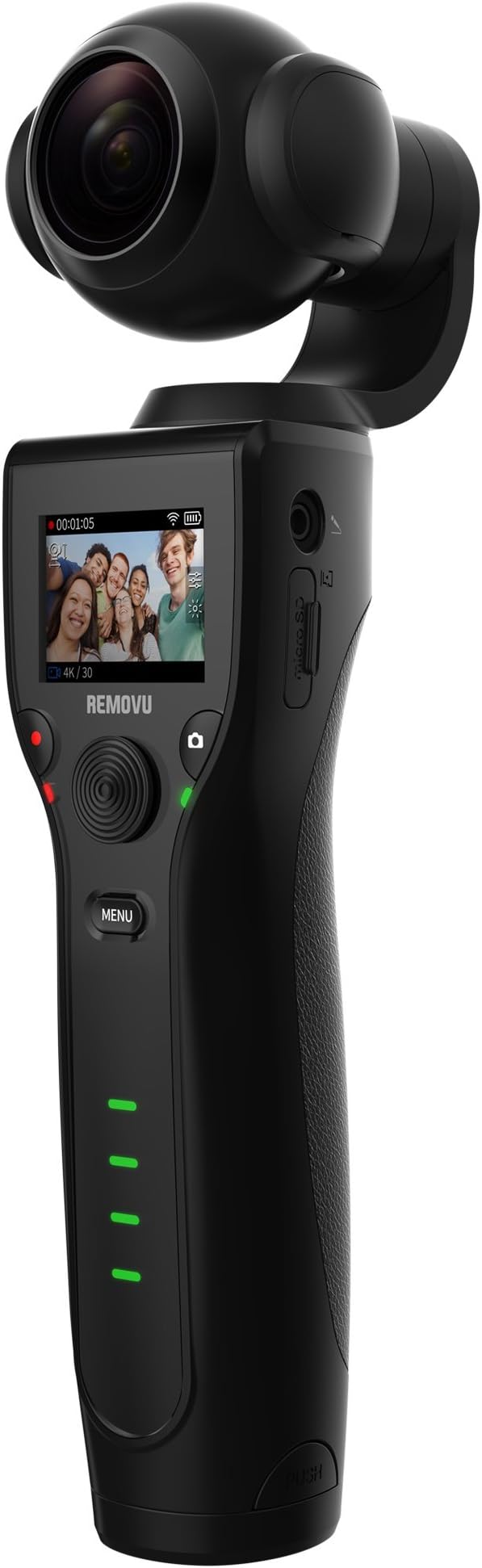


REMOVU K1 4K Video Camera with Integrated 3-Axis Gimbal Stabilizer
Product ID: 78945272
Details
- ColourBlack
- BrandRemovu
- Compatible DevicesCamera
- Item Weight12 Ounces
- Global Trade Identification Number
Review: REMOVU-K1 camera - I have one Removu-K1 camera which is presented by relative from USA. I want the necessaries for the above camera like Base Charging Stand, Extra Battery, Tripod, USB Reader and Lens cleaning pads. Review: Gut, wenn das nicht wäre.... - eigentlich, ein Produkt was gut verarbeitet ist und dennoch erhebliche Schwächen aufweist. Die Aufnahmezeit ist in allen Modis begrenzt Bei 4K lächerliche 30sec und dann braucht das Teil auch noch Ewigkeiten zum wegspeichern der Daten. Etwas anders sieht es bei anderen Auflösungen aus: 2560 /60P = 0:42 Sec 2560 /30P = 01:21 Min 1080 /P60 = 02:41 Min 1080 / P30 = 07:48 Min Das alles, kenne ich von meiner Gopro 7 nicht, obwohl die Bildqualität bei der K1 besser ist. Aber was nutzt es, wenn ich die Scenen nicht im vollem Umfang aufzeichnen kann, nichts. Auch die dazu gehörige App hat Handlungsbedarf, man kann nur einzelne Clips herunterladen. Ich habe bei Removu Support eine Anfrage gestellt, mal sehen was heraus kommt. Der Support hat innerhalb von ein paar Stunden geantwortet, sollte so nicht sein. SD-Karte gewechselt und alles läuft. Danke für den schnellen Support, hätte ich nicht erwartet. Also, schön aufpassen, welche SD-Karte man herein schiebt!! Passt in fast jede Jackentasche und die Qualität der Clips sind außerordentlich gut, besonders nachts.
| ASIN | B075VK1MK3 |
| Aspect Ratio | 16:9 |
| Audio Recording | Yes |
| Brand | Removu |
| Brand Name | Removu |
| Colour | Black |
| Compatible Devices | Camera, Cellphone |
| Customer Reviews | 3.5 out of 5 stars 153 Reviews |
| Effective Still Resolution | 12 MP |
| Exposure Control Type | Automatic |
| File Format | MP4 |
| Global Trade Identification Number | 08809430040745 |
| Has Self-Timer | Yes |
| Item Weight | 12 Ounces |
| Manufacturer | samsung |
| Manufacturer Part Number | RMK1 |
| Media Type | Micro SD |
| Model Number | RMK1 |
| Screen Size Unit of Measure | 1.5 Inches |
| Video Capture Resolution | 4K |
B**I
REMOVU-K1 camera
I have one Removu-K1 camera which is presented by relative from USA. I want the necessaries for the above camera like Base Charging Stand, Extra Battery, Tripod, USB Reader and Lens cleaning pads.
G**S
Gut, wenn das nicht wäre....
eigentlich, ein Produkt was gut verarbeitet ist und dennoch erhebliche Schwächen aufweist. Die Aufnahmezeit ist in allen Modis begrenzt Bei 4K lächerliche 30sec und dann braucht das Teil auch noch Ewigkeiten zum wegspeichern der Daten. Etwas anders sieht es bei anderen Auflösungen aus: 2560 /60P = 0:42 Sec 2560 /30P = 01:21 Min 1080 /P60 = 02:41 Min 1080 / P30 = 07:48 Min Das alles, kenne ich von meiner Gopro 7 nicht, obwohl die Bildqualität bei der K1 besser ist. Aber was nutzt es, wenn ich die Scenen nicht im vollem Umfang aufzeichnen kann, nichts. Auch die dazu gehörige App hat Handlungsbedarf, man kann nur einzelne Clips herunterladen. Ich habe bei Removu Support eine Anfrage gestellt, mal sehen was heraus kommt. Der Support hat innerhalb von ein paar Stunden geantwortet, sollte so nicht sein. SD-Karte gewechselt und alles läuft. Danke für den schnellen Support, hätte ich nicht erwartet. Also, schön aufpassen, welche SD-Karte man herein schiebt!! Passt in fast jede Jackentasche und die Qualität der Clips sind außerordentlich gut, besonders nachts.
S**O
Peoblemi nelle panoramiche
E' il secondo che acquisto e il secondo che rendo, il prodotto sarebbe eccezionale, se non avesse il difetto di perdere l'0rizzonte durante le panoramiche e gli spostamenti destra/sinistra sia con movimento manuale sia con movimento tramite joystick, anche durante i motion time-laps, cosa che rende inutilizzabili i filmati. Utile invece lo zoom 3x, mancante in altri prodotti similari (tipo il DJI). Se venissero risolti questi problemi, probabilmente dovuti al softweare, lo ricomprerei.
D**S
An excellent product. Well ready for prime time!
I ordered the Removu K1 as a pre-release item on Amazon. While I impatiently awaited its delivery I watched every review I could find on YouTube, read all I could about it on internet. Not one person had a meaningful bad thing to say about it. I already had a Smooth Q smartphone gimbal from Zhiyun that does an adequate job, but its software left much to be desired, it was cumbersome to install the camera (leaving me with an empty phone case to carry around or lose), and was just inconvenient in general. And, besides, it was bulky; too easy to be bumped by passers-by when in use. So, more often than not, when packing my gear for the day, the Smooth Q was left on the shelf, collecting dust. I was tempted, several times, to opt for the DJI Ozmo+ but, while the software seems to be more robust, in the end it also suffers from the same bring-your-own-device requirement that killed my joy with the Smooth Q. And, to boot, the Ozmo+ is even bulkier than the Q. So the K1 hit all my checkboxes, with its all-in-one design including a usable built-in LCD display, large enough to show me what I need to see. When the K1 arrived on 7-March (more than a week earlier than expected), I couldn't wait to unpack it and put it to use. Packaging The Removu K1 is packaged in a minimalistic box containing only the bare essentials: the camera, a carrying pouch, one battery, an operator's guide and a USB cable. I also ordered the accessory kit, which includes a lens protector, LCD screen protector, charging dock, cleaning cloth, a wrist strap and a microphone. For the omnidirectional microphone, there is a foam windscreen and a fur ("dead cat") windscreen. First use I charged the battery overnight, so cannot say how long that first charge took. Finally, in the morning, I was ready to start putting it through its ropes. I turned it on, and within about three seconds it was ready to go, with its reassuring beep. I found the menu system very easy to navigate, settings were nicely organized, and easy to change. (That is, except for setting the WiFi password and the WiFi name - something I like to do with every WiFi broadcast device. There is no way I could find, to set these through the built-in menu system; it must be done through the [free] app.) The app for my android phone installed quickly and easily, and connected to the device right away. It provides all the function of the menu system, plus gives me a live view of what's on the built-in LCD display, a nice touch for when doing time lapse, for example. I found the app also to be easy to navigate, and stable. Here I was able to set the WiFi attributes, but otherwise it was pretty much a convenient duplication of what could be done through the unit's menus. Results I am very happy with the results of most of the features of the K1. From a gimbal standpoint, I could expect no better; it smooths out the bumps and makes the viewing experience oh-so-much better than the non-mechanical options. I've tried almost all of the features by now, a week later; I've run it through its ropes and I must say that overall, though my expectations were already high, in general I've not been disappointed. The video quality is excellent - even in fairly low light. The time lapse feature - when given enough time to be meaningful - yields an amazing result. The thing just works. Negatives and Wishes Like other reviewers, I didn't find many ways to improve on this great unit, and what I did find are minor points. It would be nice to have a face-tracking capability - even if that had to be managed through the smart phone. It's not often needed, but would be useful, for example, when following a sports event. For me, the 1080 120FPS slow motion mode seems to produce a jerky result, not the buttery smooth slow-mo I expected. Not the end of the world; for that I just shoot in 1080 120FPS movie mode, and then slow it down in post processing, but I think there is opportunity for improvement here. (Or again, maybe it's just me.) For moving time lapse (a fantastic feature!) I hope that additional "waypoints" may be set. Rather than just Point A and Point B, I'd like to be able to set a few (say up to five) points for it to hit along the way. This would be consistent with what some of the other handheld gimbals offer. Conclusion I don't plan to give up my K1 anytime soon. As I mentioned, the advertisement and reviews hit all my checkboxes, and the unit delivered on the expectation. I'm very happy with it; it's small, convenient, and practical... and it just works. Well done, Removu!
L**T
la camera se fige en enregistrement
j'ai acheté une carte SD EXTREME type A2 64GB AVEC LA CAMERA l'appareil plante en enregistrement IMAGE SE FIGE plus possible d’éteindre l'appareil "il faut enlever la batterie !!!! cela vient il de la carte SD ou de l'appareil LE CONSTRUCTEUR PRÉCONISE UN CARTE DE TYPE A1 Avez-vous eu le même problème????
N**N
Not ready for primetime. Poor footage.
So... how about NO! For $400, I don't think that the redeeming factor of this camera should be the gimbal. The footage from it, as a dedicated camera should be better than what this is giving me. My iphone X and my friend's Pixel record better footage than this does, and their stabilization is on par. The four hour battery ran out after about 40 minutes of footage. In terms of setup, and software, I didn't have any problems importing the files to Final Cut Pro. I did however have an issue with the K1 going into safe mode pretty much every time I turned it on. And, upgrading the firmware was a nightmare. So, overall, I would NOT recommend this. I was looking for something easier than bringing a camcorder to every event, but between software, battery and poor footage, there's no way this is ready for primetime. On a positive note, it's fairly light and portable
Trustpilot
2 weeks ago
2 weeks ago