Desertcart purchases this item on your behalf and handles shipping, customs, and support to Indonesia.
๐ Elevate your drone gameโfly smarter, shoot sharper, and never miss a moment!
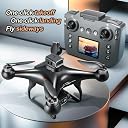
The EcuFlyAi-S116 RC Hobby Drone is a beginner-friendly FPV quadcopter featuring a built-in screen remote control, 1080P dual cameras, and brushless motors for stable, powerful flight. Equipped with two batteries for extended airtime, intelligent flight modes like one-key takeoff, altitude hold, and 3D flips, plus app control and optical flow positioning, it offers a seamless flying experience for adults and kids aged 8-12. The package includes spare parts and a carrying case, making it a complete, ready-to-fly drone solution.


| ASIN | B0FJ2F3LSX |
| Age Range (Description) | Adult |
| Age Range Description | Adult |
| Battery Cell Composition | Lithium Polymer |
| Best Sellers Rank | #617,860 in Toys & Games ( See Top 100 in Toys & Games ) #2,496 in Hobby RC Quadcopters & Multirotors |
| Brand | EcuFlyAi |
| Color | Black |
| Connectivity Technology | Wi-Fi |
| Control Type | Remote Control, App Control |
| Customer Reviews | 3.8 out of 5 stars 21 Reviews |
| Effective Still Resolution | 2 mp |
| Included Components | Four spare propellers |
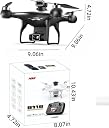
| Item Dimensions L x W x H | 9.06"L x 9.06"W x 4.72"H |
| Item Weight | 160 g |
| Manufacturer | EcuFlyAi |
| Material | Plastic |
| Model Name | EcuFlyAi-S116 |
| Number of Items | 1 |
| Number of Packs | 2 |
| Optical Sensor Technology | optical flow |
| Part Number | S116 |
| Skill Level | All |
| Special Feature | 360 Degree Flip, First Person View (FPV), One Key Rotation, Rechargeable, Speed Adjustment |
| Special Features | 360 Degree Flip, First Person View (FPV), One Key Rotation, Rechargeable, Speed Adjustment |
| Unit Count | 2 Count |
| Video Capture Format | MP4 |
| Video Capture Resolution | 1080p |
| Wireless Communication Technology | Wi-Fi |
S**2
Great Product
Great item. Performed as advertised
B**S
Decent controls, poor camera, still an overall good buy for a practice drone
Drone control is amaizing, However there are some things that need improving Camera fov and quality is very poor, even when viewing from SDcard Landing usually results in tipping when using the auto land buttin Auto avoidence system does not function well But for a small drone, its control is vey good.
D**R
Save your money!
Garbage. Complete garbage.
A**M
Great Value with Two Batteries
This drone arrived well packaged and everything shown in the listing was included. Setup only took a few minutes, and I was able to get it in the air without much effort. I really like that it comes with two batteries because one battery is usually not enough when you're having fun. The extra flight time makes a big difference. The drone flies smoothly, and the brushless motors seem much quieter than I expected. It has been reliable during several flights, and I haven't had any issues so far. For the price, I think it offers a good balance of features and performance.
L**H
Perfect First Drone Experience
I bought this as my first drone and was a little worried it would be difficult to control. Thankfully, it turned out to be much easier than I expected. Features like one-key takeoff, one-key landing, and altitude hold make learning much less stressful. After practicing for a short time, I was already comfortable flying it around my backyard. The remote screen is clear even outdoors, and it's nice not having to rely on my phone. It has been a fun way to learn how to fly, and I'm glad I chose this model.
T**H
Fun Drone for Beginners
I just tested out the EcuFlyAi RC Hobby Drone with Screen Display and dual cameras, and for a first drone, it's really a lot of fun, casual flying or light hobby use. The onboard 1080p cameras let you get video or photo footage (front + down or second angle depending on how you set it up), which is a nice bonus if you want more than just basic flying. One-key takeoff, altitude hold, and 3D flips make it straightforward to control even if you're a beginner, and having two batteries included is great-you get more actual time in the air with your session without waiting forever to recharge. What I like is how feature-rich it is for the price: brushless motor, LED lights handy for low-light flying, adjustable speed modes good for beginners vs. more experienced, and screen-display remote control so you don't have to eyeball your phone for FPV. The option for App control gives you a little more flexibility if you want to experiment with mobile control. The hovering is acceptably stable-not so super free of drift as with the high-end drones, but good enough for casual photography or just fooling with. Overall, though, it feels pretty solid, and for a beginner/teen-targeted small quadcopter-airplane hybrid, it ticks many boxes. To be honest with you, there are a couple qualifications: the build feels quite light, almost toy-grade, so I would avoid crashing or flying in too much wind-not really heavy-duty at all. The camera is good enough for casual shooting and fun FPV flying, but not professional in terms of video sharpness. Also, battery life per flight is modest-more than a toy drone, but less than a dedicated photography drone-and if pushed pretty fast or trying aggressive maneuvers, it can get a little shaky. Long story short, for beginners, younger users, or anyone just searching for a cheap, entertaining drone to learn the ropes on and grab a few shots from the sky-the EcuFlyAi drone is a great bargain. Sure, it won't be replacing those high-end camera drones, but it's a decent entry point compared to its price.
J**Z
Seems to be a durable drone for beginners
If you like controlling things that sometime act like they have a mind of their own, the RC Hobby Drone MAX S116 may be the perfect item for you. I have never flown a drone before, and of course, I crashed it on all my initial attempts to fly it. That is purely me. What this has shown is that the drone is quite durable. I have run into walls, straight into a tree trunk, it even tried to dig into the sod when it landed on its side, yet it is still 100% intact. No visible damage, though there was some sod on the frame. I feel the controls are well laid out but flying the drone takes practice. This is expected and I am getting better. The drone is economical as a learning drone with camera. It has a protected 1080p camera and other flying features. If using the RC UFO phone APP, all the controls can be accomplished via an iPhone instead of the controller. Google bombards you with advertisements. They eventually fall off once the drone is attached via Wi-Fi. I find there are different combinations using the APP and the controller. The controller can be in command and the video on the controller works is turned on, or if the video on the controller is turned off, the APP can display video at a much better resolution using the Phone APP In this situation the APP will not control flight of the drone, even if the controls pop-up on the screen. If the controller light is flashing and the APP is started, all controls are on the phone APP. I have not found out how to adjust the camera angle using the APP, only when the controller is in charge. I need to play with it more. Some of the icons on the APP are still a mystery to me. Example โGestureโ is a 3 second delayed picture that shoots every 3 seconds until Gesture is pressed again. The S116 ships with extra set of A and B blades should these get damage. My question is how do I purchase more, or are they standard? The drone comes in a zippered soft side case which the drone fits into with the Avoidance Detection unit attached to the top, but I recommend removing it to avoid potentially damaging it since it is a soft sided case. Instructions of the controls with the drone are pretty good. Nothing made me go HUH? There is a QR code on outside of the soft sided bag that links to a very important You Tube video. Be sure to watch it as there is information not in the instructions, specifically about replacing blades correctly (A blade with an A blade (vs B) for example). It also goes into deeper detail on some of the items in the manual. It is very understandable English spoken by someone obviously from Asia. I look forward to playing with this more when the weather warms up. The picrure was shot from the drone camera to my iPhone while sitting stationary on the table.
R**3
Great for kids or Beginners
This beginner's drone kit is very complete for an inexpensive kid/trainer set. You get a nice carry case, two batteries, memory card, reader, and cables. You have a choice of using your phone for the display, or using the built in screen on the controller. Each has its advantages. By not requiring a phone, it makes it a very good choice for a preteen learner. The drone itself is put together very well and is much stronger than some I have seen for this market segment. It may not survive two or more learning drone pilots, but it should make it through at least one student training. The controller is rather lightweight and range is a bit limited, but that is ok for this purpose. This quad is definitely best suited for large indoor areas, or VERY calm days outside. It lacks the power and stabilization for strong or gusty winds. The manual is extremely BASIC and doesn't do more than list the name of each control. You are on your own to figure out how to fly it if you are inexperienced. The camera is not stabilized so picture/video quality is dependent on your ability to fly stable approaches and hovers. It is a basic drone, but it has all the basic features you need to learn to use before moving up to a more expensive unit. Better to get your crashes in with this one, than to learn on a unit 10x the cost. For the price of this kit, you can afford to wreck two of them and still come out ahead over a high dollar unit for training. Bottom line, fun for anyone who wants to learn or just putt around.
Trustpilot
1 month ago
5 days ago