We remain fully operational. Our teams are working around the clock to ensure your deliveries continue safely.

DOWNLOAD THE APP


Customer Services
Copyright © 2025 Desertcart Holdings Limited
DOWNLOAD THE APP


Buy anything from 5,000+ international stores. One checkout price. No surprise fees. Join 2M+ shoppers on Desertcart.
Desertcart purchases this item on your behalf and handles shipping, customs, and support to Indonesia.
🌍 Stay connected everywhere — your pocket-sized Wi-Fi powerhouse!
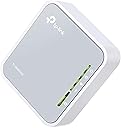
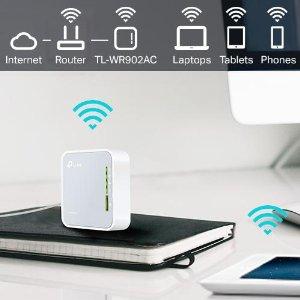
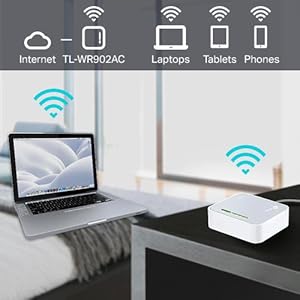
The TP-Link TL-WR902AC is a compact, travel-friendly AC750 dual-band router delivering combined speeds up to 750 Mbps. It supports five versatile modes—Router, Hotspot, Bridge, Range Extender, and Access Point—making it perfect for creating reliable Wi-Fi networks anywhere. With a lightweight design, Micro USB power input, and a USB 2.0 port for file sharing or device charging, it’s engineered for seamless connectivity on the move.



| ASIN | B01N5RCZQH |
| Antenna Location | Home |
| Antenna Type | Internal |
| Best Sellers Rank | #2,451 in Computers & Accessories ( See Top 100 in Computers & Accessories ) #32 in Routers (Computers & Accessories) |
| Box Contents | AC750 Wireless Travel Router TL-WR902AC, Power Adapter, RJ45 Ethernet Cable and Quick Installation Guide |
| Brand | TP-Link |
| Brand Name | TP-Link |
| Colour | 750 Mbps |
| Compatible Devices | Laptop, Personal Computer, Smart Television, Smartphone, Tablet |
| Connectivity Protocol | Wi-Fi, Ethernet, USB |
| Connectivity Technology | Ethernet, USB, Wi-Fi |
| Control Method | App |
| Controller Type | Switch |
| Coverage | Standard |
| Customer Reviews | 4.1 out of 5 stars 9,806 Reviews |
| Data Transfer Rate | 750 Megabits Per Second |
| Frequency | 5 |
| Frequency Band Class | Dual-Band |
| Global Trade Identification Number | 06935364095666 |
| Importer Contact Information | TP-LINK India Private Limited,Green Industrial Park, Dongri Pada, Poman, Kaman-Bhiwandi Road, Vasai East, Palghar, Maharashtra – 401208 |
| Is Electric | Yes |
| Is Modem Compatible | No |
| Item Dimensions L x W x H | 6.7L x 2.2W x 7.4H Centimeters |
| Item Type Name | Router |
| Item Weight Unit of Measure | 0.27 Kilograms |
| LAN Port Bandwidth | 10/100 megabits_per_second |
| Manufacturer | TP-Link Technolgies Co. Ltd. |
| Manufacturer Part Number | TL-WR902AC |
| Maximum Upstream Data Transfer Rate | 375 Megabits Per Second |
| Model Name | TP-link AC |
| Model Number | TL-WR902AC |
| Number of Ports | 2 |
| Operating System | Windows |
| Other Special Features of the Product | Access Point Mode |
| Packer Contact Information | TP-Link Technologies Co., Ltd, South Building, No.5 Keyuan Road, Central Zone, Science & Technology Park, Nanshan, Shenzhen, P.R. China |
| Special Feature | Access Point Mode |
| UPC | 845973095666 840460604789 |
| Unit Count | 1 Count |
| Voltage | 120240 Volts |
| Wireless Communication Standard | 802.11ac |
| Wireless Compability | 802.11ac |
S**U
Tiny, cute, very simple wifi router with capabilities of it's big brothers.
A small square box in white colour. It's design is pleasing. On your table it will look elegant. Extremely easy to set up. Just watch the tutorial video on YouTube. One of my offices is at basement. Mobile network is very poor there. I use an app on my phone that needs constant connection. It was a real headache. One day i noticed a lan port just beside my table. I got an idea. Now with this wifi router my problem got solved. Connection is stable & fast. But i didn't check the range of wifi as it serves my purpose fully. Excellent product.
V**S
A great repeater for college!
I get actually more speed over it , than just directly connecting to router , also ! College Wi-Fi is only usable by using this , so it’s great ! And it allows multiple devices on one login to router so that really helps (in single device allowance cases) , it can be ran with a power bank (almost 3 days on 20000mah) , so it’s the best thing ever , configuration for pop-up login screens may need some digging tho aha , but works
B**H
This review is about the TP-WR902AC Travel Router (Do not confuse with other routers here)
First of all - please get this fact right. The seller has placed multiple routers in a single ad. The Star ratings that you see is an aggregate of all the routers. Therefore, let me first clarify that this review is about the TP-WR902AC Travel Router. Seller has put so many routers on the same page either inadvertently - or deliberately. Either way, it misleads customers. When you start to set up the router, it asks whether you want to configure this as a "3G/4G Router" or as a "Wireless Router". One of my uploaded images clearly shows "3G/4G USB" written beside the USB port. If you are seeing Q&A to understand this router, you will have seen some answers saying that there is no USB port. If you have been to the Q&A section, I am sure you are as confused as I was. Not only does this router have a USB port - the port serves a dual purpose. * In 3G/4G mode, this is where you connect the dongle * In Wireless Router mode, this accepts an external USB which can be accessed by your devices with proper configuration. I have added a screenshot for this too - showing my external USB disk partitions as sda1 and sda2 Configuration is easy - my son (12th std) got to work on a router for the first time and he did it in minutes. Both 5 GHz and 2.4GHz WiFi working excellently (Yes - you will have two WiFi signals from this one, as the AC suffix suggests) If you configure this as a repeater, you will experience loss of speed (as with ALL repeaters - something which I explained in my review of the Netgear EX3110 extender ... search for ASIN: "B07B1B2CZT"). However, in my case I pulled a LAN cable from my main router to this one. This makes it simple to connect - just select "dynamic IP" and your router is connected. I get ISP speed and hence happy about it. Just beside the ethernet connector, there is a switch to select whether you want to share ethernet, share a hotspot or create an Access Point. Signals are very strong (as expected, the 2.4GHz gives higher range while 5GHz gives better Signal-Noise ratio). The 2.4 GHz is reaching a third room about 20 feet away - penetrating two walls. So yes - the signal is good. Three dampeners why I gave one star less: 1. Cable is just about 1 foot long (see image). Now *that* is cost cutting. I had to use an extension board to be able to place it on the table. Plug point is just about a metre higher. Wonder how much profit TP Link is making by saving the cable length !! 2. The MiniUSB charging port is a bit inside - therefore every miniUSB charging cable may not be suitable (it will keep falling off). To get a proper one, you need to see and compare the sizes to buy the longest (This one needs an additional 1mm to fit properly). This is not the only device with this issue - and there are many cables easily available - only you need to physically search for it. Online purchases may not work. 3. This does *NOT* accept third party software. dd-wrt definitely is incompatilbe. OpenWRT includes this under their compatible routers list, but their forum says they lose the 5GHz band. Also - no clarity whether OpenWRT will support the 3G/4G mode. However, the OEM firmware is great in itself offer many options to use. So I suggest you stick to it. The hardware version I got was TL-WR902AC v3 00000001 which probably uses a Mediatek card. The preloaded firmware was 0.9.1 0.2 v008a.0 Build 191209 Rel.57116n(5553). When I tried to upgrade from the India site, it said incompatible firmware and when I googled more to realize that this is probably a US firmware. I tried to upgrade to the US firmware and was told that the router already already the latest, so no changes made here. SUMMARY Pros: Ethernet input, Dual-purpose USB, 3G/4G support and rock solid dual-band signals in a pocket-sized package costing less than ₹ 2000 ... I guess that speaks volumes to help you decide. Cons: Short power cable (1 foot) and no compatibility with dd-wrt or OpenWRT made me reduce one star. I felt that this is truly what it claims to be - a powerful travel router with 3G/4G mode available.
A**H
Wi Fi connectivity issue. Worst call center support. TL WR 902 AC, AC 750 Wi Fi Travel Router.
Very Disappointed. TTL WR 902 AC, AC 750 Wi Fi Travel Router. Product description says it can be used to make WPA2 Enterprise wifi as private wifi. But No support for WPA2 Enterprise PEAP. It actually can not connect to WPA2 Enterprise wifi setup. The worst thing is their call center doesn't take the call even after even 12 rings after a long queue wait when it gets connected to representative, happened twise. They don't know hot to configure. They promised call but never called me. 3 executives disconnected the call after listening to the problem. Even after 8 calls no proper answer as they dont know about their product. The product quality, packaging seems good. But all these are meaningless when the router is not doing what it is supposed to do. Even worst feel is their call center support. On email they never replied till date. Only good thing is this product can be returned.
S**.
Versatile device but has heating issues
Device heats up during usage, setup is okay. I noticed it perform well on the boundary of original range, within signals are not good. Speed is almost same as original marginal dip. Multi functional modes are very useful and make this device versatile.
A**I
Extremely compact but Powerful
This is a great product that TPlink came up with.. It works like charm in different environments.. Use it as a hotspot/ extender / bridge etc Useful in home or travel it is very convenient
D**K
Route your wifi internet signal to lan (device which does not have wifi)
My TV wifi streaming was not working properly as inbuilt wifi adapter only supports 2.4 ghz and my broadband provider was providing better speed at 5 ghz rather than 2.4 ghz. So had to find a adapter or router like this which can take in wifi signal and route it to LAN port. Came across this device and it works like a charm. Also this device supports many other functions like range extender, simple router, hotspot mode, etc.
A**Y
Small and mighty capable with OpenWRT
It does what it says, and is smaller than I imagined. Wish it had an antenna. And damn it supports OpenWRT 🙌🏼
Trustpilot
2 weeks ago
1 month ago