Desertcart purchases this item on your behalf and handles shipping, customs, and support to Indonesia.
🚀 Triple your screen, triple your productivity — Dock like a pro!
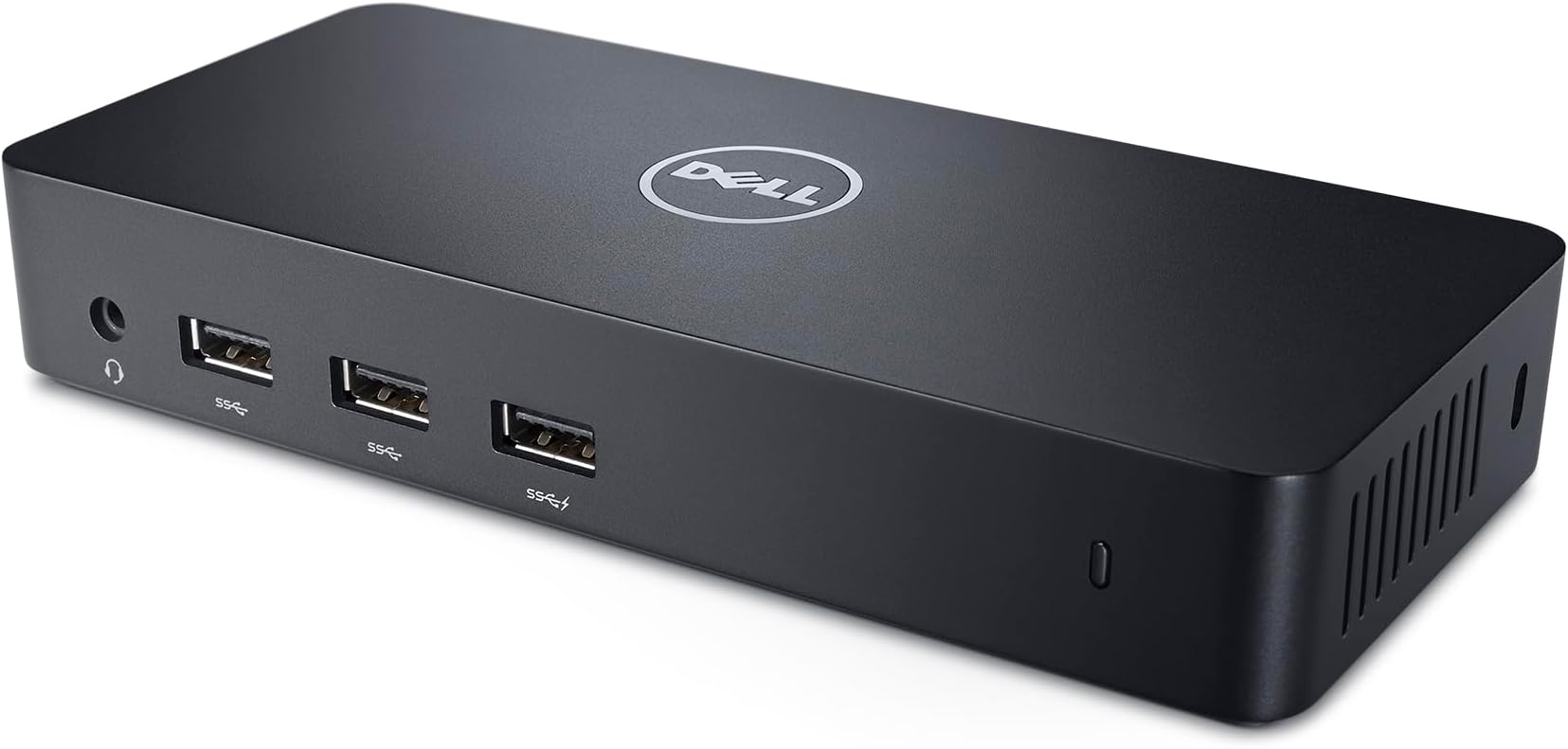
The Dell USB 3.0 Ultra HD/4K Triple Display Docking Station (D3100) is a sleek, black docking hub designed to expand your laptop’s capabilities by supporting up to three external monitors at resolutions up to 2048 x 1152 @ 60Hz. Featuring 7 USB ports (3 USB 3.0 and 4 USB 2.0), HDMI and DisplayPort outputs, and an RJ-45 Ethernet port, it ensures seamless connectivity and enhanced multitasking for Dell notebook users running Windows XP through Windows 10. Compact and efficient, it operates reliably up to 40°C, making it an essential productivity booster for professionals craving a clutter-free, multi-display setup.


| ASIN | B00O0M46KO |
| Best Sellers Rank | #5,583 in Computers & Accessories ( See Top 100 in Computers & Accessories ) #374 in Laptop Docking Stations |
| Brand | Dell |
| Color | Black |
| Compatible Devices | Dell Notebooks/ Tablet PC |
| Customer Reviews | 4.4 out of 5 stars 11,111 Reviews |
| Global Trade Identification Number | 05397063644230 |
| Hardware Interface | USB |
| Item Dimensions L x W x H | 20.7"L x 15"W x 11.2"H |
| Item Type Name | 1 |
| Item Weight | 10.08 ounces |
| Manufacturer | Dell Accessories |
| Mfr Part Number | D3100 |
| Model Number | D3100 |
| Number of Items | 1 |
| Number of Packs | 1 |
| Number of Ports | 6 |
| Product Dimensions | 20.7"L x 15"W x 11.2"H |
| Total Number of HDMI Ports | 1 |
| Total USB Ports | 7 |
| Total Usb Ports | 7 |
| Unit Count | 1 Count |
| Warranty Description | No Warranty |
| Wattage | 4.5 |
T**D
AWESOME! Works great on my Macbook Air, Win 7, and Win8 Laptops!
I am so glad I got this! I have a Dell laptop for work that clicks into a (Dell PR03X) docking station. I hate the docking station. It's just difficult to get the laptop connected to it and the docking station only allows for 2 extra monitors, not 3. So I had to buy an external USB video card for my 3rd monitor. I purchased this as a replacement for my PR03X dock and it's an EXCELLENT replacement. For one thing, I can use it with all my laptops, not just my Dell. I have a Lenovo Yoga (my wife's), a Macbook Air (2011 with OS 10.9 - which required the software from http://www.displaylink.com/support/mac_downloads.php), and my work Dell laptop. All 3 work great with this little hub. And it is pretty small and lightweight. Note: I wasn't really sure how this was going to connect to my laptop(s). It turns out it connects via a typical USB (2 or 3) port. My Macbook Air has USB 2, while my Lenovo Yoga has USB 3.0. Both work flawlessly. However, obviously the extra USB ports the device provides won't operate at USB 3 speeds if you're connected to your laptop via a USB 2 port. Anyway, once you've connected the doc to your laptop (or desktop) via a USB 2 or 3 port, its ready for up to 3 monitors to be connected to it. Two via HDMI and a third via Dell's DisplayPort (which you can get a DisplayPort-to-HDMI adapter if needed). So with the laptop screen this gives you a total of up to 4 displays! The One Con: It seems like video playback might be a little choppy when watching a 1080p video clip on YouTube while connected to a USB 2 port. I'm not sure if this was the internet or a FPS limitation of the USB video throughput. However, it seems to playback video flawlessly using a USB 3 port. So if you're considering this for video work or for gaming and you don't have a USB 3 port to plug it onto, you may find it slightly laggy and you may want to do a little more research. But again, I see no lag using USB 3. But if you want to use typical applications like Word, Excel, PowerPoint, ect. - or in my case a text editor like Sublime Text, this little dock will work great, even when using the slower USB 2.
D**J
Linux users might find something useful here
So far, so good. Initially connected with Ubuntu Gnome 16.04 on a Broadwell Dell notebook, and it was terrible- a torturous, tearing fiasco like you can't believe. Tested briefly with a Win 10 laptop (Ivy Bridge hp ProBook 6470b), and it automagically downloaded everything it needed within a couple minutes, and all was well. I decided to fetch the latest dock driver from Dell's website and push it onto the device while I had the Windows notebook plugged in. No apparent change. Switching back to Gnome afterwards was still unbearable. So I did apt install xfce4, rebooted into XFCE, and it works really well. Tried again with clean installation of Ubuntu 16.04.1 ("normal", with Unity), and it worked surprisingly well too. I don't know what the deal was with Gnome being so awful. It's a shame, too, since I really like Gnome, and it's what I always use on my CentOS and Fedora installations. Dock is currently connecting AmazonBasics A100 USB-powered speakers (consuming a USB 3.0 port and an audio jack), two external 1080p monitors over HDMI, and a USB keyboard and mouse over the two USB 2.0 ports. All is working as expected. I may check back in a few days after I add my third monitor. This setup appears to have very little discernible CPU penalty. Cool bit of kit. Kind of dense for its size, and the underside creates enough friction to keep her pretty still on a desk. Well thought out. 02.06.2017 udpate: I had trouble adding a third external display (all three external monitors are matching 1080p ViewSonic). Can't recall error message, but I couldn't populate the display on a third monitor. I just worked around the issue by running HDMI directly from laptop to one of the external monitors, and I let the D3100 feed the other two (one via HDMI, the other uses a Displayport-to-HDMI adapter for the moment). Just note you may have a problem with three displays. Currently: Ubuntu 16.04 on Dell 5548 notebook, fully patched, tested with and without Intel-proprietary drivers, stock 4.4 kernel. I'm satisfied with the setup, and I don't intend to fiddle with it any further. 03/2017 update: Inconsistent results coming up from sleep state or reboot. Got tired of fussing, so I sold the thing. I'll never buy a consumer-type notebook again, only business-class kit from now on. A proper dock and a computer with proper dock support is worth the spend, to me.
T**A
Great for business, probably not for gaming
So I read the reviews saying this unit ate up come CPU cycles while attached and it is true. I've tested this using a Youtube video, an actual video and general spreadsheet sort of things and here's my findings. First I'm using a new Surface pro 3 i7 (1.9, turboclock to 3.3 dual core with hyperthreading) 8GB RAM with an HP monitor at 1680x1050 of so you can compare the utilization for other devices. Watching youtube, I average about 7.3% utilization full screen on the one monitor. While watching a video capiable of 1080p using VLC I averaged about 8%. to note, VLC player spiked to 10% during playback so the actual player is still utilizaing more cycles. Lastly what seems to take up the most CPU utilization was moving the mouse around wildly peaking at 30%, sustaining around 26% and droping as low as 6%. As for networking, I pulled a file steady through the ethernet adapter at 20MBps (approx 160mbps). I tested with my hootoo usb dongle as well and got the same results so this is more than likley a limitation on my network (guess what I need to track down and fix). Lastly I tested USB using a Lexar USB 3.0 drive (older) and maintained a consistant 34MBps write (approx 272mbps) and 42.9MBps read (343.2 mbps). I didn't list any CPU utilization for these as they used less than 3% at any given time. Overall I'm very happy with the dock though I've only had it for a short while I think it was well worth the money. Also you might be asking why I picked this dock over the one built for the surface. 2 reasons, first this is capable of up to 3 monitors, the surface dock isn't. ALso I have a giant protecting case on the surface which doesn't fit within the dock and I'm not the type to take it on and off.
A**R
Great docking station, but expect driver headaches
Why I ordered this item: My laptop only has two ports and I'm always plugging and unplugging monitors, my ethernet cable, and random USB junk. I wanted one cable to hook up to everything at my desk. Likes: * Setup was quick. I plugged in the one USB cable and Windows found the drivers on its own, no disc needed. * I'm running two monitors off the HDMI ports right now and both picked up instantly. The included HDMI to DVI adapter let me hook up an older monitor I still use for email and Slack. * The ethernet port is a nice touch since my desk doesn't have a wired jack nearby. I ran a speed test and it maxed out my connection, no dropouts. * The three USB ports on the back charge my phone stupid fast. No likes: * Getting three separate monitors going was screwy. Two worked immediately but the third only worked after I dug through Dell's site for a specific driver. * The power brick is huge. Bigger than the dock itself. * There's no USB-C anywhere on this thing, so if you've got newer gear you'll need extra adapters. Would I pay full price for this product: Yes Final thoughts: Both monitors came on right away when I plugged this in, and the extra ports are handy for a cluttered desk. Triple monitor mode is possible but be ready to hunt for drivers. If you're on a laptop with limited ports and older Dell hardware, it's a good way to turn one cable into a full desk setup.
R**N
A game changer devide
As an accountant, I work with multiple excel documents, and I used multiple displays connected to laptop via HDMI and USB-c ports until very recently our company replaced HP laptops with Microsoft Surface laptops. Unlike my previous HP laptop, new surface laptop came with one usb-c port and one usb-a port, which was quite frustrating as I could connect only one external displays. Microsoft offers docking stations for surface laptops with the price starting at $200 which is quite expensive for my budget. After several days of searching for the right device, I decided to try Dell docking station, and I wasn't disappointed. It works perfectly for me, I can connect 3 external displays (1 in laptop's usb-c port, and 2 displays in the docking station, 1 port remains available) which is crucial for my work. The docking station also comes with multiple usb-a ports and 3.5mm audio port which is very convenient. As a warning, the device is not plug & play and not identified by windows on my laptop, I had to download a driver from Dell website. Also I am not sure if this docking station can be used for gaming, sometimes there are lagging issues with the image. Otherwise, I am very happy with this docking station.
J**Y
It delivers
I have 2 screens and 1 laptop and a desktop. I regularly need to share keyboards, mice and one or both of the screens between the desktop and laptop. I have a Dell thunderbolt connection (TB16 docking station). The TB16 only has 1 HDMI and a display port. I bought HDMI switches thinking that I could use a connector to HDMI for the display port. I was wrong. I then found this thing. It is cheaper, has 2 HDMI ports and is compatible with every computer I use. I've used a Lenovo t480, Asus chromebook and the XPS 13 (9360). Ironically, the XPS is the one that has trouble. The XPS does not pick up the ethernet and the dimensions of the connected monitors look funny. The background image is just larger on the monitors but otherwise works well and there might be a way to fix this but it hasn't bothered me enough to figure it out since my wifi connection is strong enough. It is otherwise truly and awesome solution and has eliminated several other more complicated solutions to share 2 screens across 2 monitors (each monitor only has 1 HDMI). It even works with my corsair k95 and logitech g502 (which can be fussy with docking stations). BTW, I only use this for HD not 4K or any higher resolution. Also - I wouldn't recommend going used because the vendors take forever and mine came without the USB type A to type B cord. The HDMI switches that I'm using are the Roofull 5 in 1. I'm also using a USB 3.0 switch (ABLEWE). My only complaint is I wish I would've found it earlier.
D**T
Works perfectly for my needs.
I recently started a new job creating customized SQL procedures and reporting, and my employer provides a notebook for me to work with. While at home, I needed much more screen real estate to be as effective as possible, and I chose this solution based upon my years of experience with Dell products. This meets and even exceeds my expectations. I have 2 27-inch HDMI monitors, and a 32-inch Sharp Aquos that I use as well. The docking station provides only 2 HDMI connections and 1 DisplayPort connection, so I had to pick up a third-party DisplayPort-to-HDMI adapter. I'm using a Gigabit Ethernet connection with this, plus I've connected a USB wireless keyboard/mouse combo through one of the USB 2.0 connectors on the back of the unit. The docking station is connected to the Toshiba Satellite notebook via a USB 3.0 connection. Setup took only minutes and everything works perfectly for me; I couldn't be more pleased. At my office I use a different brand USB 3.0 docking station, but the provided software intelligently knows which docking stations is plugged in at any time and maintains my monitor preferences and defaults without a hitch. What I do doesn't require the same type of horsepower as gaming, but it does require crystal clear, FullHD visuals as I'm often working with tiny text and graphics that must be perfectly aligned in a final product. The fact that this also supports UltraHD gives me an upgrade path to support a future notebook and monitors. I couldn't be more satisfied.
D**L
Not a Universal Docking station according to Dell!
Purchased Aug 22, 2015, Arrived with the DisplayPort not working properly after drivers and updates were verified. Requested a return. Replacement arrived Sept 16, 2015. DisplayPort worked properly for 3 months. Its now January 6, 2016 and display port is dead again. Now I must attempt to contact Dell support directly for my 3rd replacement. I am a computer engineer and can tell you this product was used by someone extremely tech savvy and has been an unreliable failure in such a short time of ownership. What keeps me hopeful that I will eventually get a good one? Well I wanted a USB docking station that would allow me to have 1 monitor with 2560x1440p and another monitor with 1920x1080p resolution in a dual screen setup with the option of upgrading to a 4k monitor later on and still being supported by this docking station. No other docking station on the market right now can support such a setup. So I'm crossing my fingers and remaining hopeful this can get resolved. I'll update my review if it does. My setup: Samsung 27" Monitor hooked up via HDMI 1920x1080 ASUS 27" PB278Q hooked up via DisplayPort 2560x1440 Logitech keyboard Logitech mouse Connected to laptop via USB 3.0 Tested on a Sony S series and HP Elitebook and both fail to pickup the monitor connected via DisplayPort. This product is only compatible with the following systems according to Dell Support: Source: http://accessories.dell.com/sna/productdetail.aspx?c=us&l=en&s=dhs&cs=19&sku=452-BBPG#Overview Inspiron 14 3000 Series (3442) Inspiron 14 5000 Series (5447) Inspiron 15 3000 Series (3541) Inspiron 15 3000 Series (3542) Inspiron 15 3000 Series (3543) Inspiron 15 5000 Series (5547) Inspiron 15 5000 Series (5548) Inspiron 15 7000 Series (7547) Inspiron 17 5000 Series (5748) Inspiron 17 5000 Series (5749) Inspiron 17 7000 Series (7548) Inspiron 7348 Latitude 3340 Latitude 3450 Latitude 3550 Latitude 7350 Latitude E5404 Precision M3800 XPS 13 (9343) Therefore this is not a Universal docking station. Amazon needs to stop advertising as a universal docking station and Dell needs to change their packaging because it says universal dock on their product packaging. Even know anyone who understand electronics knows that DisplayPort, HDMI, and USB are cross industry standards and are not product specific standards. Dell support are completely oblivious to this.
J**N
Awesome docking station
This does everything that I need it to with 5 USB 3.0 slots and the ability to power 3 external displays. This docking station is able to power all my peripherals, my external 8Tb drive, as well as another USB extension with 4 more accessories. The transfer speeds of this docking station is solid depending on the device you link with it. The great thing of this docking station is that it is a plug and play device. This is all done through a USB 3.0 (my model). Pros - can link up to 3 monitors - great transfer speed - minimal delay on peripherals - can plug in LAN cable - can power a 4K display Cons - no charging for your device - slightly expensive I feel that this should be priced 20-40$ lower TL:DR - Great docking station that will get things done
A**.
Can use as hub and multiple display upto 4 max
This product very useful Look is neat clean sharp compact n cool Very simple to use n install Utility - u can remove wire clutter from ur laptop -extra usb ports -most important use is can connect 4 displays Superb product but costwise is expensive
O**N
Sehr gute Universal Docking-Station
Ich habe mir diese Dock bestellt da ich es mit meinem Tablet (Acer Iconia W700) auch als Desktop-Rechner nutzen wollte. Dafür brauchte ich natürlich mehr USB-Anschlüsse (Maus + Tastatur, Webcam, DVD-RW-Laufwerk, USB-Stick...). Zudem hatte ich auch keine Lust jedes mal HDMI-Kabel, 3,5-Klinkenstecker, USB-Hub und Netzstecker an und ab zu stöpseln. Daher habe ich nach einiger Recherche das Dell D3100 bestellt. Zum Dock selbst: - Gut verarbeitet - Kompakt - Anschlüsse sind gut verteilt und in ausreichender Zahl vorhanden - von Lüftergeräuschen oder großer Hitzeentwicklung ist nichts zu merken - etwas schade ist das es keinen An-/Aus-Schalter hat (ich lasse es über eine schaltbare Mehrfachsteckdose laufen, daher ist mir dieser Punkt relativ egal - wäre nur noch besser gewesen) Zur Funktion: - Aufbau, Verkabelung, usw. - alles sehr einfach - Treiberinstallation sollte vor dem ersten Einstecken erfolgen (ich habe mir den Aktuellen von der DisplayLink-Seite geholt) - Audio, USB-Geräte, LAN - alles läuft super Monitor: - Auflösung bei mir Full-HD - per DVI und per HDMI läuft einwandfrei - ich habe den Monitor über ein HDMI-Kabel angeschlossen - ob und wie es mit zwei Monitoren HD oder 4K aussieht kann ich nicht sagen, da ich dies noch nicht probiert habe Von Verzögerungen beim Bild oder verschlechterter Qualität habe ich nichts gemerkt, auch nicht bei HD-Filmen. Spiele von der Xbox One auf das Tablet und somit über die Dock auf den Monitor läuft auch super. Hin und wieder hatte mein Tablet nach dem Neuverbinden mit der Dock eine Verzögerung bei der Erkennung (seit dem neuesten Treibern auch hier keine Probleme mehr).
P**R
Excellent Investment
You will love this especially if you are working from home. I have bought one for me and another one for my better half. We both use 2 monitors, full keyboard, mouse, ethernet (wired). I also use a full blown speaker system, microphone and conference lighting. All work like a charm. I just need to plug in the docking station. Love it.
I**7
Es un muy buen producto.
Es un producto muy útil. Le conecté dos monitores Ultra wide, mis audífonos, un dispositivo bluetooth, cable ethernet y hasta ahora sin problemas. Lo uso con una laptop acer y no he tenido problemas de compatibilidad.
Trustpilot
2 weeks ago
2 weeks ago