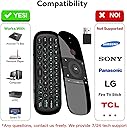
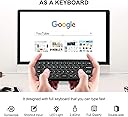
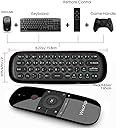
⌨️🖱️📡 Control your screen like a pro—compact, smart, and always connected!
The WeChip W1 Mini Air Fly Mouse Remote combines a full QWERTY keyboard with a precision air mouse, leveraging low-power 2.4G wireless technology for stable, long-distance control. Designed for seamless plug-and-play use across PCs, Smart TVs, Android TV boxes, and set-top boxes, it features backlit keys for low-light usability and an intelligent anti-shake cursor algorithm. Lightweight and compact, it’s the perfect remote for professionals seeking efficient media navigation and quick typing without bulky peripherals.


| ASIN | B07F8SXHJV |
| Best Sellers Rank | 26,187 in Computers & Accessories ( See Top 100 in Computers & Accessories ) 249 in Computer Keyboard & Mouse Combos |
| Guaranteed software updates until | unknown |
| Item model number | sb-sss-sser |
| Manufacturer | WeChip |
| Product Dimensions | 15.5 x 5.2 x 1 cm; 130 g |
G**E
Compact remote with solid air mouse and full keyboard—snappy, lightweight, and plug-and-play ready.
Grabbed this for an Android TV box and occasional PC control—wanted something compact that didn’t need a full keyboard and mouse setup. The air mouse works spot-on once you get the hang of it—responsive, no lag, and tracks clean across the screen. Great for media browsing, YouTube, and app navigation. Keyboard’s small but usable—ideal for quick searches or login entries. Backlit keys help in low light, and the layout’s logical once you get used to the thumb typing. Plugged in the USB dongle and it paired instantly—no drivers, no faff. Used it in the van for media control and at home for a tucked-away HTPC setup. Battery life’s solid, and it charges via micro-USB—quick top-up and back in action. 👍 Pros ✅ Responsive air mouse—tracks clean, no lag ✅ Full QWERTY keyboard—handy for searches ✅ Backlit keys—usable in low light ✅ Plug-and-play—no setup needed ✅ Lightweight and compact—easy to stash 👎 Cons ❌ Small keys—thumb typing only ❌ No volume rocker—media keys are basic ❌ Micro-USB charging—not USB-C ❌ Needs line-of-sight for best signal 🧭 Personal Review If you want a compact remote that handles media, typing, and motion control without the bulk, the WeChip Mini earns its spot. I’ve used it across Android boxes, PC setups, and van media kits—no drama, just clean control and solid build. Proper stash-ready gear for anyone who wants their screen sorted without dragging out a full keyboard.
B**T
Works out of the box in Libreelec Kodi.
I wanted to use a remote for a Libreelec build I had (Kodi as an OS) but also needed basic keyboard as well. I had an MX-3 remote once but like others it suffers from the burnt out 2.4ghz reciever. So I decided to try another one. This works out of the box flawlessly. I can only assume the Libreelec team has ported the keymap into the build. no setup was needed and it is plug and play. Key notes: -the keyboard does disable and only enables when you flip it. -the power button does talk to the 2.4ghz receiver - this was the only button that has different behaviour -everything was supplied -other users report the metal shroud on the usb plug of the dongle coming apart, not happened yet to me but I have used a small usb extension cable to overcome this. keymap the keymap in Libreelec kodi is as follows: Home = Kodi Home (send you to the homescreen) Hamburger (three lines button) = short press is context menu in library, long press is side bar, during playback shows controls Back = does same as pressing backspace and sends you to the previous screen you were in Vol+/- = controls Kodi's Volume up/down/left/right = navigate while in library etc, during playback left and right act as skip (10s to jump through,) up and down also skip (jumps to halfway) OK = short press is the same as enter, long press in library brings up context menu, during playback shows up controls Power = does nothing while the PC is ON, however if you 'sleep' the PC and press it, it sends a power on command and the PC wakes up. some sort of special command. I'll have to see if I can get it to sleep the box. the keyboard uses the US keymap, so I had to change this in Kodi. Additionally there is another blue LED on the side visible when using the keyboard, this lights up when FN is pressed to indicate FN is on. it should be noted that FN is a lock key and not a press to hold. Airmouse was jittery for me, but I expected that in Libreelec. I don't use that anyway. remote buttons are clicky type, rather than soft rubber but in my opinion don't feel cheap and aren't loud either. Decent for the price, chargin cable included. Cons: only issue is the location of the back button, it's not intuitive to have it bottom right. this is ok if you are left handed but not for right handed. needs more buttons, mute, basic playback, and an info button. mouse button could (and should) be moved to a mini button much lower down so you don't accidentally activate it.
J**K
Works but don't trust the manual.
So I bought this for my nvidia Sheild, the original remote had issues, I'd used a button remapper but it was tike to upgrade. I choice this one, purely on price. Anyways, plugging the USB dongle into the shield, and it connected instantly no issues, all the buttons worked as expected. You can navigate fine, home, back, select etc. The top right button brings a cursor up on the screen, again that works fine. Pressing the button again turns it off (cursor disappears a few seconds after you have turned it off) Keyboard function works just like any other wireless keyboard. IR Learning ... this is where the manual is actually wrong, and gives incorrect instructions. The manual says to hold down the power button and ok button for 3 seconds and then press you button you want to program, ie the volume up key. This is not the correct procedure. What you must do, is first unplug the USB dongle from your device. The remote will then flash blue (it's trying to pair) wait until this stops. Now hold the button you want to pair for 3 seconds, and the blue light will rapidly blink a few times. Next point your old remote at the remote and press the key to be learn, again the remote will flash again. And that's it. Repeat this step for each key you want to learn. The manual also says when finished to press the mouse pointer button to save the learned keys, but because the other part was wrong, I dont know if that's also wrong (but press it anyways :) ) I have a sound bar connected to my bedroom tv using optical so can't control the volume with my main remote. Using this function, I was able to program the volume + and - for the sound bar the the volume button. Useful points. If you want to be able to turn your shield on with this remote, you must make sure you enable power to the USB port when the device is in sleep, this can be done in Device Preferences > System > USB port power (last two options). Another useful, key combo to learn which isn't mentioned in the manual is how to factory reset. This is handy if you accidentally program a a button in using IR learning. To factory reset the wechip remote simply hold down OK + Left arrow untilnl the device blinks. Sadly you can't remove the programming of a single button, so you will have to reprogram them all again, but at least you can reset it. So all im all it's an ok remote, works fine on the shield and I am sure other Android devices and similar. And forth price it's not going to break the bank.
E**G
Je l'utilise sur un Rapsberry PI3 sous le système multimedia Kodi, et cette télécommande est parfaite pour cet usage : facile d'utilisation et instinctive, j'ai pu programmer sans problème le bouton/marche arrêt pour commander la télévision... Le clavier a l'air fonctionnel, même si je n'ai pas encore eu l'occasion de m'en servir. Et la finition est très correct, on n'a pas l'impression d'avoir de la camelote en main. J'ai 3 petits points mineurs : - la documentation est très mal traduite... C'est un peu plus compréhensible en anglais - je n'ai pas trouvé si la fonction bouton droit de la souris était disponible - je n'ai pas trouvé la touche TAB En ce qui concerne la souris, ce n'est évidemment pas d'une précision absolue, mais c'est inhérent à ce principe de commande : j'ai le même problème avec la télécommande de ma freebox A part ces petits points, je suis vraiment très satisfait de cet achat
S**I
Lo más importante: Funciona AL INSTANTE (no como mi mier-da de mando por defecto de la Nvidia Shield). Una cosa curiosa... Los botones de volumen son FÍSICOS, nada de táctiles, que ya temía que los tocara sin querer como el mando de la Nvidia. El Air Mouse es lo que es... Al principio te tiembla el pulso, pero al moverlo ya no te tiembla y haces lo que te da la gana. Luego, al pulsar en alguna tecla/icono de la pantalla, no hay que esperar mucho para que no te vuelva a temblar el pulso. ¡Pero me he quedado sorprendido, es súper útil! El teclado va algo duro pero no demasiado. Tiene que ser así para que no pulsemos alguna tecla sin querer, y no le veo problema por ningún lado (bueno, sí, que no tiene la ñ, pero se pulsa la n y se busca por donde haga falta hasta que encontremos lo que queremos). Casi todos los caracteres adicionales los ejecutaremos con la tecla Fn (al estilo portátil). Hay que tener cuidado porque por defecto a mí ya me venía el Fn puesto... Lo he pulsado/desactivado y sin problema. No le veo problema a pulsar el Fn cada vez que tengamos que utilizar algún carácter "de esos azules". No es exactamente como un teclado de PC pero tampoco lía tanto. He probado de cargarlo por el USB y se me ha encendido una luz roja... No sé si eso significa que ya no se puede cargar más o tiene que salir una luz azul o de otro color cuando la carga está a tope. Pero creo que la carga viene a la mitad y es más que suficiente hasta que indique de alguna manera que le falta batería. Para mí, que venía de la birria de mando de la Nvidia Shield 2017, ha sido un cambio brutal.
P**R
Fjärrkontrollen fungerar riktigt bra och ligger skönt i handen. Tangentbordet på baksidan är ett stort plus. Perfekt för smart-TV eller mediadator.
A**R
Usb tv ye taktıgımda tüm fonksiyonlar otomatik tanındı, sadece açma kapama düğmesi ilk aşamada olmadı onu da öğrenme fonksiyony ile tanıttım. Tüm tuşlar akrif çalışıyor (tv: philips oled708). Genel anlamda mouse ve klavye kullanımından ve malzeme kalitesinden memnun kaldım, başarılı bir ürün.
C**I
parfait
Trustpilot
1 month ago
1 month ago