Buy anything from 5,000+ international stores. One checkout price. No surprise fees. Join 2M+ shoppers on Desertcart.
Desertcart purchases this item on your behalf and handles shipping, customs, and support to Indonesia.
⌨️ Elevate your typing game with style and security!
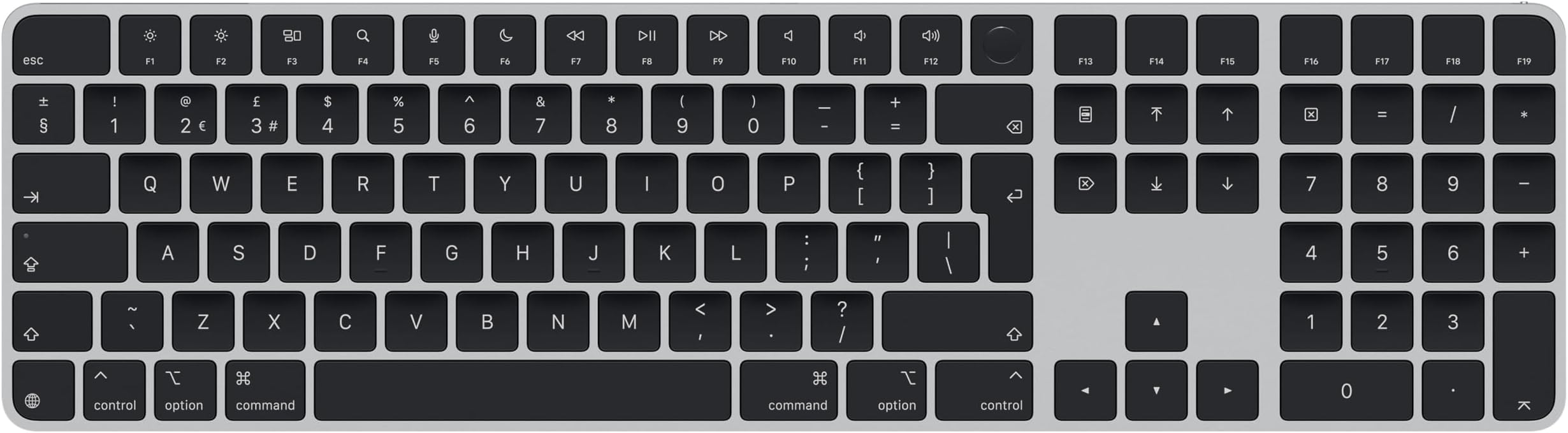
The Apple Magic Keyboard with Touch ID and Numeric Keypad is designed for Mac models with Apple silicon, featuring a sleek black design. It offers secure authentication, an extended layout for enhanced navigation, and a rechargeable battery lasting over a month. Ideal for both professional and gaming use, it pairs effortlessly with your Mac and includes a USB-C Charge Cable.
| Brand | Apple |
| Compatible devices | Mac mini, MacBook, iMac |
| Connectivity technology | Bluetooth |
| Keyboard description | Standalone |
| Special feature | Backlit |
A**3
Apple quality, style and ease of use, especially the Touch ID
The latest version of the Apple Magic Keyboard has taken innovation up a notch, now featuring a sleek integrated Touch ID sensor that merges functionality with state-of-the-art design. This modern masterpiece showcases a USB-C charging port, adding an element of convenience that’s hard to overlook. Accompanied by a delicate yet sturdy USB-C charging cable, which is so thin it seems to vanish on my desk, this keyboard not only serves its purpose but also elevates the aesthetics of my workspace, effortlessly charging everything from my phone to various other devices. When it comes to performance, this keyboard impresses with its remarkable battery life, lasting around two months even with daily use before it calls for a recharge. And when it does need power, it charges quickly. Crafted specifically for seamless compatibility with Mac computers, the keyboard connects with an almost magical ease, syncing flawlessly to enhance the user experience. Its ultra-slim silhouette not only adds a touch of modern elegance but also lends it a luxurious feel that’s delightful to the touch. The quality of the materials is evident, and the typing experience is nearly silent, allowing for distraction-free creativity and productivity. The integration of Touch ID transforms the way I engage with my devices, simplifying the login process and elevating security with just a gentle touch. This feature not only provides peace of mind but also streamlines online purchases, turning an usually tedious checkout process into a breeze. While the price may raise an eyebrow, as is often the case with Apple products, the exceptional quality, stunning design, and outstanding functionality of the Apple Magic Keyboard make it a worthwhile investment. I do recommend the keyboard.
J**S
Great keyboard worth the premium charged
It's apple so you know it will be a great quality product and it certainly is. Keys have a very positive feel and are very responsive. The Number keypad is a great option to enhance laptop use. The bluetooth connection is very robust and never had any problems. The touchID makes sign in and ApplePay purchases or verification simple, more so if you close your laptop lid.
A**M
Expensive but worth it
A high build keyboard which perfectly compliments your Apple machine. Touch ID works well and I don’t have issues with connection. Software should show you when battery is low with a popup, but apart from that I have no complaints. Looks the part, works well, battery life decent enough.
P**N
A Premium Price, But a Premium Experience – A Worthwhile Upgrade ⭐⭐⭐⭐
A Premium Price, But a Premium Experience – A Worthwhile Upgrade ⭐⭐⭐⭐ As expected with Apple, the Magic Keyboard (USB-C) comes at a premium price, but you’re paying for build quality, reliability, and seamless integration. I was hesitant at first, but after fully committing to Apple’s ecosystem, this keyboard has become a key part of my setup. Why I Took the Leap I originally used an ageing 2014 MacBook Air, but over time, I transitioned to an iPhone, M4 iPad Pro (13”), and finally, the M4 Mac Mini when it launched—completing my full Apple workstation. It’s been a big investment, but one I have no regrets about. The Magic Keyboard fits perfectly into this setup, providing a smooth typing experience with a minimalist design that blends seamlessly with my other Apple peripherals. What Stands Out ✅ Comfortable Typing: The key travel is just right—not too shallow like some ultra-thin keyboards, but still quiet and tactile. ✅ USB-C Charging: Finally! No more Lightning cables—charging is simpler and more universal. ✅ Reliable & Consistent: As expected with Apple, the keyboard just works—instant pairing, no lag, and great battery life. ✅ Aesthetics & Build: A clean, premium look that elevates my desk setup. ✅ Fingerprint Sign-In (Touch ID): A game-changer. This was a key factor for me, as it’s the closest thing to iPhone’s Face ID—an absolute lifesaver for quickly authorising logins, payments, and security prompts. With the amount of things we need to sign into daily, this adds so much convenience. ⭐ Final Verdict If you’re already invested in Apple’s ecosystem, the Magic Keyboard is a fantastic addition. I paired it with the Magic Mouse and Trackpad, making macOS navigation effortless. It’s a learning curve switching from Windows, but Apple’s seamless integration has made it an easy adjustment. 💡 Tip: Check out my photos and video if you’re interested in how it fits into a modern, minimalist setup. I promise there’s a picture of the keyboard in there—just look closely 😉 Would I recommend it? If you’re an Apple user looking for a no-fuss, high-quality keyboard with the added convenience of Touch ID—absolutely. 4 stars instead of 5 because of the cost.
J**B
Very high quality
Love the Apple Magic Keyboard with Numpad and Touch ID! It feels lightweight, looks premium, and the battery lasts forever. Typing is smooth, Touch ID is super handy, and the numpad is great for number-heavy tasks. Really solid keyboard — highly recommend!
R**L
'Different' than 'normal' keyboards, but better once used to it!
Keep an eye on the price - it fluctuates so you might have to wait for it to be merely expensive rather than VERY expensive. To be fair, it's not THAT much better than other 'good' keyboards but it's so pretty (I got black as I found a previous white one got grubby) and it has the fingerprint button for purchases and unlocking for the Mac Mini that's arriving soon. I got this rather than the smaller one, partly because I'd really miss the 'delete right' key if it wasn't there, but I find myself using the numeric pad more than I expected. It says 'for Apple Silicon' but every except the fingerprint readers works fine on my Intel MacBook Pro. Annoyances, for which it wouldn't be fair to mark it down... Why don't the American's put " as SHIFT-2 where it belongs??? Takes some getting used to. I use '#' a lot and SHIFT-3 gives £. This can be fixed by setting the keyboard to 'US' (that seems to be the only thing it affects). I often hit CAPS-LOCK when I mean SHIFT, but I think that's just me. It's a different 'feel' to a 'normal' keyboard if you're not used to an Apple one, but quick to get used to and I actually find I type more quickly.
D**R
The Gold Standard for Ecosystem Integration, but Lacks Essential Features and Ergonomics
As a professional who spends 8–10 hours a day at my desk, I’ve used almost every iteration of the Apple keyboard. I purchased this Black Key version with Touch ID to complement my Mac Studio setup. While it excels in aesthetics and "it just works" connectivity, it falls short in a few critical areas that potential buyers should consider before dropping this much cash. Design and Build Quality The build is undeniably premium. The aluminum chassis is rigid with zero flex, and the new black-on-silver aesthetic is much sleeker than the traditional white. It looks beautiful on a minimalist desk. However, the design is a double-edged sword. The Typing Experience (The "Flat" Problem) The scissor-switch mechanism is tactile and responsive, but the extremely low profile is a major ergonomic hurdle. • Ergonomics: Because the keyboard sits almost flush with the desk and lacks adjustable tilt legs, my wrists begin to ache after about three hours of continuous typing. • Travel: The key travel is shallow. If you are coming from a mechanical keyboard or even a high-end membrane board like the MX Keys, you might find this feels "stiff" over long durations. Functionality: Touch ID is the Star The primary reason to buy this over a third-party board is the Touch ID sensor. • Seamlessness: It works perfectly for 1Password prompts, system settings, and Apple Pay. It is significantly faster than typing a long password fifty times a day. • Silicon Only: A reminder for others—this feature only works with Apple Silicon (M1/M2/M3) Macs. The Value Gap (Missing Backlighting) For a keyboard at this price point, the omission of backlit keys is baffling. • In a dim office or during evening sessions, the black keys become difficult to navigate. • Many competitors at half this price offer smart backlighting that adjusts to ambient light. At this premium tier, you expect a "pro" device to have pro lighting. Connectivity & Battery The Bluetooth stability is 10/10. I haven’t experienced a single drop-out. The battery life is stellar; even with heavy daily use, I only need to plug it in via the included braided USB-C to Lightning cable once every month or so. Final Verdict Pros: • Touch ID is a massive time-saver. • Reliable, instant wake-from-sleep connectivity. • Stunning aesthetic that matches the Mac ecosystem. Cons: • Lack of backlighting is unacceptable for the price. • Poor ergonomics (too flat) for long-form typing. • High "Apple Tax"—you are paying for the brand and the sensor, not the typing comfort. Who is this for? If you are a casual user who wants a clean desk and the convenience of Touch ID, this is the best choice. If you are a writer, coder, or anyone typing for 8+ hours a day, you might want to look at an ergonomic mechanical board or a dedicated membrane alternative with a better incline.
R**E
Worth spending the money
You know what they say, buy cheap buy twice. Which is exactly what happened in this situation. I bought a generic keyboard for my Mac mini as it wasn't provided with one (odd) but got so frustrated with the constant unbinding or waiting for it to connect to the Mac that I ended up buying the official Magic Keyboard as well! This is an excellent keyboard really easy to use, comfortable to use and very quick to connect. If you are looking at this thinking is it worth the money I would personally say that it is.
A**I
روعه
روعه بلا منازع
I**A
Excellent quality and on-time delivery!
I am very happy with this product. It arrived exactly on time and the quality is very good. I highly recommend it!
A**R
Jättenöjd!
Bra produkt och snabb leverans. Är jättenöjd!
N**K
5stars
Perfect
P**D
sobriété et Comfort des touches.
super clavier très complet et agréable à utiliser.
Trustpilot
1 day ago
2 months ago