
🚀 Elevate Your Streaming Game!
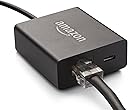
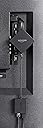
The Ethernet Adapter for Amazon Fire TV Devices provides a reliable wired internet connection, ensuring fast streaming and compatibility with various Fire TV models. Its easy plug-and-play setup makes it a must-have for any serious streamer looking to enhance their viewing experience.
F**0
A must!
Do you have a Fire Stick 4K and frustrated over erratic performance? Is your WiFi connectivity or speed slow due to the number of devices sharing your WiFi? If so, you should consider this adapter. With it you can connect to your physical network via an Ethernet cable (you must have an available port available on a network switch). This adapter has a power pass thru for your Fire Stick. Immediately, your throughput should go up as you are now passing maximum speed to your Fire Stick. The side benefit is the elimination of this WiFi drain to the rest of your devices. The adapter seems to be well made, doesn't generate much heat, is small, designed well and a bargain. It is easy to setup and is plus and play. I did not have to reset my Fire Stick, it automatically connected with the saved settings. Amazon should always recommend this optional item to provide the buyer with optimal performance. In my case the throughput and reduction in latency was significant. Highly recommend.
A**O
Works great and faster than wireless.
I've had this for a long while now and its much better than having my amazon 4k stick wireless. Nothing to complain about really. Was easy to install and to use. Quality is good enough to continue to work for a few years now.
J**T
Perfect
Works perfectly, now my firestick is hard wired . No buffering no issues
G**M
Adequate for Internet streaming content
Works well for standard streaming, but problematic if streaming 4K HDR content from a media server like Plex. I really wish they would make these streaming devices with Gigabit Ethernet ports, but they all seem to settle for 10/100. This caused buffering problems with my Plex server content. I had to go back to wireless in order to have adequate bandwidth for 4K HDR (HD Blu-ray) content. I prefer the reliability of wired connections whenever possible.
H**D
Amazon fire Stick adapter for plugging into your modem
This is a solid product I highly recommend this if you want to plug your Amazon fire stick straight from a hard drive from your modem works perfect and makes it much faster instead of lagging and gets rid of all buffing that you may have.
G**E
Works as it should
works great!
J**A
Hardwired
Works great no buffering and no problems streaming 4k and iptv content. I think others are probably not using a quality ethernet cable (cat6 or better) or their overall bandwidth is limited and that's why they are experiencing buffering. Worked well on an older gen firestick too before we upgraded.
N**D
TESTED, TESTED & TESTED AGAIN..........
I am hoping to shed some light here on this product without getting into much technical mumbo jumbo (and there is a lot of mumbo jumbo). Do your homework on the mumbo jumbo technical things I am about to explain & it will explain in detail reasons for my test results. There are a million articles on the net explaining bandwidth, latency, speeds, wifi vs. ethernet and so on. Way too much to explain in this review. Ok, first of all the product is very easy to use. It's a no brainer (plug & play). I have two older amazon Fireboxes with ethernet port built in (remember this it's important). I purchase this for the new firestick because it does not have an ethernet port built in hoping it would give me the true speeds my internet is set up for ( 50-70mbps consistently with ethernet cable hooked direct to "older" firebox" with built in ethernet port). Because the new firesticks do not have a built in port this adapter is being paired down to a mini USB port when it finally reaches the firestick and this is where the problem or downfall of this product begins. I had no better internet speeds from my new firestick with this adapter above and beyond what I was getting via just connected to wifi (less speed more often than not). I tested and tested and re-tested both old firebox, new firestick, ethernet vs wifi, multiple TV's, same Tv's, Tv's in different locations of the house, all with the same final results. The one thing that was very apparent in comparing the new firestick to the older firebox was that the new firestick DEFINATELY has a much better wifi receiving capability (Could be the processor or just the new technology) and does give a vastly improved wifi connection over the older units (more than double the speeds when both hooked to wifi on same TV). Hands down the new firestick wins out over the older units for Wifi signal reception. Test ResultS for speed when connected direct to ethernet: 1) New Firestick with adapter = Average 21mbps (6 speed tests performed & averaged). On wifi 25-30mbps. 2) Old Firebox with built in Ethernet port = Average 64mbps (6 speed tests performed & averaged). On wifi 10mbps IN THE END......If you have a very good Wifi connection with your new firestick (download speed of 25-30mbps or more) don't expect this adapter to speed that up in anyway. IF however your wifi connection is only giving you speeds of 5-15mbps you will surely benefit from this adapter. Anything below 20mbps, specially below 10 makes for some buffering in many situations (not all situations but if you want reliable streaming without buffering you should have a consistent 25-30 or more mbps specially with quality streams). I hope this helps someone out there looking at not only this adapter but in making informed decisions on the firestick options amazon is selling. There are some older refurbished fireboxes with built in ethernet ports still being sold. If you know for a fact you're doing direct ethernet connection it may be a much cheaper and better option in the end. If you know you're going to go with the wifi option the new firesticks are best for processor speed and reception. For the life of me I don't know why Amazon didn't put a built in ethernet port on the new firesticks???????
Trustpilot
1 month ago
1 month ago