Buy anything from 5,000+ international stores. One checkout price. No surprise fees. Join 2M+ shoppers on Desertcart.
Desertcart purchases this item on your behalf and handles shipping, customs, and support to Indonesia.
๐ Elevate your wired network game with Route10 โ where speed meets security and control.
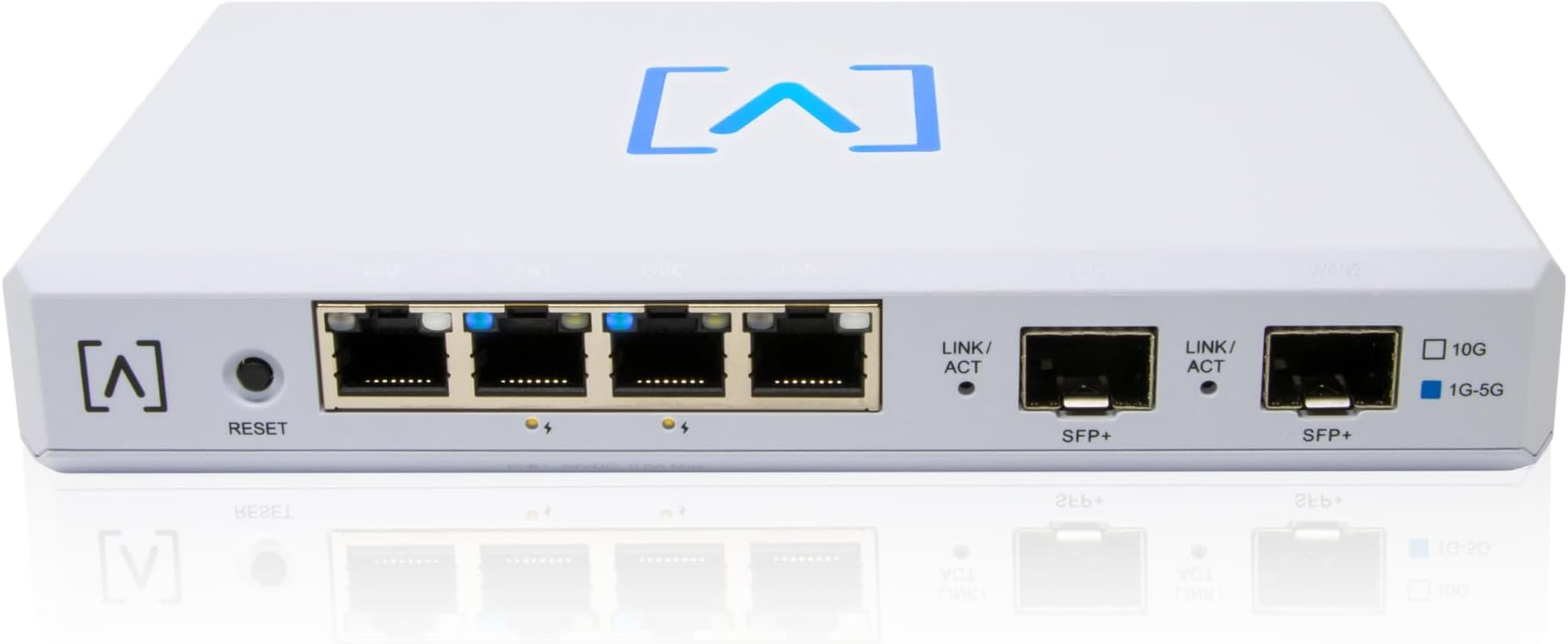
The Alta Labs Route10 is a professional-grade 10 Gigabit multi-WAN router powered by a Qualcomm quad-core processor with hardware-accelerated VPN. Featuring 2x 10 Gbps SFP+ and 4x 2.5 Gbps Ethernet ports with 40W PoE+, it supports advanced routing, VLANs, load balancing, and real-time traffic monitoring. Designed for advanced home and business networks, it integrates seamlessly with Alta Labsโ ecosystem for unified wired and wireless management.


| ASIN | B0DHT7RHZJ |
| Antenna Location | Business |
| Antenna Type | Internal |
| Best Sellers Rank | #23,573 in Electronics ( See Top 100 in Electronics ) #177 in Computer Routers |
| Brand | Alta Labs |
| Built-In Media | Power Supply, Wall Mount, Wall Mount Hardware |
| Color | White |
| Compatible Devices | Personal Computer |
| Connectivity Protocol | Ethernet |
| Connectivity Technology | Ethernet |
| Control Method | App |
| Customer Reviews | 4.2 out of 5 stars 89 Reviews |
| Data Transfer Rate | 10 Gigabits Per Second |
| Frequency Band Class | Single-Band |
| Has Internet Connectivity | Yes |
| Is Modem Compatible | No |
| Item Weight | 1.5 Pounds |
| LAN Port Bandwidth | 10 Gbps |
| Manufacturer | Alta Labs |
| Maximum Upstream Data Transfer Rate | 10000 Megabits Per Second |
| Mfr Part Number | Route10 |
| Model Name | Route10 |
| Model Number | Route10 |
| Number of Ports | 6 |
| Operating System | [Proprietary OS] |
| Other Special Features of the Product | Internet Security, LED Indicator, Parental Control, Remote Access |
| Router Firewall Security Level | High |
| Router Network Type | Wired |
| Security Protocol | WPA2 |
| Smart Home Compatibility | Not Smart Home Compatible |
| Special Feature | Internet Security, LED Indicator, Parental Control, Remote Access |
| UPC | 845882005701 |
| Unit Count | 1.0 Count |
| Voltage | 24 Volts (DC) |
| Warranty Description | 2 Year Limited Warranty |
| Wireless Communication Standard | 802.11ax |
| Wireless Compability | 802.11ax |
N**N
A very capable router that you can't beat for the features, price and performance.
I've been impressed by this router. I was in the market for a 10 Gb capable router. The router that my fiber provider gave me with my service (Eero) didn't have support for multiple VLANs. I looked at the home Netgear and Linksys routers but not only were they more expensive than the Route 10, but they lacked SFP+ slots and didn't have all the features I was looking for. Any router capable of being flashed with OpenWRT didn't seem to be able to actually push 10G. Next I considered mini PCs designed for OPNsense/pfSense. Most had Intel N100 or N105 CPUs. The reviews weren't super encouraging that these CPUs could handle 10Gb throughput. That and once you added RAM and M.2 to them, they were much more than this router. My network background is strictly Cisco CLI, but the setup wasn't too hard to pick up. For initial setup, you simply create an account on Alta, connect your router to the internet and enter the serial number into your account. This is the default method for configuration (Alta calls it Control) where the router is configured via the cloud. There is no license fee for this option. Alta also provides a free VM/Docker image of Control if you want to run it locally. For my home setup, there wasn't much advantage to running it locally so I opted to use the default cloud method. After a few minutes of clicking around, I was able to set up multiple VLANs with DHCP pools and reservations, tie in some existing non-Alta APs, set up port forwarding and configure additional firewall rules. The documentation on the site is somewhat lacking, but I was able to find any information I needed on the forum. The software is actively being updated with new features. A few months ago, they added the ability to run a Wireguard server on the router. If you're in the market for a 10Gb capable router and feel comfortable with basic network concepts like firewall rules, VLANs port forwarding, etc, I would highly recommend this router.
D**N
Awesome router! Would recommend
Iโve been using the Alta Labs Route10 for a few days now, and I couldnโt be happier with it. Finding a router that offers 10 Gbps speeds for under $200 felt too good to be true, but this one delivers in every way. Itโs fast, reliable, and handles everything Iโve thrown at it without breaking a sweat. Whether itโs streaming, gaming online, or running a bunch of smart devices, it keeps everything running smoothly. What really impressed me is how capable this router is, especially for it's price point. Itโs not just great for a home networkโitโs more than capable of managing a small business network too. The added features like multi-WAN support and VPN make it perfect for anyone who needs a secure and reliable setup, and the built-in DPI tools give you an easy way to monitor and manage your network traffic without feeling overwhelming. Iโve been following Alta Labs for a while now, and they seem to really care about building great products and improving them with updates and new features. The Route10 is no exceptionโitโs thoughtfully designed, packed with features, and still really easy to set up and manage, even if youโre not super tech-savvy. If youโre looking for a router that can handle everything from home networking to small business needs, I canโt recommend this one enough. Itโs an incredible value for the price and has been a total game-changer for me.
D**E
Amazing, with a caveat
Amazing* so far! Iโve looked high and low for such a device. Not a lot of companies are catering to the prosumer market. If youโre like me, you want the best of the best all in one nice package. You often walk around shaking your fist at the sky saying โwe have the technology for this, why doesnโt it exist!?โ What I wanted (needed) was a multi-port 10GbE router with level 3 capabilities for reassigning ports and configuring VLANs. You see, I have a Fiber Optics drop to my house that gives me 1Gbps connectivity to the internet, but my media enclosure is inside a pantry in the house. Luckily, during renovations I ran a few CAT6 lines out to the garage where the ONT drop is. Why is that important? Well, the ONT needs power, but I have no power outlet out there (ironically since itโs next to the houseโs electrical panel). Anyhow, turns out, you can power that sucker over Ethernet. So I needed a solution that allowed for my WAN port to include PoE, but virtually no consumer product provides that. I was rocking a standard (albeit beefy/expensive) consumer grade โrouterโ (which is technically a router+ap), which was made to look โprettyโ, and thus was bulky and odd shaped, which did not make it conducive to keeping in a media enclosure. I managed anyway (running external antenna outside the effective faraday cage), and it worked fine, but I had to have this massive and annoying PoE injector. Needless to say, the way the media cabinet was โorganizedโ was not ideal. After upgrading to the Alta Labs Route10, and verifying it did work, I decided to commit and I bought the AP6. I ran a new CAT6 line to a spot on my ceiling centered in the house, which took about 20 mins. Punched one end down into the patch panel, and punched the other end down into a CAT6 keystone. Plugged that sucker into the second PoE port on the Route10, and boom, my whole setup was complete. Now, why 4 stars instead of 5? Normally Iโd drive my rating all the way down to 1-star to make a point, but I do think these guys show promise and Iโm hoping my dream will come true. Maybe it never will, but weโll see. You see, the problem is that thereโs effectively no onboard management software. Ironically itโs mostly all cloud based. Soโฆ you can buy ANOTHER piece of hardware to manage the hardware on your networkโฆ basically think of it as a fancy RaspberryPi that has the management software installed on it and you plug that into your network and it broadcasts an endpoint you can hit from your browser to then manage the software. Okโฆ โcoolโ, but I dropped $200 on a powerful router which is basically the main character in a home network. Arguably, this isnโt exactly โhome networkโ gear, but it does still seem silly to me that a device like this couldnโt also just run the management software. There is an option to run the software via a docker container, and I tried getting that running on my macOS machine, but ironically (considering docker is supposed to be insanely portable) couldnโt get it to work. I may try to fire it up on the NAS, but the question still remains, what happens when I move away and rent the place out? Iโve got an AirBnB unit in the basement which was part of the motivation behind upgrading to this level of hardware especially with the AltaPass feature (very cool). Super easy to configure multiple WiFi networks and SSIDs, as well as providing different passwords for different levels of access. Iโm in the process of moving all the IoT devices over to the new profile specifically for IoT devices which limits their exposure to the internet etc. which is crucial in todayโs cyber security world. Anyway, thatโs why Iโve knocked off 1 star. I hope they hear this plea and work on getting at least some basic management features directly on the Route10. Also, would love if more ports were 10GbE, and or more of them were PoE. As it is, Iโm using the SPF+ ports (10GbE) for my desktop and my NAS, so at least they have the best connectivity. 2.5GbE is not shabby, way better than 1GbE, but if youโre gonna call it the Route10โฆ cmon.
J**T
Updated; Support came through and I look forward to continuing to support Alta Labs
UPDATE 5/27/25 - Renewed Confidence Thanks to Follow-Through and Leadership After early frustrations with support following a hardware failure, Iโm pleased to report that Alta Labs has made significant strides in addressing my concerns. Most notably, Alta Labs CEO Chase Harrison personally ensured that my case was handled appropriately when other hands had fallen short. That level of ownership speaks volumes. Several support reps, including managers and members of parent company Soundvision Technologies, followed through on their promises with full testing, transparency, and a genuine overhaul of the support experience. The Route10 Router remains a fantastic piece of hardware on paper โ and in practice. It offers excellent performance, a robust feature set, and meaningful updates on the horizon. My earlier concerns about being left on my own in the event of failure have been resolved, and my experience has changed for the better. Alta Labs listened, responded, and made it right โ and that earns back both trust and respect. Original Review The Route10 is, on paper, a fantastic piece of hardware. It performs incredibly well, offers a strong feature set, and has exciting potential with more updates on the horizon. Unfortunately, all of that means very little when you're left stranded after a hardware failure. After a recent storm, one of the POE ports failed - taking out an AP6 Pro Wi-Fi 6 access point with it. While I understand that hardware can fail, what followed has been far more disappointing: an utter lack of support from Alta Labs. Despite multiple attempts to reach out, Iโve received little to no response. โMattโ from support has gone completely silent, and the only troubleshooting offered was a basic power cycle. No follow-up, no further assistance, and certainly no replacement options. Alta Labs appears to have no functional after-sale support system. If youโre expecting help outside of standard weekday working hours, forget it. Thereโs no infrastructure in place for real-world, real-time support, which is critical for networking gear... especially in business or mission-critical environments. Great router, but buyer beware: you're on your own if something goes wrong.
B**N
Alta Labs delivers a solid network line up for home and corporate network infrastructure.
I own an IT Firm & and an MSP. We have started using the Alta product line as our go to for networks outside of the datacenter. The Route 10 offers a cornucopia of options and the ports can negotiate 1Gb, 2.5Gb, and 10Gb. So for anyone looking for a better edge solution for 2+Gb internet, this could be what you are looking for. The cloud visibility and super fast deployment & scaling makes this product line great for our needs and that of many of our clients / customers. As a side note, the wireless mesh that the Alta ecosystem offers has an innovative approach that allows for a single SSID (one for 2.4 and one for 5GHz) with VLAN isolation based on password. So you can assign a password for guest, IoT, Private, Filtered traffic, etc. and your network clients will only know their password. This can drastically reduces wireless noise (depending on your deployment) and has an obfuscation effect for your private networks.
U**R
Deceptive product offering
The first and foremost biggest issue with this router is it requires internet access to manage. I believe if you want local management you need the "optional network controller" that is another $200. No where does it mention this on the product page. SO very unfriendly on the consumer side. It is mind blowing there is no local interface for router management. It is strictly cloud only without the controller, but who knows if that requires internet access as well to setup. The 2nd major issue is this thing gets extremely HOT. I only had it hooked up and running for a couple hours and I thought it was going to melt itself. When I went over to touch it and switch some cables around the underside was almost untouchable. I don't know how a device this small that generates that kind of heat does not have some kind of active or even passive cooling. So reliability of this device would be a major concern long term. The 3rd issue I ran into is while it supports "dual wan" and wan failover it will not aggregate wan. I have a Netgear CM1200 and it requires wan aggregation for multi-gig internet. WAN aggregation is pretty common in the business class side of network devices. However when I contacted technical support to see if I was doing something wrong they called my modem "archaic" and didn't quite understand why I was attempting to do what I am doing. Mind you on Linux it is a one-liner to aggregate WAN if you're setting up a custom gateway. Anyway.. I have found TP-Link router that does support wan aggregation for $50 less. This tells me they do not have very knowledgeable people answering the phone. But at least they answered the phone I guess. Another issue is the web interface is atrocious. I really thought we were long past the point of terrible web interfaces for network management but alas they seem to want to bring it back. Their idea of an interface consists text or icons that you or may not be able to click that may or may not open tiny little windows/boxes you have to move around. Theres no clear indication of what stuff is manageable or not at all. You kind of just click around and see what text or buttons open up other tiny windows. It is kind of absurd really. I would avoid this router as its effectively a $400 router if you need their "network controller" as well to manage it locally outside of the cloud. For that price you could purchase a very nice all-in-one router with all the local functionality and small business class performance you would expect at that price point.
N**.
Amazing great quality Router
Setting up the route 10 was super easy. Ids/IPS was added and works great. It blocked some malicious files right away my kid had access. Vpn setup is super easy. Supports ipsec server or wireguars. Vlan setup is easy. I dont have super speed internet yet where I live but this was $200. Not very costly and definitely worth the price. Looks great in my room. Switching from starlink router to this speed up my network a little bit. I saw downloads around 150-200. Now I see 150-300. 2 wan ports to use. If you have spf module there is 1 wan port otherwise traditional copper cable. You can switch the wan port to a lan port so you have another port to utilize. You can block applications via wifi. So you would have to get an access point for that. I've been told from the company there are plans for wired application blocking coming just not yet. Overall I'm very pleased with the route 10.
E**D
A Unique Router Experiment
Initial setup was confusing, there are no labels on the box, and not a single included piece of paper. Wait, wrong, there WAS a SCAN THIS card for a quick start guide. But wait, I don't have any easy way to scan anything.... and since when is trying to follow instructions on a tiny 4" screen a thing, anyway? Therefore I surmised they expected the install to be trivially easy. So of course I tried to configure the unit without searching for the manual on the internet, yeah, and that didn't go well. The ports are not labeled intuitively, so I of course my assumptions were wrong. And after wasting a solid hour, I finally was forced to find a manual, and with that came success, finally. They have this weird hybrid configuration approach, where you click the options on their web configuration tool, and then it updates your local unit. They advertise a mobile app too, but hah. NO. That was completely worthless, and not useful. The unit did support most of the features I was looking for, ie. multi-homed internet, port forwarding, etc. and worked well enough, so I've generally been happy with it. The one thing I found quite startling, is how hot it runs. I ended up buying fans to install directly under it, to at least keep the outsides at room temperature. The housing is 100% plastic, so its a pretty poor thermal interface, so the insides must be crazy hot. Which IMHO is a pretty bad design, but I guess that's what you get with a 200 dollar router. It's worked just fine these past few months. update: 5 months, one afternoon the light on top suddenly turned purple, and the internet was dead. After cycling the power, that was the end. The unit died, literally, as now both POE lights dimly illuminate, but has no other signs of life. So it's on its way back to Alta Labs (I hope) for repair or replacement. Sigh, so overall this was a failed experiment. I can not recommend this device to anybody looking for a good quality router. I just built my own out of a small form factor PC, and some nice Linux software. So I'll be sticking with my new solution now, as my last home built one lasted 10 years, not the 5 months this thing lasted. Update: after it died I got an an RMA, sent it in, and months later, still no replacement. No bueno.
S**N
An amazing device at an even better price!
What a fantastic package for a great price. From the minute you open the box you can tell itโs a quality product everything comes packed nicely and the product looks sleek. Once installed I reviewed the performance of the device and it far outperforms my tplink ax11000 it replaced. Now I can get 10gbps links to my other switch and seamless 2.5gbps speeds to my main devices. For 300 or so dollars this is an amazing device with some functions like IPS and firewall style rules you generally wonโt find for under 800. Very happy with this purchase so much to the point that I recommended it to my entire team at work. One of the best features is that I can access my firewall from almost anywhere.
J**A
Compact and fast wired router
This wired router has a powerful hardware and can easily reach 2Gb speed. The firmware doesn't have a lot of features compared to Unifi OS, but it receives regular updates from Alta Labs.
Trustpilot
4 days ago
1 month ago