🎨 Elevate your creative flow with flawless 4K color connectivity!
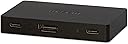
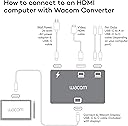
The Wacom Converter HDMI to USB-C Conversion Box enables Wacom Movink 13 and Wacom One 14 users to connect their tablets to computers lacking Thunderbolt or DisplayPort Alt USB-C ports. Supporting up to 4K UHD resolution at 60Hz and delivering vibrant 10-bit color, this powered adapter features HDMI, USB, and power ports in a compact copper enclosure. Ideal for professionals seeking seamless multi-device switching and enhanced visual fidelity.
| ASIN | B0DGVQRGCZ |
| Additional Features | Powered |
| Best Sellers Rank | #871 in Video Converters |
| Brand | Wacom |
| Color | Black |
| Compatible Devices | Wacom Movink 13, Wacom One 14 |
| Customer Reviews | 3.0 3.0 out of 5 stars (13) |
| Enclosure Material | Copper |
| Hardware Interface | HDMI |
| Item Weight | 0.22 Pounds |
| Manufacturer | Wacom Technology Corporation |
| Mfr Part Number | ACK45219Z |
| Model Number | ACK45219Z |
| Number of Ports | 3 |
| Operating System | Windows, macOS |
| Total Usb Ports | 1 |
| UPC | 753218983961 |
C**R
Did not work for me
I bought this because reviews told me to buy to be able to use the wacom one 14. And after buying more than a hundred bucks in wires and ac adapters I have not been able to make it work even with Wacom tech support. I will most likely be returning it as well as the tablet
C**K
Convenient little adapter!
I bought this as I was curious if it might be a simpler way of switching the connection of my Wacom Cintiq Pro 17 between my MacBook Pro and Windows 11 PC. Works beautifully! Plugged my PC into the USB and HDMI ports in the back and then connected the USB C in the front to the Wacom - with the Cintiq Pro 17 which has its own power supply, the power connection on the adapter isn't needed - now can simply move the USB C between the MacBook and PC to use the Cintiq on either... no more dealing with the PC's HDMI cable or swapping the input on the Cintiq. Exactly what I was hoping for!!!
V**.
Works like a charm
This was a life saver. I tried all kinds of cabling to use my Wacom 14 without having a bunch of cable protruding out from the display. I used one cable from the display (which was long), and the converter was set off to the side with no clutter around the display.
C**S
Greedy company
It's just absolute trash that we have to buy this in the first place. As in, they couldn't design their own product correctly that it doesn't need patch cables. Then, when you look, this p.o.s. is not ten bucks, it's over 50. Why even. Greed.
H**P
Waste of money
Bought this because it was apparently what I needed for my Wacom one 14 to work. It’s not super clear that you need this, two data capable USB c to USB c cables, one USB c to whatever you can plug into the wall for power cable, and one hdmi. So not only does this cost $80, but those will run you another $37, and then the kicker is IT DOESNT WORK ANYWAY. When I plug it in one of my computers it does nothing at all and isn’t recognized, and in my other computer it’s recognized but then glitches off over and over and over again in a loop. Huge waste of money and time. Do not buy.
E**C
Works great
Works for using a movik without a thunderbolt capable motherboard for desktop pcs and is a lot less clunky than the 13HD cable I used before my movik upgrade Even with the converter box it's incredibly light and it's a lot smaller than I imagined
K**R
work with portable monitor
this does work with a Power Delivery portable monitor (UPERFECT Y) . just make sure that the cable going to the monitor is the correct cable. i had to find that out by trying out multiple cables until i found the one that came with the monitor.
L**E
Doesn't provide the workaround as indicated.
I purchased this as a "workaround." Why? I built a BEAST Gaming PC with ASUS ROG Maximus Z790 Dark Hero mother board - which was supposed to be "Thunderbolt 4 + DISPLAY" compatible. I intended to use my WACOM MovInk 13 with it. Well - it doesn't work. Wacom blames ASUS - ASUS blames WACOM. You would think Thunderbolt 4 is Thunderbolt 4? After doing everything possible - Wacom recommended this converter as a workaround. It doesn't work either. I actually had more connectivity/recognition with just the USB C/TB4 than I did with this device (just no display - which is still useless). SO - experiment fail. I have to settle with using my Movink on my 5 yr OLD MS Surface LOL!
Trustpilot
1 week ago
1 week ago