🚀 Elevate Your Mini PC Game with Power & Precision!
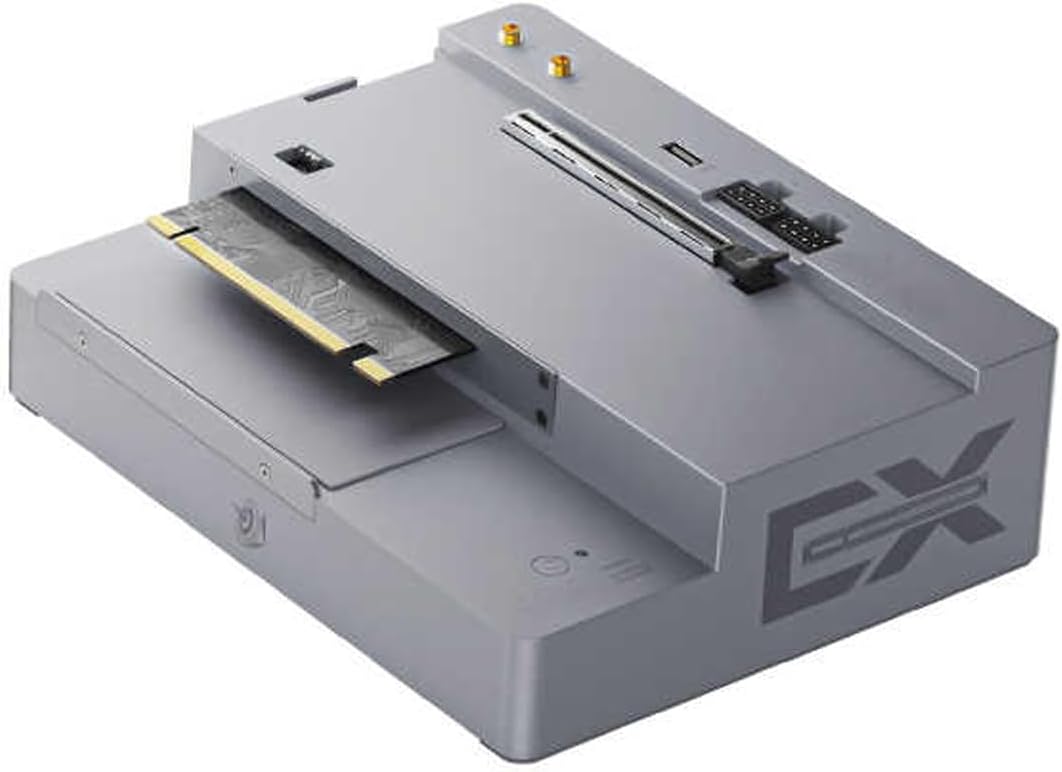
The Beelink EX Docking Station transforms your Beelink GTi12/14 mini PC into a powerhouse by supporting high-end NVIDIA and AMD GPUs up to 600W. Featuring a PCIe x16 slot for lossless external graphics card connection, a built-in 600W power supply, and multifunctional interfaces including M.2 and USB ports, it offers versatile expansion and energy-efficient dual-switch control. Certified and backed by lifetime support, it’s the ultimate upgrade for professionals demanding desktop-grade graphics performance in a compact form.
| ASIN | B0DFWNP7KX |
| Best Sellers Rank | #50,777 in Electronics ( See Top 100 in Electronics ) #355 in Mini Computers |
| Customer Reviews | 4.1 4.1 out of 5 stars (23) |
| Date First Available | September 2, 2024 |
| Item Weight | 4.64 pounds |
| Manufacturer | Shenzhen AZW Technology Co.,Ltd |
| Package Dimensions | 10.47 x 8.27 x 4.21 inches |
A**F
Works like a charm. Love the feature set.
This thing is awesome and at $130 instead of the price on their website of $180, can't beat the price. Listing said it had 600W power supply but it didn't use the word "Pro" in the name. Beelink had a previous version they called non-Pro. So I was worried the price was because it was the 300W version. Thankfully it is the 600W version. I'm using a Beelink GTi13 mini pc with it, along with a Radeon 9070XT. System gets identical numbers in 3dmark as the 9070XT in my 9800X3D PC. So very happy with that result. The x8 PCIe5.0 slot is more than enough to handle this GPU. I also added a fan connected to the fan header on the docking station for some added cooling to the backplate of the graphics card while it sits in the dock. I also love that it comes with a x1 PCIe 5.0 expansion slot in the docking station. I'm adding a second 4TB nvme (first one I added to the GTi13 itself) and I should be able to expect around 4GB/s from the drive. I did not use the extra x1 connection to put a wireless adapter into, so I didn't try the antenna connection. I simply swapped out the WiFi 6 card in the older GTi mini PC with an updated wifi 7 card so I could use an nvme instead. But they do include the connector for the WiFi card if you wanted to do that (just swap it with the nvme connector in the docking station). Overall very pleased with the setup, I put it together to take on an extended stay trip where it's easier to ship a mini PC box, docking station box, and the graphics card in the box than trying to ship my half glass large PC.
M**S
be careful putting it together as it has small screws
The initial docking station setup was intimidating. but is actually pretty easy to setup. I have had mine for a while and had 0 issues. I took the OS NVME and placed it in the docking station. and installed 2 other NVME sticks in the MiniPC while it is slower running it off the docking station it does work, and you do not notice the difference. mainly because all apps are installed on the Other NVME drives.
A**N
Fantastic with GTI13 and RTX 5070
had a few "power on" issues initially but resolved with different power cord. Works fantastic with Beelink GTI13 and RTX 5070.
S**B
It's me
It looks cool it's the bomb
A**R
It’s D*E*A*D : It Won’t Power Up or Turn On
D * E * A * D: Bought this in April along with a Beelink Gti 14 so that I could use an external gpu. The Gti 14 has worked flawlessly from day one. I finally got a new Nvidia gpu yesterday and installed it. The dock will not rurn on / power up. The power light does not come on. There is no power to the gpu. I tried 2 different power cables and 2 different electrical plugs ….. same result: D*E*A*D! Unfortunately, since it took me awhile to get the gpu that I wanted (one that is approved by Beelink) I am passed Amazon's return window. So, now I am dealing directly with Beelink and waiting for a response / solution from them. I assembled this system - computer / dock / gpu - to use with DaVinci Resolve Studio. Now I am basically high-and-dry until I get a dock that functions. I will update this review after I see how Beelink addresses this problem / issue. UPDATE: Amazon graciously took the defective unit back. I immediately ordered a replacement unit on Amazon (from a Seller other than Beelink) and received the replacement the next day! I reattached the gpu and it immediately fired up! I had already installed drivers for the gpu ahead of time, so when I started the GTI 14 it immediately saw the gpu. System specs: GTI 14 (from Amazon) GPU docking station (from Amazon) and Gigabyte RTX 5070 GPU (from Amazon). Also, Da Vinci Resolve Studio 20 saw the RTX 5070 and simple preference change selected the 5070 as the default graphics card.
S**T
Worked GREAT, until it didn't
Unit worked just fine with the Beelink GTi12 Mini I bought until 4 months later it just shuts off while watching a video. Everything looks fine and it did not overheat or make any sound but my display turned off and I noticed the power light was off. Unplugging everything and putting it back has yielded no results. This is unfortunately beyond the 30 day return window so I will have to buy another if I want to make use of the Mini PC I have. 2 Stars as the unit worked great until it didn't.
P**P
It works as intended for my mini plex server
I use this with a Beelink GTi13 and an arc a380 ELF (no 8pin required) and it runs 100% perfectly. It looks good, seems pretty high quality, all the screw threads are nice. The price is very low compared to much wonkier TB4 or occulink solutions. I dont know how hard you can push the power supply yet since I'm only using it for a very low watt transcoding task but maybe I'll toss a 7900 XTX on it. Functions perfect in windows, but after testing I have moved to Ubuntu 25 desktop and it works perfectly there as well. Very simple to setup and slot in the GTi13.
A**R
Its a pro version
It arrived as a ex pro pcie 5.0 works great with a 4070 super and a 5070 wouldn't go farther due to two 8 pin they say 300w per 8 pin don't know if I trust a 600w 12vhpwr adapter with all 5080 and up melting
Trustpilot
4 days ago
1 month ago