⌨️ Elevate your Surface Pro game—type smarter, store smarter, work anywhere!
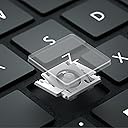
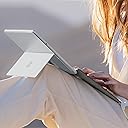
The Microsoft Surface Pro Keyboard in Sapphire is a sleek, lightweight accessory designed for Surface Pro 8 and 9. Featuring a full mechanical keyset with backlit keys, a large precision trackpad, and a revolutionary magnetic pen storage integrated into the hinge, it delivers a premium typing experience while keeping your Slim Pen secure. Its slim profile snaps on instantly, protects your screen, and offers versatile angle adjustments, making it the ultimate productivity companion for professionals on the go.
| ASIN | B0CXKV2R3J |
| Best Sellers Rank | #22 in Computer Keyboards #25 in Tablet Keyboards |
| Brand | Microsoft |
| Color | Sapphire |
| Customer Reviews | 4.6 4.6 out of 5 stars (898) |
| Date First Available | March 8, 2024 |
| Hardware Platform | PC |
| Item Dimensions LxWxH | 12.5 x 10 x 0.5 inches |
| Item Weight | 9.9 ounces |
| Item model number | 8XA-00215 |
| Manufacturer | Microsoft |
| Operating System | Windows 11 |
| Power Source | Battery Powered |
| Product Dimensions | 12.5 x 10 x 0.5 inches |
| Series | Surface Accessories |
I**Y
Nothing beats the original, OEM keyboard!
I've been using tablet PCs since they first became available, going back to the innovative devices from Motion Computing in the early 2000s. The Microsoft Surface is part of how these versatile devices became mainstream, rather than niche. This is a surprisingly good keyboard, capable of letting you type with speed and accuracy, despite its thinness and lightness. Very welcome is a slot to store and charge the Slim Pen, finally solving a small but persistent issue with tablet-and-stylus that's been around for a long time. If you've used tablets with auxiliary keyboards for a long time, I think you'll be pleased with this keyboard's design and performance for the long haul. Its materials seem well-chosen and, if past examples are any guide, will prove to be reasonably durable over the long haul. I rely on my Surface Pro. It's my "daily driver" and has thoroughly taken the place of a conventional laptop for most of my non-computationally-intensive tasks. The original, OEM, Microsoft keyboard for the Surface Pro is a big part of why the system as a whole works so well. Accept no substitute! Just buy the Real Thing.
C**D
CLEVER pen storage IN HINGE - you’ll NEVER lose yr pen ever again!!
I am a true Microsoft zealot.. and I am not apologetic about it when it comes to my PCs. I PARTICULARLY love the Surface format. It’s compact, tidy & lightweight, leverages all the MSFT businesses applications I spent a career utilizing -and which I still use for supporting my non profit efforts (maximizing my time & contributions.) Functionally it fits in my purse when I want to carry it with me, offers a suite of options on power/ speed/ storage depending on what you need, and has a satisfying responsiveness and feel of the keys when typing. I’ve actually had 5 or 6 of them over time (and just bought a new one -I’m so excited!) I am UNBELIEVABLY pleased with the CLEVERNESS of the new keyboard; not only does it have current fashion colors and the familiar touch pad if you need it ( tho’ I’m a “touch screen” kind of gal), you now have a choice of getting an electronic pen with it (used to buy them separately) …. BUT MAJOR IMPROVEMENT is a feature of the current magnetic hinge mechanism on the keyboard that’s the current standout. The keyboard attaches with INCREDIBLE ease to the tablet & offers solid protection for the face of the screen - it’s the AMAZING electronic PEN STORAGE that “knocks this keyboard right outta the park”! Who ever designed the present pen storage was a GENIUS! The original storage was a loop you slipped your electronic pen into (…. and which from which the pen would slip out of - I lost 2 and gave up using that method of storage, keeping one in my purse. Inconvenient, but at least I wasn’t replacing price pens.) NOW, there is this wonderful magnetic storage slot WITHIN THE HINGE ATTACHMENT that cradles your electronic pen, keeping it out of sight in the fold of the attachment area between the tablet and keyboard, YET EASILY accessible with a QUICK tug of the keyboard which unfolds the hinge showing the hidden compartment of the electronic pen - you’ll NEVER lose your pen again!! It’s right at hand EXACTLY when you need it, but stored safely out of sight when not in use (See photo comparing new keyboard to older keyboard hinge area.). STELLAR! The Surface w keyboard has been a life long love affair for me - the new keyboard attachment mechanism with electronic pen storage continues to “seal the deal”!
G**.
Comfortable, responsive, and stylish
I bought this keyboard and Slim Pen 2 bundle to go with my Surface Pro 11 Copilot+, and I’m really happy with the purchase so far. The keyboard feels great to use, even when it’s magnetically lifted into the angled position. That small slant actually makes a big difference in comfort for me during longer typing sessions. The keys and trackpad are both very responsive and have a quiet, satisfying feel. The Slim Pen 2 is also a solid add-on for the Surface Pro. As a college student looking to move away from paper notes, this pen is comfortable to hold and writes smoothly on the screen. The haptic feedback is a surprisingly nice detail; it doesn’t feel exactly like pen on paper, but it adds just enough resistance to make digital writing or drawing feel more natural. I went with the black color bundle to match my black Surface Pro, and it all looks super clean and sleek together. Functional, stylish, and totally worth it!
G**.
Great Type Cover
Good product and great fit for the Microsoft Surface. I had no need of the Bluetooth capability of the more expensive keyboard for the Surface. Easy to type on. Does not flex too much when typing. The trackpad works well, as does the slim pen. A benefit I did not realize until I tried it, is that you can open the kickstand and fold the keyboard backward and the back of the keyboard supports the surface in my lap for reading and using the pen to highlight texts. Pressing the keys when the keyboard when it is folded back does not cause inputs to the computer.
A**M
The only keyboard available for SurfacePro with Pen charger!
Good until it lasts. This was a replacement keyboard for my SurfacePro 8. I had it for a year or so and then suddenly it stopped working. I tried everything to fix it, but gave up. The problem was after taking the keyboard apart was a broken ribbon cable. Microsoft doesn't make these things to last that's for sure. Each time the keyboard is closed it bends and eventually the ribbon bends with it too. Photos are enclosed of the attached said ribbon. Besides that the new one is great until it stops working, which I hope is a really long time. I do really enjoy the quality and the comfort of the soft keys and Alcantara feel. Very nice overall, just wish it would be better construction and quality to last a long time.
E**N
Must-Buy with Surface Pro
Fits my surface pro 11 perfectly! Nice feel and enough basic protection. The keyboard is comfortable and so useful. The pen has so far been an excellent addition. No issues.
J**L
Justo lo que necesitaba! El accesorio original 100% compatible
A**A
Excelente producto, me encanta. En general es de muuuuuy buena calidad, la construcción, los materiales, todo, se siente verdaderamente de alta calidad todo. ¿Por qué dos estrellas? Pues muy premium y todo pero el teclado no se carga automáticamente cuando lo conectas, tienes que estarlo reiniciando, apagandolo y conectandolo a la surface en vez de que el teclado se cargue por si solo, no se si sea un bug u otra cosa pero incluso en foros aparece este mismo problema. 🤷🏻♀️
F**D
I’m very happy with the product. Everything works perfectly and as expected.
A**R
Takes a few seconds to connect
S**Y
From a different region and not compatible with the UAE. The magnetic click does not connect.
Trustpilot
3 days ago
1 month ago