Buy anything from 5,000+ international stores. One checkout price. No surprise fees. Join 2M+ shoppers on Desertcart.
Desertcart purchases this item on your behalf and handles shipping, customs, and support to Indonesia.
🎯 Elevate your gaming setup with the Magic-NS — where versatility meets pro-level control!
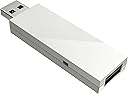
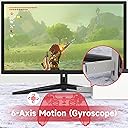
The Mayflash Magic-NS adapter is a compact, matte-finished USB-C device that enables seamless compatibility between a wide range of wireless and wired controllers—including Xbox, PlayStation, and Switch models—and multiple gaming platforms such as Nintendo Switch, Steam Deck, PC, and retro consoles. Featuring 6-axis motion support and customizable rumble settings, it transforms your gaming experience with precision and flexibility, all backed by a strong 4.3-star user rating.


| ASIN | B079B5KHWQ |
| Best Sellers Rank | 21,968 in Computers & Accessories ( See Top 100 in Computers & Accessories ) 775 in Adapters |
| Box Contents | Magic-NS adapter |
| Brand | MAYFLASH |
| Brand Name | MAYFLASH |
| Colour | White |
| Compatible Devices | Desktop |
| Compatible devices | Desktop |
| Connector Type | USB Type C |
| Connector type | USB Type C |
| Country of Origin | China |
| Current Rating | 1 Amps |
| Customer Reviews | 4.4 out of 5 stars 8,736 Reviews |
| Global Trade Identification Number | 06970582690163 |
| Input Voltage | 5 Volts |
| Item Dimensions | 7.3 x 2.1 x 0.9 centimetres |
| Item Type Name | Magic-Ns Wireless Controller Adapter for Nintendo Switch & PC - Nintendo Switch |
| Item Weight | 30 g |
| Item dimensions L x W x H | 7.3 x 2.1 x 0.9 centimetres |
| Manufacturer | Mayflash |
| Manufacturer Part Number | MAGIC-NS |
| Model Number | MAGIC-NS |
| Nominal Power | 5 Watts |
| Number of Items | 1 |
| Number of Ports | 1 |
| Package Quantity | 1 |
| Power Plug Type | No Plug |
| Product Finish Type | Matte |
| Smart Home Compatibility | Not Smart Home Compatible |
| Specific Uses For Product | Video Game Console |
| Specific uses for product | Video Game Console |
| Unit Count | 1.0 count |
| Warranty Type | Limited |
G**G
Switch steering wheel 🎡
Does what it says on the tin! Works with a Ferrari steering wheel and pedals on Switch Oled. Search on YouTube for instructions. I did update the firmware. Note that this doesn't work with the newest Xbox controllers.
M**S
Good universal controller adapter for Switch/PC however not without flaws
The adapter itself works fine and is very easy to set up however I've noticed a few issues with it. 1. There seems to be a slight amount of input lag compared to when I use the same controllers on PC (this includes wired to the adapter and wireless) 2. When using the Xbox controller via wireless, the HOME button (bright XBOX button in the middle) doesn't work at all however if plugged in it works fine. I've tried a DS4 with the adapter too and it seems to work fine both wired and wireless so I think there's a bug in the firmware with the Xbox controller specifically. Not a big issue but it does mean you will have to use the Xbox controller wired if you want to be able to go back to the home screen (unless you have a joycon on the side for that). Overall 4 stars. Would be 5 stars if the issue with the Xbox controllers was fixed. Edit: the middle xbox button seems to be working now. Apparently if you have both joycons plugged in it won't work but if you disconnect them it does. Weird but I'm glad it works anyway. Changed to 5 stars.
E**N
DS4 motion controls are working
A few reviews here are a bit outdated now. To enable Dualshock rumble and motion: * Update the dongle to v1.19+ using a PC. * Set "pro controller over usb" in your Switch menu. * Press the button on the dongle until the LED turns purple. MOTION - The controls themselves work very well. After testing them in Splatoon 2 and Zelda I do feel they are slightly less accurate than Nintendo controllers when aiming to the sides, but otherwise not bad at all. They're certainly good enough for the 'waggle' motions Mario Odyssey requires. If motion is the only thing tempting you towards a Pro Controller instead, I definitely recommend giving the updated Mayflash a try as an alternative. RUMBLE - This is a little more hit and miss. Games with basic feedback like Zelda work great and are perhaps even an improvement if you prefer the feel of Dualshock 4 rumble. HOWEVER, you may find that some HD rumble games just don't translate well to standard rumble: Mario Odyssey uses it for so many reasons that your controller will practically be rumbling nonstop. Splatoon almost works properly, but the indistinguishable vibrations felt when moving through ink safely and taking damage might be confusing enough to put you at a disadvantage. If this bothers you, vibrations can usually be turned off on a per game basis, and some like Mario Kart even work absolutely fine, so it's not a huge issue. Ultimately I think it's a good feature to have, but it's still definitely one of the main trade offs compared to a more expensive Nintendo controller. OVERALL PROS - There isn't really any noticeable input lag, it fits nicely out of sight inside the back compartment of the Switch dock, has a good wireless range, works with a variety of wired/wireless controllers (with a more reliable d-pad than the Pro), all Switch buttons are accounted for (on DS4) and it doesn't need to be touched once you are set up other than to assign new controllers. CONS - Only one player can connect per dongle, motion feels a little more sluggish turning to the sides than up/down, games might give inconsistent feedback if designed for HD rumble (see above) and the console can't be switched on remotely with the controller.
T**S
Switch 2 Compatible!
I bought the previous model (V1.0 rather than V1.2) a long time ago and I am happy to say upon putting it into my recently purchased Switch 2, it still works. Great piece of kit that can save you a ton of money on pro controllers.
C**C
Used to connect a ps3 controller to the Switch..
I have used this to connect a PS3 controller to use with the Switch, and it works perfectly, we needed another controller to play lego undercover and at £60 i couldn't justify a set of joy cons, so bought this to try. Took a while to work out how to connect the PS3 controller as the instructions are useless, but it turned out to be obvious, you need to make sure the Magic-NS is flashing red, and then connect the controller to it using the PS3 charging cable, it synced immediately, we could then unplug it and use it wirelessly, all the buttons work as expected so is easy to get used to. I plan to buy another 3 of these plus a usb hub so we can have four player mario cart. We also have PS4 controllers should we ever need the gyro, but so far the unused PS3 controller has been perfect.
H**V
Love it
Since getting the product on 18.09.2017 I have been using it every day and i am quite happy whit it. I have been using it with my dual shock 4 on my Switch, PS3 & PC witlessly without any issue of connection or input lag. At first i was a bit let down that there was no vibration when connected to the switch, but after a quick look at the manufacturers website i realized there was an update.The process took no more then a minute or two and afterwards i had vibration functionality. I fully recommend this adapter if you use a dual shock or xbox one s controller and would like you play with them on your switch/ps3/pc I will update this review if in the future i come across any negatives or if future updates provide additional features
M**R
Wired only on Series X controller
Works fine through wired connection with a new Series X controller, though takes a little fiddling to get set up. Will not connect wirelessly at the moment, may have to attempt a firmware upgrade, but have no access to a laptop at the moment, so does not do what I initially bought it for, though I can only assume that this is on the fault of the controller at this time.
G**G
Not currently working wirelessly for latest XBox series X controllers (21/11/20)
Should have checked before buying, but unfortunately this unit does not sync wirelessly with the newest XBox series X controller yet (which I also bought recently). It can sync with other older controllers (synced fine with the switch controllers, recognizes it as wired pro controllers instead of joycon), and the afore mentioned XSX controller does work wired. Good news is that the firmware does seem to get regular updates (latest one on Nov 11 a beta for XSX controller, 10 days before this review) so expect it to work with DS5 and XSX soon. Other than that, responsiveness is very good on both wired and wireless, no issues.
A**A
You Need This - Update 12/30/2024: Revert Firmware Update on Your Xbox Controller!
---Update:--- My Magic-NS adapter has been working perfectly for nearly 4 years, but I recently ran into an issue and am updating to help others. I've been using the same Xbox One S controller with the Magic-NS adapter on my Switch since my original review without ever updating the firmware on either. I got an Xbox Elite Series 2 for Christmas and had difficulties switching my new controller to the Magic-NS adapter via bluetooth. This is how I got it to work: 1. The Xbox One S controller that I had been using wirelessly with the adapter had become bugged. The controller would not disconnect from the adapter and would also not reset. In order to solve this, I connected my Xbox One S controller to my PC via USB cable and updated the firmware on the controller. This caused the controller to change from classic Bluetooth to BLE, which effectively disconnected the controller from the adapter. 2. I updated my Magic-NS adapter to the latest version by connecting it to my PC and following the instructions that it came with. 3. I connected my Xbox Elite Series 2 controller to my PC via USB cable and reverted the firmware so that it uses classic Bluetooth instead of BLE. I then plugged the Magic-NS adapter back into my Switch dock, made sure it was on the purple setting and attempted to sync the controller wirelessly once again and was successful. It's important to note that it takes much longer for the Elite Series 2 controller to wirelessly connect to the Magic-NS adapter than the One S controller. Once synced, it stays that way. It's been working flawlessly ever since! ---Original Review--- Boy, am I glad I bought this! After purchasing a Switch at the beginning of the year, I was checking out all of the great accessories that are available and wanted to get a controller to use for when I have it docked instead of always having to use the joycons. I quickly learned that many controllers for the Switch run rampant with problems as well as being ridiculously overpriced (looking at you, Switch Pro Controller). While I wouldn't mind spending money on something of good quality, I just can't purchase something that so many consumers report stopped working right after the return window / warranty runs out. So I decided to have a look at some adapters. I have many Xbox controllers because I own a 360, One S and Series X. I've always preferred the design of an Xbox controller over anything else and thought it would be ideal to be able to use one with my Switch. Upon receiving my product, I was pleased to find that I didn't need to connect it to my pc for any updates for it to work properly. I'm currently using my Xbox One S controller and all I had to do was put the adapter on the purple setting and enable Switch Pro mode on the console. The adapter fits perfectly in the back of the Switch's dock and after about 5 months of using it, it has never disconnected or given me any issues. I like that I can adjust the vibration on the controller to make it stronger or weaker depending on what game I'm playing. There are a few things that I think would improve this product: 1.) Turning on the Xbox controller doesn't take the Switch out of sleep mode like it does with the console it's intended for. You have to wake the Switch up via the home button on the joycon. 2.) After putting the Switch to sleep, the controller stays on. I remove the battery pack to turn it off instead of waiting forever for it to eventually go to sleep thus unnecessarily draining the charge on the battery pack. 3.) I have the button mapping for the controller set to reflect how an Xbox controller should work. While it does save my preset, I have to go into the settings and select it each time I use the controller because it defaults to Nintendo's settings. Regardless of the improvements I feel would make the adapter better, it's important to remember that controllers for other consoles have never been intended to work on a Switch; so the fact that the adapter does just that makes this a genius hack and excellent accessory for the Switch. Despite the minor inconveniences I mentioned, I'm grateful to have found this product and recommend it to anyone who doesn't want to waste money on the low quality, overpriced controllers that Nintendo licenses.
J**L
Working perfectly!
I had no issues with this one. :) I have tested the ps5 controller and the wii u controller on nintendo switch.
A**E
Beste Option, für die die schon eine Konsole besitzen.
Ich kann diesen Bluetooth Stick mit ruhigen gewissens an jedem weiterempfehlen der schon eine Konsole bzw. Controller besitzt. Ich habe mir diesen Stick wie viele auch, geholt um an einer Nintendo Switch mit einem Marken fremden Controller spielen zu können. In meinem Fall hatte ich vorher schon eine Xbox One und wollte den Controller an der switch weiter nutzen. Um nicht einen Switch Pro Controller kaufen zu müssen. Als der Stick ankam hatte ich diesen zuerst am PC ausprobiert mit Hilfe der Minecraft Win10 Edition, dort musste ich feststellen das sich der normale Xbox One Controller nur per Kabel verbinden ließ, aufgrund des fehlenden Bluetooth Moduls. Jedoch mit den Xbox One s Controller meines Bruders, welcher ein Bluetooth Modul besaß, ließ sich dieser auch ohne Kabel problemlos mit den Stick und letztlich den PC verbinden. Und alles Funktionierte ohne Probleme und Latenzen. Am nächsten Tag kam die Nintendo Switch an. Genau wie am PC ließ sich der Controller über den Stick problemlos verbinden und nutzen, Im Docking Modus am Fernseher sowie auch im mobilen Modus mit Hilfe des Bei liegenden USB auf USB-C Kabels. Auf dieser Weise konnte ich mit meinen Bruder schon einige Spaßige Stunden in Mario Kart 8 verbringen. Wohl bemerkt mit einen Xbox Controller. Zur Installation gibt es nicht viel zu sagen Stick einstecken den richtigen Modus einstellen, den Controller verbinden und der Spaß kann losgehen. Sämtliche Informationen wie man den richtigen Modus einstellt, ein Controller verbindet oder auch die Software Updates installiert stehen in der Bedienungsanleitung. Welche in einem leicht verständlichen Englisch verfasst ist. Eine Deutsche Version wäre auch schön gewesen aber Englisch ist heutzutage ehrlich gesagt kein Problem mehr. Jedoch war ein Software Update bei mir nicht nötig da alles auf Anhieb funktionierte. Das einzige was wirklich noch schön gewesen wäre ist wenn man mehrere Controller per Bluetooth verbinden könnte. Dies ist leider nicht der Fall. Aber auch nicht zwingend notwendig. Wie es mit anderen Controllern aussieht kann ich leider nicht testen, bin aber davon überzeugt das dort auch keine Probleme auftreten werden. Doch insgesamt kann ich dieses Produkt nur weiterempfehlen, da es die perfekte Lösung ist wenn man schon Kompatible Controller mit Bluetooth besitzt und sich keinen überteuerten Pro Controller von Nintendo kaufen möchte oder einfach den gewohnten Controller weiter verwenden möchte. Danke an Alle die sich die Komplette Bewertung durchgelesen haben. Ich werde diese Bewertung Editieren wenn in Zukunft noch etwas negatives mit den Bluetooth Stick Passieren sollte. Ich hoffe ich konnte Ihnen bei der Kaufentscheidung behilflich sein.
M**L
Plug and play
Marche très bien et plug and play
G**H
Xbox Controller on my Nintendo Switch
Does exactly what it claims to do. Using my Xbox One controller with this on my Nintendo Switch. It took me 2 minutes to update the firmware to the latest version prior to me using it. Very happy with this.
Trustpilot
1 month ago
3 weeks ago