Buy anything from 5,000+ international stores. One checkout price. No surprise fees. Join 2M+ shoppers on Desertcart.
Desertcart purchases this item on your behalf and handles shipping, customs, and support to Indonesia.
⌨️ Elevate your workspace comfort and crush deadlines in style!
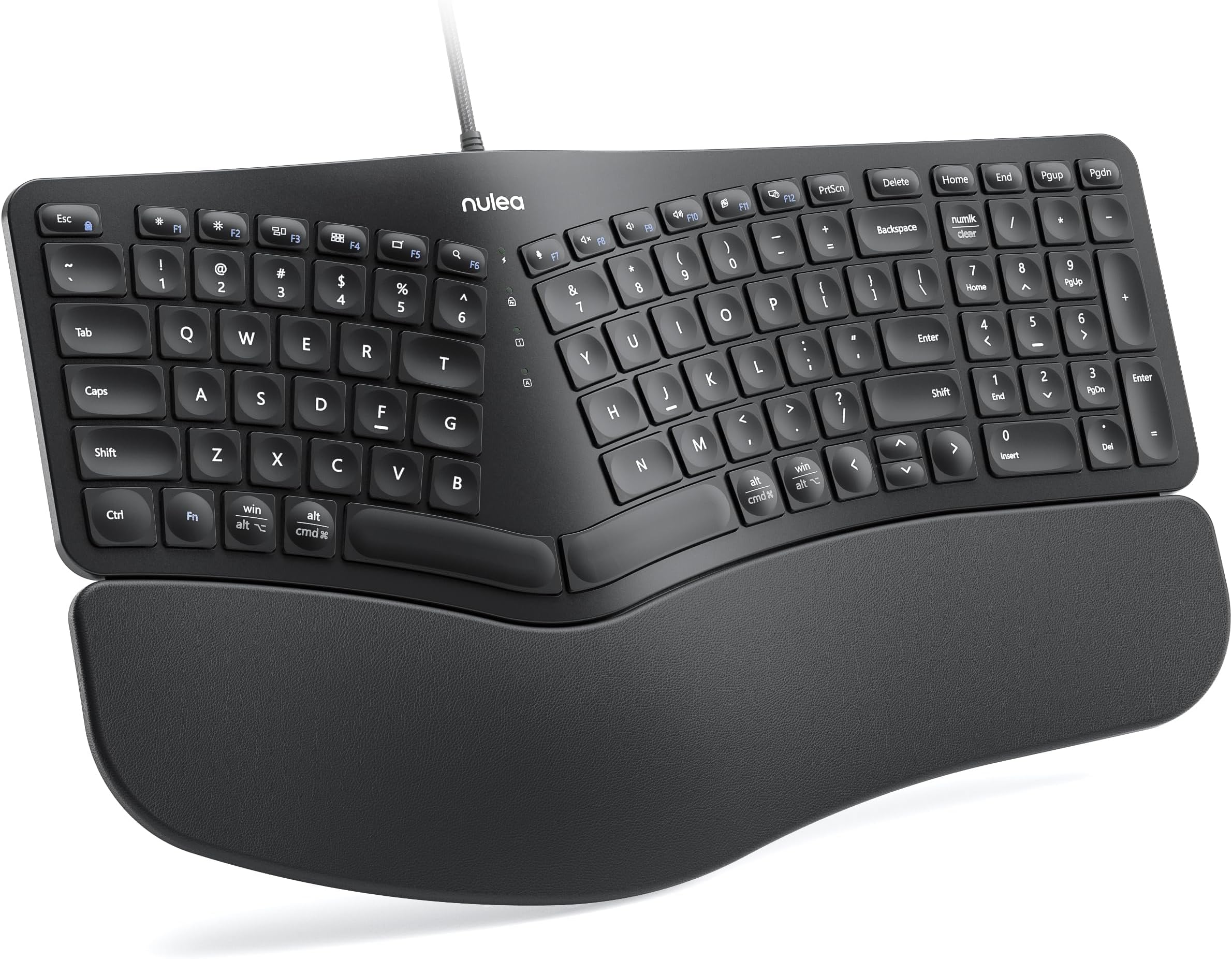
The Nulea RT05C Wired Ergonomic Keyboard features a split design that aligns with your natural hand posture, an oversized cushioned wrist rest for superior comfort, and adjustable tilt legs for personalized ergonomics. Its durable braided USB cable guarantees a stable wired connection, eliminating lag and interference. Compatible across Windows, Mac, and Linux platforms with plug-and-play ease, this keyboard is engineered to enhance productivity and reduce strain during extended typing sessions.


| ASIN | B0CXPCMGP1 |
| Best Sellers Rank | #166 in Computer Keyboards |
| Customer Reviews | 4.4 4.4 out of 5 stars (368) |
| Date First Available | March 11, 2024 |
| Item Weight | 3.05 pounds |
| Item model number | RT05C |
| Manufacturer | Nulea |
| Package Dimensions | 17.83 x 11.5 x 1.57 inches |
M**K
Nulea RT05C Wired Ergonomic Keyboard - White
I've been using the Nulea RT05C Wired Ergonomic Keyboard for about a month now, and it's been a solid upgrade. Some of the key sizes are different from my previous Logitech ergonomic keyboard, so there was a bit of an adjustment period. However, unlike my old Bluetooth keyboard that would occasionally lag, this corded one is consistently responsive, making for a smoother typing experience. The split design encourages a more natural hand position, which feels more comfortable compared to traditional layouts. The cushioned wrist rest stands out, providing excellent support and making long typing sessions much more manageable. The adjustable tilt legs are a great addition, letting me fine-tune the angle for better posture and comfort. Setup was effortless, I plugged it in, and it worked immediately with my MacBook Pro. Do wish it was a USB-C connection, but not a big issue. The keys have a nice tactile feel and respond well, which helps with typing speed. Overall, noise level from typing isn't bad. If wrist strain from prolonged typing is an issue, this keyboard could be a worthwhile solution. Overall, it’s been a great experience so far, delivering both comfort and functionality for extended use.
B**A
Love my Keyboard
Love, love, love my keyboard! It is not only lovely to look at, but the keys are wonderful and it just feels magnificent! I look forward to working and using this beautiful keyboard. Please note, the photo doesn’t do the color justice. The pink is such a sweet pink. It’s truly a pink, girly girls dream.
M**N
Almost a cheaper replacement to K860
I needed a wired keyboard for work. My go to keyboard is the Logitech ERGO K860. The Nulea keyboard isn’t quite as good as the K860, but it works well enough. The keys are a little louder than the K860, but the layout works well. I tried a number of split keyboards to find one similar to the K860 and Nulea is what I kept.
T**R
Very comfortable keyboard
Update 11/4/2025: I have used this keyboard for 10-1/2 months now and everything I said originally (below) I still agree with. It is my favorite keyboard ever. The keys are still springy (as long as you don't have a very heavy touch) and all the keys work as if they were new. I still wish there was a Ctrl key instead of a Windows key on the right side (but not enough to motivate me to downloaded 3rd-party keyboard mapping software to switch it). I definitely would buy it again. Pros: - Comfortable hand and wrist position - The space bars are not too high vertically. I had to abandon an early "ergonomic" keyboard because the slope was such that I was getting tenosynovitis (aka "mommy's thumb") in both wrists. This keyboard is not doing that to me. - Nice tactile and auditory feedback. (Some may complain the keyboard makes too much noise but I like it. If you like to hit the keys hard, you may find the keyboard not springy enough, but for a light touch it is quite good.) - Coming from an old Microsoft ergonomic keyboard, the main keys (letters and numbers above them) are where my fingers expect them, including the "Y" which is accessed by the right hand. (Some split keyboards have the "Y" positioned for the left hand, which is not what I'm used to.) - Not as wide as many keyboards that also including a number pad and arrow keys. - You can toggle the keys at the very top between normal function keys and keys that control brightness, volume, etc. (The default is the latter, but when you press Fn+Esc you toggle them to function keys.) Cons: - In order to make all the keys fit, some keys are not where I'm used to. What bugs me the most is that I have trouble finding the arrow keys, "home" and "end" without looking. "Pgup" and "Pgdn" are in a weird place too but as they are at the very top right, they are much easier to find. ("Delete" is above "Backspace", so not so hard by touch.) - There is no "Ctrl" key to the right of the space bar, only to the left. (I may try remapping the "Win" key on the right to "Ctrl", since I never use the right "Win" key and there is also a "Win" key on the left. This is not a programmable keyboard, but there are software tools that allow remapping any keyboard.) - There is no dedicated "Insert" (or "Ins") key, but the number pad has "Insert" on the "0" key so it's not a big deal to me. - The LEDs are very bright (but easily made dim by a sheet of paper over them). - No backlighting (which only bothered me when I couldn't find the arrow keys by touch in the dark and when I hit the 0/Insert key by mistake and couldn't find that in the dark either). By the way, I was puzzled by why the number pad wouldn't work until I realized that I had Mouse Keys on. If your number pad isn't working, try pressing the Alt + Left Shift + Num Lock keys to toggle Mouse Keys off. (If Mouse Keys was already off, you will get a dialogue box asking you to confirm that you want to turn Mouse Keys on.)
P**O
Bastante cómodo, de muy buena calidad, recomendado
S**E
Absolutely adore this keyboard. Fantastic ergo keyboard. Nice layout. Keys are quiet and made for typing. I loved it way better than my last one after only two min of using this one. Buy it, you won't regret it. I love pink so of course grabbed that one on sale.
J**.
Todo excelente, sólo que no sabía que los teclados ergonómicos traen la tecla B del lado izquierdo y yo estoy acostumbrado a usar el dedo gordo de la mano derecha pera esa tecla. Fuera de eso todo excelente.
T**L
Pretty good so far.
A**R
It's a great product. The reason I did not give it a 5-star review is because it does not have a Ctrl button on the right-hand side, only on the left-hand side. That really messes up my 'cut-and-paste' routine. I don't like it. I need a Ctrl button on the right-hand side to support my workflow. For this reason, I returned this product and purchased a different one that had a standard key layout. Otherwise, it's a great keyboard, very nice design.
Trustpilot
1 week ago
2 months ago