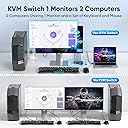
🎯 Master your workspace: One monitor, two computers, zero hassle.
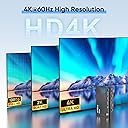
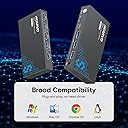
The Hearvo USB 3.0 HDMI KVM Switch enables professionals to control two computers with a single 4K@60Hz monitor, keyboard, and mouse. Featuring three USB 3.0 ports for ultra-fast peripheral sharing, HDCP 2.2 support for protected content, and dual switching methods including a wired remote, it offers seamless multitasking with plug-and-play simplicity and adaptive EDID for optimized display performance.


| ASIN | B0D5D4FK1H |
| Best Sellers Rank | #1 in KVM Switches |
| Brand | Hearvo |
| Brand Name | Hearvo |
| Circuit Type | 2-way |
| Color | Black |
| Connectivity Protocol | HDMI |
| Connector Type | Plug In |
| Contact Material | Aluminum |
| Contact Type | Normally Open |
| Control Method | Remote |
| Current Rating | 1 Amps |
| Customer Reviews | 4.3 out of 5 stars 752 Reviews |
| Included Components | kvm |
| International Protection Rating | IP20 |
| Item Dimensions | 6.4 x 5.9 x 0.8 inches |
| Manufacturer | Steetek |
| Material Type | Aluminum |
| Model | STK-S7232H |
| Mounting Type | Desktop Installation |
| Number of Items | 1 |
| Number of Positions | 1 |
| Operating Voltage | 5 Volts (DC) |
| Operation Mode | ON-OFF-ON |
| Specification Met | Hdmi |
| Switch Type | Push Button |
| Terminal | Blade |
| Unit Count | 1.0 Count |
| Upper Temperature Rating | 80 Degrees Celsius |
D**E
Jackpot
This solved my 2 MacBook Pro one monitor dilemma. Easy to set up and allows me to switch between laptops in a snap. I think I need to order slightly longer HDMI cables just to help with cable management. Runs my keyboard and mouse and allows me to switch between laptops while using one monitor. It’s good quality and for under $30 it has helped me more productive.
M**X
Great option for Mac and PC
This is a great product for a PC and Mac combo. Consolidating the Mac’s inputs to one USBC is streamlined and reduces cable clutter. Adding the power input is also a great touch, allowing that singled USB-C input to take care of charging, audio and sound, and USB inputs. I found some screen flickering would occur when I used a USB-C extender cord. But when using the stock or just a longer cord hasn’t had an issue at all.
V**I
Smooth Switch
This KVM switch is everything I needed! I knew about two monitors or more for one PC, but I wasn’t aware of a device that would allow me to have two computers connected to one monitor. This was a necessity for me because the monitors that I have only have one HDMI port, and even the ones that have 2 or more, require me to go to the Home Screen, change sources, login, and wait for everything to load. Orrr, have one monitor for each computer. That is no longer a problem with the KVM switch. The switch works super smoothly, it’s promoted for PCs, but I tried it with 2 Mac Minis as well as a Mac Mini (iOS software) and a PC (Windows software) and it worked perfectly! So it is compatible with both softwares. The switch is as simple as the press of a button and you’re immediately right to wherever you left off. The connection is immediate and fast. In my case, I just needed to move the mouse a bit to wake it up, but everything was there. I did not expect such a tiny decide to be so efficient. My only downside is the mess of wires that are visible, since you have the hdmi going from the device to the monitor, then an hdmi & USB combo from the device to each PC, so 5 cables coming out the back, and then the usb cables coming out of the front if your mouse and keyboard are wired. There’s one additional (3 total) USB port in the front, which could be good for a headset or a portable hard drive. The device itself is powered when connecting the USB port to each PC. Without that connection, the device won’t be powered. So I would just recommend that in some future it maybe comes with a small wall mount that can be set up under the desk so all of those wires aren’t exposed. I like a neat desk, so that’s just my personal preference. But the device itself is amazing and I definitely recommend it.
P**O
The Adaptive EDID support works exactly as advertised
I’ve been using this USB 3.0 HDMI KVM Switch with Adaptive EDID for a few weeks now, and overall it’s a very capable and reliable device. The Adaptive EDID support works exactly as advertised - it preserves the optimal display settings across different systems, which makes switching between machines seamless and prevents common HDMI handshake issues. The USB 3.0 interfaces provide fast data throughput for peripherals, and the HDMI implementation supports modern video standards up to 4K/60Hz with HDCP compliance, ensuring crisp and stable visuals. However, I would like to clarify one technical point: Does the switch reliably pass audio over HDMI from the connected devices to the monitor? Specifically, is the HDMI hub/switch fully audio-transparent, or are there any known limitations in how audio is forwarded through the Adaptive EDID implementation? This would be helpful to confirm for setups where audio must be delivered directly to the display or speakers via HDMI. Overall, excellent value for the price and works well in mixed-OS environments. Adaptive EDID makes this especially useful in setups with diverse hardware.
H**E
USB 3.0 HDMI KVM Switch 1 Monitor 2 Computers
Given that I have a limited amount of area to work with, the fact that it is surprisingly lightweight and does not take up much space on my desk is a significant advantage. It has a sleek appearance that mixes in nicely with the other technological devices that I have, thanks to the matte black finish. For the purpose of connecting my two computers to the switch, I made use of the USB cables that were included in the box. I was particularly grateful that the package had everything that I needed, including the controller. It didn't take me long to get the switch up and running since the directions were easy to understand. Because all of the HDMI and USB connections are properly labeled, it is simple and straightforward for me to connect my monitor, keyboard, and mouse without any potential for misunderstanding. I also linked my printer and external hard drive to the switch, which was a pleasant bonus that offered even more capability to the system. The picture quality is fantastic, and there is no discernible loss in clarity or color accuracy when moving between devices. I typically use a 4K monitor, and the image quality is superb. I really love the fact that the EDID adaptable function guarantees that the settings of my monitor are maintained across both computers. This is something that I truly appreciate since it eliminates the need for me to modify the display settings each time I move between machines.
A**P
Reliable, Solid Performer — My Experience with the Steetek USB 3.0 HDMI KVM Switch
I’ve been using the Steetek USB 3.0 HDMI KVM Switch (1 Monitor / 2 Computers, 4K@60Hz) for several weeks now, and it has consistently delivered on the “reliable” promise. Here’s why: 1. Stable switching between machines: Switching from my desktop to my laptop has been rock-solid. The device doesn’t drop input, stutter, or glitch when using the button or the wired remote. just works. That consistency is exactly what I was missing in other products. 2. Strong video performance without flicker or dropouts I run a 4K@60Hz monitor, and this KVM maintains the display signal without flickering or momentary black screens, even when switching back and forth. The “Adaptive EDID” feature appears to help it negotiate and retain stable video resolution. 3. Reliable USB peripheral handling The three USB 3.0 ports are a nice bonus. I have multiple devices (keyboard, mouse, external SSD) plugged in, and switching rarely interrupts or confuses the devices. I haven’t encountered “missing device” or recognition issues. 4. No external power, yet consistent performance Despite being bus-powered only, the unit maintains consistent performance under normal loads. That’s one less cable and one less point of failure. The “plug and play” nature saves hassle and reduces one potential weakness. 5. Build quality and support confidence The unit feels solid and well-built. The inclusion of a “lifetime Protection Plan” seems to support that. Also, the brand has placed it high in the KVM rankings (ranked #3 in KVM Switches on Amazon) which suggests broad adoption.
D**R
Love this thing.
This KVM switch works very well and is easy to setup and use. The manual is easy to follow and has plenty of illustrations, you can't go wrong.
B**S
Great (with a few caveats...)
PROS: Overall, works as intended. Came with all pieces and USB-to-USB cables (nice plus). Setup was a breeze — literally plug and play. Wired “remote” works (worked, more on that later) fine, though the cord length makes it useless for my setup. Not so bulky that it can’t sit on a desk or under a monitor. So far, no issues with lag, frozen frames, screen tearing, etc. I can’t speak to 8K since I’m not rolling in cash, but at 2K there’s no noticeable resolution loss. Build quality is better than expected for the price — solid aluminum case that feels like it could survive some abuse. TL;DR: Works as advertised. ~~~ CONS: Power draw. There’s no dedicated power supply, so the USB ports are underpowered. The host ports I’m using are USB 3.1/3.2 (same or higher spec than the advertised 3.0), but just my RGB keyboard (Razer BlackWidow V3) is enough to throttle charging on my wireless mouse (Logitech G502 Lightspeed) to the point where I can’t charge and use it at the same time. (Special nerd stuff): G502 charging + in use → 250–500 mA @ 5 V BlackWidow RGB on → 250–400 mA @ 5 V Combined → up to 900 mA (exactly the USB 3.0 spec limit) This KVM won’t deliver that much total current across its three USB ports. Additionally the controller seems to be a very weak link in this system. Mine lasted two presses before promptly dying. TL;DR: USBs are underpowered — don’t expect full USB 3.0 charging behavior. Controller isn't reliable
Trustpilot
3 weeks ago
1 week ago