🚀 Elevate your dual-laptop setup with seamless 4K power and speed!
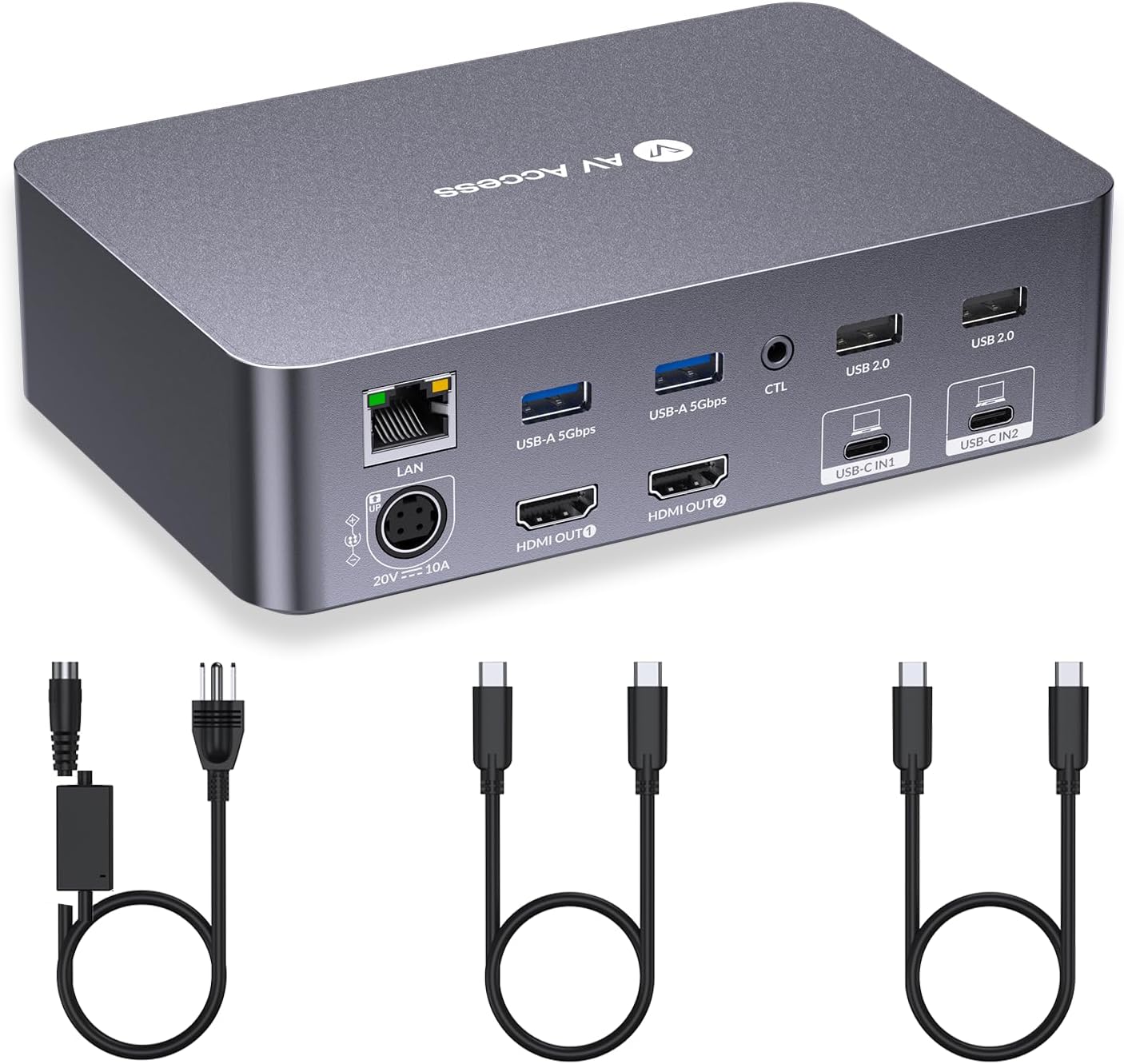
The AV Access KVM Switch Dock is a premium 12-in-1 docking station designed for professionals and gamers who juggle two laptops and dual monitors. It supports dual 4K UHD displays, delivers 60W power to each laptop, offers ultra-fast 2-3 second switching with EDID emulation, and includes versatile ports like USB-C MST, USB 3.0, Ethernet, and SD card slots. Ideal for boosting productivity and gaming performance in home office setups.


C**N
Great KVM if you deal with laptops at work.
Received my package quickly from Amazon. I do have another AV Access device called the iDockB30 but it's good for two desktops and a laptop and I wanted the one that can connect to two laptops to have as my work keyboard-video-mouse (KVM). It's easy to set up. Just two USB-C cables that go to the corresponding ports on the back of the iDockC20 and power. The other ends of the USB-C cables will go to the respective laptops. I'm a big Lenovo ThinkPad fan so I have a ThinkPad T14 Gen 5 AMD from my work and a ThinkPad P14s Gen 5 AMD as my personal daily driver. Turned on the unit and works well. Though the T14 had a little issue connecting but once I rebooted it worked fine. I'm able to press the switch on the docking unit to switch between the two with no issue. Looking over the build it looks solid, and the ports are labeled clearly so you know what device to plug into what. There are a decent number of ports in the back and the SD card reader is convenient to have since at my work place, I sometimes need to use the cards to read any external data. I tested out the network connectivity between the two by switching and it doesn't seem to lose the connection which is nice. Since the power distribution is 60W I would only recommend the KVM for use on business class laptops like the Lenovo ThinkPads. It would be advisable that if you are going to be connecting a gaming laptop on it like a Asus Strix G16 or a Lenovo Legion i7 having USB-C ports it will provide enough power if you plan to game on it. I would only use it for productivity work. I hope the next iteration of the USB-C ports on the docking unit will be like USB 4 or Thunderbolt 4/5 but for right now it suits to what I need to it do at my workplace. I do have dual monitors, and they worked great on them. No issue whatsoever since the monitors I have are 27-inch 1080P and a 32-inch 1440P. I have used it for quite a number of days, and I personally like the device. It is working great so far for me and does what I need it to do. Since I do IT work, I like the fact that I can plug in a second laptop and run through items without having to plug in a monitor etc.
M**I
Perfect KVM Switch Dock for Multi-Monitor and Laptop Setup
The AV Access KVM Switch Dock is perfect for users who need to connect multiple monitors and laptops simultaneously. It supports 4K dual monitors with refresh rates of 2K@144Hz and 1080P@240Hz, making it ideal for both office work and gaming. Equipped with 2 USB-C MST ports, 60W PD charging for each PC, a 1G Ethernet port, and EDID emulation, it ensures smooth device switching without resetting monitor configurations. With stable performance and easy setup, this dock is an excellent choice for creating an efficient work or gaming environment.
R**H
Superior quality, excellent value, and outstanding technical support
Outstanding KVM with just the features I needed. I have several different brands of older KVMs but the AV Access is sleek, small, and completely functional. It even has an IR switch in case you place the unit out of reach. The provided cables are of very good quality. I'd made a wiring error when hooking everything up and hit their web site to see if they had troubleshooting documentation online. A little chat window opened up. I expected some sort of sales bot, but typed in "troubleshooting" and to my surprise was immediately connected with their Technical Support group. The support engineer Kevin was really excellent - honestly, among the very best experiences I've had dealing with support. No scarcely trained staff reading from a support flowchart, Kevin knew the product extremely well and was equipped with graphics of the unit showing what needed to be done. I was up and running in no time. I'll be replacing the older, bulky Belkin units - reliable, yes, but just way oversized - with AV Access KVMs. Thanks AV Access for a great, well designed and well built unit - and thanks, Kevin, for your patience, competence, and for getting me up and running in record time.
S**C
Don’t buy it overheated and started having issues on day 2!😡
Wow, just crazy this thing worked great out of the box, I was really hoping this was it, as the kvm switches are notoriously problematic once they overheat and guess what this one did the same thing. I know what you are thinking, well how many items were plugged in and running. Just my two laptops and two screens, I had a one usb dongle connected for the keyboard and mouse. The problems were not instant, the first day it was all sunshine's and daisies. Day 2 I had to switch my screens u know 1->2 and 2->1 nothing major I could have lived with that and it also started disconnecting and connecting one of the usb drives connected to my personal laptop. Day 3 I noticed it was no longer powering one my laptops so here comes the power cable as an extra and I was ok with that as well. Today was the last straw for me mid teams call I lose a screen and connection and the screen wont come back, I switch to my personal laptop same thing screen wont come on, I test the screen with a direct plug into my laptop and it works. What a disappointing piece of garbage, don't waste your time! The reason I am so mad about this is because I spent an hour running the cables for this thing so they were neat and not cluttered and then had to pull them all apart and disconnect so I can send this back. 😡
A**M
Single and therefore best device on the marked :) Still might be improved.
Using it for almost 20 days now, so here is my honest opinion: 1) First let's discuss setup: I have a personal "gaming" ROG Zephyrus M16 (2022) with 3080TI. I have some none name company Dell laptop with Ryzen 7 4750U. Laptops are using Windows 11 Pro and Windows 10 Pro correspondently. Next monitors: Internal gaming laptop have 2k 165Hz display. Internal dell laptop 1080p 60hz. External Dell monitor G3223D 2k 165Hz and Asus VA27EHE monitor with 75Hz refresh rate. 2) Review: Pros: * I don't think there is anything on the market that have 2 USB-c input and can work like a hub, so this product is the only choice! * Device split ethernet connection between both laptops so your "inactive" device will be always online. * Tons of ports, should be enough for any regular user. * Device is emulating screen for "inactive" laptop and you won't have problems with messy windows sizes/icons movement all around the desktop/strange RDP behavior and etc. Cons: * My Dell 2k 165hz monitor is NOT working in 165hz mode not it's working in 144hz mode. It's shows artefacts only and I verified that connecting it via second USB-c port directly to laptop fix the problem. HDMI cables are also good 2.1 standard cables so at least 144hz refresh rate should work, but it is not. * Device is not working with my other thunderbold-4/usb-4 type-c cables. I am not sure why, I understand that instruction says to use only original one, but why??? And when original one will wear out what I will have to do????? * Device does not support DDC/CI pass though so you will not be able to change your monitors brightness, and even my old semi-working messy Baseus hub supported that! My eyes will never recover from that :(((((((( * Other reviews mention that device get hot and this is partially true for me as well. But when I connect gaming laptop to original power break (99% of the time) looks like internal USB-C power supply can get some rest and kvm switch getting less heat and it's getting just warm, not hot hot. * Other reviews mentioned that switch between laptops can take up to 5 seconds. This is again partially true for me: 1080 display got online in 1.5 second, but the main 2k display took around 3 seconds. * Device mention "wake up" function, but it's not working for both my laptops, and I triple checked USB wake-up settings * When you turn off your laptops and than turn them back on they didn't find the external displays before you disconnect USB-c cable and connect it back. Sometimes it takes 2-3 attempts before it starts working. * For some reason I wasn't able to run all 3 displays: rather internal or 2 external. This might be the way how it works or even my laptops hardware limitations but still good to share for those who expect that setup to work. Resolution: it might look like device have more cons than pros from my review, but as I mentioned before AV Access is the only company that offer smth like. This is the only company that filled the niche and did that not badly. If we would have competitors with same price tag I would give product 3 star, but since they are the only one who "cared about us" — it's 5 stars minus 1 as regarding all cons. I am sharing the review not to stop other customers but to share feedback to the company so next generation of devices or maybe some kind of firmware upgrade will improve the quality.
A**K
Game-Changer for Dual Monitor Setups – Seamless, Smart, and Powerful!
Just two days in, and I’m already sold—this AV Access KVM Switch Dock is exactly what I’ve been searching for. If you're juggling multiple devices and want a clean, efficient setup, look no further. 🔌 Effortless Switching: I’ve connected both my mini-PC (via USB-C with display out) and my work laptop, and the switching between them is smooth and instant. It even wakes my mini-PC from sleep when I toggle inputs—huge plus! 🖥️ Dual Monitor Brilliance: I’m running two high-refresh-rate monitors, and the image quality is stunning. Whether I’m working or gaming, everything looks crisp and fluid. ⚡ Smart Design: While my mini-PC doesn’t support USB-C power delivery, that’s a minor trade-off. The dock significantly reduces cable clutter—HDMI cables go straight to the dock, keeping my desk neat and organized. 🌐 Extra Perks: With 60W PD for each PC, 1G Ethernet, and EDID emulation, this dock is packed with features that make it ideal for both productivity and play. 🎮 Verdict: Super happy customer. This dock has transformed my workspace and simplified my tech life. Highly recommended for anyone balancing work and gaming on multiple machines.
K**R
Best KVM switch for 2 monitors and 2 windows laptops setup
I've been using this iDock for the past few weeks, and it's been a great addition to my setup, which includes both my work and personal laptops, a Logitech unified receiver for my keyboard and mouse, and a USB camera. Both laptops run Windows. My monitors are 1920x1080 and 2560x1080 resolution If you're looking to minimize cable clutter while seamlessly using two laptops and two monitors, this device is an excellent choice. It requires only a single Thunderbolt connection from your laptop, handling power delivery and video output to the monitors efficiently. I haven't experienced major issues with my personal laptop, aside from occasional blank screens. When I reached out to customer support, they recommended using a 40G USB-C cable since the included cables only support 20G. I'm unsure if that would resolve the issue since neither of my monitors is 4K. If your personal laptop is Mac or Mac Mini, it only duplicates the screen, and you cannot extend your screen. This is a limitation in newer Mac books and Mini with M chips. However, on my office laptop, I frequently hear notification sounds indicating USB devices connecting and disconnecting, which can be distracting during work. As I don't have admin access, troubleshooting is limited, but all connected devices function properly. Unfortunately, customer support's solutions didn’t resolve the issue. The device does heat up, though not to an alarming level. If you plan to mount it under a desk, I’d suggest monitoring its temperature initially. Despite these minor inconveniences, the iDock works well for my setup and helps reduce cable clutter significantly. I've also tried other KVM switches that require USB and HDMI connections without power delivery, which made cable management a nightmare. Overall, the iDock suits my needs well. I’m giving it four stars due to a few small drawbacks. Update: 7/30/25 - I am reducing my rating to 3 because one of monitors keeps go off. Whenever it happens, I have to disconnect and reconnect the thunderbolt cable or the HDMI cable to the monitor. It is so frustrating.
J**N
Works perfectly to streamline multiple configurations.
I've been an engineer for over 20 years, and in the last 5 years we've had the ability to work from home on different occasions. I had a desktop computer and two ultra-wide monitors at home. I spent several months plugging and unplugging to swap back and forth from my home computer to my work computer. I spent several days looking for something to streamline it and avoid having to continue to plug and unplug, with the fear of damaging the ports. Everywhere I looked, I couldn't find anything even close to what I needed until I found AV Access's products. I ordered the iDock C10, and used it for a couple of years. It worked perfect. You're able to connect your monitors, computers, headphones, keyboard, mouse, etc to the back, and still have USBs open on the front for flash drives. One big benefit is that these boxes are heavy enough that they stay sitting on the desk, even with all of the cords pulling on it. Most of what you find now is cheap, lightweight plastic, but these are very solid. After getting a new laptop, I liked the iDock C10 so well (desktop/laptop), that I ordered the iDock C20 (laptop/laptop). At first it was hard to justify the cost, but after using it, it's definitely worth the investment. Their customer service is excellent. There was a short time I started having problems with the screens flickering. I contacted customer service and they were already aware of the issue and had a firmware update almost ready. Each time I've contacted them by email (which works best with my schedule), they always respond within a few hours. If you work from home, or have more than one computer/laptop you use regularly, I highly recommend these products. I have zero complaints.
Trustpilot
1 month ago
3 weeks ago