Buy anything from 5,000+ international stores. One checkout price. No surprise fees. Join 2M+ shoppers on Desertcart.
Desertcart purchases this item on your behalf and handles shipping, customs, and support to Indonesia.
📚 Dive into color, comfort, and endless stories—your next obsession awaits!
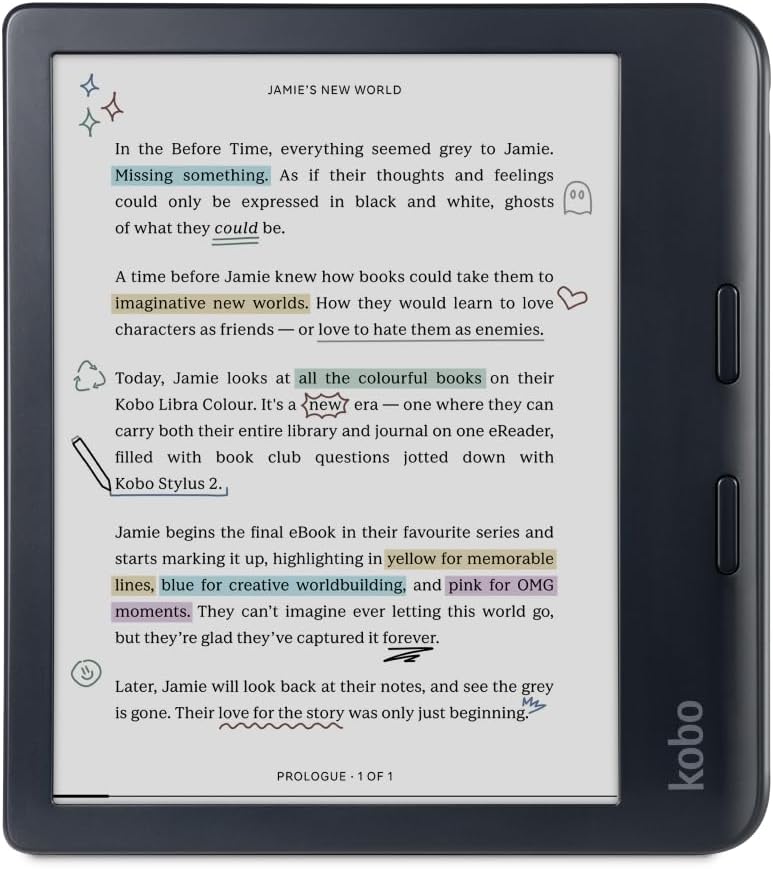
The Kobo Libra Colour is a 7-inch glare-free color eReader featuring the latest Kaleido™ 3 E Ink display, IPX8 waterproofing, and 32GB storage. Designed for professionals and avid readers, it supports audiobooks, customizable reading settings, and stylus-compatible note-taking. Lightweight and eco-conscious, it offers weeks of battery life and seamless access to Kobo’s extensive eBook and audiobook ecosystem.


| ASIN | B0CZXX465Z |
| Battery Average Life | 2 weeks |
| Battery Description | Lithium-Ion |
| Best Sellers Rank | 919 in Electronics & Photo ( See Top 100 in Electronics & Photo ) 8 in eBook Readers |
| Bluetooth support? | No |
| Box Contents | Charging Cable, User Manual |
| Brand Name | Kobo |
| Colour | Black |
| Compatible Devices | [VARIOUS: Windows, macOS, iOS, Android] |
| Country of Origin | China |
| Customer Reviews | 4.6 4.6 out of 5 stars (3,646) |
| Display Technology | Electronic Ink |
| File Format | EPUB, MOBI |
| Human Interface Types | Buttons |
| Item Weight | 7.05 Ounces |
| Manufacturer | Rakuten Kobo |
| Manufacturer Part Number | N428-KU-BK-K-CK |
| Memory Storage Capacity | 32 GB |
| Model Name | Kobo Libra Colour |
| Model Number | N428-KU-BK-K-CK |
| Native Resolution | 1680x1264 |
| Network Connectivity Technology | Wi-Fi |
| Night vision | No |
| Other Special Features of the Product | Color display and Kobo Stylus 2 compatibility |
| Product Warranty | Manufacturer Warranty |
| RAM Memory Installed | 32 GB |
| Screen Size | 7 Inches |
| UPC | 681495009473 |
| Unit Count | 1.0 count |
R**S
A great colour e-reader - well worth a look
I really wanted to like this e-reader. And I do — it's really very good. I've used e-readers for many years, and whilst I've not been an early adopter, each model I've purchased has been an improvement over the previous one. Recently my trusty old Paperwhite, which I'd given to my son, finally died. I therefore took the opportunity to gift him my Oasis and decided to pull the trigger on a colour e-reader. I did my research and decided to try a different brand to the one I'd previously used. I settled on the Kobo and am so far very impressed. It's very similar in form factor to the Kindle Oasis, with the same size screen and the side bezel with the page turn buttons. This was something I really liked on the Oasis, and the fact that the Kobo Libra shared the same form was one of the reasons I chose it over other options. I decided to purchase the bundle that came with the stylus, as it was the same price as the Kobo on its own, which seemed like a good deal. I can't say I've really used the pen yet, but as it was essentially free it's a nice-to-have. I think I would get more use out of it if I didn't already have an iPad with a pen, which I use for taking notes. The usefulness of the stylus really comes down to what you plan to do with the Kobo. Let's start with the screen, which is of course the most important (arguably) part of any e-reader. The screen is good, certainlyb on par with other e-readers. Text is sharp in both black and white and colour (although be aware that the resolution in colour is less than that in B&W due to the way colour E-Ink screens work). It's certainly not fuzzy though, and honestly I think most people would struggle to see any difference. Colour itself is fairly muted. Again, this is true of all current colour E-Ink screens. I'm sure as the technology advances this will improve but don't expect heavily saturated colours. I've attached a photo wihich shows the screen in standby mode (i.e. no backlighting) as well as one of the home screen. The screen is responsive and page turns happen quickly. You do of course get the usual flashes etc. which are part and parcel of E-Ink screens but it's still very good and barely noticeable most of the time. The UI is really nice, and I find it less cluttered than the Kindle OS. It's also less in-your-face when it comes to advertising. Whilst there are a couple of links to the store and for Kobo+, they're pretty unobtrusive. The bottom of the screen features options for accessing your books, discovering content, making notes, and accessing settings. There are of course various options for sorting your book collection too. Sideloading books via Calibre is very easy, which was great for me as I have a large Calibre library. If that's important to you, rest assured it's seamless — just as it was with Kindle devices. The reading experience is great and the page turn buttons feel solid. They're less clicky than those on the Kindle Oasis, and I much prefer using them to tapping the screen and getting fingermarks all over it. I did find the buttons were inverted compared to the Kindle, but it's easy enough to swap the behaviour in the settings. There's a good selection of fonts available, so there should be something to suit most readers. Rotating the device automatically re-orients the page, which is handy if you read in bed and switch sides — it also has a landscape mode if you prefer that orientation, though it's not something I use so I can't really attest to its usefulness. Battery life seems good, which isn't unexpected with E-Ink. Being colour shouldn't affect the power consumption based on my understanding of how colour E-Ink screens work. Installation of KOReader is possible if you prefer it, but I've not felt the need as yet. The stock reader is nice enough that I don't feel I'm missing out on features I grew to like in KOReader on my Kindle. You can also install a custom menu that allows quick access to useful features. This is done at your own risk, of course, but the options are there if you're someone who likes to tinker. I did encounter one negative when attempting to read a comic — well, it's a colour e-reader, you have to try at least one. Unfortunately the screen size meant I was unable to comfortably read the text. Whilst this isn't necessarily the fault of the e-reader itself, it's definitely a limitation of the screen size. I did find manga more suitable, which makes sense given that it tends to be printed in a format similar in size to the Kobo's screen. Your mileage may vary depending on your eyesight. Another minor negative, though not necessarily with the device itself, is the Kobo store. I found it less easy to navigate than the Amazon store. It may just be me, but searching by category didn't really work as expected — as an example, I navigated to Non-fiction and then to a section that should have returned true crime books, but found a lot of fiction being surfaced instead. Using Goodreads to discover content and then searching the Kobo store is no issue, but it's something worth being aware of. Kobo customer support also seems very good. I had an issue with my device and tried all the troubleshooting steps on their website to no avail. I contacted their support agents and explained the issue and what I'd already tried and they didn't try to force me to retry all the steps, instead providing my with a return label so I could send my device back to them for replacement. The whole process from sending to receiving the replacement only took a few days. As someone who spent a lot of time in the past working in Customer Service I expect a certain level of service from companies myself and I'm happy to say it was received from Kobo. Overall I'm really happy with my purchase. When you take in to account that it's a fair bit cheaper than other devices it's hard not to see this as a great deal. If you're heavily invested in the Amazon Kindle ecosystem and have a large number of DRM protected books this may not be for you, but if you're in the market for a colour e-reader and aren't worried about the brand then I would recommend this wholeheartedly.
B**Y
From Kindle to Kobo - it beats the Coloursoft
I last tried the Kobo Libra Colour about ten months ago. It was a rebound purchase when my Scribe packed in after a year, and Amazon was singularly unhelpful, refusing to repair or replace a £400 bit of kit. In a fit of pique, I decided to come away from Amazon and try the Kobo. But I wasn't in the right headspace. Although I desperately wanted a colour device (the Colorsoft hadn't launched then), I was comparing the Kobo against the Scribe and the Oasis. I was also still very immersed in the Amazon ecosystem - I've had Kindles since the first iteration. I was really looking for a unicorn - a large colour reading device plus notebook. I wasn't impressed with the Kobo notebook - the screen was small, and the pen didn't feel like writing on paper, as the Scribe does. I sent the Kobo back. So now, months on, I recently tried the Boox Note Air 4C (it was a birthday gift). But the battery life was woeful. Yes it had a colour screen, and yes the notebook functionality is way better than the Scribe. But I didn't feel it was good enough to replace the Scribe. So I decided to give the Kobo another try and re-calibrate my approach. Not viewing it as a notebook device to replace Scribe but as a 7 inch colour e-reader to replace the Kindle Colorsoft (but the Kobo happens to have a notebook as an added bonus). Plus, we are now at the point where Amazon's approach to licencing means many people have moved away from the ecosystem in favour of Kobo. If they can do it, I can too, I thought. This time, I'm viewing the Kobo through new eyes. I thought it felt cheap and plasticky originally. But I hadn't realised it's made from ocean-bound plastic. In fact, it's a very environmentally friendly product, designed to be fixed if it goes wrong, rather than discarded. And it's super light too. Suddenly I got what all the reviewers have been raving about. It IS a device for readers. Small and thoughtful features enhance the reading experience no end. Let's compare it to the Kindle Coloursoft, as I think that's the fairest and closest e-reader to this. The display on the Kobo Libra Clour is way better. I know there's a lot of talk about colour devices being darker and, yes, both are compared to non colour e-ink devices. However, you can get the Kobo to a B&W e-reader background lightness without feeling like the front-light is cranked up too high. At just 8% it begins to feel akin to regular e-readers and it just gets better from there. And, unlike the Boox, using the front-light doesn't eat up battery. By comparison, the Kindle Coloursoft has a very murky screen. Also, the colour screen is much more vibrant on the Kobo. Side by side, I'd say it knocks the Coloursoft out of the water. I've added photos but the difference is far more obvious in reality. Initially, I did have a niggle with the Kobo's fonts - none seemed as bold as those offered on Kindles. However, this time, I learned you can adjust the 'weight' of the font in the settings to make them bolder. You can also download fonts for free online then save them to the font folder on the Kobo (it's super easy to do - just connect the Kobo to your computer or other device). Doing this, I was able to download Bookerly, which is the font I normally opt for. The next plus is how easy it is to adjust the front-light. No having to tap on the screen a couple of times to bring up the brightness menu and adjust. On the Kobo, you can choose to run your finger up and down the left side of the screen and, hey presto, it adjusts your light. This is such a reader-friendly option. And on the subject of making things quick and easy, you can also slide down from the top to easily get back to the last few things you viewed - whether a novel or a notebook. In both the Coloursoft and Scribe, you need to click back to the home screen. It was always an irritant on the Scribe not being able to easily toggle back to the book I was reading from within the notebook, and vice versa. The reading experience itself is enhanced by the addition of the stylus, if you choose to get it. But even just being able to highlight in different colours is helpful (something you can also do on the Coloursoft). However, to also be able to write directly on the book page, and in various colours, is game changing for keen annotators. Scribe has made it a little more intuitive to write on the page, but still doesn't offer the full-on option of having what you write appear directly on the page - instead, it shoves it into an expandable side-margin or a text-box that takes up space on the page. Another really helpful tool on the Kobo is being able to highlight a word (which brings up a drop-down menu) and click 'search'. Most people who use e-readers probably try to search when reading a book to find where names or other things have appeared previously. This is a direct route to doing that. On Kindles, though, you have to click the magnifying glass icon, then type in the word or name you're searching for. This function on the Kobo makes it so much quicker and more seamless to perform this function. You can also customise both footers and headers in the Kobo, to give you different info e.g. percentage read/ page number/time left in book/ in chapter etc. So this is totally customisable. Finally, the Kobo has PAGE TURN BUTTONS! This is something many hardcore Kindle fans have missed immensely in later iterations. Better still, the Kobo does a full auto rotate (which can be disabled). Something which, for some unknown reason, was a function Amazon removed from the Coloursoft. The full auto-rotate means you can move the device from left to right hand (the page-turn buttons automatically recalibrate) AND you can read it in landscape mode too. Now to the ecosystem ... I realised shifting would require a change in outlook. I've spent around 15 years downloading samples and curating my Amazon collections. I realised I'd NEVER move device if I remained wedded to that. I just had to take the plunge. Realistically, when you go into physical bookshops, you don't see exactly the same books in each one. You browse what's on offer and make your choice from there. So, personally, it was a bit of a mental letting go for me. I don't use Kindle Unlimited so that wasn't an issue. I believe the Kobo equivalent isn't quite as good (although it is cheaper) - but it's anticipated that as more authors move over to Kobo, their catalogue of free novels will increase. There's also a reward scheme where you pay £6 a year and can earn points for every book you buy, which you can then redeem for a free book. So Kobo are rewarding loyal readers. The device itself is much more reader-friendly - showing you the books/previews on your device and encouraging you to read what's on there - rather than trying to sell you more books, like Amazon does. There is also access to Overdrive to borrow library books; although it doesn't seem like it's available for most libraries in the UK who use a different borrowing system to Libby (which is linked to Overdrive). But really, once I put the Amazon catalogue I have on my Kindle out of my mind, I've found there's more than enough choice and deals on Kobo. Generally, if a novel goes on offer on Amazon, it'll have the same offer on Kobo. Overall, even though I've only had the Kobo a few days, I'm loving it so far. It ticks so many boxes: colour/waterproof/notebook as a bonus/very intuitive/makes reading easy. A note on the stylus - I got the Kobo one but you can get cheaper compatible versions, but from what I've gleaned, the highlighter and eraser functions are always reversed; so if you get an eraser at the end, that'll highlight and the button on the pen will erase. Apparently the Metapen M1 at £29 is manageable because the eraser and highlighter functions are both buttons on the pen body, so it's not too important which button does what. And it's almost half the price of the Kobo stylus. Finally, cases ... if the case is just as important as the device for you (which it is for me, as it's part of the reading experience), suitable cases are thin on the ground. Largely because there is no streamlined case that has a pen holder. There are chunkier cases which have a pen loop at the side. But nothing that encases the stylus within the case. Apart from Kobo's own Notebook case. Generally, I like a kickstand and pen holder. However, I decided having a place to safely stow the pen was more important, so I opted for the Kobo Notebook case in blue. It is a beautiful case (definitely not the cheapest option though at around £34). Also, I've found that when turned sideways, there's a flap on the front of the case that can be used to prop the Kobo up - not sure if that's intended, but it works well. All told, when stacked up against the Colorsoft, the Kobo wins hands-down. It's a lovely looking device, a little wider where the Coloursoft is longer - but with the same size reading area on both. It's just a lovely, intuitive device that's had a lot of thought put into it by a design team who has clearly researched what readers want.
J**9
Wow! Best product ever purchased maybe? And a word from a nerdy little kid...
Talk about falling in love with a product. Scoured reviews for ebook readers and the libra colour was what I needed. Had never owned an ebook reader before so had been using mobile phone or at times an ipad to read ebooks. When I got this I also ordered the luxury case you'll see on amazon (around 30 or so). Take my advice, get the case with it. Closes magneticalky, fits it superbly. Back to the device. It was new to me but got it opened, beautiful reader. I mean so high quality it's just not funny. Within 10 min I had it linked to the Web (yeah it can link to Google drive etc) and had transferred like 40 ebooks over. So easy. You can do this via the cable or like me just do it over WiFi. I can go to Google drive on my phone or laptop, drag files into the rakuten kobo or similar folder and then your reader has a section to access idrive, other online locations such as the kobo store (amazing too), and heck you can even go to a browser in a 'beta' type file. Just a note - because of the eink display, refresh rates etc don't expect much from a browser etc. Other than functionality that is. But it does everything you need. Omigod these things are so good. I literally felt guilty for buying myself it. That's how good the thing is. Honestly this thing is one step away from getting Beyonce to give you her cell number. The display is superb, much like a real book. I have mixed formats of files but I use software called Calibre (free and comes in mac, pc, android etc versions) whcih allows you to manage your library for the libra, convert formats, add different book covers or change anything you want for each book. This is the platinum standard software I would say to manage libraries with your kobo libre. Amazing stuff. Yeah so amazin display, fast when you change page. Super customisable. Battery is so good I started to think mine was solar powered. Oh did I mention I opted for the stylus as well? It's a no brainier for me I mean add a little to the initial buy price to get it thrown in with the libra (cos it does come free and is optional) or wait till after and get stung for the full stylus price? I love the thing. It's accurate, it has your own notebook section so like I read a lot of science books, and I like to take notes. You can do so on the actual book pages or if you're like me, finish a part, open the 'my notebooks' section and separately do some notes etc. It's a joy to use, very accurate and its smart so it knows not to let your palm hitting the screen to do anything. Omigod amazing. For the older user... Years and years back there was this little nerdy kid who watched Inspector Gadget with his kid brothers and sisters and like most kids he longed to have the 'smart' electronic book that Gadget's daughter Penny owned. She cracked crimes with it, mainly by looking stuff up but this was the thing to have. The nerdy kid dreamt about having a book like that for years. Then he grew up.. And years went by and he had put away childish things but then had some twists and turns in life and started to think again of what truly made him happy? KOBO - you guys gave that nerdy little kid his dream book with the libra colour. I cannot explain to you the joy of reading classics or scientific books on here, especially looking at how the diagrams 'pop' right out of the page at you with the eink screens colour output. The nerdy kid is now a nerdy man. But he's a happy nerdy man. Every morning he gets up and the first thing he does it reached for his Kobo Libra Colour, his own magic little book. You guys aren't making products - you're making dreams come true. Thank you so much. Ex nerdy little kid
P**E
Incredible Product, Customer Service falls Short
The Kobo Libra Colour is a fantastic device and an absolute pleasure to read on. Setting it up was quick and easy, adding books is straightforward, and the reading experience itself is excellent. I love the range of font sizes and styles, the dark mode options, and the brightness settings, everything is very customisable and easy on the eyes. It’s a device I genuinely enjoy using every single day. However, I did run into an issue with the stylus. After only six days of use, the eraser function left light scratches on the screen. I’d strongly recommend applying a screen protector immediately and avoiding the eraser function on the stylus altogether. With a screen protector in place, the marks are barely visible, but knowing they’re there is frustrating. Unfortunately, my experience with Rakuten’s customer service didn’t live up to the quality of the product. While a replacement device was offered, it would have meant being without the device for 10 -14 business days, which wasn’t practical. The web chat experience felt dismissive at times, with the issue framed more as user error than a potential product fault. No alternative resolution or goodwill gesture (such as book credits or vouchers) was offered, which was disappointing given how new the device was. Overall, the product itself is amazing and I genuinely love using it. The only reason this isn’t a 5-star review is due to the lack of confidence I now have in the customer service and aftersales support. The device is excellent, the support experience, less so.
G**R
Brilliant reader
I love this. It is nice and easy to use and the form factor makes it perfect for one handed reading (with the other hand under the covers, or to rest my head on. It's nice and light, so no hand strain from holding it up even after an hour or so. The colour is nice but a little useless, I mean the colours are good, but the screen is just a bit small for reading comics on and the only part of books that are in colour are the covers. If you want a primary comic reader, get something a bit bigger. The surface tablet is ideal for me, but maybe I just have bad eyesight!?! The backlight is nice and bright and can be scaled right back so it's a soft glow depending on need. Perfect reader that has me reading way more than I did before buying it.
R**D
Great alternative to a kindle
The Kobo Libra Colour E-Reader has been an excellent upgrade for me! The side buttons are a standout feature, similar to my older kindle, making it incredibly easy to navigate through books and hold the device comfortably during long reading sessions. The colour screen has exceeded my expectations, especially when reading comics—though it can’t completely replace the experience of printed material, it’s a fantastic way to carry and enjoy multiple comics on the go. I also purchased the stylus, and so far, it’s been great for note-taking. It’s responsive and smooth to use, though I do wish there was an option to sync notes with OneDrive. Google Drive works fine, but having more options would be a nice touch. One of the biggest perks has been the ability to connect to my local library and borrow books for free—this has been such a game-changer! The transition from my Kindle was seamless, and I have no regrets about making the switch. Overall, this is a solid e-reader that I’m very happy with.
D**B
Very impressed
Exceptional design, easy to use, and it really makes reading easier, faster and more comfortable. It feels strong and robust, but it's also refined. You can feel the thought that has gone into it. After a few tries I was navigating the screens and options very easily. Like any device it takes a little effort, but after that it's become very intuitive. The screen is excellent in bright light and very comfortable in dull light. It's super light, very slim and easily fits into a bag or large pocket. I'm not used to eReaders but found the process of signing-up and download books very easy. The selection of books is vast. I tested the library by typing in some very obscure titles and was amazed when it returned not just the book I was looking for but different options as well. This device allows you to take notes and highlight the text. This is really important to me as I like to catch my thoughts, and it makes the Kobo great for research.
H**S
Game Changer
I am very pleased with this, and I'm pleased that I chose it as my first colour, e-ink reader - something I have been looking at for some time, It’s much better than any of the Kindle readers I have owned. One standout feature is the **Google Drive integration**, which makes adding your ownbooks incredibly easy and convenient. The eReader is lightweight, making it perfect for on-the-go reading. Another fantastic aspect is that it is fully repairable by the user – you can even replace the battery yourself! This is a huge plus for those who value sustainability and longevity in their devices. The display offers vibrant color saturation, which can be further enhanced by switching to "developer mode." This is a simple process, and there are plenty of YouTube videos available to guide you through it. The display is also glare-free, making reading comfortable even in bright sunlight¹. Additionally, the Kobo Libra Colour supports a wide range of file formats, including EPUB, PDF, and MOBI, giving you the flexibility to read almost any book you want. The device also features something kobo calls **ComfortLight PRO**, which reduces blue light exposure, making it easier on the eyes during nighttime reading. Overall, I highly recommend the Kobo Libra Colour for anyone looking to enhance their reading experience with a versatile, user-friendly, and sustainable Reader! It's also, for a colour reader especially, very cheap. Now, if only they would bring down the price of the stylus that goes with it.
Trustpilot
1 month ago
2 days ago