

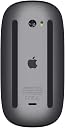

Apple Magic Mouse 2 (Wireless, Rechargable) - Space Gray
Product ID: 62017836
Details
- BrandApple
- ColorSpace Gray
- Connectivity TechnologyWireless
- Special FeatureWireless
- Movement Detection TechnologyOptical
⚡Rechargeable
📏Compact Design
🖱️Multi-Touch
✨ Elevate Your Workspace with Magic Mouse 2! ✨
The Apple Magic Mouse 2 is a sleek, rechargeable wireless mouse designed for effortless navigation and optimized performance. With its lightweight build and innovative Multi-Touch surface, it enhances your productivity while eliminating the hassle of traditional batteries.
| Brand | Apple |
| Color | Space Gray |
| Connectivity Technology | Bluetooth, Lightning, Wireless |
| Movement Detection Technology | Optical |
| Special Feature | Ergonomic Design, Lightweight, Portable, Rechargeable, Wireless |
4**E
This is perfect
So I just bought the new Magic Keyboard with the track pad for my iPad Pro 11. The track pad on the keyboard works wonderfully well, BUT, I don’t always like the use a track pad. Sometimes, a regular mouse on a mouse pad just feels right. I almost got another brand of Bluetooth mouse for my new iPad with keyboard set up but then saw that the Magic Mouse 2, in Space Gray, was available. I went for it. What the heck...all matching stuff...iPad, Magic Keyboard, Magic Mouse 2. It’s magic. I’ve set up my iPad on my coffee table with the keyboard attached and like to sit back while lying on the floor with everything right in front of me. The Magic Mouse 2 just feels so good using it on the iPad. It was so simple to set up. Make sure Bluetooth is on on the iPad, then flip the little switch on on the bottom of the Magic Mouse 2...go to settings, Bluetooth....it will pair automatically after you click on the Magic Mouse 2 that shows up on the Bluetooth devices list. It was quick, simple and flawless. I went on the Mouse settings on the iPad to adjust pointer speed, scrolling direction and right or left secondary click. All set. I love this mouse. It’s very small and portable too, perfect if you’re now using your iPad as a laptop with the new Magic Keyboard. Apple does it again. Love it all. Oh, by the way, the Magic Mouse 2 now has a built in rechargeable battery; another big plus. Buy this.
T**E
Great mouse ,works with iPad Pro 10.5 running iOS 13.4
So I purchased this mouse once but returned it because the scrolling feature did not work on iPad Pro 10.5 iOS 13.2 BUT now that iOS 13.4 is out, it now scrolls. Mostly the mouse works like any other mouse. It has the ability to use gestures and they appear to work. I have a Microsoft mouse and the Magic Mouse 2 functions better at scrolling. The Magic Mouse 2 also scrolls from side to side, if the app supports it. The Microsoft mouse has a wheel and you need to spin it somewhat fast to get it to function somewhat smoothly. Some people said you cannot get to the home screen using it but you can, its just kind of odd. You basically take the pointer pull it towards the bottom of the screen and that brings up the application in the bar/menu/etc. Pull it quickly towards the bottom and it will downsize the app you are in and expose the desktop. Perform that function again and it will bring up all the apps you have open. At that point you can click on the app you want or put the cursor over the app and flip your finger towards the top which will in turn close the app. I bought this second Magic Mouse 2 directly from Apple because I wanted space gray and Amazon was out of stock. Will I keep it? I Think so. Is it worth $50.00 more than the Microsoft mouse that does most of what this does, probably not. But remember all things go on sale for the holidays and there’s always a holiday just right around the corner.
M**K
Perfect Companion for iPad
I purchased an iPad Air with a Brydge Keyboard not too long ago, and felt like it was missing something as I carried out daily functions on it. The Magic Mouse 2 in Space Grey completed it. The incorporation of mouse support on iPadOS is a welcome feature, and its compatibility with the Series 2 Accessories is a nice touch. There are multiple features the Magic Mouse boasts, especially on a desktop and or laptop. I mainly appreciate the feature to swipe through my Home screen with ease on the mouse, as well as scroll through pages when I web browse. If you’re looking to upgrade to a quality Apple mouse for use with your iPad and or iMac/MacBook, I say go for it. Otherwise there are cheaper alternatives. I mainly chose the Magic Mouse 2 due to the extra features it boasts on iPadOS, and that it’s slimmer than most mice and could easily slip into a pouch and/or bag when traveling. On a side note there is also the Magic Trackpad 2 which is compatible with iPadOS and features similar touch features. I however always preferred using a mouse. If the features interest you but do not like using mice I would suggest looking into the Magic Trackpad 2. Overall its another quality product from Apple. The Space Grey matches well with my iPad Air & Keyboard, and in terms of functionality it does its job.
D**E
Great Mouse. better than the Magic Mouse 1..
I love the design of the Magic Mouse. Low profile and easy to use. Touch features are great for my MacBook. Biggest plus on this one over the Magic Mouse 1 is you can charge it. My old one ate batteries. this one holds a charge, plus I don't have to buy batteries. Some people don't like that it charges from the bottom, but you will charge it so infrequently, that this is not an issue. Just plug it in at night, or when you leave your office, and you will be fine. Not a major issue. It also feels very solid compared to the first one. No battery compartment that feels shaky. I highly recommend.
I**M
Good Mouse for Mac
I recently transitioned back to a Mac after many years of PC only. I was used to a mouse vs. an internal trackpad. So, I quickly purchased this Magic Mouse 2. After a short time, it is a "must have" for me. I quickly changed my Mac preference to set my "right click" so that it felt much like what i knew. It works great and it was an easy transition including the top touch scroll. Note that it comes with a USB to lightening cable, while a new MacBook Air does not have a USB port. While this mouse ultimately pairs by BlueTooth, in order to pair the first time it needs to be be be connected to your Mac by USB so you will also need to purchase a USB-C (MacBook Air port) to USB adapter (which I luckily had). Otherwise, other than being a somewhat "pricey" mouse, it's great...
J**N
Cool feature rich mouse, but has some flaws
First off the mouse is great. With touch gestures you can easily navigate Mac OS and all your activities. I’ve had macs before without a Magic Mouse and now wish I would have to had a better experience. The comfort level is a little iffy for my large man hands. It seems to dwarf the mouse and almost seems my hands are to big for the mouse. The battery life seems really decent for the mouse. I’ve used it for the paste 4 hours and it’s gone down 1% just from the charge it had from the factory. So it does seem to have a battery that will last a long time which is good because that brings up the last major flaw. The major deal breaker is that the mouses charge cord is on the bottom. So unfortunately if you run out of a charge during work time your SOL and have to find a USB mouse.
S**G
It's wonderful!
It's a Beautiful mouse and looks so pretty with my keyboard and MacBook Pro space gray. I bought it in July 2020 and until now has been great and works perfectly. The battery level is so good, charge lasts a long time. I recommend it.
M**S
Excellent
Excellent
D**A
Lindo e util
Fora o design esse mouse é ótimo para uso do Mac
S**H
Magic Mouse
Good product but to easy as other mouse
U**.
Apple halt
Gewohnte Qualität von Apple. Auch gewohnte Preisvorstellung. Ich persönlich finde es etwas teuer. Verbindung klappt auf Anhieb. Für Gaming allerdings nur bedingt geeignet. Die Ergonomie ist auch nicht gegeben. Für kurze Anwendungen völlig OK aber sobald man länger damit zu tun merkt man es in der Hand. Die Konkurrenz zeigt dass es geht wenn man will. Leider funktioniert die Konkurrenz nicht erwartungsgemäß an meinem Mac. Verbindungsprobleme mit Bluetooth die Logitech bekannt sind aber nichts unternommen wird. Jedenfalls ist die Magic Mouse sehr komfortabel. Das Wischen ist ein mehrgewinn beim arbeiten am PC. Unter Windows sind ohne irgendwelchen extra Treiber nur die Standards verfügbar.
D**R
get your mice out
sleek & stealthy
K**N
Original product
Excellent
Trustpilot
2 months ago
2 weeks ago