Buy anything from 5,000+ international stores. One checkout price. No surprise fees. Join 2M+ shoppers on Desertcart.
Desertcart purchases this item on your behalf and handles shipping, customs, and support to Indonesia.
๐ Elevate your dual-PC workflow with 8K clarity and seamless control!
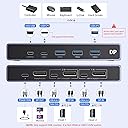
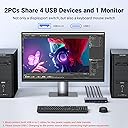
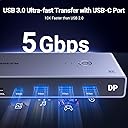
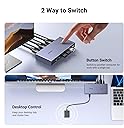
The UGREEN 8K@60Hz DisplayPort KVM Switch is a premium 2-computer, 1-monitor switcher supporting ultra-high resolutions up to 8K@60Hz and 4K@240Hz with HDR. It features four USB 3.0 ports for fast peripheral sharing and offers easy switching via button or desktop controller. Compatible across Windows, Mac, and Linux, it includes high-quality DP 1.4 cables and supports G-Sync, VRR, and HDR passthrough, making it an ideal solution for professionals demanding seamless multi-device control and stunning visuals.


| ASIN | B0CFFFHFJT |
| Best Sellers Rank | 7,704 in Computers & Accessories ( See Top 100 in Computers & Accessories ) 15 in KVM Switches |
| Brand | UGREEN |
| Brand Name | UGREEN |
| Color | Grey |
| Colour | Grey |
| Compatible Devices | 2 computers, keyboard, mouse, external hard drive, printer, devices with USB-A and USB-C ports, Windows, Mac OS, Linux systems |
| Compatible devices | 2 computers, keyboard, mouse, external hard drive, printer, devices with USB-A and USB-C ports, Windows, Mac OS, Linux systems Compatible devices 2 computers, keyboard, mouse, external hard drive, printer, devices with USB-A and USB-C ports, Windows, Mac OS, Linux systems See more |
| Connector Type Used on Cable | Plug In |
| Connector type | Plug In |
| Country of Origin | China |
| Customer Reviews | 4.2 out of 5 stars 805 Reviews |
| Manufacturer | Ugreen Group Limited |
| Manufacturer Part Number | 25962 |
| Model Number | 25962 |
| Number of Ports | 5 |
| Number of ports | 5 |
| Smart Home Compatibility | Not Smart Home Compatible |
| Unit Count | 1.0 count |
| Unit count | 1.0 count |
W**L
HDR, VRR, Gysnc, 165Hz on Windows, Mac OS (M1), RGB Keyboard 75Hz, All Working!
I use an Apple MacBook Pro M! for music production and as my daily driver. I also have a Windows Rig I built myself for gaming. Running a 4080 super and AMD 7800X3d. My Monitor is an LG UltraGear 38 Ultrawide, running at 3840x1600. It has a refresh rate of 165Hz with overdrive. But I run it at 120Hz as it gives me 10 bit colour. It is GYSNC compatible and so provides variable refresh rates across the full spectrum. It is also HDR 600 Compliant. I am connecting wired Razer BlackWidow Pro V2, and a Razer Mouse. (Don't judge, I love the RGB!). I was looking for a device that could swap between both devices, making my life considerably easier then it was faffing around changing the input on the monitor, swapping over the keyboard, etc. I was dubious about this device, because I was asking for a lot. However, I can safely say, it all works. Working on the PC Side : * GYSNC passthrough works perfectly, I get variable refresh across the range * HDR passthrough works perfectly. I still get HDR compliancy via the switch * 165Hz at 8 bit colour, 120Hz at 10 bit colour, at 3480 x 1600 (native), works flawlessly. * Both Razer Keyboard and Mouse are detected and work flawlessly as though they are connected natively. * Previous Logitech Dongle (MX Keys and Mouse Master 2s) also works perfectly. Working on the Mac Side : * HDR passthrough works perfectly. I still get HDR compliancy via the switch * 75Hz VRR works perfectly. This is the maximum my dock provides via Displayport * Both Razer Keyboard and Mouse are detected and is recognised via openRGB (great software BTW), and colours can be changed. Additional Notes : I did think I would need to supply the device with additional 5v power due to the RGB keyboard and mouse being connected. To my surprise, this was not the case. This may be different if you're using Corsair Devices, or Logitech, or SteelSeries RGB devices. If so, I can't see why they wouldn't work if you provide them enough power given my Razer Devices work without it. You will need you're OWN power cable though if you do require additional power; Contents : 2 x USB A to USB C cables. 2 x Display Port 1.4 to Display Port 1.4 Cables (Backwards compatible) - And yes, they are DP 1.4 compliant! 1 x USB remote control cable The DP cables are very short at about 3 feet. Bizarrely the USB cables are another foot longer. Still, they are excellent quality cables. The unit itself has some weight to it. Is certainly DP 1.4 compliant and is very well made. The remote control is quite long, but isn't up to the standard of the rest of the device. Merely functional and acceptable. There is room for improvement. I may decide to make my own as a fun project. Additional Notes for Mac Users : I see there are quite a few negative complaints from Mac Users saying this device does not work with their device. That might be down to what dock you're using. Or you are using the wrong type of cable. Or you're confusing Display port with Thunderbolt as they are NOT the same. This is a basic DISPLAY PORT switch. A Thunderbolt switch WILL allow Video Passthrough via your USB-C connector. However, you can basically double the price of that device, if not more. You might be better off using the HDMI version of this dock if you're having problems. But if you're expecting to get video passthrough on a basic Display Port switch that isn't Thunderbolt, then you're not going to have much luck I'm afraid. Just an FYI. Blame the USB/Thunderbolt corporate overlords standards committee for not making this clearer. Conclusion : If you have TWO DP compliant devices, want HDR, VRR, Gysnc, and High Refresh rates at high resolutions, then this is a GREAT device for the price. I was very surprised it provided all of the above. I was expecting to pay a LOT more for a more compliant device. (You're looking in the hundreds of pounds to be honest!). I was very surprised at how good the build quality of the unit is, how good quality the cables were, and how competitive the price is. Very pleasantly surprised in every aspect. I recommend.
L**M
KVM for sharing one monitor between 2 PCโs using Display Port connections.
There do not seem to be that many DisplayPort KVMโs on offer. I was particularly attracted to this one because unlike numerous other KVM solutions this product supplies two DP leads in addition to 2 USB leads. The DP leads are very chunky โ (note : quite short โ 1 metre) and seem like high quality. The price at review time was ยฃ47.99 (owing to a 20% offer โ previously ยฃ59.99). Even the cheapest DP-DP cables would add considerably to the cost if not included, so I think this is very good value. This unit doesnโt come with a power supply, but for me this was a plus. The power is suppled via a USB port and I am more than happy to run a USB cable supply from an existing USB port rather than sacrifice a mains socket for another charger. The unit is made of metal and is very compact. I was not sure from the description if it came with a remote control. I decided I wanted to try this one regardless because of the other features, but as it turns out it does indeed have a remote switch which plugs into a micro USB socket on the front. One minor criticism: the labelling of the different ports is very hard to read. In use though they are fairly obvious so the labelling is not really that important. To reduce cabling even more, I opted to use a wireless keyboard/mouse combination rather than using my usual wired keyboard. The small wireless dongle sits in one of the front USB slots and thatโs it. This all works very well. One thing to note though, if the un-selected PC goes to sleep when sharing the monitor using the mouse/keyboard does not wake it. I have to lightly press the power button to wake the machine. This is slightly annoying but not too bad when you are aware of it. I removed the remote button โ again to remove unnecessary cabling. The button on top of the unit is no less convenient than using the remote, so again an opportunity for less wiring clutter. Obviously useful to have though if you are siting the KVM somewhere less accessible / out of sight somewhere. The device is not only โplug-and-playโ but also โfit-and-forgetโ if you are not using the monitoring sharing; you forget it is there since the principal PC in use starts up as normal. For me, this is exactly how it should be. Summary โ a stylish little unit at a good price. It absolutely helps with my project of running two PCโs side by side as I migrate a lot of legacy software from an old Windows 10 PC to a new Windows 11 machine.
B**O
Comes with a few limitations
This is a nice little KVM, but it comes with a few limitations you should be aware of. Before I get into that, I was instantly impressed by the build quality. It's surprisingly small, looks sleek on your desk, and has some weight to it, so it won't slide around when you press the switch button. It comes with two USB-C to USB-C cables and two DP to DP cables and a wired remote switcher so you can hide the KVM itself if required. The DP cables are short (1m), but I assume this is because the DP specification states that 8K@60Hz requires 1m or shorter cables which is exactly what the KVM is advertised to support. Selling it with longer cables would probably have caused users to claim the KVM wasn't working as advertised. The USB-C cables, however, are longerโI think 2mโbut I didnโt measure them. Now, on to the limitations. If youโre looking to buy one of these, you are most likely more of a power user and need to be aware of a few things. I run the KVM to control a Windows 11 PC and a Mac Mini M4 Pro, as I game on the PC and do everything else on the Mac. This means I generally leave one or the other alone for an extended period of time, and this is where the first problem comes in. You can't wake a hibernating or sleeping device (PC or Mac) when you switch over to it from the active computer. If, while gaming, the Mac goes to sleep, I have to press the physical power button on the Mac to wake itโmouse or keyboard input will not wake it as the input has been severed, so to speak. The same goes for the PC. This behavior is confirmed by Ugreen support and is not a defect but a limitation of this KVM. Some much more expensive KVMs will apparently keep the connection between the KVM and the computer 'alive' even when the computer which is not the active KVM target goes to sleep, but sadly not this KVM. You can, of course, set the sleep timer to be several hours long or even disable it, but that's far from ideal from a power consumption point of view if youโre like me and rely on sleep mode instead of powering off your devices. The second issue Iโve found, which may be linked to macOS software, is that switching from Win11 to the Mac doesnโt always trigger the display to activate, even when the Mac is not sleeping. Switching from Mac to Win11 always works however. I canโt tell if this is a Mac issue or some issue with the KVM and Ugreen support has not been able to confirm either or. So itโs something to keep an eye out for if you try this KVM and you use a mac or two. Another point for Mac users: as other reviewers have also pointed out, note that while your Mac has Thunderbolt (which also supports USB-C DisplayPort mode), the KVM does not support Thunderbolt. In other words, youโll need one cable for the display to KVM and one cable for the keyboard/mouse to KVMโyou canโt use a single cable from the KVM to your Mac for both display and peripherals. For PC gaming, there is no noticeable input lag, and G-Sync works flawlessly through the KVM switch. I have a wired Wooting keyboard and a wireless mouse with a dongle plugged into the KVM, and it all works flawlessly. Itโs just a real shame that you canโt wake sleeping devices when switching over to them and that the Mac switching is a bit flaky. Do note that you can wake the active KVM device if it went to sleep just fine (as the USB hub connection is never severed), so itโs just switching over to a sleeping device that requires the power button to be pressed to wake it. Update: After replacing the UGREEN DisplayPort to USB-C cable that I also ordered with the KVM with a cable from another brand, the switching issue to the Mac Mini has gone away which is great. The wakeup issue still persist as its a hardare limitiation.
D**E
Works perfectly with a Macbook and a gaming PC
I use it to switch between a Mac book Pro and a PC with a gaming card with gsync and MX Master mouse and MX keys. The DisplayPort cable comes from the PC and a USB-C to DisplayPort cable comes from the Mac. They go in to the KVM and the DisplayPort output goes into a 32 inch Philips mini-led gaming monitor. This small device allows me to toggle between the two computers effortlessly with a press of a button and all features like gsync and HDR seem intact (though the Mac will only do 100hz refresh using HDR, that threw me for a while, a Mac issue not the KVM). Keyboard and mouse flip effortlessly too. Would highly recommend this device. Not had it long but hopefully it lasts as it meets my requirements perfectly.
2**Z
Cuts out all the time
Cuts out all the time. Yes I made sure the USB power is on all the time etc. The item is trash. Need to be unplugged and re-plugged in every 2-3 hours for it to work "Ok" and still the mouse movement gets 'stuck' every few minuets.
P**.
Great Display Port KVM (with considerations)
Quick review: The product itself is great. Well built, sleek as a KVM can be and good quality cables. The only negative I can say about it is that the remote doesnโt have any way of showing which input device youโve switched to. This is genuinely the only change I think it needs. Considerations: - this is not a thunderbolt KVM and you need to use both a display cable and a data cable for each device - you cannot use a HDMI output from a MacBook Pro/Mac mini/ Mac Studio unless you use an active HDMI to display port cable (I wouldnโt recommend this option but have shared a better alternative right below). A normal DP to HDMI cable will not work. - If you connect a MacBook Pro Iโd highly recommend that you use a USB-c thunderbolt cable to display port cable (1m) - if you have two displays or want thunderbolt youโll have to buy a more expensive device - this thing isnโt pretty. Youโre going to want to jam is somewhere out of sight, hence why the remote would benefit from visual feedback indicating which device was active. Over all great product, and sharing these considerations as so many others kindly have in the reviews.
L**H
A great DP KVM switch.
I just bought a new desktop PC and needed regular access to my old one in order to transfer files across. This switch lets me easily share the display port monitor, keyboard and mouse between my 2 systems. Although there is a changeover button on the switch box itself, a useful remote control button and cable is also included so that you can tuck the main box and wiring away to tidy up your desk. The keyboard and mouse change over instantaneously whilst the monitor takes a couple of seconds. Very solidly built and comes complete with 2 good quality DP cables. Note that this switch is for display port connections only.
C**W
Great for monitor sharing between two comps
I bought a simpler/cheaper dp 4k @240hz switch. I donโt need all the usb ports etc, but the cheap one was rubbish and caused loads of monitor flickering, even to the point the monitor would knock itself off. I'm using on a Macbook M3 Max and a Mac mini on a 49" Odyssey Ultrawide. Getting full resolution (less than 4k on this monitor) but 240Hz coming through nicely. The little remote switch button is great, I can hide all the cables nicely. Paid an extra ยฃ30-40 for this UGREEN and just so much better.
K**I
ๅ้กใชใๅใๆฟใใงใใพใใ
็ป้ขใๅใๆฟใใใใจใใใใใฏUSBๆฉๅจใฎๅใๆฟใๆฉ่ฝใใกใคใณใซ่ณผๅ ฅใใพใใใ ็ป้ขใฏๆถฒๆถๅดใงใๅคๆดใงใใพใใใใใฟใณไธใคใง็ป้ขใใฏใคใคใฌในๆฅ็ถใฎใญใผใใผใใชใฉใในใฆๅใๆฟใใใฎใง้ๅธธใซไพฟๅฉใงใใ ้ ๅปถใๆฉๅจใฎ่ชคไฝๅใชใฉใใชใใ็งใฎ็ฐๅขใงใฏๅฎ็งใซๅไฝใใพใใใ TypeCใฑใผใใซใDPใฑใผใใซใชใฉใใในใฆๅ ฅใฃใฆใใพใใใฎใงใ็ฐๅขใๅใๆนใฏใในในใกใงใใ
A**D
Quality product
Compact, takes less space, easy to use. One push and it switches from one pc to another. High resolution
V**I
Great product
Brilliant product. works as expected with almost instant switch for the Monitor, keyboard and trackpad . using to switch 34 inch ultra wide 165HZ oled between macbook and macstudio. There is almost nothing in this price range which can do all this. impressive.
W**C
Capable little KVM
Can confirm that this KVM works with the following setup: M1 Max MacBook Pro and Lenovo laptop both running usbc to dp 1.4 (ugreen) to the KVM. Mac is connected via an anker thunderbolt 4 cable to the KVM while the Lenovo is using the included usb a to c cable. Juicing it with 18w is sufficient it seems since I get picture and surprisingly, the usb a ports output enough power that my MX Master 3S detects a charge! KVM is connected using a standard DP 1.4 cable to the monitor. I didnโt use the included one because itโs way too short and too thick. The KVM is metal, is surprisingly small compared to my 4 in 1 out HDMI 2.1 switch but is comparable in weight. Looks and feels well made but only time will tell. My monitor is a Lenovo curved ultrawide with 3440 x 1440 pixels and both machines are able to hit the max 144hz via this KVM with DP 1.4 cables. The wired remote is a single button with no indicator so you have to look at the dock itself to see which device you have switched to. The indicator lights on the decide itself is very small and too close together which might be an issue for some. Very pleased with the product so far. Will update if anything else changes. Update: the KVM pulls around 0.027A from the outlet and I was not able to get it to pull anymore by loading up the USB ports with peripherals. It also seems to work just fine with it unplugged. The KVM does get its power from the connected laptops because if I dont connect it to the laptop via USB C, the KVM will not charge my mouse, even if I connect it to the outlet. Since my setup only needs it to drive a 3440 x 1440 @ 144hz monitor, I suspect that higher definition/ refresh rate might result in power draw from the outlet. The product can certainly do with more detailed documentation.
N**T
Excellent KVM Switch
This Display KVM Switch was purchased to share a monitor, keyboard and mouse between my gaming PC and my Mac mini M2 Pro and it is working flawlessly. My monitor is a 3440x1440p 165hz and I am getting the full resolution and refresh rate on both computers. G-Sync and VRR is also working on both Mac and PC. I am using a Logitech wireless keyboard and Corsair wireless mouse and I have both dongles attached to the KVM and they are also switching across both computers along with the DisplayPort signal. I really can't fault this unit at all, it is working perfectly.
Trustpilot
1 month ago
1 week ago