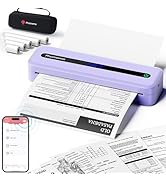
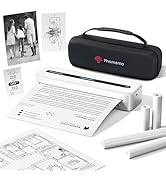
🖨️ Print Smart, Print Stylish — Wherever Life Takes You!
The Phomemo M832 is a sleek, portable thermal printer offering high-resolution 300 dpi monochrome prints on multiple paper sizes up to A4. Designed for professionals on the move, it connects wirelessly via Bluetooth to smartphones and tablets or via USB to computers. Its inkless thermal technology eliminates cartridge hassles and reduces costs, while a powerful rechargeable battery ensures reliable printing anytime, anywhere. Perfect for home, office, study, or business travel, it combines versatility, quality, and convenience in a compact form factor.


| ASIN | B0CKP5B8V7 |
| Are Batteries Included | Yes |
| Batteries | 2 Lithium Polymer batteries required. (included) |
| Best Sellers Rank | 5,976 in Computers & Accessories ( See Top 100 in Computers & Accessories ) 14 in Portable Photo Printers |
| Colour depth | 1 bpp |
| Compatible devices | Laptops, PC, Smartphones, Tablets |
| Connectivity Type | Bluetooth |
| Controller type | Android 7 and above, iOS 13 and above |
| Customer Reviews | 4.2 4.2 out of 5 stars (1,528) |
| Date First Available | 9 Oct. 2023 |
| Delivery information | We cannot deliver certain products outside mainland UK ( Details ). We will only be able to confirm if this product can be delivered to your chosen address when you enter your delivery address at checkout. |
| Dual-sided printing | No |
| Form Factor | Printer |
| Guaranteed software updates until | unknown |
| Included components | 1 Phomemo M832 Portable Printer, 1 Roll of A4 Thermal Paper, 1 Thermal Printer Storage Bag, 1 This Printer User's Manual, 1 USB-C Charging Cable |
| Item Weight | 700 g |
| Item model number | M832-BK |
| Lithium Battery Energy Content | 19.24 Watt Hours |
| Lithium Battery Packaging | Batteries contained in equipment |
| Lithium Battery Weight | 2 Grams |
| Manufacturer | Phomemo |
| Max copy speed (black and white) | 5 ppm |
| Max input sheet capacity | 80 |
| Maximum Supported Paper Size | A4 |
| Maximum black and white print resolution | 300 x 300 dpi |
| Maximum colour print resolution | 300dpi |
| Maximum copies per run | 100-150 copies |
| Number Of Lithium Ion Cells | 2 |
| Number of Lithium Metal Cells | 1 |
| Operating System | Android, Mac OS, Windows, iOS |
| Print media | Thermal Paper |
| Processor Count | 1 |
| Product Dimensions | 31 x 11.4 x 9.2 cm; 700 g |
| Scanner type | Photo, Portable |
| Sheet size | 216/210/110/80/53 mm Millimetres |
| Warranty type | [TYPE] warranty |
R**L
Thermal Printing on Another Level
The first thing I thought when I opened the box after this printer was delivered was “Wow, that’s small!” because, compared to an inkjet printer, it is extremely compact - I could fit more than 8 of these in the space my old inkjet occupies! It doesn’t weigh much either, and it has a rechargeable battery, features which make this printer the most portable printer I’ve ever owned. I can just stick it in my bag, and print anytime, anywhere. It’s a thermal printer, so uses special thermal paper rather than ink cartridges - there’s no ink to spill or cartridges to change. As it’s thermal printer, I'm going to assume that people know the differences between thermal printers and inkjet/laser printers so I’m not going to compare them, but rather compare it to other thermal printers I’ve used. Fully charged, this printer prints good quality documents, with greater detail than other thermal printers, 300dpi is more than enough detail for anyone. You can choose from 3 levels of print that differ in the darkness of the print, basically - it comes set to the darkest option, and I’ve not seen any reason to change it. When down to the last moments of charge, the print does get less dark so bear that in mind and keep it charged up for best performance. The printer connects to your device by Bluetooth, there are no leads except for usb c for charging). The Phomemo app (iOS in my case) takes care of the initial connection and is how you print your documents. It’s a great app with lots of features for creating documents or printing your own documents. For most documents, it’s easy to print them - you open them in the app they were created in then share the document, and select Phomemo as the destination. The document opens in the Phomemo app and you print from there. You can print webpages out easily from the app, and even generate your own images using the AI feature. Another handy feature is the ‘remove background’ feature which does what it says in the tin! The App has lots of features - you can check it out on the App Store. Paper wise, you have the choice of paper on a roll of various widths or individual sheets. For everyday use, I’ve found the roll fine, but use single A4 sheets for letters or documents I want to file or give to someone else. They come in a pack of 100 which will last me ages. For me, the strengths of this printer are its portability and its 300 dpi resolution. They put it on another level compared to most thermal printers. It’s decent value for money given its size and level of detail, and is well worth having, especially if you travel a lot or need a printer you can easily carry round. The App makes this a highly functional and versatile thermal printer you can use for all non-colour printing tasks, anywhere you need to. I’m more impressed with it than I expected to be. Just make sure you don’t let the battery run down too far to ensure best print performance. Two thumbs up 👍🏼👍🏼
M**O
Reliable, Fast, and Hassle-Free Thermal Printer
Setup was quick, printing is fast, and the output is consistently clear with no smudging. I like that it doesn’t need ink — just load the roll and you’re good to go, which saves money and hassle. It’s compact enough to keep on a desk or carry around, and it connects reliably without constant troubleshooting
A**R
A rocky start but working well since
My review of the Phomemo M832 thermal printer is in the context of having paid £57 for it. Overall I am cautiously happy with the M832 printer. I was drawn to this printer by its Linux driver support, downloadable from Phomemo's website. Phomemo get an A+ for that, since most other manufacturers of A4-sized thermal printers seem not to offer Linux drivers. Most of the printing I have done so far has been via Linux (specifically Linux Mint on 6.8.0 kernel) but I have also tried the Android app. I also wanted an A4 printer that can also do receipt size paper rolls and the M832 can do widths of 53mm, 80mm and 110mm as well as A4 and US letter. I don't print often so the idea of a small thermal printer that I could put away in a draw when not in use appealed to me over relatively larger ink printers taking up some desk space. The printer is portable too and is battery powered. It was a disappointing and rocky start with this printer. On my first use after opening the printer I connected via USB to my Linux PC and the outcome was very faint in the test A4 page I printed and in fact it only got halfway through before dying. So low battery, OK, but according to the online manual (which has a table of LED light combinations and their meaning vs the boxed manual which has no such information) the LEDs showing on the device did not indicate a low battery as there was no red LED showing. Also the Android app connected to the printer via bluetooth reported 100% charge which made no sense. The behaviour of the printer not recognising the low battery was confusing and disconcerting. In any case I left it to charge for several hours and on a new test print the quality was good and it got through the whole page successfully. I then tried a test of the Android app and this printed fine. However I then tried another print from the PC it would freeze halfway through and it kept freezing on some repeat attempts with me trying to reset the printer via the reset button. At this point I was getting ready to call it faulty. I left it a day with all the PC and printer powered off. Since then I have hooked it up via USB and done many more prints from the Linux PC without issue. I also tried printing a photo from the Android app and it came out better than I expected but printing photos is not really the best use case for any thermal printer. I don't really know what was the issue before as to why it froze and so I have unanswered questions about the device's reliability but since those initial problems on the first day it has worked without further fault on I'd say 15+ prints so far over several days. I have tried different sizes of paper all printing successfully and of good quality output and good definition. I'm going to keep the printer and hope that I don't see a freeze up again. So long as it keeps working as it now is I am happy with the value and price I paid. -------------- Some further notes: >>>>> There is a thin layer of plastic film over the LED and ON/OFF button area of the device that is very difficult to notice and remove as there is no tab, but removing this film improved the sensitivity of the ON/OFF button which is a capacitive touch button. Before removing it the button didn't register every touch and initially I didn't see why; this contributed to my feeling the device could have been faulty. >>>>> Regarding paper sizes: I was hoping for the paper sizes to be a common standard so there will be many manufacturers of thermal paper available to keep the paper prices down. A4 and US letter are standard for the large paper sizes. Of the smaller sizes 80mm is a common standard, 110mm is somewhat common. 53mm seems to be less common where most of the market is at 57mm. However I did get some 57mm adhesive backed paper and have printed successfully with that by treating it like 53mm paper on the PC. When using paper rolls there are left and right plastic tabs in the printer to insert into slots depending on the paper width, presumably to help keep the roll centred in place; to fit in the 57mm roll I put the left tab in its designated 53mm slot and aligned the paper roll against that, I left the right tab out the way in another non-53mm slot doing nothing. The quality of the Phomemo paper I've bought is good and the 80mm rolls were somewhat better quality than another generic 80mm paper I tried, so depending on the price it may be worth paying extra. Also the paper rolls are liable to curl up after printing, although flat sheets of thermal paper are available and compatible with the printer. Still the rolls are convenient to keep in the printer and use less space. The paper cutting edge is effective and much better than another printer I tried, I consistently get a good tear. The printer is monochrome which is another limitation of thermal vs ink printers. If you know where to look I found A4 rolls and flat sheets at the price of around 5 pence to 8 pence per A4 page which is reasonable. >>>>> Regarding the Android app: no account registration is required, just install and use which is welcome. The app has features for printing documents from the phone, printing an arrangement of photographs or scanning a picture to improve contrast for thermal printing. Also there are some other bits I haven't tried. You can install it and see the features without connecting to a printer if you are so interested. I've checked since the initial low battery issue I experienced and it only ever reports 100% battery in the Android app that I have seen so I'm not sure how reliable that is. >>>>> Regarding printing from PC: I have used the free and open-source LibreOffice Draw (supports Linux, Windows and Mac) to create some labels/prints in the 80mm and 53mm sizes and this has worked well to print out portrait and landscape; I've done this by setting the page properties to the right dimensions for the printer e.g. 80mm*106mm and 53mm*70mm. I have also printed out PDF A4 documents. The printer shows up to use in Linux same as any other printer so it should work with any software that can print.
T**Y
Good quality printer, with good printing quality on thermal paper
Good quality thermal printer, works well with a real of paper and A4 thermal paper, easy to use and set up, printing quality is good too very good, Not add any paper jams, and in my opinion the product charges very quickly, comes with good quality case for storage, product is Light, and will fit in a laptop bag or work bag. I haven’t experienced any issues with this product. The app is also easy to use.
A**R
Stopped printing on half of the page
The printer worked fine a few times and then only printed on half the page. I troubleshooting: changed paper, cleaned the metal bar, and reset to factory, etc... all the suggesting on line. It is frustrating since it is new. I have reached out to customer support and hoping for answers OR a refund.
E**8
Hace poco adquirí esta impresora térmica portátil y no podría estar más contenta con la compra. Es muy fácil de usar y me resultó sencillo conectarla tanto al Mac como al iPad. Pero lo que más me gusta es su increíble portabilidad y diseño compacto, lo que la hace ideal para llevar a todas partes, sobre todo en mi caso que viajo bastante. La calidad de impresión es sorprendentemente nítida para una impresora térmica. Los textos salen perfectamente legibles. Además, no requiere tinta, lo que supone un ahorro considerable a largo plazo. Otro aspecto que me ha gustado es su velocidad de impresión. Además, los materiales de los que está hecha parecen de buena calidad. La verdad es que esta impresora ha superado mis expectativas. Recomiendo totalmente su compra. PD: un 10 para el servicio técnico, me surgieron algunas dudas sobre su uso y me las resolvieron súper rápido.
A**Z
Super imprimante, rapide et silencieuse vraiment bien. Hyper contente de l'achat
N**W
Er läuft und läuft ohne Probleme, edial für unterwegs.
R**A
I mean for under $50 how can you go wrong!!!
T**O
アプリをダウンロードして、簡単に接続でき、簡単に印刷出来ます。 感熱紙を使うので、インクは不要ですが白黒印刷になります。 電源はバッテリーなので、急いで印刷したい時や試し印刷に活用しています。 感熱紙なので、長期保存したいときは、コピー機でコピーするようにしています。 使い方次第ですが、十分に活用しています。
Trustpilot
1 month ago
1 month ago