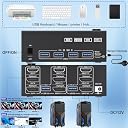
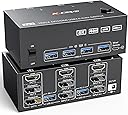
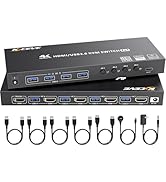
🚀 Elevate your workspace: Triple monitors, dual PCs, zero clutter, infinite productivity!
This 4K@144Hz KVM Switch supports 2 computers sharing 3 monitors via HDMI and DisplayPort, with 4 USB 3.0 ports for high-speed peripheral sharing. It delivers ultra HD visuals up to 8K@60Hz, supports extended and mirrored display modes, and offers seamless switching through a wired remote or panel buttons. Compatible with major OS platforms, it streamlines multi-device setups for professionals seeking a clutter-free, high-performance workstation.


| ASIN | B0CL9Q4VF2 |
| Batteries Required? | No |
| Batteries included? | No |
| Best Sellers Rank | 15,163 in Computers & Accessories ( See Top 100 in Computers & Accessories ) 44 in KVM Switches |
| Colour | Black |
| Customer Reviews | 3.8 3.8 out of 5 stars (365) |
| Date First Available | 18 Oct. 2023 |
| Item Weight | 950 g |
| Item model number | KC-203DHKDEU |
| Manufacturer | camgeet |
| Part number | KC-203DHKDEU |
| Product Dimensions | 11.9 x 6.5 x 4.3 cm; 950 g |
| Style | HDMI+2 Displayport KVM Switch Triple Monitor |
| Switch Type | 3-way |
A**B
Excellent product
Good product, easy to install and works perfectly.
J**N
Sick customer service and item
Does the job, others probably have issues as they're not supplying enough power to their usb hubs that sends the signal to this switch. No issues and customer service is really good.
A**Y
Didn't work, no response from either PC or peripherals.
Sadly this is a bad review from me. I used all of the supplied cables with my PC and work laptop, plugged into mains power and nothing seemed to work. No display from either machine, peripherals not working when connected to the front and no amount of changing the configuration of display cables made a difference. Maybe I got a bad unit, but sadly I will not be getting another one of these and have to leave a negative review on this occasion.
A**X
Almost perfect!
I’m having mixed feelings about this and maybe it’s user error. I’m successfully able to run both my Mac and PC through the KVM whilst maintaining 120hz (upper bound on my monitor) so for that, it’s perfect. My external Mic also correctly works through the KVM My biggest gripe is that DisplayPort audio isn’t working, so I can’t get headphone volume out of the back of my monitor through the DP cable connected to the KVM In addition to that, 4 USB ports on the front is slightly too few and they’re not expandable (can’t plug a usb hub for extra connectivity, which I guess is a design feature due to power constraints), meaning I have to plug my lightbar into mains opposed to USB so I can use it with both PCs Sometimes the mouse and keyboard don’t go active and I have to turn the hub on and off. Aside from that I’ve experienced no issues with flickering speed or connectivity The product fits nicely on my desk, is of sturdy manufacturing quality and seems like it’ll be very durable Overall I’m quite happy with this purchase, please let me know if any of the above issues are due to user error, though I couldn’t find anything in the manual Cheers
C**N
Great for 3 computers.....
Why only 4 stars? Well sometimes the mouse doesn't carry over or one of the monitors but pressing the button again sorts that out. Perhaps I did not press the button hard and long enough. Still, great for 3 computers.
A**R
Magic
Magic, you plug things in and it switches between them. The remote is a bit small, but works. The additional USB inputs are very handy.
A**N
Revolutionised Office
I work from home for a number of different clients and have dual monitors. One client has just moved over to Teams which was causing havoc on my laptop with my other clients. I therefore dug out my old laptop just for them but the hassle of manualling unplugging a docking station each time I needed to switch clients was driving me potty! I looked at a number of KVM switches and this seemed to be just what I was looking for. Three computers (extra one being my home CCTV) and two monitors. Neither of my laptop are compatible with dual monitors so I have been using a docking station (USB-C on the newer laptop and USB-A on the older one) to get around this. Now for this to work for me, I need to plug the HDMI leads (of which you need two for each laptop) into the USB-C docking station but for the USB-A docking station, one HDMI needs to be in the docking station and the other needs to be straight into the laptop. The CCTV, a basic system just plugs into the KVM switch via HDMI. I purchased short HDMI leads but it is still spider city around the back of the desk. Pic 1 shows the whole setup, Pic 2 is the KVM switch in action, Pic 3 is the USB-C Dock and Pic 4 (difficult to capture) shows USB-A Doc and plugs into laptop. Hope this helps!
C**4
4k @ 144hz is not possible
The KVM switch works well however if you are a worker and a gamer with high spec equipment, this isn’t for you. I have a RTX 4090 with Ryzen 9 7950X3D so I should be able to play at max settings and high FPS. For the monitor, I have a Samsung G7 28” 144hz so I should get more than 60fps. The only time I can set the refresh rate above 60hz is if I disconnect my other (2k@60hz) monitor - thus defeating the point of having a KVM. I want to be able to do work and game without having to change cables and this doesn’t do it. Even though it states dual monitor with 4k @ 144hz, through my experience, this is not possible. As soon as I reconnect my other monitor, I am locked at 60hz on my 4k monitor. I will be asking for a refund as it is pointless for me to have the item.
D**E
Non funziona bene, ad ogni riavvio del pc bisogna riconfigurare gli schermi.
M**L
Ein Top Switch. Funktioniert einfach und verlässlich. Ich habe ihn jetzt ca. 1 Jahr täglich 10-12 Stunden im Einsatz und ich hatte bis heute noch nie Probleme. Mein Dual-Monitor-Setup (2x 32'' QHD 165 Hz) bekommt die volle Leistung und auch das täglich mehrfache umschalten auf mein Notebook ist kein Problem. Kann man sich gönnen ;)
L**.
I tried using this to easily switch between my laptop & desktop on the same monitor. The monitor has a resolution of 3840x1600 an a refresh rate of 160hz, which is supported by the DP 1.4 spec. At this resolution and refresh rate, the image from both sources contains artifacts, flickers and drops out frequently. Lowering the refresh rate to 60hz only seems to reduce flickering a bit, but the image still retains artifacts & the connection still drops out sometimes.
K**A
Mniejsze niż się wydaje, ale wtyczki mieszczą się bez problemu. Działa niezawodnie.
M**G
Läuft wie es soll. Bildschirme erkennen immer ihre zuvor eingestellte Position, dank integriertem EDID. Aber achtet auch auf die Kabel die angeschlossen werden. Die unterstützen oft nicht alles. Hab gleich noch ein paar gute DP Kabel dazu bestellt.
Trustpilot
3 weeks ago
3 days ago