


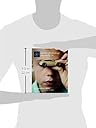
Adobe Photoshop Elements 14 Classroom in a Book
Product ID: 57926209
Desertcart purchases this item on your behalf and handles shipping, customs, and support to Indonesia.
Buy Adobe Photoshop Elements 14 Classroom in a Book 1 by Evans, John, Straub, Katrin (ISBN: 9780134385181) from desertcart's Book Store. Everyday low prices and free delivery on eligible orders. Review: Photoshop Elements 14 CIB - This a very good book, but it refers to both PC and Mac and can be a bit distracting at time when you are trying to download photos lessons from Peachpit.com, you can sometimes get mixed up with commands for PC and Mac causing you to press the wrong key on your computer so things don't work out for you, but if you persevere and just keep trying you get there. I don't think I am even 25% of the way through this book but I have learned a lot so far ( and I can go back again and repeat lessons until I understand them). The lessons from Peachpit.com come as part of the book and are free to download as long as you have purchased this book. I am very pleased with this book so far and hope to become very good with this software,it may take some time but hey I'm retired now and have plenty of that. Wishing all photoshop elements users good luck with there projects,John. Review: A really good introduction to Photoshop Elements - I've only tackled the first three lessons so far, but it's given me a taste of the book. I have a reasonably good knowledge of the editor side of elements from past versions but had never tackled the organiser part. This book's tutorials make it easy to understand and in between doing the lessons, I have already made a start in sorting my many photos into some kind of order. I can thoroughly recommend it, even to someone new to elements completely. The lessons are well written and give good simple guidance through what is really quite a complex suite. In addition to the book you get a free set of example photos to download from the publisher's website, which is great because you don't want to be using your own valuable photos to try out in the lessons. However, herein lies the reason for denying it the last star. Some of the given photos aren't well chosen. When doing face recognition the examples were of a family including a mother and four sisters of similar ages, two of whom were twins. We were told who was whom on one photo then asked to sort them; well, photoshop couldn't tell them apart and neither could I. This wouldn't have been so much of a problem if not for the fact that you needed that completed in order to do the following exercises properly. So much better would have been a family of two grandparents, two parents and two children of opposite sexes.



| Best Sellers Rank | 2,146,784 in Books ( See Top 100 in Books ) 486 in Manipulating & Editing Photographs 1,152 in Digital Photo & Video Editing 1,860 in Digital Photography Techniques & Tips |
| Customer reviews | 4.2 4.2 out of 5 stars (64) |
| Dimensions | 19.05 x 1.27 x 22.86 cm |
| Edition | 1st |
| ISBN-10 | 0134385187 |
| ISBN-13 | 978-0134385181 |
| Item weight | 635 g |
| Language | English |
| Part of series | Classroom in a Book |
| Print length | 312 pages |
| Publication date | 3 Dec. 2015 |
| Publisher | Adobe |
J**N
Photoshop Elements 14 CIB
This a very good book, but it refers to both PC and Mac and can be a bit distracting at time when you are trying to download photos lessons from Peachpit.com, you can sometimes get mixed up with commands for PC and Mac causing you to press the wrong key on your computer so things don't work out for you, but if you persevere and just keep trying you get there. I don't think I am even 25% of the way through this book but I have learned a lot so far ( and I can go back again and repeat lessons until I understand them). The lessons from Peachpit.com come as part of the book and are free to download as long as you have purchased this book. I am very pleased with this book so far and hope to become very good with this software,it may take some time but hey I'm retired now and have plenty of that. Wishing all photoshop elements users good luck with there projects,John.
W**B
A really good introduction to Photoshop Elements
I've only tackled the first three lessons so far, but it's given me a taste of the book. I have a reasonably good knowledge of the editor side of elements from past versions but had never tackled the organiser part. This book's tutorials make it easy to understand and in between doing the lessons, I have already made a start in sorting my many photos into some kind of order. I can thoroughly recommend it, even to someone new to elements completely. The lessons are well written and give good simple guidance through what is really quite a complex suite. In addition to the book you get a free set of example photos to download from the publisher's website, which is great because you don't want to be using your own valuable photos to try out in the lessons. However, herein lies the reason for denying it the last star. Some of the given photos aren't well chosen. When doing face recognition the examples were of a family including a mother and four sisters of similar ages, two of whom were twins. We were told who was whom on one photo then asked to sort them; well, photoshop couldn't tell them apart and neither could I. This wouldn't have been so much of a problem if not for the fact that you needed that completed in order to do the following exercises properly. So much better would have been a family of two grandparents, two parents and two children of opposite sexes.
C**E
Beginner/Learner format
A well laid out infomative book which would suit an absolute beginner If you understand the basic concept of layering and are looking for a reference book to read up on bits and pieces this is not for you It does what it says on the cover, its a classroom in a book
D**S
An excellent training course for PSE 14.
This is an excellent training manual for PSE 14. The step by step exercises and reference images are very good. My only criticism regards the face recognition exercises which are too time consuming and difficult to get correct. I thoroughly recommend this publication to anyone who wants to get to grips withe PSE 14.
S**1
Easy to understand
Everything is explained in steps and easy to follow. You don't need to be smart or have a college degree to understand. I love it and am creating cool things in Photoshop Elements.
P**C
Three Stars
ok
M**E
Four Stars
Good well thought out book
K**S
Great book
A great and easy book to follow would say to all Elements users go buy it
J**T
The Adobe Classroom in a Book series is an excellent training series that I have used to learn the Adobe software for many years. I was introduced to this series by another graphics student and have since relied on it to give me the initial training I need to become familiar with the basics of the excellent programs published by Adobe. This training series is the best way I know, and continually use, to learn a new Adobe software program or an upgrade to the program, and it gives many references to other avenues of continual learning that Adobe offers.
Y**S
Très bon produit et facile à utiliser Convivial , a la portée de tous Bon départ pour passer au logiciel complet
H**P
great
J**Z
Me ha servido de gran ayuda para perfeccionar mis conocimientos sobre como utilizar con gran facilidad Adobe Photoshp Elements 14
D**N
I am currently in lesson 8 of the 10 lessons. Once the book is purchased, you are provided an access code to download sample photos. I loaded the book on to my tablet and the photos to my desktop. I follow the lessons on the tablet while performing the tasks on the desktop. I like the hands on approach and being led through the steps to accomplish a task. I had previously owned Elements 12 but never really utilized it to its full potential. When I got a new computer capable of handling Elements 14 I found myself still just working around the edges. So I bought this product and so far I'm happy with it. Introductions to most lessons say that you will spend one or two hours but usually I'm taking three hours. I particularly liked the explanations of the Organizer side of Elements. I plan on using it much more than I was previously. Only issue I've had so far is in the lesson dealing with layers. I am somewhat familiar with layers from previous editing programs I've used. However, much of the lesson format was 'do this, now do that' with little explanation of why I was doing it. Perhaps when I finish the book and start working on my own photos some of it will become clearer. So far, other than that, I'm happy with the book. It has a very complete index that I will likely refer back to when I really start making full use of Elements 14.
Trustpilot
4 days ago
1 month ago