


Desertcart purchases this item on your behalf and handles shipping, customs, and support to Indonesia.
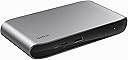
⚡ Elevate your workspace with the ultimate 5-in-1 Thunderbolt 4 hub — power, speed, and style in one sleek dock.
The Belkin Connect Thunderbolt 4 Docking Station is a premium 5-in-1 USB-C hub designed for professionals who demand high-speed data transfer (up to 40 Gbps), robust 96W power delivery, and support for a single 8K or dual 4K displays. Compatible with Mac, Windows, and USB-C devices, it features overcurrent protection and sustainable construction with 72% recycled content, all backed by a 2-year warranty.


| ASIN | B0CGJ1M5BX |
| Best Sellers Rank | 32,335 in Computers & Accessories ( See Top 100 in Computers & Accessories ) 299 in Docking Stations 14,251 in Hi-Fi & Home Audio Accessories 22,926 in Home Cinema, TV & Video Accessories |
| Brand | Belkin |
| Brand Name | Belkin |
| Colour | Silver/Grey |
| Compatible Devices | Thunderbolt 4, Thunderbolt 3, USB4® and USB-C enabled devices |
| Compatible devices | Thunderbolt 4, Thunderbolt 3, USB4® and USB-C enabled devices |
| Country of Origin | Vietnam |
| Customer Reviews | 4.0 out of 5 stars 277 Reviews |
| EU Spare Part Availability Duration | 2 Years |
| Hardware Interface | Thunderbolt 4, USB 3.2 Gen 2 |
| Hardware interface | Thunderbolt 4 , USB 3.2 Gen 2 |
| Item Dimensions L x W x H | 13.4L x 7.4W x 1.8H centimetres |
| Item Weight | 1.27 Kilograms |
| Manufacturer | Belkin |
| Manufacturer Part Number | INC013vfSGY |
| Model Number | INC013vfSGY |
| Number of Ports | 5 |
| Product Warranty | 2 year |
| Product dimensions | 13.4L x 7.4W x 1.8H centimetres |
| Smart Home Compatibility | Not Smart Home Compatible |
| Total USB Ports | 5 |
| Total USB ports | 5 |
| UPC | 745883854332 |
| Unit Count | 1.0 count |
| Wattage | 96 watts |
A**N
Triple computer setup
This has enabled me to use my desktop's monitors, audio interface and speakers with my laptops and switching is seamless. This is the one cable solution I was looking for for my laptops. I have a separate USB switch for the audio interface which the speakers are connected to, but the monitors are plugged into both the dock and my desktop at the same time. I am able to run the monitors with HDMI and DP mode USB-C at high resolution AND refresh rate (1440p 144Hz and 1080p 144Hz) which was important for me. The only quirk with was with my M1 Pro MacBook, where I had to use DP mode USB-C for the second monitor because of something to do with what the graphics hardware itself supports. This was not an issue with my Intel Windows laptop. Power delivery is more than enough for my MacBook, which charges super quick with this. It's technically not quite the 140W the Dell laptop can use but I haven't noticed performance being affected much or battery charging slowly (even though Windows keeps telling me it is). It's easy to miss and doesn't stand out too much visually sitting under my main monitor, which is what I was looking for.
M**R
An expensive cable tidy solution*
I love this product. I've only had it since yesterday but it's been a pretty flawless setup for me. One 4k 60hz monitor, audio interface, midi keyboard, webcam, and laptop cooling pad all go into this and are all fed by a single USB C cable into my MacBook Air m2 for faster charging than the default brick gives me. I have had no issues getting the monitor to work properly as other reviewers have noted, but that could be the newer chip? The downside is that my work laptop needs 120w power and so I didn't quite eliminate cable clutter, as I still have to use the existing power supply, but it's freed up every other port. Doesn't make any noise, doesn't seem to get too hot, it just sits there being unobtrusive.
A**R
Good - but at a price
There is, in theory, a lot to like, a couple of bits to love and a few things to dislike (the price of course being the main one!) with the new pro 4 dock from Belkin. Design wise, it’s incredibly sleek and professional looking with a mix of aluminium and plastic. It’s AC adapter is a bit of a brick but can thankfully be masked away pretty easily due to the cord length. The front has some pretty standard io at first glance with a few surprises at closer inspection – a multi functional SD card reader, 3.5MM audio jack in and out, USB-c 3.1 gen 2 port which supports fast charging and upstream (for connecting to your laptop) thunderbolt 4 port, next to a power button that allows you to stop the dock from delivering any power to devices when not in use (which I personally find pretty useful!). At the back, we’ve got power in, 2 HDMI ports (both supporting HDMI 2.0) , a downstream (for connecting to an external accessory or monitor) thunderbolt 4.0 port, a gigabit ethernet port and 4 USB-A ports (only two of these are 3.1 ports, with the other two being 2.0 ports). It can supply up to 90W pass through charging of a device, which is actually on the lower end when comparing against other similar priced docks. If you’re the type of power user that this level of dock is aimed at, this could well be a limiting factor depending on what beast of a machine is supposed to be connected to the dock! The dock can be fiddly when being used by Mac users. You won’t be able to make the most of both HDMI ports simultaneously for Mac Users, you’ll need to user a thunderbolt port for one display and a HDMI port for the other. This massively sways use of the dock towards favouring PC users, or a setup where Mac use is the very occasional use. This with the price bracket in mind is disappointing and very much worth bearing in mind. With the right laptop mind, you could in theory get a total of three displays connected at once – which is an impressive feat for a dock this size. The dock can support a single display at 8k (upto 30 hz), or dual 4k at 60hz, so it’s display options and flexibility is likely where this dock stands out to other competitors currently. For the right setup, this is a lovely professional dock. It seems to be tailored more towards adaptable office setups rather than homes with little additions like the power button and chosen ports but assuming you’ve got the right setup to make the most out of it (I personally wouldn’t consider this dock if my main driver was a Mac), it could well be a contender !
M**R
Flawed design - avoid - stop selling this amazon
3 exchanges and every single one defective: I thought I had a defect with one of these, but i'm on my third exchange now and I can safely conclude the product is defective and has a fundamental design flaw. Firstly, it cant achieve the spec advertised. 1Gbit. Can't do it. I can get 1gbit by bypassing this device, same lead, same port. This device also had a broken audio port. Secondly, on my second device the display just totally went. Showed snow, like the old analogue tv's. Unusable. Very embarrassing during work when I cant see my screen. (also cant achieve 1gbit) Third swap, the screen is constantly flickering two days into use. It's going to go the same way as the second. (also cant achieve 1gbit). Such an expensive and useless piece of tech. I love the idea of it, I love the brand. Thats why ive patiently gone through 3 exchanges. But enough is enough. You can't get three duds. The product is fundamentally flawed and incapable of delivering what is expected. Additional info: i'm def not overloading it. I am using 1 of the HDMI ports. I still have free slots available. The speed can't even be achieved when nothing else is plugged into the hub. I've tried swapping the HDMI ports (as there are two) and its the same problem
N**E
Good dock
Works well. I bought reused (like new) and it is working great. I am happy with the purchase.
A**H
Flickering monitors, poor support
Fairly expensive for what it is, but looks tidy and has a decent number of connections. However, I have had problems with displays repeatedly going black when connected to HDMI which persists with different laptops; I have resorted to using a HDMI to USB-C adapter to overcome this. Belkin support are not especially helpful and there are no driver or firmware updates for this dock so it looks like I'm stuck with it.
S**K
Highly recommended
Great piece of kit. Purchased to use with my Mac mini. Highly Recommended.
P**E
Price high, but fast Thunderbolt 4 ports and you only need one Thunderbolt 4 cable to do everything
This is a great docking station. It is pretty heavy and sturdy build with a really nice design. The docking station is made in matt aluminum and the front and back sides are finished in high gloss black. The docking station is really fast and has so many ports. On the front there are 2x USB Type-C ports , SD card reader and 3.5mm audio in/out and a Power ON/OFF button. The USB Type-C are 1xThunderbolt 4 port and 1x USB Type-C 3.1 Gen 2 port with 90W PD fast charging. On the back there are 2x HDMI ports,1x Gigabit Lan port, Thunderbolt 4 port and 4x USB Type-A ports. The USB Type-A ports are 2x USB Type-A 3.1 ports and 2x USB Type-A 2.0 ports. There is also a 22V/5.45A power in port and there is a 120W power supply that you connect to the port. The power supply comes with 3 different power cables for connecting to mains sockets. There are cables with 3-PIN UK plug, EU plug and Swiss 3 PIN plug. This is really good as you don't need travel adapters to use the docking station when you travel. Both the front and the back Thunderbolt 4 ports are 40Gbps ,which is great for data transfer,like connecting external SSD or to connect monitor that has USB Type-C port. I really like that I can connect my MacBook only with one Thunderbolt 4 cable and use the same cable for everything. The cable gets my MacBook charged and also transfers the data from and to all my devices. I use the 0.8M Thunderbolt 4 cable that comes with the docking station connected to my MacBook and I have an external hard drive with another 40Gbps/100W rated USB Type-C cable. I also have my phone connected to the USB Type-C 3.1 Gen 2 to transfer pictures and videos to my MacBook and also a monitor connected via 8K/60Hz HDMI cable. The reason to use such an HDMI cable is to be able get the full 5K/60Hz resolution supported by the MacBook. The docking station supports dual 4K displays via the HDMI ports and you can also connect a third display via the second Thunderbolt 4 port ,but both of these can be used only if you laptop supports them. Some M1 MacBooks like mine support only one external screen so keep that in mind. The price of this Thunderbolt 4 Dock Pro docking station is £399.99 at the moment ,which is a pretty high price. The main reasons for the price are the Thunderbolt 4 ports and 40Gbps high speed data transfer that comes with them. When you have big data files to transfer on a daily basis you need something really fast. When you are multitasking or using external monitor as well, then you need something exactly like this. Recommend it. Hopefully my review was Helpful for you.
A**T
Doet wat moet.
Doet wat moet. Plug and play.
K**T
Supplied cable for dock died after less than 2 months
The dock works fine, however the Thunderbolt 4 cable it came with suddenly died after less than 2 months of normal use on my desk. Very disappointed.
Y**V
Excellent dock for a Windows notebook
I am pleasantly surprised with the dock - even though the notebook I am using has Thunderbolt 3, there's no problem attaching 2 1440p monitors via HDMI, bookshelf speakers(via the 3.5mm headphone output on the front), LAN connection, and a USB type C webcam. Works great. Some nitpicks: - the power button on the dock doesn't command the laptop, but turns on/off the dock itself; - the input for the notebook is on the front - for me, it's a plus, because of the short provided cable, but for some might be a bother; - the store page here doesn't say anything about compatibility with macs - on Belkin's website there's a diagram for single/dual/triple screen setups with Windows and Mac machines(M1 and intel based);
S**E
Ottima ma con qualche perplessitá
Se avete un Macbook e volete collegare 2 monitor esterni attenzione, leggete fino alla fine! La Dock in se é ottima e funziona bene, ci sono dei "peró" da elencare: - Contrariamente ad altre Dock, il cavo di collegamento al PC si trova sulla parte frontale, mentre tutti gli altri connettori (alimentazione/schermi ecc) stanno sul retro, quindi ci sará sempre questo cavo un po "ingombrante" attaccato davanti. - Se acquistate questa dock per collegare 2 monitor esterni a Macbook/Macbook Pro con processore M1 o M2 (varianti NON pro), evitate. I processori M1 ed M2 base non supportano piú di 1 monitor esterno (vedi specifiche sul sito apple), anche se la dock ha 2 prese HDMI e 2 prese Thunderbolt sul retro. - Se acquistate questa dock per collegare 2 monitor esterni a Macbook Pro con processori M1 Pro o M2 Pro (comprese varianti MAX), potete collegare 2 schermi, ma non entrambi alle 2 HDMI posteriori. Le 2 HDMI sul retro con i Macbook non funzionano in contemporanea. Se volete collegare 2 monitor dovete collegarne uno su un'HDMI e uno su una Thunderbolt sfruttando per esempio un adattatore Thunderbolt -> HDMI anche da 20 euro (io ne ho preso uno della "Uni" per esempio e funziona benissimo). In questo caso se il monitor ha un refresh rate elevato (es 144Hz da gaming o simili) collegatelo preferibilmente alla Thunderbolt e non all'HDMI, perché spegnendo e riaccendendo spesso la dock con 2 monitor collegati potrebbe "perdere" la risoluzione e scalare ad una inferiore per qualche strano motivo (collegato alla thunderbolt non succede). Ricapitolando, buona dock una volta che capite i suoi limiti e come "trattarla" per farla funzionare come dovrebbe.
A**E
Kijk goed welke aansluitingen je nodig hebt.
Ik heb de afgelopen 2 jaar een displaylink port replicator gehad voor mijn MacBook pro M1 Pro. Deze port replicator had een USB-C aansluiting naar de MacBook pro, waardoor de netwerk doorvoer geknepen werd. Vandaar nu dit dockingstation die wél 1GB netwerk geeft. Verder is het even wennen dat de aansluiting voor de Macbook Pro aan de voorkant zit. Designtechnisch niet het mooiste. Ik heb deze niet gekocht om meerdere beeldschermen aan te sluiten. Ik heb er een LG 27 inch Ultrfine beeldscherm aan hangen. Die werkt perfect. Nu het aantal USB-C aansluitingen toeneemt, kom je er achter dat er eigenlijk te weinig USB-C aansluitingen op deze dock zit. slechts 1 !! USB 2.0 is niet meer van deze tijd, die hadden ze er af mogen halen en vervangen voor een snellere USB variant of nog beter USB-C. Mijn ervaring op dit moment is dat er zeker te weinig USB-C poorten zijn en te weinig snellere USB2.x variant. Nog een vreemde die ik niet verklaren kan. Ik had een externe Sandisk Pro SSD aangesloten op de Thunderbolt 4 aansluiting aan de achterkant van de dock. Echter de SSD krijgt constant een disconnect. En een Mac vind dat niet leuk.
Trustpilot
1 month ago
2 weeks ago