Buy anything from 5,000+ international stores. One checkout price. No surprise fees. Join 2M+ shoppers on Desertcart.
Desertcart purchases this item on your behalf and handles shipping, customs, and support to Indonesia.
✂️ Create Bold. Craft Smart. Own Your Space.
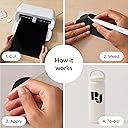
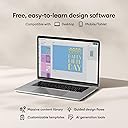
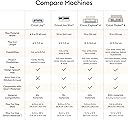
The Cricut Joy Xtra Smart Cutting Machine is a compact, versatile crafting tool designed for professionals and hobbyists alike. It supports over 50 materials, integrates with inkjet printers for full-color Print-Then-Cut projects, and connects via Bluetooth to the Design Space app offering access to over 1.5 million images and fonts. Its sleek, portable design fits any workspace, making it ideal for personalized cards, decals, shirts, and more—empowering users to create professional-quality projects with ease and style.


| ASIN | B0CF6L9SMJ |
| Active Surface Area | 218.75 cm² |
| Best Sellers Rank | #28,678 in Arts, Crafts & Sewing ( See Top 100 in Arts, Crafts & Sewing ) #30 in Scrapbooking Die-Cut Machines |
| Brand | Cricut |
| Brand Name | Cricut |
| Color | White |
| Customer Reviews | 4.5 out of 5 stars 1,562 Reviews |
| Global Trade Identification Number | 20093573787144 |
| Included Components | Joy Xtra Machine |
| Item Dimensions D x W x H | 6"D x 12.5"W x 5.5"H |
| Item Type Name | Cricut Joy Xtra | Smart Cutting Machine - Create stickers, shirts, signs & more |
| Item Weight | 6 Pounds |
| Manufacturer | Cricut |
| Material | Plastic |
| Material Type | Plastic |
| Model | 2010313 |
| Operation Mode | Automatic |
| Part Number | 2010313 |
| Print media | Unknown |
| Product Dimensions | 6"D x 12.5"W x 5.5"H |
| UPC | 093573787140 |
| Unit Count | 1 Count |
A**I
Awesome machine that does way more than the cricut joy
This cricut joy xtra is affordable and can do way more than the cricut joy. Would highly recommend getting this one instead of the joy since this has a sensor and is compatible with a home printer allowing you to make stickers without any problem. It also allows you to do bigger projects than the cricut joy since it’s bigger. You could easily make larger than mat projects with this machine, 3 foot piñatas, larger logos, and it is easy to use. Love that you can make many projects without spending too much like you would with the bigger versions. It’s a great size so you could even fit it on one of those 3 tier carts with wheels and have your own movable cricut station. The downside is that it does not have the scoring option and you won’t be able to engrave. Love this machine and would highly recommend if you want to get into the cricut wagon. It’s a perfect first cricut.
B**E
The Perfect Crafting Companion!
The Cricut Joy Xtra Smart Cutting Machine is a game-changer for both novice and seasoned crafters alike, earning an unwavering 5 out of 5 stars for its exceptional performance and versatility. This compact powerhouse delivers precision cutting with ease, handling an impressive array of materials including vinyl, cardstock, and fabric—perfect for creating personalized cards, decals, labels, and more. Its sleek design and portability mean it fits seamlessly into any workspace without sacrificing power or functionality. What sets the Cricut Joy Xtra apart is its user-friendly interface combined with robust smart technology that simplifies complex projects while maintaining a professional finish. Bluetooth connectivity enhances the crafting experience by allowing seamless integration with design apps on your devices, offering creative flexibility whether at home or on the go. Moreover, setup is straightforward—an ideal feature for beginners eager to dive into their first project without hassle. For those invested in personalizing gifts or embarking on ambitious DIY endeavors, the Cricut Joy Xtra Smart Cutting Machine promises consistent quality results every time; it's more than just a tool—it's an indispensable partner in your creative journey!
K**L
Great product, easy to use
I have been using the Cricut Xtra for a few years now, and am truly impressed with it's versatility. It's compact, with removable power cable, and the housing and components are very sturdy. It's an affordable product that produces accurate and remarkable cuts quickly. Great for any medium with a width of 9.5in (for smaller sizes, I recommend the name brand mat). Cutting tips are easy to change and are available on Amazon from third-party at very reasonable price. Bluetooth connection is stable most of the time - if there's a problem, unplug and reconnect power and it works, with no risk of losing your project.
M**S
EASY TO USE
Don’t doubt yourself just buy this one🙏🏻 connects fast to my Mac , I’ve had it over a year and still haven’t changed the blades. Great bang for your buck super cool cutter.
A**R
Cricut Machine is functional and fun to use.
Ordered this as a gift. The recipient loves it, and has made interesting and fun items.Cricut Machine
T**M
I've always wanted a Cricut...
So I have always wanted a Cricut cutting machine, but I don't really have the space in my house, they're fairly expensive and the original Cricut Joy was too small for my tastes. Enter the Cricut Joy Xtra machine...I'm loving this thing. I found it on sale on Amazon and it was small enough to be stored away when not in use, but big enough to be useful. So far I've cut some vinyl decals for a friend to sell to raise money for her nonprofit, I've cut some vinyl decals for myself, for my family, and I've made a few T-Shirts with heat transfer vinyl. I also have some printable vinyl sticker paper to try out soon. This machine cuts up to 8.5 inches wide and 12in long on a mat, but up to 4ft long with smart materials. That said I don't like the Cricut smart materials. There aren't enough colors/variety and the vinyl is difficult to handle due to the thick paper backing. I cut a vinyl decal of lettering for my Dad's truck using a mat and carefully aligning the letters and words to make it long enough. Is that convenient, no not at all, but it's doable and for my needs it worked well. Most of what I cut (so far) are small decals and hopefully small stickers soon, so this machine is excellent for my needs. It does officially support print then cut which is wonderful and one of the main reasons I ordered it. I also ordered sublimation markers that fit in the Cricut Joy Xtra and can be used like the infusible ink markers and I haven't had a chance to use them, but I'm looking forward to it. The downsides in my opinion are the smaller cutting width (not too big an issue if plan ahead carefully), the lack of official tools (like engraving tools or different cutting blades, etc), and there are no buttons on the machine so no off button (it must be unplugged to turn it off), and then there is the software... Cricut Design Space is designed to be intuitive and easy to use and for the most part it is...however too many features are behind the subscription/paywall and I don't think the subscription is worth $10 a month. It is easy enough to manipulate your own images and import them into Design Space though. I have been using GIMP to edit photos like PNG and JPG files as well as InkScape for vector graphics like SVG files. It's easy to create a vector graphic importing a JPG into Inkscape and tracing the bitmap. However this is easy for me as I have a bit of graphic design experience and a degree in Information Technology. Design Space might be easier to use for people without that background. Another downside that I absolutely despise is the need for internet in order to not only use Design Space, but to cut an image. Why do I need internet to cut something on a cutting machine. That's just dumb in my opinion. Overall, for a first time Cricut user and a first Cricut machine, I love this thing. If Cricut would improve Design Space and eliminate the need for internet connectivity to cut files, I would give it 5 stars.
S**N
Absolutely the best purchase I’ve ever made
Absolutely the best purchase I’ve ever made. It’s opened up an endless amount of projects that keep me busy for hours. I chose this one because it was affordable, small, and compact, and it seemed like a smarter financial option since I wasn’t sure how much I’d actually use it at the time. I could not recommend this machine enough. Setup was a breeze, and with so many YouTube tutorials available, learning how to use it was incredibly easy.
A**S
Don't Buy This
Do not buy this brand. The machine itself works fine, but the software required to operate it (Cricut Design Space) is absolute trash. The worst I've dealt with. Are you old enough to remember dial-up internet? That's the level of patience you need for this. And after you've spent all of that patience on the slowness and it generally not doing what you ask it to (I shouldn't have to zoom out 6 times before it finally does), it will decide that it cannot locate any available printers... even when said printer is connected to your laptop by USB... It's atrocious how much money this company makes on their machines, overpriced HTV and other materials (don't buy them if you do have one already, just buy HTVront & Joyeza sticker paper, it's better quality and cheaper) only for them to put NOTHING into the very thing required to use this stupid device. After a couple of years of wanting to chuck this thing in the dumpster, I'm finally looking at other options.
Trustpilot
2 weeks ago
2 weeks ago