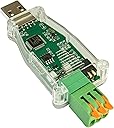
⚙️ Unlock the future of CAN bus communication — be the first in your network!
The DSD TECH SH-C31A USB to CAN Adapter is a compact, open-source hardware device based on Canable 2.0, featuring USB 2.0 connectivity, enhanced protective housing, and flexible firmware options to support both standard CAN and high-speed CAN FD frames. Ideal for professionals seeking reliable, customizable CAN bus interfacing with dedicated technical support and a 1-year warranty.


| ASIN | B0CDGD1FSH |
| Best Sellers Rank | #236 in USB Computer Network Adapters |
| Customer Reviews | 4.1 4.1 out of 5 stars (76) |
| Date First Available | August 2, 2023 |
| Item Weight | 0.704 ounces |
| Item model number | SH-C31A |
| Manufacturer | DSD TECH |
| Product Dimensions | 2.76 x 1.18 x 0.39 inches |
B**R
Works beautifully
I am using it on an Ubuntu Linux system, and it worked just as well as a Canable with the alternate firmaware.
C**T
Works with Savvycan on Linux
The first thing that I did when I got this was install the candlelight firmware from the canable website. This went smoothly with no issues. I have successfully used this with SavvyCan running on Linux mint with minimal configuration. Mine came with the screw down connectors for the wires which is not as convenient as the lever type it is shown with but it still works fine. Overall, this is a good option for an all in one can bus reader that is mostly ready to go out of the box. I was able to connect to my car first try after installing the candlelight firmware as mentioned. This does what an esp32 plus a can transceiver like the mcp2562 with the added benefit of can-fd support, which the esp32 cannot do, in one compact package and a very reasonable price for everything this can do.
M**L
Good product reasonably priced
Setup was not straightforward but was not extremely difficult
D**N
Worked with my nmea 2000 network
A**.
Plug and Play with Modern Linux Kernel
Able to easily use the can-utils package and verify operation using a scope with built in CAN decoding.
R**D
Does not work. No drivers
I purchased this to work with Windows and a Jetson Nano to work with CAN Bus data. for both windows and Nano/Linux the device did not install or there where no drivers. Tried to flash the Candlelight firmware, still was not able to use device.
K**S
Looks great, nice packaging., can't get it to work.
Maybe i'm missing something, but I couldn't get it to talk to my computer out of the box, was able to reflash it to newer firmware, but it still won't talk. Sending it back. If you can get it to work mechanically it's beautiful, with great connectors.
B**L
It works
Dip switch for termination resistor broke on first use. Other than that, works as advertised.
S**N
Works flawlessly on a raspberry pi with Home Assistant.
R**R
If you're planning to use this in a Windows environment, I strongly suggest flashing the most current slcan firmware to this device. I had difficulties getting the as-shipped firmware working with Cangaroo on Windows 10 (22H2), but after flashing slcan, everything worked without any further issues. I have experienced this issue before with other adapters so I was expecting and prepared to deal with this. Here is how I flashed the firmware and got the device working: -Download the most recent slcan build for Canable 2. The file will be called "canable2-b158aa7.bin" and can be found at canable.io/builds/canable2/slcan/. (This is accurate as of September 6, 2025. Newer builds may be available in the future. Be sure to compare file names and upload dates.) -Download and install STM32CubeProg from ST's website. It is free. -Set the "BOOT" switch on the SH-C31A to the "ON" (down) position and plug it in to the PC. -STM32CubeProg will detect the adapter connected in DFU mode. -"Connect" to the device using the green Connect button in STM32CubeProg. -Load the .bin firmware file into STM32CubeProg and download the file to the SH-C31A using the default settings. -When complete, "Disconnect" from the device in STM32CubeProg by pressing Disconnect. -Remove the device from your USB port, set the "BOOT" switch back to the "OFF" (up) position. -Plug the device back into USB and it will be recognized as a COM port. No driver installation is required. It will be instantly recognized in Windows, and visible in Cangaroo's adapter selection (in the attached images, mine happened to enumerate as COM8, yours will likely be different). The red LED and both green LEDs should light immediately when the device is plugged in. In terms of performance with the correct firmware, the unit is excellent and I'm very pleased with it. The internal 5V isolated power supply module puts out a rather noisy 5.4VDC, but it's usable. I do wish the unit had a removable terminal block instead of a fixed one, but I'm not too upset about this. A new RTB could be soldered in if repair is needed. Everything considered, I think the value for money is amazing. This is an excellent adapter to have for your workbench if you're learning, designing, or experimenting with CAN networking.
J**N
Adaptador USB a bus CAN que es ideal para proyectos electrónicos, en mi caso lo uso para leer los datos del bus y hacer llamas en el bus, junto a dos Arduinos que cuentan con sensores. Con lo cual logro hacer una pequeña red CAN de 3 dispositivos donde puedo controlar sin problema el estado de los LEDs de salida en el pin 13 del Arduino, así como la lectura de sensores de temperatura a distancia. Para pruebas rápidas es muy aconsejable. Su conector de 3 pines se puede retirar con facilidad del adaptador, con lo cual se puede desconectar del bus CAN el adaptador en cualquier momento que uno lo necesite según las pruebas lo requieran. Funciona sin ningún y de manera correcta en mis proyectos con Arduino.
D**R
Ich bin begeistert von diesem USB-zu-CAN-Adapter! Er überzeugt durch seine hohe Qualität und Zuverlässigkeit, insbesondere in anspruchsvollen Umgebungen. Die Unterstützung von CAN FD ermöglicht eine schnelle und stabile Datenübertragung, was für meine Projekte in der Automatisierung und Robotik essenziell ist. Die kompakte Bauweise mit den Maßen 6 x 5 x 2,4 cm und das geringe Gewicht von nur 44,1 Gramm machen ihn zudem sehr handlich und einfach zu integrieren. Ein weiterer Pluspunkt ist die vollständige Signal- und Energiedämmung. Diese Funktion schützt meine Geräte zuverlässig vor Störungen wie Erdschleifen oder elektrischen Geräuschen, was in industriellen Hochspannungsumgebungen einen enormen Unterschied macht. Im Vergleich zu früheren Modellen bietet dieser Adapter spürbare Verbesserungen in Sachen Schutz und Isolation, was ihn ideal für den professionellen Einsatz macht. Besonders hervorheben möchte ich die Open-Source-Hardware und die mitgelieferte Firmware, die auf Canable 2.0 basiert. Die Möglichkeit, die Firmware über die Känguro-Software anzupassen, gibt mir die Flexibilität, den Adapter genau auf meine Bedürfnisse abzustimmen. Zudem sind alle Designdateien und Schemata öffentlich zugänglich, was für Entwickler wie mich ein großer Vorteil ist, da ich Anpassungen problemlos vornehmen kann. Insgesamt ein top Produkt, das durch seine Funktionalität, Robustheit und Anpassbarkeit überzeugt. Ich kann es jedem empfehlen, der einen zuverlässigen und vielseitigen USB-zu-CAN-Adapter für industrielle oder technische Anwendungen sucht!
C**J
I requested this to add CAN capabilities to my klipper based 3D printer, which worked pretty much out of the box (after a reflash). The isolation of this item helps keeps "high" voltages away from your SBC so give me more confidence to add CAN to my tool heads, so if something goes wrong your not dumping 12/24V in to your SBC and maybe other things connected to the SBC (like your main-board). The device is very easy to reflash the firmware on the unit if needed as its just a flip of a switch to access the bootloader of the STM32 on the device (STM32G431) then you can flash the device like any other. The unit also allows you to switch in/out a 120ohm resistor which makes it perfect to act as either a controller or as a network monitor as it can either be part of its own network or sniff the traffic of an existing network. Very pleased with the device.
Trustpilot
1 month ago
2 days ago