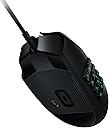
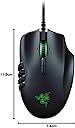
🔥 Dominate Every Click with Razer Precision 🎮
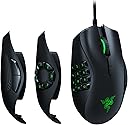
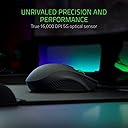
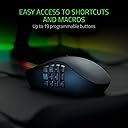
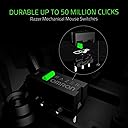
The Razer Naga Trinity is a wired gaming mouse engineered for MOBA and MMO enthusiasts, featuring a cutting-edge 16,000 DPI 5G optical sensor, three interchangeable side plates with up to 19 programmable buttons, and award-winning mechanical switches rated for 50 million clicks. Its ergonomic right-handed design and fully customizable RGB Chroma lighting make it the ultimate tool for precision, comfort, and style in competitive gaming.


| ASIN | B077KJKMYD |
| Antenna Location | Gaming |
| Are Batteries Included? | No |
| Are Batteries Required | No |
| Battery Average Life | 100 Hours |
| Best Sellers Rank | 283 in PC & Video Games ( See Top 100 in PC & Video Games ) 13 in PC Gaming Mice |
| Box Contents | 3 Plates, Razer Naga Trinity |
| Brand Name | Razer |
| Button Quantity | 19 |
| Colour | Black |
| Compatible Devices | Laptop, Personal Computer |
| Customer Reviews | 4.4 4.4 out of 5 stars (10,322) |
| Embellishment Feature | RGB |
| Enclosure Material | Plastic |
| Global Trade Identification Number | 00814855026340, 08886419332374 |
| Hand Orientation | Right |
| Hardware Platform | PC |
| Item Dimensions L x W | 11.9L x 7.4W centimetres |
| Item Weight | 4.23 Ounces |
| Manufacturer | Razer |
| Manufacturer Part Number | RZ01-02410100-R3M1 |
| Model Name | Naga Trinity |
| Model Number | RZ01-02410100-R3M1 |
| Mouse Maximum Sensitivity | 16000 Dots per Inch |
| Movement Detection | Optical |
| Network Connectivity Technology | USB |
| Number of Batteries | 2 AA batteries required. |
| Operating System | Windows |
| Pattern | single |
| Power Source | Corded Electric |
| Product Features | Programmable Buttons |
| Product Warranty | 24 months warranty after purchase |
| Range | 1.2 |
| Style Name | Naga Trinity |
| Theme | Video Game |
| Unit Count | 1.0 count |
J**N
Superb gaming mouse!
yes the mouse is a little bit expensive but once you use it you'll realise why. As a PC gamer i wanted a mouse that was capable of responding fast but also had programmable buttons to make certain games easier. I originally looked at cheaper gaming mouses and wasn't sure if going cheap was the way to go. In the end I went for a more expensive mouse and i'm really glad i did. Here are my reasons why. Mouse is larger than expected.- I have large hands and these days a lot of computer mice and gaming mice are getting smaller the help with weight, this mouse however was larger than i expected and a pleasant surprise. It also has an ergonomic to it which helps with my RSI. Its also worth noting that although its bigger than expected the mouse is still rather light weight. customisation- The level of customisation on this mouse is insane, not only do you get three different side pieces to use but the buttons themselves can be programmed to do some pretty impressive things from simply binding them the a Key, all the way up to using and opening programs. the RGB feature is also widely customisable and makes your set up look cool haha. DPI and Reaction time- For those who play faced paced games you'll know that input lag from the mouse can be a huge factor and from button lag too. The lag on this mouse is as far as i can tell minuscule. You are also able to customise the speed of the buttons and the DPI down the smallest digit. Overall- On the whole this mouse does not disappoint. It does its job and more. I would recommend for any serious gamer and even programmers. You pay the price you get the quality.
A**R
This mouse FOR ME is the best out of all 3 Main Positives over the mice ...
This is coming from the perspective of somebody who plays MMO/multi action games primarily and some FPS games somewhat competitively I DO NOT PLAY MOBO GAMES AT ALL So I've owned the razer naga 2012, razer naga chroma (2017) and the corsair scimitar. This mouse FOR ME is the best out of all 3 Main Positives over the mice I've used 1) It has a top tier optical sensor, rather than the (IMO) poor laser sensor that comes with the razer naga/chroma. The standard razer nagas served me well but in all honesty the laser sensors sucked especially if i wanted to play games that required high precision 2) The razer software, is FAR FAR FAR superior, than the cue software that corsair offers. I had nothing but issues with the corsair software, such as the buttons on the side repeating themselves over and over again, when CPU usage was high (70-80%+) and also sometimes, the cue software just NOT working at all, thus disabling all the buttons on the side of the mouse, forcing me to close to the software and use the on board memory which you SHOULDN'T have to do. Corsair support was useless in solving this issue. If you're an avid mmo player you know that CPU usage can get a little high in populated areas. I own the 3570k @4.5ghz When the software was closed, and the on board memory was being used, the mouse worked fine I understand that not everybody has had this specific issue with the cue software but even without the buttons repeating themselves issue I'd still take the razer software over corsairs any day of the week. 3) You can change the side panel, to fit your needs (to a certain extent). Personally, I only use the side panel with the 12 buttons, due to my muscle memory knows where all 12 are without me needing to think about it, and i don't see the benefit of having less buttons on the side, due to the fact that it doesn't reduce the weight of the mouse enough to warrant the change. Here's the razer trinities major FLAW If you read number 3 of my positives i put "to a certain extent" and here's why The mouse is sold as a jack of all trades, but in reality it's an MMO/MOBA mouse, that can be used as an fps mouse thanks to it's great sensor. This is a very heavy mouse, and for fps games you tend to want a light mouse, that you can flick/swipe with ease at any moment and due to the fact they didn't add the option to remove/add weights, to the mouse your pretty much stuck with a heavy mouse whatever game you're playing, this could be a deal breaker, for players looking to buy a mouse for mainly FPS games, but some mmo/moba games on the side. If they had the option to change the weight of the mouse, on top of changing the side panel of the mouse I'd say it would be the best all round mouse on the market without a shadow of a doubt So should you buy the trinity? 1) If you're primarily an MMO/MOBA player but like playing some fps shooters on the side this mouse is perfect for you, IFcan afford the added cost. 2) If you're primarily an FPS player and play some mmo/moba games on the side this mouse MAY not be best option for you assuming you like lighter mice while you play FPS games. Don't forget to thumbs up if my review helped you :)
A**G
Amazing mouse, lets u go between targets in no time!
I wasn't 100% sure what i needed for my next gaming mouse, i had the Razer Abyssus before which still works perfectly fine being razer & having amazing build quality, however with no side buttons meant i had to use more of my keyboard to control the game, but without trying the different styles i didn't really know what to go for however with the Razer Naga Trinity u get the best of both worlds & its super easy to swap between the 2, 7 & 12 button configurations, all 3 pull off & snap back on with strong magnets, so far for me i'm liking the 2 & 7 configs but i'm sure if i was to play more MMO's then the 12 button would be perfect for that. Sensitivity wise is next level, which for me will take some getting used to on the highest setting of 16,000 to put into prospective if i go all the way to the left side of my 27" monitor on the lowest settings @800dpi it takes around 13cm of mouse movement to go from far left to far right, on the flipside @16,000dpi it takes only 1cm of movement so u can go from target to target way faster giving you the advantage in the game over your opponents. The dpi is also really easy to change on the fly with up & down buttons on the mouse itself just under the scroll wheel, it has dpi speeds of 800,1800, 4500, 9000, 16,000 so there's a speed to suit all players & games. Having a Razer keyboard too u can adjust the lighting to match the keyboard lighting effects or just use the software to match the mouse to your pc. Being Razer i'm sure the Naga Trinity is going to last me many years like all my other razer products & i feel it was a really good upgrade from my last Razer mouse so i would 100% recommend to others
E**S
He podido experimentar de primera mano la versatilidad y potencia que este ratón gaming ofrece. Aquí está mi análisis detallado tras un uso intensivo en diversos géneros de videojuegos. 🔹DISEÑO Y CONSTRUCCIÓN🔹 👍 LO QUE MÁS ME HA GUSTADO: + Placas Laterales Intercambiables ➤ La capacidad de cambiar entre 3 placas laterales diferentes es una característica destacada, permitiéndome adaptar el ratón a cualquier juego, ya sea MMO, MOBA o FPS. 👎 LO QUE MENOS ME HA GUSTADO: - Sensación de Calidad ➤ A pesar de su funcionalidad, el material y la construcción dan una sensación algo barata, especialmente en comparación con otros ratones de precio similar. 🔹FUNCIONALIDAD Y USO DIARIO🔹 👍 LO QUE MÁS ME HA GUSTADO: + Sensor Óptico de 5G ➤ El sensor de 16 000 PPP ofrece una precisión excepcional en juegos, capturando cada movimiento con detalle y sin retrasos. + Botones Programables ➤ Hasta 19 botones programables brindan una gran flexibilidad para asignar macros y funciones, lo cual es invaluable en juegos complejos. 👎 LO QUE MENOS ME HA GUSTADO: - Rueda de Desplazamiento ➤ Varios usuarios han reportado problemas con la rueda de desplazamiento, desde rigidez hasta fallos completos, lo que pone en duda su durabilidad a largo plazo. 🔹ERGONOMÍA🔹 👍 LO QUE MÁS ME HA GUSTADO: + Ergonomía General ➤ A pesar de algunos comentarios sobre su tamaño, encuentro que el ratón es cómodo de usar incluso durante sesiones prolongadas. 👎 LO QUE MENOS ME HA GUSTADO: - Tamaño para Grandes Manos ➤ Usuarios con manos grandes pueden encontrar el ratón algo pequeño, lo que podría llevar a incomodidad o fatiga. 🔹SOFTWARE Y PERSONALIZACIÓN🔹 👍 LO QUE MÁS ME HA GUSTADO: + Personalización Extensiva ➤ El software de Razer permite ajustar los PPP, la iluminación y programar botones con facilidad, lo que añade un gran valor al ratón. 🔹CONCLUSIÓN🔹 El Razer Naga Trinity se destaca por su versatilidad y la gran cantidad de botones programables, siendo una herramienta poderosa para gamers serios. Sin embargo, la calidad de construcción y los problemas reportados con la rueda de desplazamiento son aspectos que requieren atención. Recomiendo este ratón a aquellos dispuestos a invertir en un dispositivo altamente personalizable, pero sugiero considerar las alternativas si la durabilidad es una prioridad clave.
O**S
Souris polyvalente assez solide qui as résisté pour la précédente a 3 ans de mmo acharné. Le réglage de la sensibilité et les faces amovibles sont un gros avantage. j'aime avoir une souris ayant du poids et la trinity donne de bonne sensations ainsi qu'une bonne prise en main. Elle peu sembler un peu chère, mais son confort d'utilisation vaut l'investissement.
S**E
J'utilise maintenant cette souris qui m'a été recommandé par des potes. J'ai longtemps hésité avant de la commander car j'ai des petites mains (je suis une femme), mais finalement j'ai sauté le pas et je dois dire que je ne suis pas déçue. Elle a une très bonne prise en main. Si j'ai mis quelques jours à écrire mon avis c'est parce que je voulais d'abord la tester. Il m'a été difficile de comprendre comment faire les raccourcis pour mon jeu : World of Warcraft. J'ai pu également régler les couleurs de la souris. Au final très bonne qualité, très précise. Nous pouvons régler le dpi comme l'on souhaite. Je ne regrette pas du tout mon achat. J'avais une souris acheté chez Action. Il m'en fallait une autre car celle d'action, le clic gauche s'est cassé. Pourtant je fais très très attention. Je pense pouvoir dire que cette souris Razer va me durer plusieurs années. Et tant mieux. Je vous recommande sans hésité cet achat si vous êtes à la recherche d'une souris multifonction. Elle a 3 blocs. 1 Bloc avec 2 boutons (spécial bureautique), 1 bloc avec 7 boutons (pour les jeux de tirs largement suffisant) et 1 dernier bloc avec 12 boutons spécial MMO comme World of Warcraft. Les blocs sont faciles à changé. Nous pouvons également mettre qu'un seul bloc et paramétrer ainsi plusieurs profils ce qui en fait un autre point positif. Alors n'hésitez surtout pas. Si vous jouez à des jeux vidéos et que vous faites également de la bureautique cette souris est faite pour vous.
A**Y
Very nice versitile mouse. Downside is that the side buttons rub off after a year of use. Overal very happy with it
C**R
Ich benutzte die Maus, um MMORPGs zu spielen, deshalb habe ich mir die geholt. Die 12 Knöpfe sind Gold wert, aber man kann nur Tastaturtasten auf die Maustasten "mappen" - das bedeutet, man hat keine gesonderten Tasten für das Spiel sondern muss z.b. die NUM Tasten benutzen. Das muss man aber nur 1x einstellen, und dann klappt alles wunderbar. Die Tasten sind grandios, ich habe keine Probleme mit einer heruntergedrückten Maustaste 1 oder 2 während ich erneut klicken will. Das Feedback ist 1 A. Das Highlight ist das Scrollrad. Ich hatte in keiner Maus so ein Hammer Scrollrad. Das Einrasten des Rades ist klar, es gibt keine "Zeilenübersprünge" oder ähnliches. Also da macht sogar das Arbeiten freude. Zusammenfassung: Pro: + 12 Tasten und austauschbare Seitentasten funktionieren gut + Klick von Maustaste 1, 2, Daumen Vor- und Zurückbuttons sind gut, tolles Feedback + Mausrad ist exzellent, tolles Feedback, präzises einzelzeilenscrollen ist genauso möglich wie auf einmal 5 Zeilen. Contra: - Die Seite, wo man den kleinen Finger ablegt ist "ergonomisch" geformt mit einer Einkerbung, was mich manchmal stört. - Die Razer Software hatte Sicherheitslücken und es wurde zwischenzeitlich ein Update zurückgezogen, aber ich denke das ist inzwischen gelöst. - 12-Tasten und MOBA-Tasten Seitenteil kann nur mit Tastaturtasten gemappt werden, also man verliert beim Spielen effektiv Tastaturbelegungsmöglichkeiten Fazit: Trotz der kleinen Contras der Maus würde ich sie nie wieder hergeben. Ich hatte vor dieser Maus eine Logitech MX 518 und bei der ging nach zig Jahren die Maustaste 2 kaputt. Die Razer Naga Trinity ist die beste Maus, die ich jemals besessen habe, übertrifft in der Haptik die MX518 und ist auch noch individuell und schnell modifizierbar (ca. 5 Sekunden, bis man von 12-Tasten Seiteneinlage auf die 2-Tasten vor-und-zurück Seiteneinlage gewechselt hat). Besonders möchte ich noch einmal hervorheben, wie geil das Scrollrad ist. Danke Razer, ihr habt ein Top Produkt gebaut, wofür jeder Euro wert war, den ich bezahlt habe. Ich bin unfassbar glücklich mit dieser Maus.
Trustpilot
2 days ago
2 months ago