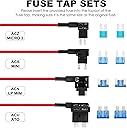
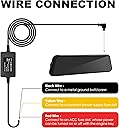
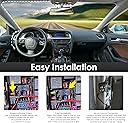
🚗 Power Up Your Drive with Invisible Protection!
The Pelsee Dash Cam Hardwire Kit is a comprehensive Type-C power solution designed for 12V-24V vehicles, delivering a steady 5V/2A output to keep your dash cam running seamlessly. Featuring low voltage protection to prevent battery drain, an upgraded ACC power indicator for easy installation, and a parking monitor mode for continuous recording, this kit ensures your dash cam stays powered on and ready—whether driving or parked. Compatible with a wide range of dash cams and vehicles, it includes all necessary tools and fuse taps for a tidy, professional hardwire setup that frees your cigarette lighter socket.


| ASIN | B0C7QY4KB9 |
| Are Batteries Included | Yes |
| Auto Part Orientation | Front & Inside |
| Auto Part Position | Rear |
| Best Sellers Rank | #10,459 in Electronics ( See Top 100 in Electronics ) #149 in Car On-Dash Mounted Cameras |
| Brand | pelsee |
| Built-In Media | Type-C hardwire kit, fuse tap cables, installing crowbar |
| Color | Black |
| Compatible Devices | Type-C Dash Cams |
| Compatible with Vehicle Type | Car |
| Connectivity Technology | USB |
| Control Method | Touch |
| Customer Reviews | 4.5 out of 5 stars 484 Reviews |
| Display Type | LCD |
| Field Of View | 130 |
| Frame Rate | 24/30/60 FPS |
| Item Dimensions D x W x H | 5"D x 5"W x 5"H |
| Item Type Name | full set hardwire kit |
| Manufacturer | pelsee |
| Model Name | Pelsee Hardwire Kit for P12/P12 Pro/P10 Pro Mirror Dash Cam |
| Mounting Type | Suction Mount |
| Other Special Features of the Product | Low Voltage Protection, Parking Monitor |
| Real Angle of View | 130 Degrees |
| Screen Size | 12 Inches |
| Special Feature | Low Voltage Protection, Parking Monitor |
| Supported Standards | Type-C |
| UPC | 850052299033 |
| Vehicle Service Type | Car |
| Video Capture Resolution | 1080p |
| Warranty Description | Pelsee commits to provide 30-day refund and 12 month manufacturer defect warranty! Feel free to contact us with any questions or concerns. |
H**Y
2003 BMW 325ci placement
Product works yet difficulties with the 2003 BMW 325ci e46 fuse box due to numerous issues with BMW's odd fusebox. I added a few images on how to align the plugs. ACC (red) wire into #4 Positive (yellow) wire into the lower row under #10 This allows the pelsee12pro to turn on/off with the ignition and when it's off, (set to g-sensor/low) will record locked video (front&rear) and save them in the locked folder... the unit never turns on but it did record my tests, so it was on...just no screen and it does have the bootup/bootdown logos when I turn the car on/off..so it stays off but in some sort of wizards eye state. I will be monitoring the battery level to see if it drains too much or if the BMW will learn it's draining power and turn it off completely (bmw does this). The ground wire went to an existing tiny hole by the passenger right foot (behind plastic/carpet) and I needed a tiny metal screw and washer. The only thing that would be helpful is a lead wire or something to help fish the wires through the headliners and down pillars for a truly stealth installation. Beginning to end took me about 3 hours for pulling front curtain air-bag covers, removal of sun-visor, part headliner, sanding the paint around the ground point, finding a good screw+washer, and running the wires... Figuring out which fuse spots to plug into wasn't easy b/c BMW has many that will stay on for 5 minutes to 2 hours and shut off, and that's not in any users manual. The USB part feels like quality and snaps into the pelsee12pro tightly without any wiggle, so that should be good for years since it can stay where it is. The rest of the connection points look and feel good too. Overall seems like a quality product. During the installation, I was a little rough and it held up without any issues. Highly recommended if you want your pelsee12pro cam to turn on/off with the ignition and also be stealthy recording when the cars parked and left unattended.
E**E
Quality Camera, Highly Recommend
*This is review is by Niall* After having a frustrating time with my last dash cam due to phone connectivity issues, I was looking for something easier, a plug in and record device as opposed to trying to connect it to a phone first. Searching, browsing and even more browsing and with so many other dash cams on the market, we're certainly spoiled for choice. Until I saw the Pelsee P10 Pro 10" 4K Mirror Dash Cam. A simple plug in and play set up. Exactly what I wanted. But not only that, they have safety systems built in, which I was impressed with and hadn't seen it on any others..at this Pelsee price too that is. Affordable but not breaking the bank. These safety systems were for Advanced Driver Assistance System and Blind Spot Detection. After installing it over the rear view mirror, the rear dash cam is certainly sturdy and not going anywhere. The straight forward setup up of settings, correcting the time, turning the safety systems on or off and calibrating the sensitivity of it. A breeze to do. Having now used it for a solid month I certainly do feel so much safer behind the wheel knowing if ever I'm in an accident, the Pelsee rear view dash cam has me covered at the front and the rear. It detects people and other cars swiftly, with beeps letting me know if there's a car coming up behind me left or right. With brilliant 4k resolution on both cameras BUT drops slightly to 2.5K at the rear cam if the safety features are on. Don't worry, that's still fantastic clarity to view the footage in. I did have queries though, I didn't like the fact that it automatically started recording as soon as the dash cam turned on, I felt it was wasting footage before I even set off driving so I asked if there would be an update in the future for disabling that or have a setting where it would start recording when the car is then in motion. Query 2 was that on the split screen for front and rear, would it be possible to switch the rear view to the left and the front on the right, I felt it'd be easier for my eyes to quickly see behind if it was closer to me. That may have been a more personal note I had but I was assured by Helen in support that it'd be something they'd look into. So yes, they are taking notes of any issues we have to then maybe update them in the future. I did however run into an issue viewing the files on a desktop. The third party app for viewing it wasn't wholly compatible. An email to the ever helpful support of Helen guided me in the right direction. Apparently I had to slightly change each file name on the front and rear video files then I was able to view both video displays simultaneously. Happy days. Another hiccup I discovered was that when it's raining, the rear lens gets quite fogged up and misty making it a little difficult to see behind. It's just a big blur of lights behind you with no outline of cars. I'd suggest to maybe invest in a lens protector for that rear camera..or a camera shield. Maybe something Pelsee could include in future packages? With this unknown to me brand, originally, I wasn't sure about buying but after other stellar reviews, now knowing it's a quality product and well designed and researched, easy to set up and absolute reassurance that Pelsee has me covered when out driving, I'm delighted I purchased this rear view dash cam.
J**.
Works perfect with the Pelsee P12 Plus
I was very impressed with the Pelsee P12 Pro, so I opted to hardwire to free up my cigarette adapter port and take advantage of the Parking Monitor. Install came with everything I needed and I was able to easily identify constant power and ACC using an LED lighted power tester I had. I set the power cut-off to 12.4 to ensure my car would not have any issues with a low battery, set the time lapse to 1 sec intervals and record duration to 24-hours. On start-up, it powers on the screen almost instantly since it is already powered in time lapse mode and switches the recording to normal mode automatically. When you power down the unit, the screen stay on for several seconds and alerts you with a pop-up message that it is going into time lapse recording, then the screen powers down. the next day I checked out the footage and it recorded the entire night on both front and rear camera. Someone claimed it doesn't work for dual cameras but this is not true. The time lapse recording was saved for front and rear camera under separate files. Make sure you power the power cables correctly. I initially put the constant power on the red wire and ACC on the yellow wire. That will only power on the unit but shuts off when you turn off the car. I realized my mistake quickly and swapped the wires. After that it has worked flawlessly. Love it! * I didn't have a good bare ground option so I just added my own with a self tapping screw (see photo)
B**G
Check your intended fuse box before buying
The add-a-fuse-block is too short to make a connection on the inside fuse panel of my F150 in the required low profile mini fuse slot. I need to buy a separate pigtail. The under hood fuse box works fine as the mini low pro fuses aren’t sunken down in the fuse box. If the place you’re installing this add a fuse isn’t flat, it won’t work. You’ll need an extension of some kind. Nearly all the ones on the market are the same so I can’t fault the company. This is a car manufacturer issue so make sure to check the exact place you intend to tap. Overall, the kit seems adequate and I like the connections provided. The blocks seem cheaply made and the pins on some of the fuse blocks are somewhat bent.
D**I
Works perfectly as described. Not sure why ppl are complaining.
So, I installed this kit with P12 Pro on my 2014 GMC Yukon. The installation wasn't hard at all if you know what you're doing. However, if you don't, you might reverse the wires, which will cause issues like the device never turning off. If you're unsure about the installation process, ask for help from a mechanic, dealership, etc. Don't criticize a product because you didn't know how to install it. So far, I haven't had any issues, except for the first day when the power shut-off protection was originally set at 11.3V. As a result, when I turned the car on the next day, it struggled to start. However, I've since changed it to 12.4V, and everything has returned to normal. Both the front and rear cameras are working fine. I'm not sure why some people are claiming that only the front camera works, saying there's no splicer for the rear camera or a second USB. You don't need a second USB for the back since it's one system.
L**D
Works as described - Easy to install
Works well, and was easy to install. My husband was pleasantly surprised to find out I had installed both cameras in my Jeep while he was at work. Hopefully, it will survive our hot weather longer than our previous dashcam. So far, so good!
G**I
Must have
Hard wired kit is a mush have if buying a dash cam you need this add on item so you can have 247 recordings These dash cams has everything like the voice wen in traffic and your looking at your phone it tells you the car in front of you has moved up so it keeps you on point… night vision mode it like a house camera black and white sees everything in the dark without light 💡 that’s nice to have other thing I always wanted was download videos from your phone with other dash cams in the pass you had to choose one are the other feature with Pelsee cams it has everything in these cams 247 recording gps voice night vision clean quality I don’t think the other cameras on the market like Wolf box can do most of what Pelsee cams can do best dash camera I must say … but in order to have 247 recording you need to also have the hardwired kit makes life easier cheers 🥂
R**G
safety
hard wire is better then taking all the plugins.
Trustpilot
2 months ago
2 days ago