🚀 Elevate Your Data Game!
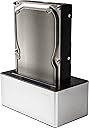
The Freecom Hard Drive Dock 3.0 is a versatile and stylish docking solution that supports both 2.5" and 3.5" hard drives, offering 2TB of storage with lightning-fast USB 3.0 connectivity. Weighing just 347g, it's perfect for professionals on the move, compatible with both Mac and Windows operating systems.
| ASIN | B006TA36B0 |
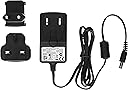
| Box Contents | Freecom mDock 3.0 Docking Station (Hard drive not included), Power adapter, USB connection cable |
| Brand Name | Freecom |
| Colour | black, silver |
| Compatible Devices | Laptop |
| Customer Reviews | 4.2 4.2 out of 5 stars (293) |
| Global Trade Identification Number | 04021801561374 |
| Hardware Interface | USB, USB 3.0 |
| Input Voltage | 12 Volts |
| Item Part Number | 56137 |
| Item Weight | 347 Grams |
| Manufacturer | Freecom |
| Manufacturer Part Number | 56137 |
| Model Number | 56137 |
| Number of Ports | 2 |
| Product Warranty | 2 years |
| Total USB Ports | 1 |
| Unit Count | 1.0 count |
| Wattage | 18 watts |
T**R
Great Piece of Kit...
What a find! I've used this with my MacBook Pro to clone its startup drive to a new Seagate Momentus XT hybrid drive, and also to transfer my iTunes library from a 1TB to a 2TB disk... it works flawlessly, out of the box. I was a bit apprehensive about adaptors for 2.5" and 3.5" drives, but Freecom's solution is adaptor-free and works beautifully. I'm using it daisy-chained to an earlier FreeCom 1TB external via FireWire and the MacBook sees both drives, no problem. As long as the Quattro is plugged directly into the MacBook, it can also be used as a startup drive. Another nice touch is that Firewire 400, 800, eSATA and USB cables are provided, and the mains adaptor can be easily switched between UK and European sockets, so no need for a plug adaptor. I'd also echo all the positive comments about noise and cooling. My only quibble is that when inserted, the drives seem to sit ever so slightly skew, which at first made me think I hadn't inserted them properly. Other than that, this is a fantastic product at a good price when compared to other, far-less flexible enclosures out there.
J**S
Does the job
Nice array of connections. Firewire 800 I've daisy chained to another drive. Only running a few weeks but no problems yet. (running this product with a 2T WD green - keeps cool silent running, great backup drive). Pros Comes with decent cables. The connection sockets at the rear seem nice and solid. Quick to swap drives Cons: Some care needs taking to slot in a drive, and not as snug as I'd like; maybe due to varying sizes of drives. There is some play and drive could flap about, not ideal if the drive is accidentally knocked, I've wedged some paper to firm up slot. I can't say that build quality could withstand frequent swapping of drives. The power button doesn't feel very positive, its a very stiff plastic push button which feels it might break if you press too hard. The blue LED is a bit too bright. Quality I'd say should be around the £30 mark, but most enclosures seem pricey against quality. Having said that it hasn't broken yet, and drive performance doesn't seem impaired. Works OK - but longevity unknown, can always find another enclosure if it fails without losing the backup drive.
I**N
Brilliant Hard Drive Dock
This is an absolutely brilliant bit of kit. My unit came with ALL cables including an IDE ribbon and Molex power to enable connection of the older IDE type Hard Drives. Freecom have obviously addressed the cabling issue for the newer production runs of the dock, so I presume that the people who get one without the cables will be older stock. I got mine dispatched and sold from Amazon, not a third party seller. If you do get a box without the IDE cables, it’s no big deal. I wasn’t expecting to get them. I would think most people who are buying this dock will have a spare ribbon connector lying around. The 4 pin Molex power cable, however, is a little bit of an oddity though. I certainly didn’t have one of those as it’s a FEMALE to FEMALE connector (they are available online for around £3 – search “female to female Molex adapter” on the big auction site ;-) The power adapter is a strange thing. It comes with a 2-pin “euro style” plug and a bundled “shaver type” 2-pin to 3 pin adapter. A bit bulky and unsightly, but it does the job it’s meant to do, namely powering the dock. The dock is childs play to use. 1. Connect the cables (power and USB) and slot your SATA drive into the top of the dock OR add the IDE ribbon and Molex if you’re using an IDE drive 2. Switch the power on and push the power button on top of the dock. The LED flashes to show connection/data transfer 3. Your drive will now appear in “My Computer” and can be used immediately. Ejecting the drive is simple. Power off and press the “eject” button on the dock I’m running the dock under Windows 7 with no problems whatsoever. I’ve attached all types of drives, SATA, IDE, 3.5, 2.5. I’ve read other peoples comments on how the attaching of the IDE drives looks messy and unprofessional, but for me, the addition is more of a helpful “legacy” thing. How many people nowadays will want to be attaching IDE drives? I imagine most people nowadays will be slotting SATA drives into the top. Either way, for me, the fact that it CAN do it is a welcome addition. The unit seems well made and I see no reason why it won’t give many years of service. I’m well pleased with my purchase. It’s such a useful tool to have and I would highly recommend it for anyone who enjoys tinkering with PC’s.
D**R
Firewire Port problem
I've spent about four hours trying to get this unit working with Firewire 800 and my Mac refuses to recognise a connection. All my other Firewire devices are working fine, I've tried different leads and a different computer too. The USB port is working fine but too slow for transferring 300GB of images. It's being returned as faulty. I'll update when the unit is replaced, hopefully with positive news.
B**T
Me va de maravilla. Lo mejor es la cantidad de posibilidades de conexión que tiene. Funciona muy bien tanto en Mac como en PC.
M**.
Buen dock para sata con posibilidad de leer ide, para ello se necesita el cable de conexión que no va con el producto. Funciona bien y, al contrario de otro dock que utilizo, no crea conflictos o crash del s.o.
A**F
Enfin en dock pour disque dur universel, multiples interfaces (e-sata, firewire 400 & 800, usb 2) pour s'adapter à toutes les situations, fiable et inspirant un réel soin de construction sur le choix et la qualité, un bel appareil permettant de profiter du firewire, votre pc vous remerciera sur l'impact des ressources système. Je recommande chaudement.
L**E
Das Dock ist ordentlich verarbeitet und der Kunststoff wirkt wertig. Auch steht das Dock sicher auf dem Untergrund; das Einsetzen und Entnehmen der Datenträger ist damit problemlos möglich. Für alle Anschlussmöglichkeiten sind die entsprechenden Kabel mitgeliefert, diese sind jedoch nicht sehr biegsam, sondern recht steif ausgefallen. Mit seinen u. a. Firewire-Anschlüssen ist das Dock eindeutig für den Einsatz mit dem Mac konzipiert. Mit diesem Dock ist das Einbinden und Benutzen eigentlich intern zu verbauender Datenträger als externe Datenträger sehr leicht. Die Datenträger werden nach dem Einsetzen in das Dock ordnungsgemäß gemountet und erscheinen dann im Finder bzw. auf dem Desktop. Daten können wie gewohnt darauf gespeichert werden. Zudem lassen sich die Datenträger mit dem Festplattendienstprogramm beliebig formatieren. Die Handhabung ist sehr intuitiv, allerdings sollte man die internen HDDs sorgfältig in das Dock einsetzen, damit diese auch richtig einrasten. Zudem haben die eingesetzten HDDs ein wenig Bewegungsspielraum im Dock. Die Arbeitsfläche sollte daher keinen allzu großen Bewegungen ausgesetzt sein. In einer Mac-Umgebung ist es ohne Weiteres möglich, das System von Datenträgern, die mittels dieses Docks an den Mac angeschlossen sind, zu booten. Oben beschriebene Einsatzzwecke funktionieren nicht nur mit klassischen Festplatten, sondern auch mit SSDs. Ich habe mir das Dock für folgendes Szenario angeschafft: Es sollte eine Samsung SSD 840 Pro Series 512 GB in mein MacBook Pro 13" early 2011 verbaut werden. Hierzu sollte die ursprüngliche interne HDD zuvor auf die neue, im Dock befindliche und über Firewire angeschlossene SSD geklont werden und diese hiernach anstelle der ursprünglichen internen HDD im MacBook Pro verbaut werden. Das Klonen sollte anfangs über das Festplattendienstprogramm (dortige Kategorie "Wiederherstellen"), welches durch einen Neustart über die Recovery-Partition aufgerufen wurde, erfolgen. Der Klonvorgang ging hier anfangs problemlos vonstatten, nach einer Weile tat sich jedoch nichts mehr; die Fortschrittsanzeige des Klonvorgangs veränderte sich nicht mehr und auf die SSD wurden keine Daten mehr geschrieben, was auch daran zu erkennen war, dass die LED des Docks, welche den Datendurchsatz signalisiert, nicht mehr blinkte. Ein Wiederholen dieses Vorgangs führte zu gleichem Negativ-Ergebnis. Da es mit dem Festplattendienstprogramm nicht zu funktionieren schien, versuchte ich es über die Software eines Drittanbieters, hier dem Carbon Copy Cloner. Doch das Ergebnis war das selbe, der Klonprozess fror nach einer Weile ein. Anscheinend gab es irgendein Problem beim Klonen einer internen HDD auf eine via Firewire über das Dock angeschlossene SSD. Den Fehler konnte ich jedoch nicht ausmachen. Daraufhin entschied ich mich, von einem Klonen abzusehen, die neue SSD zu verbauen und das System über das Time Machine Backup wiederherzustellen, was anstandslos funktionierte und im Endeffekt vielleicht sogar schneller ging, als das System vorher zu klonen. Das Dock kam bei diesem Workaround nicht zum Einsatz. Ob der Fehler beim Klonen auf das hier zu bewertende Dock zurückzuführen ist, kann ich nicht sagen, daher erfolgt kein Abzug in der Bewertung. Für den ein oder anderen mag das hier Beschriebene aber sicherlich hilfreich sein. Zusammenfassend kann ich das Dock für den täglichen Gebrauch zur Verwendung eigentlich interner Datenträger als externe Datenträger empfehlen.
A**N
I can now extract data from old hard drives once the PC they are in dies...awesome. The only piece of false advertising is the lie of omission that this product is form the UK so it requires a UK electrical socket. If you are in North America beware you will need a transformer and plug adapter. I already have one from the UK so was able to use it.
Trustpilot
1 week ago
1 month ago